

- Posts: 18
- Thank you received: 0
PayPal Advanced iframe
11 years 10 months ago #181714
by vasnat
PayPal Advanced iframe was created by vasnat
-- url of the page with the problem -- :
www.vibrantlifestyle.ca
-- HikaShop version -- : 2.3.4
-- Joomla version -- : 3.3.6
-- PHP version -- : 5.4.35
-- Browser(s) name and version -- : Chrome
Hi guys,
I have set up PayPal Advanced to work in a n iframe at checkout. It works: the customers can pay; get the summary of transaction, BUT when they click the link "Return to Site" I get a Error 404 in the iframe and the cart is not emptied at that time (or maybe it is but the page will not refresh).
In the background though - the order confirmation; the payment; the order status are all accurate and sent out
In PayPay Manager interface I set up the return page to be my homepage and in the config for the payment plugin I set the same.
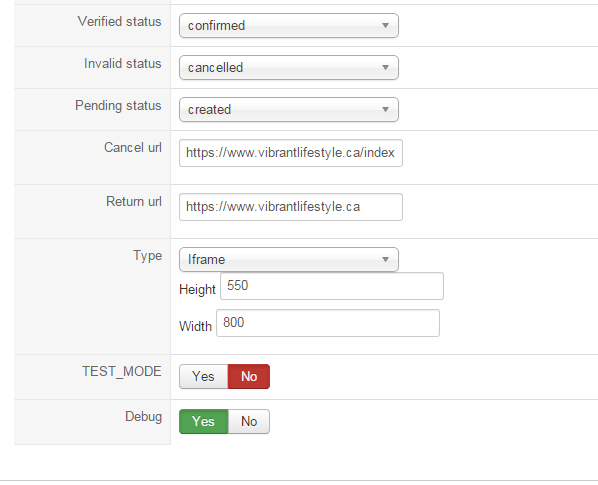
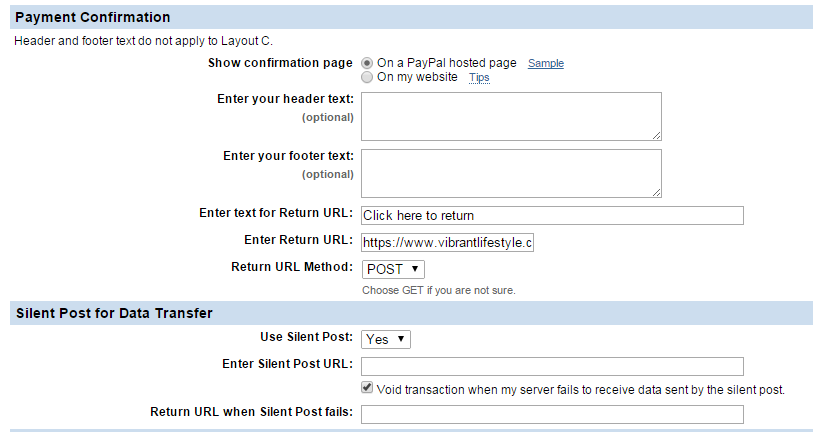
Can you advise - what am I doing wrong? Up to this point the check out process is smooth.
vs
-- HikaShop version -- : 2.3.4
-- Joomla version -- : 3.3.6
-- PHP version -- : 5.4.35
-- Browser(s) name and version -- : Chrome
Hi guys,
I have set up PayPal Advanced to work in a n iframe at checkout. It works: the customers can pay; get the summary of transaction, BUT when they click the link "Return to Site" I get a Error 404 in the iframe and the cart is not emptied at that time (or maybe it is but the page will not refresh).
In the background though - the order confirmation; the payment; the order status are all accurate and sent out
In PayPay Manager interface I set up the return page to be my homepage and in the config for the payment plugin I set the same.
Can you advise - what am I doing wrong? Up to this point the check out process is smooth.
vs
Please Log in or Create an account to join the conversation.

Less
More
- Posts: 12953
- Thank you received: 1778
11 years 10 months ago #181818
by Mohamed Thelji
Replied by Mohamed Thelji on topic PayPal Advanced iframe
Hello,
Thanks.
Can you give me the link where you are redirected where you use the "Return to Site" button ?when they click the link "Return to Site" I get a Error 404 in the iframe and the cart is not emptied at that time
Thanks.
Please Log in or Create an account to join the conversation.
11 years 10 months ago #182217
by vasnat
Replied by vasnat on topic PayPal Advanced iframe
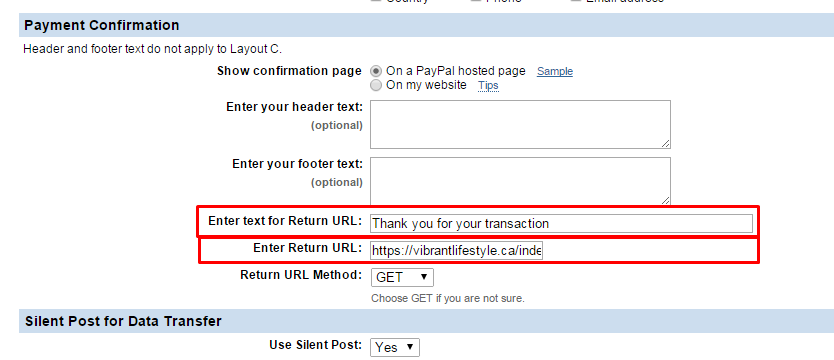
I have attached the image with the link i setup in //manager.paypal.com (for PayPal Advanced)
Here's what happens at the time of transaction:
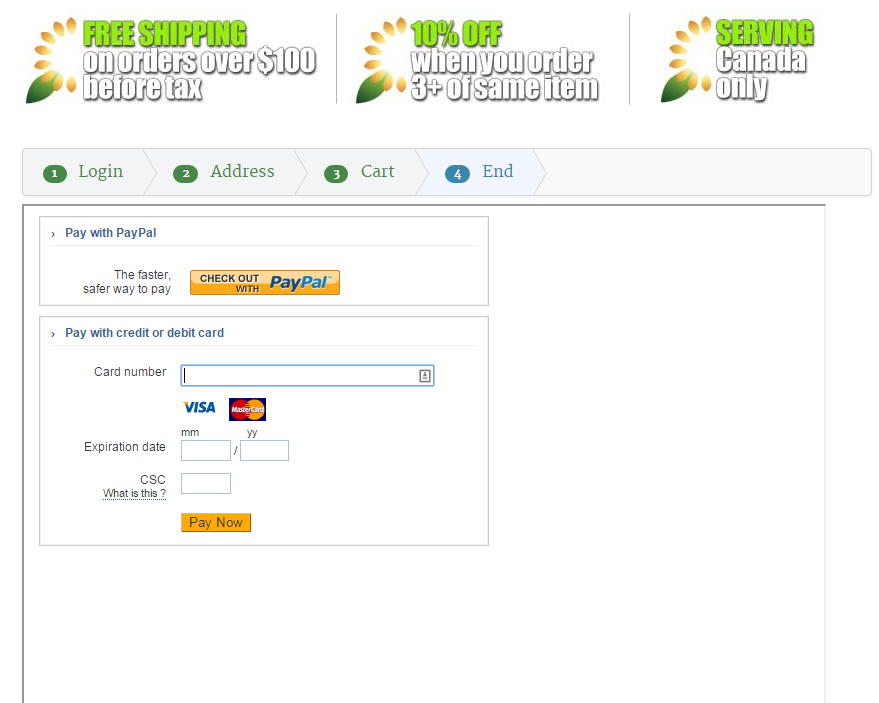
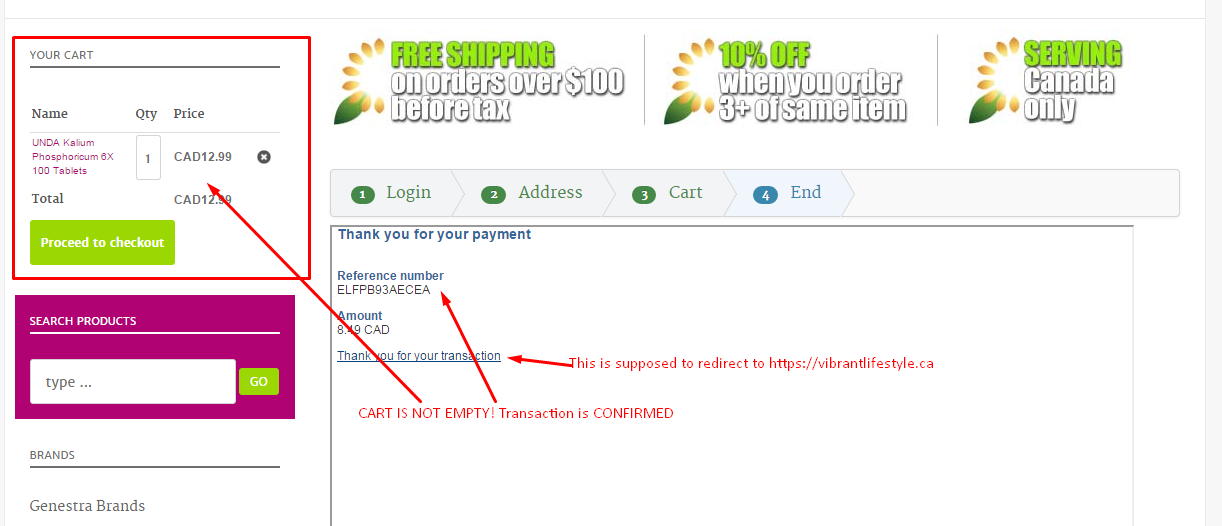
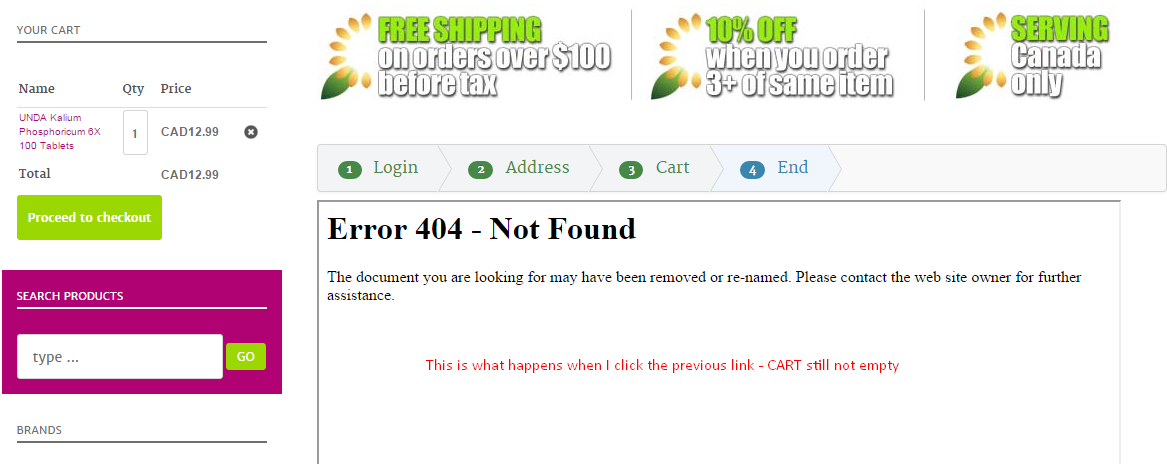
Here's what happens at the time of transaction:
Please Log in or Create an account to join the conversation.

11 years 10 months ago #182500
by Jerome
Jerome - Obsidev.com
HikaMarket & HikaSerial developer / HikaShop core dev team.
Replied by Jerome on topic PayPal Advanced iframe
Hi,
The Paypal advanced in "iframe" mode display an iframe in your website.
An iframe is a website in another website ; so you're displaying the paypal website (for the payment) in a part of yours.
What the iframe is doing does not impact the rest ; an iframe does not communicate with his parent (and the parent can't communicate with the child).
So, when the order is confirmed in paypal, there is no way for your website to know it (using javascript or something else).
The page in your website is not refreshed ; I really don't see how it would be possible to refresh and empty the cart dynamically. The only solution is that the iframe open a thank you page which will redirect/refresh the parent to a confirm page.
About the 404 ; it will be useful to know the page which has been asked.
It is supposed to redirect you to your url ; but we have to know which url is used instead. Because if you got a 404 page, it means that the url is not the right one.
Regards,
The Paypal advanced in "iframe" mode display an iframe in your website.
An iframe is a website in another website ; so you're displaying the paypal website (for the payment) in a part of yours.
What the iframe is doing does not impact the rest ; an iframe does not communicate with his parent (and the parent can't communicate with the child).
So, when the order is confirmed in paypal, there is no way for your website to know it (using javascript or something else).
The page in your website is not refreshed ; I really don't see how it would be possible to refresh and empty the cart dynamically. The only solution is that the iframe open a thank you page which will redirect/refresh the parent to a confirm page.
About the 404 ; it will be useful to know the page which has been asked.
It is supposed to redirect you to your url ; but we have to know which url is used instead. Because if you got a 404 page, it means that the url is not the right one.
Regards,
Jerome - Obsidev.com
HikaMarket & HikaSerial developer / HikaShop core dev team.
Please Log in or Create an account to join the conversation.
11 years 10 months ago #183192
by vasnat
Replied by vasnat on topic PayPal Advanced iframe
Sorry for the delay in response.
I understand how the iframe functions. What is puzzling me - Hikashop IS picking up the order as being "Confirmed" after the payment is successful. In the back-end I see it correctly.
What I am wondering then is: you are saying that "...when the order is confirmed in paypal, there is no way for your website to know it (using javascript or something else)." - but as I said in the control panel the Order is correctly captured as confirmed - which means the communication with PayPal is established.
If that is the case - why wouldn't the cart be emptied?
vadim
I understand how the iframe functions. What is puzzling me - Hikashop IS picking up the order as being "Confirmed" after the payment is successful. In the back-end I see it correctly.
What I am wondering then is: you are saying that "...when the order is confirmed in paypal, there is no way for your website to know it (using javascript or something else)." - but as I said in the control panel the Order is correctly captured as confirmed - which means the communication with PayPal is established.
If that is the case - why wouldn't the cart be emptied?
vadim
Please Log in or Create an account to join the conversation.
11 years 10 months ago #183221
by vasnat
Replied by vasnat on topic PayPal Advanced iframe
Here is some more information. I do believe that something is wrong with the plugin - this is is the address that is giving me the Error 404. This link is redirected to after the Thank You page generated by PayPal Advanced. Both the Manager.PayPal and the PayPal Advanced plugins have been set up to use a specific thank-you page on my website, and none of those links function.
Part of the message is hidden for the guests. Please log in or register to see it.
Part of the message is hidden for the guests. Please log in or register to see it.
Please Log in or Create an account to join the conversation.

11 years 10 months ago #183227
by nicolas
Replied by nicolas on topic PayPal Advanced iframe
Hi,
PayPal sends a payment notification directly from their servers to your server to notify HikaShop and at that point HikaShop confirms the order.
The cart is emptied, but you don't see it because the page is not refreshing. It has nothing to do with the order being confirmed or not.
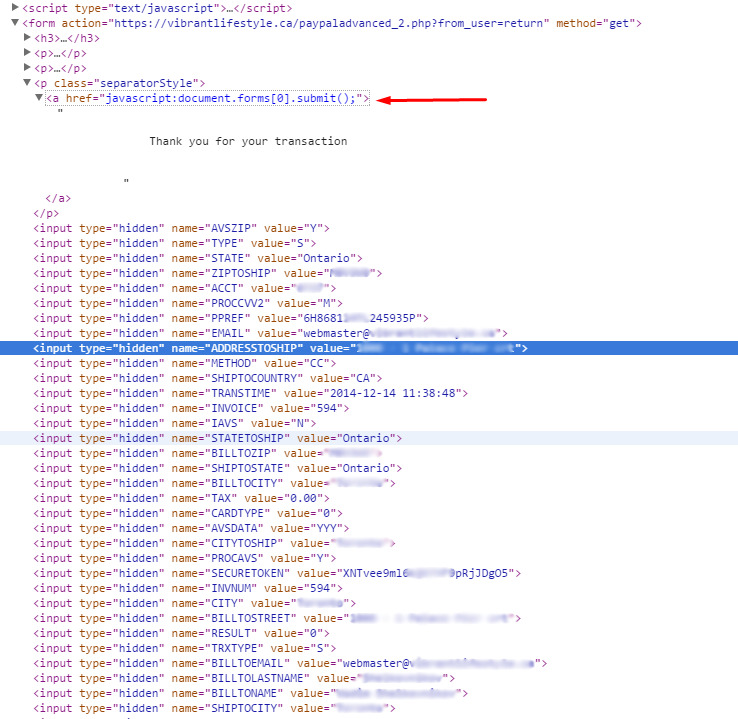
As Jerome said, We would need to know the URL that generate the 404 error to be able to better understand what's going on on your website. Please use your browser's developer tool to look at the href attribute of the "go back to the shop" link in the HTML of the page in order to get that URL. This page explains how to look at the HTML of a specific element on pages with your browser:
www.hikashop.com/support/support/documen...the-display.html#css
PayPal sends a payment notification directly from their servers to your server to notify HikaShop and at that point HikaShop confirms the order.
The cart is emptied, but you don't see it because the page is not refreshing. It has nothing to do with the order being confirmed or not.
As Jerome said, We would need to know the URL that generate the 404 error to be able to better understand what's going on on your website. Please use your browser's developer tool to look at the href attribute of the "go back to the shop" link in the HTML of the page in order to get that URL. This page explains how to look at the HTML of a specific element on pages with your browser:
www.hikashop.com/support/support/documen...the-display.html#css
Please Log in or Create an account to join the conversation.
11 years 10 months ago #183288
by vasnat
Replied by vasnat on topic PayPal Advanced iframe
Here's what I found (this is form a live test):
At checkout I get a PayPal Confirmation:
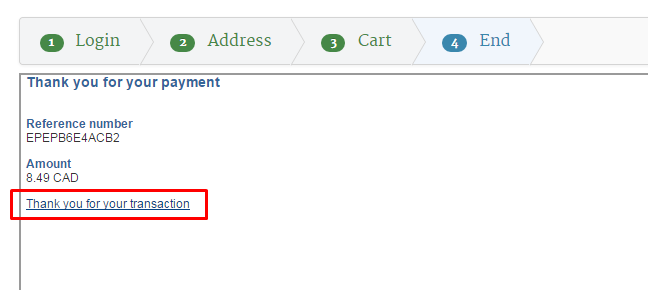
Which should lead me back to a thank you page on my site, which has been setup in both manager.paypal.com and HikaShop plugin
But this is th code that is attached to the "Thank you..." message
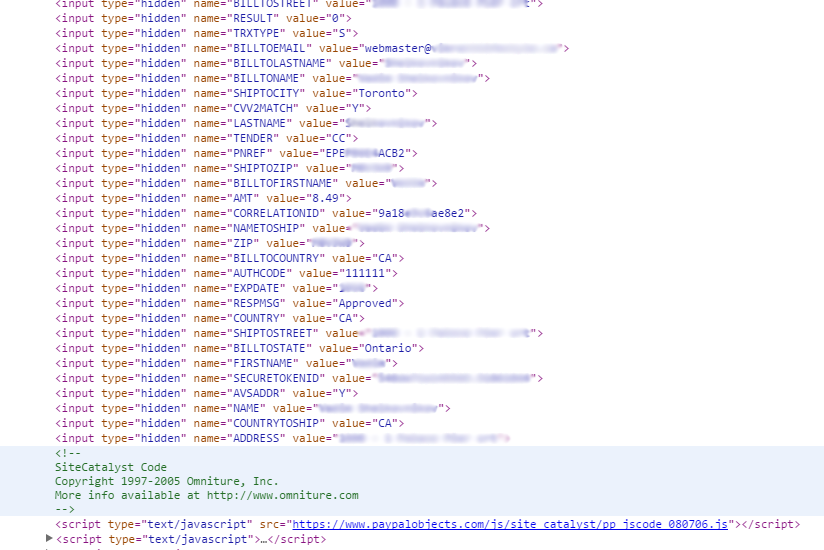
At checkout I get a PayPal Confirmation:
Which should lead me back to a thank you page on my site, which has been setup in both manager.paypal.com and HikaShop plugin
But this is th code that is attached to the "Thank you..." message
Please Log in or Create an account to join the conversation.
11 years 10 months ago #183427
by vasnat
Replied by vasnat on topic PayPal Advanced iframe
Nicolas, Jeremy,
More info on the subject....
I just got off the phone with PayPal - their integration team testing showed that the code for return URL I set up in their admin settings is being overwritten by an API call from the PayPal Advanced plugin from HikaShop.... and according to them that is what is causing that unpleasant URL and Error 404 message.
More info on the subject....
I just got off the phone with PayPal - their integration team testing showed that the code for return URL I set up in their admin settings is being overwritten by an API call from the PayPal Advanced plugin from HikaShop.... and according to them that is what is causing that unpleasant URL and Error 404 message.
Please Log in or Create an account to join the conversation.

11 years 9 months ago #187472
by Xavier
Replied by Xavier on topic PayPal Advanced iframe
Hi,
So do you have solved you issue ? Removing the return url in the plugin settings and let Paypal manage the return url was the solution ?
So do you have solved you issue ? Removing the return url in the plugin settings and let Paypal manage the return url was the solution ?
Please Log in or Create an account to join the conversation.
Time to create page: 0.355 seconds