

- Posts: 59
- Thank you received: 0
Display custom item fields not effected by setings
11 years 7 months ago #191238
by phil2010
Display custom item fields not effected by setings was created by phil2010
-- url of the page with the problem -- :
afford.com.au/support-our-work/make-a-donation-sp-123
-- HikaShop version -- : HikaShop Business: 2.3.5
-- Joomla version -- : Joomla! 3.3.3 Stable
-- PHP version -- : 5.4.29
-- Error-message(debug-mod must be tuned on) -- : Quantity field on 'Add to cart' button and Display custom item fields not effected by setings on module
I have successfully set up donate feature on another website www.scfa.edu.au/j3/donate but on the site I am working on afford.com.au/support-our-work/make-a-donation-sp-123 I cannot get the quanity and display custom fields to be effected by the setting of the module.
Any suggestions apprietiated
-- HikaShop version -- : HikaShop Business: 2.3.5
-- Joomla version -- : Joomla! 3.3.3 Stable
-- PHP version -- : 5.4.29
-- Error-message(debug-mod must be tuned on) -- : Quantity field on 'Add to cart' button and Display custom item fields not effected by setings on module
I have successfully set up donate feature on another website www.scfa.edu.au/j3/donate but on the site I am working on afford.com.au/support-our-work/make-a-donation-sp-123 I cannot get the quanity and display custom fields to be effected by the setting of the module.
Any suggestions apprietiated
Please Log in or Create an account to join the conversation.

Less
More
- Posts: 12953
- Thank you received: 1778
11 years 7 months ago #191292
by Mohamed Thelji
Replied by Mohamed Thelji on topic Display custom item fields not effected by setings
Hello,
I just tested it and it worked fine, what do you exactly mean by :
I just tested it and it worked fine, what do you exactly mean by :
I cannot get the quanity and display custom fields to be effected by the setting of the module.
Please Log in or Create an account to join the conversation.
11 years 7 months ago #191389
by phil2010
Replied by phil2010 on topic Display custom item fields not effected by setings
this is the problem page.
afford.com.au/support-our-work/make-a-donation-sp-123
in the example page the custom code allows the user to enter the amount and go directly to the cart. The Hika setting for this modulke are not responding in the problem site as they are in the parallel site
skin.com.au/j3/donate
these are current setings on www.affford.com.au
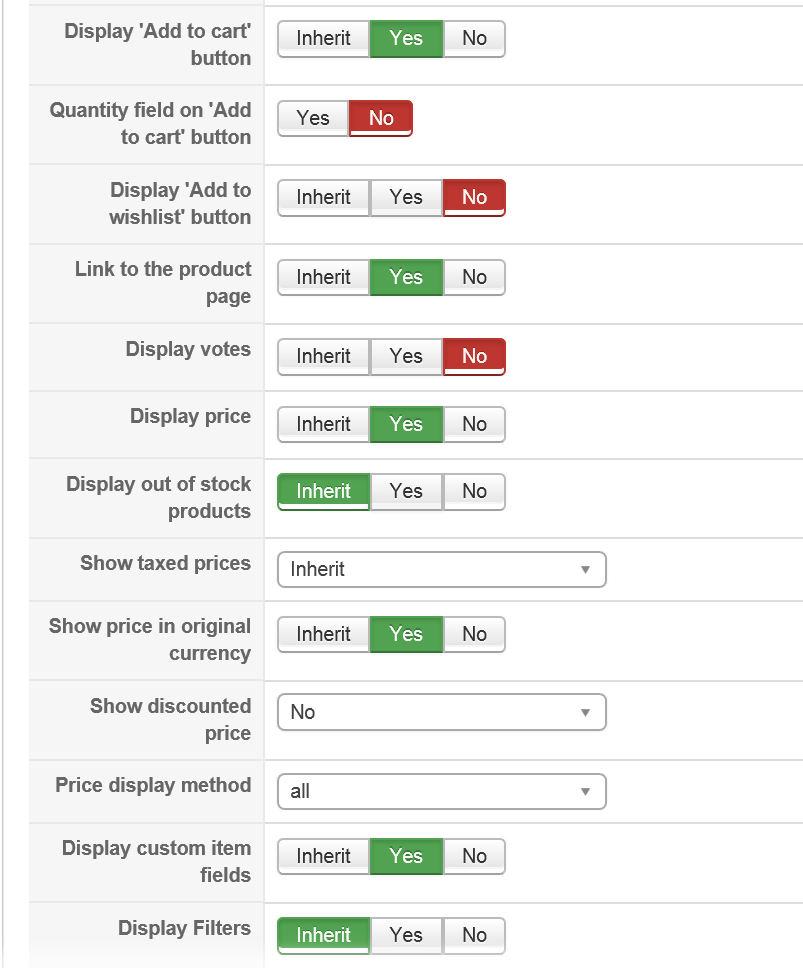
afford.com.au/support-our-work/make-a-donation-sp-123
in the example page the custom code allows the user to enter the amount and go directly to the cart. The Hika setting for this modulke are not responding in the problem site as they are in the parallel site
skin.com.au/j3/donate
these are current setings on www.affford.com.au
Please Log in or Create an account to join the conversation.
11 years 7 months ago #191418
by phil2010
Replied by phil2010 on topic Display custom item fields not effected by setings
I am still not getting the custom code to show in the product module...
afford.com.au/hikashop-menu-for-module-1...uct/11-make-donation
I have update all apps and joomla to curent ver in case there was a conflict but no luck
afford.com.au/hikashop-menu-for-module-1...uct/11-make-donation
I have update all apps and joomla to curent ver in case there was a conflict but no luck
Please Log in or Create an account to join the conversation.

11 years 7 months ago #191399
by Jerome
Jerome - Obsidev.com
HikaMarket & HikaSerial developer / HikaShop core dev team.
Replied by Jerome on topic Display custom item fields not effected by setings
Hi,
I am sorry but I don't understand anything of your message.
Your first link is a page of jdonation (which is not HIkaShop).
The second link have an HikaShop product display and the custom item field is right displayed.
So please, explain your issue.
Regards,
I am sorry but I don't understand anything of your message.
Your first link is a page of jdonation (which is not HIkaShop).
The second link have an HikaShop product display and the custom item field is right displayed.
So please, explain your issue.
Regards,
Jerome - Obsidev.com
HikaMarket & HikaSerial developer / HikaShop core dev team.
Please Log in or Create an account to join the conversation.
11 years 7 months ago #191533
by phil2010
Replied by phil2010 on topic Display custom item fields not effected by setings
sorry. i might have been very tired. lets try again. thanks for your patience.. here is the problem module on the right columb.
afford.com.au/support-our-work
the custom field are not appearing on hika product module dispite being selected on the module setting tabes.
the custom field shoes perfect in the product page, but wanted users to input the ammount in the module a go strait to the payment.
i manages this in another hika site last week, www.scfa.edu.au/j3/donate
the main difference is that the custom code is not appearing in the probem donate module code ar all. i have just transfered afford.com.au from starter to busines and up graded to the latest update if that helps.
afford.com.au/support-our-work
the custom field are not appearing on hika product module dispite being selected on the module setting tabes.
the custom field shoes perfect in the product page, but wanted users to input the ammount in the module a go strait to the payment.
i manages this in another hika site last week, www.scfa.edu.au/j3/donate
the main difference is that the custom code is not appearing in the probem donate module code ar all. i have just transfered afford.com.au from starter to busines and up graded to the latest update if that helps.
Please Log in or Create an account to join the conversation.
11 years 7 months ago #191534
by phil2010
Replied by phil2010 on topic Display custom item fields not effected by setings
there errrors before was because i restored an earlier back up to try again from the start but no luck.
Please Log in or Create an account to join the conversation.
11 years 7 months ago #191537
by phil2010
Replied by phil2010 on topic Display custom item fields not effected by setings
i have also found that the custom amount showes in the right module whe module display set to table or list.. just not when div
Please Log in or Create an account to join the conversation.
11 years 7 months ago #191565
by Jerome
Jerome - Obsidev.com
HikaMarket & HikaSerial developer / HikaShop core dev team.
Replied by Jerome on topic Display custom item fields not effected by setings
Hi,
In the page "support our work", the module used is the module with ID 189
You should check the configuration of that module (in HikaShop > Display > Content module) to have same options for the module with ID "156" in the second website (the "donate" page).
Like you have already mentioned, the problem is for what I see, more related to the setting which allow to display the custom item fields.
But with your different screenshots, it's difficult to know which module your displaying (from which website and for which ID).
Regards,
In the page "support our work", the module used is the module with ID 189
You should check the configuration of that module (in HikaShop > Display > Content module) to have same options for the module with ID "156" in the second website (the "donate" page).
Like you have already mentioned, the problem is for what I see, more related to the setting which allow to display the custom item fields.
But with your different screenshots, it's difficult to know which module your displaying (from which website and for which ID).
Regards,
Jerome - Obsidev.com
HikaMarket & HikaSerial developer / HikaShop core dev team.
Please Log in or Create an account to join the conversation.
11 years 7 months ago #191633
by phil2010
Replied by phil2010 on topic Display custom item fields not effected by setings
I have set all the module setting exactly the same, that is quite simple. When set to active, the donation shot shows the table with the custom inserted correctly.
In the second screen grab you can see the support module screen grab showing that dispute having custom code is active in the module settings. It is not showing in the module. I know it is working since it is on the product page.
In the second screen grab you can see the support module screen grab showing that dispute having custom code is active in the module settings. It is not showing in the module. I know it is working since it is on the product page.
Please Log in or Create an account to join the conversation.
Time to create page: 0.227 seconds