
- Posts: 131
- Thank you received: 7
Authorize.net - script timed out - works in Debug
- bonzomedia
-
 Topic Author
- Offline
Less
More
11 years 6 months ago - 11 years 6 months ago #193436
by bonzomedia
-- HikaShop version -- : 2.3.5
-- Joomla version -- : 2.5
-- Error-message(debug-mod must be tuned on) -- : "Your script timed out while we were trying to post transaction results to it."
Our store has been working perfectly. Around Feb 10 we started getting the ""Your script timed out while we were trying to post transaction results to it." message when customer's paid in Authorize.net.
Despite trying everything, including upgrading Hikashop, combing the site for any JS errors that might be causing an issue, speaking with Authorize.net I cannot figure out why.
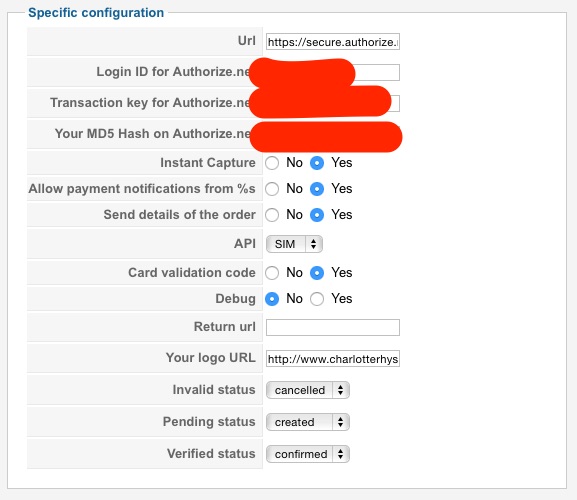
To test the configuration I flipped the Debug mode to On and did a test transaction and it worked perfectly taking me to the correct Thank you message and the order was moved to Confirmed. Flipped it back to Live mode and again got the message about the script timing out. Screenshot of my config is attached.
Authorize.net - script timed out - works in Debug was created by bonzomedia
-- HikaShop version -- : 2.3.5
-- Joomla version -- : 2.5
-- Error-message(debug-mod must be tuned on) -- : "Your script timed out while we were trying to post transaction results to it."
Our store has been working perfectly. Around Feb 10 we started getting the ""Your script timed out while we were trying to post transaction results to it." message when customer's paid in Authorize.net.
Despite trying everything, including upgrading Hikashop, combing the site for any JS errors that might be causing an issue, speaking with Authorize.net I cannot figure out why.
To test the configuration I flipped the Debug mode to On and did a test transaction and it worked perfectly taking me to the correct Thank you message and the order was moved to Confirmed. Flipped it back to Live mode and again got the message about the script timing out. Screenshot of my config is attached.
Last edit: 11 years 6 months ago by bonzomedia.
Please Log in or Create an account to join the conversation.

Less
More
- Posts: 12953
- Thank you received: 1778
11 years 6 months ago #193864
by Mohamed Thelji
Replied by Mohamed Thelji on topic Authorize.net - script timed out - works in Debug
Hello,
Can you :
- Check that the debug mode option is ON through your Authorize.net payment configuration page
- Test it again
- Show me your Payment log file content.
You'll be able to check your payment log file through "Hikashop->System->Configuration->Main" by using the "See the report" button of your Payment log file option.
So you're saying that when you set the "Debug" option of your Authorize.net configuration page, it's working fine ?To test the configuration I flipped the Debug mode to On and did a test transaction and it worked perfectly taking me to the correct Thank you message and the order was moved to Confirmed. Flipped it back to Live mode and again got the message about the script timing out. Screenshot of my config is attached.
Can you :
- Check that the debug mode option is ON through your Authorize.net payment configuration page
- Test it again
- Show me your Payment log file content.
You'll be able to check your payment log file through "Hikashop->System->Configuration->Main" by using the "See the report" button of your Payment log file option.
Please Log in or Create an account to join the conversation.
- bonzomedia
-
Topic Author
- Offline
Less
More
- Posts: 131
- Thank you received: 7
11 years 6 months ago #193884
by bonzomedia
Replied by bonzomedia on topic Authorize.net - script timed out - works in Debug
Mohamed
Live Mode (with exactly the same Login ID, Transaction Key and MD5) - Get script timeout error
Debug Mode (with exactly the same Login ID, Transaction Key and MD5) - Works perfectly.
Switching Debug Mode on does not produce any log file content.
Live Mode (with exactly the same Login ID, Transaction Key and MD5) - Get script timeout error
Debug Mode (with exactly the same Login ID, Transaction Key and MD5) - Works perfectly.
Switching Debug Mode on does not produce any log file content.
Please Log in or Create an account to join the conversation.
Less
More
- Posts: 12953
- Thank you received: 1778
11 years 6 months ago #193890
by Mohamed Thelji
Replied by Mohamed Thelji on topic Authorize.net - script timed out - works in Debug
Hello,
What are you exactly doing to choose if you are on Live/Debug mode ? Did you change the "URL" option value ?
What are you exactly doing to choose if you are on Live/Debug mode ? Did you change the "URL" option value ?
Please Log in or Create an account to join the conversation.
- bonzomedia
-
Topic Author
- Offline
Less
More
- Posts: 131
- Thank you received: 7
11 years 6 months ago - 11 years 6 months ago #194053
by bonzomedia
Replied by bonzomedia on topic Authorize.net - script timed out - works in Debug
Mohamed, As I've stated above - the only thing that I've done is to flip the Debug on. All other settings have remained the same. From your documentation setting the payment gateway into Debug automatically uses the test mode of Authorize.net
"Debug : You can activate the debug mode of the Authorize.net payment plugin. If you do so, informations about each notification received from Authorize.net will be logged in the payment log file. You can see and modify the location of this file in the configuration page of HikaShop. Also, that will turn on the "test mode" of Authorize.net so the payments won't be processed by Authorize.net."
Can you please suggest how I can fix this, it's now becoming urgent.
"Debug : You can activate the debug mode of the Authorize.net payment plugin. If you do so, informations about each notification received from Authorize.net will be logged in the payment log file. You can see and modify the location of this file in the configuration page of HikaShop. Also, that will turn on the "test mode" of Authorize.net so the payments won't be processed by Authorize.net."
Can you please suggest how I can fix this, it's now becoming urgent.
Last edit: 11 years 6 months ago by bonzomedia. Reason: spelling
Please Log in or Create an account to join the conversation.

11 years 6 months ago #194161
by nicolas
Replied by nicolas on topic Authorize.net - script timed out - works in Debug
Hi,
A timeout occurs when Authorize.Net attempts to send the transaction response to your designated Relay Response URL but your URL is unresponsive for any reason. The most common causes are to use a URL which is not publicly accessible, exists behind a firewall that prevents Authorize.Net from connecting to the page or uses any password protection or automatic re-directs.
If you see the timeout error immediately on all transaction attempts it's likely due to one of the aforementioned reasons but can also occur if you have a Relay URL specified in your account settings that does not match the URL hikashop is sending in your request. Make sure that you don't have any Relay URL specified in your Authorize.net account settings.
So please check all that and you'll find the solution.
A timeout occurs when Authorize.Net attempts to send the transaction response to your designated Relay Response URL but your URL is unresponsive for any reason. The most common causes are to use a URL which is not publicly accessible, exists behind a firewall that prevents Authorize.Net from connecting to the page or uses any password protection or automatic re-directs.
If you see the timeout error immediately on all transaction attempts it's likely due to one of the aforementioned reasons but can also occur if you have a Relay URL specified in your account settings that does not match the URL hikashop is sending in your request. Make sure that you don't have any Relay URL specified in your Authorize.net account settings.
So please check all that and you'll find the solution.
Please Log in or Create an account to join the conversation.
- bonzomedia
-
Topic Author
- Offline
Less
More
- Posts: 131
- Thank you received: 7
11 years 6 months ago #194208
by bonzomedia
Replied by bonzomedia on topic Authorize.net - script timed out - works in Debug
Nicolas, I've checked and double checked. Why is it working in debug mode and not in live mode?
Please Log in or Create an account to join the conversation.
- bonzomedia
-
Topic Author
- Offline
Less
More
- Posts: 131
- Thank you received: 7
11 years 6 months ago #194321
by bonzomedia
Replied by bonzomedia on topic Authorize.net - script timed out - works in Debug
I went back to authorize.net and complained bitterly about this working in test mode but not live mode. I have no idea what they did, some kind of reset, but it is now working properly. Phew! And thanks for the help!
The following user(s) said Thank You: Jerome
Please Log in or Create an account to join the conversation.
Time to create page: 0.228 seconds