

- Posts: 36
- Thank you received: 2
Paypal Advanced - Can't Enter Credit Card Info
11 years 6 months ago #194829
by heart0
Paypal Advanced - Can't Enter Credit Card Info was created by heart0
-- url of the page with the problem -- :
www.kaleighsheffieldmusic.com/index.php/...checkout/step/step-2
-- HikaShop version -- : 2.3.5
-- Joomla version -- : 3.4.0
-- PHP version -- : 5.4.19
-- Browser(s) name and version -- : Chrome 41.0.2272.89 m
I have Paypal Advanced set up. And when I get to the payment/shipping page in the checkout process, it doesn't give me a way to input the credit card information... Confused!
-- HikaShop version -- : 2.3.5
-- Joomla version -- : 3.4.0
-- PHP version -- : 5.4.19
-- Browser(s) name and version -- : Chrome 41.0.2272.89 m
I have Paypal Advanced set up. And when I get to the payment/shipping page in the checkout process, it doesn't give me a way to input the credit card information... Confused!
Please Log in or Create an account to join the conversation.

11 years 6 months ago #194911
by nicolas
Replied by nicolas on topic Paypal Advanced - Can't Enter Credit Card Info
Hi,
Why is that ? It's normal. The credit card form directly in the payment method selection area is not something which can be achieved with PayPal Advanced as PayPal Advanced doesn't offer such capability.
PayPal Pro, on the other end, offers that capability.
Why is that ? It's normal. The credit card form directly in the payment method selection area is not something which can be achieved with PayPal Advanced as PayPal Advanced doesn't offer such capability.
PayPal Pro, on the other end, offers that capability.
Please Log in or Create an account to join the conversation.
11 years 6 months ago #195001
by heart0
Replied by heart0 on topic Paypal Advanced - Can't Enter Credit Card Info
How come I'm getting a popup that says "Please complete your payment information" when I push the "next" button? It's given me no place to put the payment information...
Please Log in or Create an account to join the conversation.
11 years 6 months ago #195059
by nicolas
Replied by nicolas on topic Paypal Advanced - Can't Enter Credit Card Info
Hi,
This would indicate that the system didn't find any valid payment method to be displayed on your checkout.
Our FAQ on the matter (I don't see any payment methods during the checkout, or I don't see some of them, what is the problem ?) contains a list of things you should check:
www.hikashop.com/support/support/documen...on/106-faq.html#paym
That should allow you to find the problem
This would indicate that the system didn't find any valid payment method to be displayed on your checkout.
Our FAQ on the matter (I don't see any payment methods during the checkout, or I don't see some of them, what is the problem ?) contains a list of things you should check:
www.hikashop.com/support/support/documen...on/106-faq.html#paym
That should allow you to find the problem
Please Log in or Create an account to join the conversation.
11 years 6 months ago #196057
by heart0
Replied by heart0 on topic Paypal Advanced - Can't Enter Credit Card Info
This doesn't make any sense. As you can see in the image I attached...it shows the Paypal Advanced payment option.
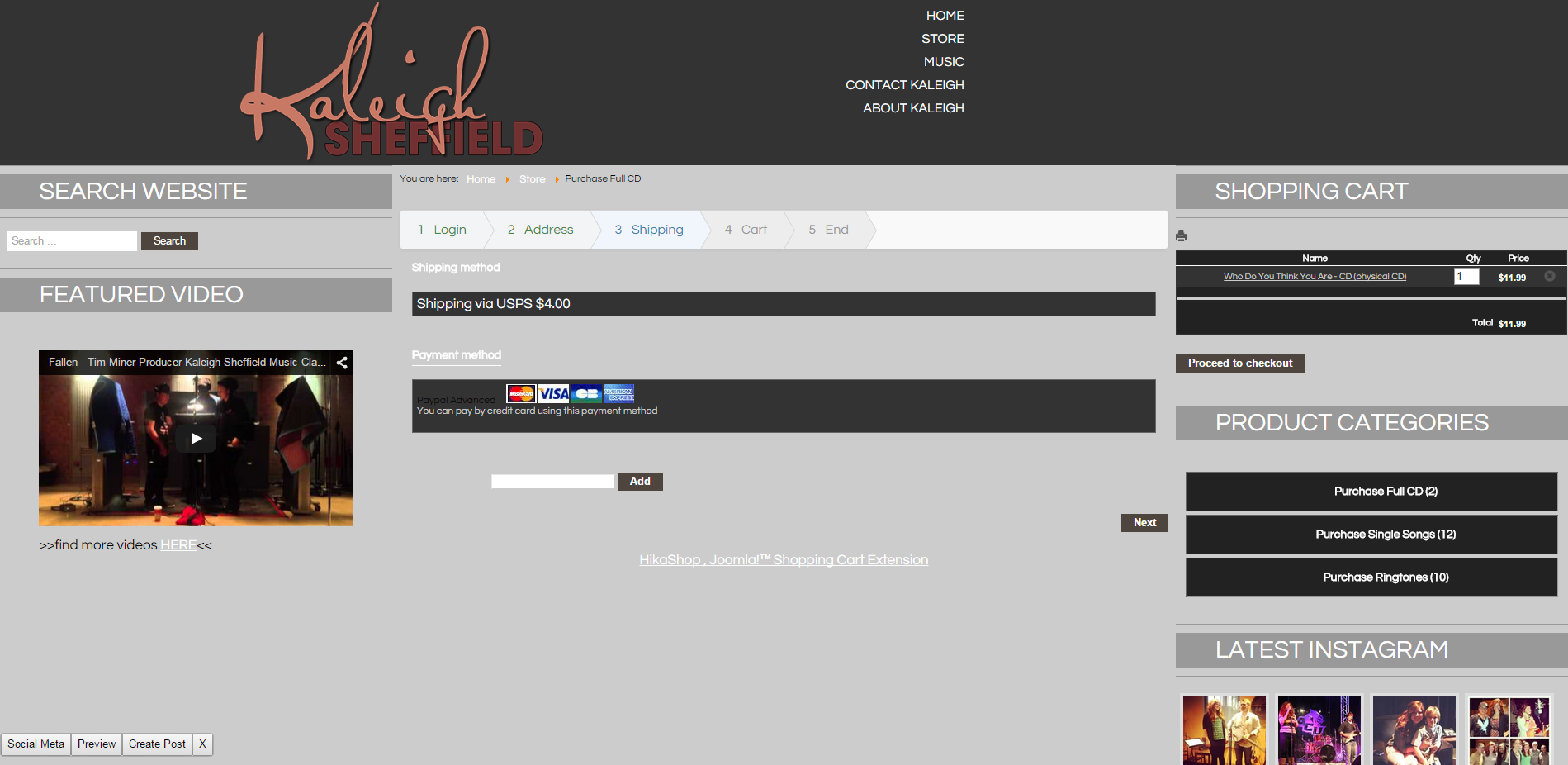
But when I push "next" I get a pop-up that says "Please complete your payment information".
But when I push "next" I get a pop-up that says "Please complete your payment information".
Please Log in or Create an account to join the conversation.
11 years 6 months ago #196989
by heart0
Replied by heart0 on topic Paypal Advanced - Can't Enter Credit Card Info
Just wanted to follow-up on this. Haven't gotten a response yet. Thanks so much!
Please Log in or Create an account to join the conversation.
11 years 6 months ago #196990
by nicolas
Replied by nicolas on topic Paypal Advanced - Can't Enter Credit Card Info
Hi,
This indicates that you turned off the "auto select shipping and payment methods" option of the HikaShop configuration, so the payment method is not selected automatically by default. You need to click on its name in order to select it and then you'll be able to continue your checkout.
I would recommend to keep that auto select option turned on. It will be easier for your customers.
This indicates that you turned off the "auto select shipping and payment methods" option of the HikaShop configuration, so the payment method is not selected automatically by default. You need to click on its name in order to select it and then you'll be able to continue your checkout.
I would recommend to keep that auto select option turned on. It will be easier for your customers.
Please Log in or Create an account to join the conversation.
Time to create page: 0.212 seconds