

- Posts: 47
- Thank you received: 4
Identifying PayPal transactions
11 years 5 months ago #197435
by amigo
Identifying PayPal transactions was created by amigo
-- HikaShop version -- : 2.4.0
-- Joomla version -- : 3.3.6
-- PHP version -- : 5.3.25
Hello, I have PayPal account, that receives a lot of payments from different sources.
I need to identify the payments that are coming from my website with hikashop. Here is how I identify them at this moment.

I attach screenshot with code. Orange word “Seller” identifies the seller (in my case it is online store). Please tell me how can I transmit this information using hikashop.
-- Joomla version -- : 3.3.6
-- PHP version -- : 5.3.25
Hello, I have PayPal account, that receives a lot of payments from different sources.
I need to identify the payments that are coming from my website with hikashop. Here is how I identify them at this moment.
I attach screenshot with code. Orange word “Seller” identifies the seller (in my case it is online store). Please tell me how can I transmit this information using hikashop.
Please Log in or Create an account to join the conversation.

11 years 5 months ago - 11 years 5 months ago #197457
by nicolas
Replied by nicolas on topic Identifying PayPal transactions
Hi,
HikaShop has no such item_number variable sent to PayPal.
It sends either no item number (when the send order details option of the paypal payment method is turned off), or the variable item_number_X (when that option is activated, and in that case X is the position of the product in the order and the variable contains the code of the product).
If the send orders details option is turned off, you could potentially add the variable item_number_1 and maybe that will do what you want.
If that's ok with you, try to add the line:
after the line:
in the file plugins/hikashoppayment/paypal/paypal.php
HikaShop has no such item_number variable sent to PayPal.
It sends either no item number (when the send order details option of the paypal payment method is turned off), or the variable item_number_X (when that option is activated, and in that case X is the position of the product in the order and the variable contains the code of the product).
If the send orders details option is turned off, you could potentially add the variable item_number_1 and maybe that will do what you want.
If that's ok with you, try to add the line:
Code:
$vars['item_number_1'] = 'Seller';
Code:
$vars['item_name_1'] = JText::_('CART_PRODUCT_TOTAL_PRICE');
Last edit: 11 years 5 months ago by nicolas.
Please Log in or Create an account to join the conversation.
11 years 5 months ago - 11 years 5 months ago #197716
by amigo
Replied by amigo on topic Identifying PayPal transactions
Thanks
Do you know if I can test it in some way without actually placing and paying order?
Also, I have no notifications about Paypal payments or order details on e-mail. That is my main instrument of tracking orders, so it is very important to work properly.
It's like noone ordered and payed nothing.
When someone choose something else, like "pay on delivery", I successfuly receive e-mail with order details.
Do you know if I can test it in some way without actually placing and paying order?
Also, I have no notifications about Paypal payments or order details on e-mail. That is my main instrument of tracking orders, so it is very important to work properly.
It's like noone ordered and payed nothing.
When someone choose something else, like "pay on delivery", I successfuly receive e-mail with order details.
Last edit: 11 years 5 months ago by amigo.
Please Log in or Create an account to join the conversation.

11 years 5 months ago - 11 years 5 months ago #197726
by Jerome
Jerome - Obsidev.com
HikaMarket & HikaSerial developer / HikaShop core dev team.
Replied by Jerome on topic Identifying PayPal transactions
Hi,
You can simply create a paypal in sandbox mode ; with a test account.
And you can limit the payment method (be careful, not the Joomla plugin) to a specific Joomla user group thanks to the ACL (HikaShop Business).
- Order status notification
- Order creation notification
If not, you should check if these emails are enabled via "Hikashop->System->Emails".
Also, if you are talking about a "PayPal email" you should maybe check your PayPal account or directly ask it to PayPal.
Regards,
You can simply create a paypal in sandbox mode ; with a test account.
And you can limit the payment method (be careful, not the Joomla plugin) to a specific Joomla user group thanks to the ACL (HikaShop Business).
If you are talking about an Hikashop email, you should receive at least 1 email when your order is created and 1 when your order is confirmed :Also, I have no notifications about Paypal payments or order details on e-mail. That is my main instrument of tracking orders, so it is very important to work properly.
It's like noone ordered and payed nothing.
- Order status notification
- Order creation notification
If not, you should check if these emails are enabled via "Hikashop->System->Emails".
Also, if you are talking about a "PayPal email" you should maybe check your PayPal account or directly ask it to PayPal.
Regards,
Jerome - Obsidev.com
HikaMarket & HikaSerial developer / HikaShop core dev team.
Last edit: 11 years 5 months ago by Mohamed Thelji.
Please Log in or Create an account to join the conversation.
11 years 5 months ago #197858
by amigo
Replied by amigo on topic Identifying PayPal transactions
Yes, I am talking about Hikashop email
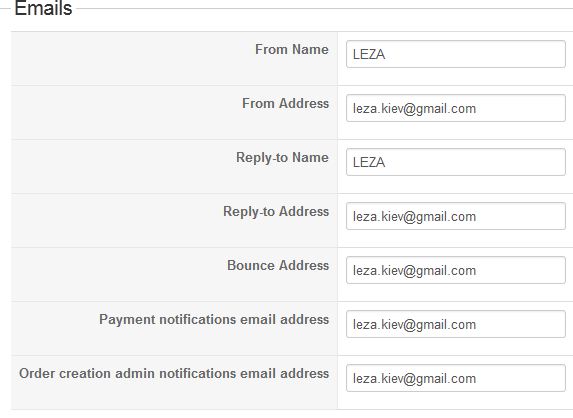
I have all e-mails enabled. Also, I receive notification with other payment methods.
But I've got no notifications neither when order is created with PayPal, nor when it is payed.
Nevertheless, I can see in Hikashop -> Orders, that arder was created or payed. Again, the problem is e-mail notifications, I have none of them, when choosing PayPal.
I have all e-mails enabled. Also, I receive notification with other payment methods.
But I've got no notifications neither when order is created with PayPal, nor when it is payed.
Nevertheless, I can see in Hikashop -> Orders, that arder was created or payed. Again, the problem is e-mail notifications, I have none of them, when choosing PayPal.
Please Log in or Create an account to join the conversation.

Less
More
- Posts: 12953
- Thank you received: 1778
11 years 5 months ago #197901
by Mohamed Thelji
Replied by Mohamed Thelji on topic Identifying PayPal transactions
Hello,
Reading that thread will probably help you :
Reading that thread will probably help you :
HikaShop uses the standard joomla email sending functions. If you have a problem only on that email, it means that the problem is the content of the email.
Fist, you should check your different settings in the hikashop configuration under the tab mail. The encoding might not be correct for your email server, it could the ad name option , etc.
What you could try also is to send an email via the interface in sales when changing an order information. Does that work ? If yes, then, the problem is really the content of the order creation notification.
It could also be that your hosting company doesn't allow you to send more than one email per thread and at the end of the checkout, two emails are sent (1 to the customer and 1 to the vendor). So you might want to check on that with your hosting company.
Please Log in or Create an account to join the conversation.
11 years 5 months ago - 11 years 5 months ago #198014
by amigo
Replied by amigo on topic Identifying PayPal transactions
FISRT QUESTION
Ok, I got the problem.
I have no mail notifications from ENGLISH version of the site. Everything else works properly.
When English language is selected and order is created I have no notifications sent to my shop's e-mail. And it doens't depend on geolocation.
For example, if I go to English version, pick some products, then go to russian version and complete checkout, I WILL have email notifications as needed.
I already have some orders missed because of that. What could be solution?
SECOND QUESTION
Is it possible to send information with "Note to seller" so I could track from PayPal by this note, wherefrom payment has come?
Ok, I got the problem.
I have no mail notifications from ENGLISH version of the site. Everything else works properly.
When English language is selected and order is created I have no notifications sent to my shop's e-mail. And it doens't depend on geolocation.
For example, if I go to English version, pick some products, then go to russian version and complete checkout, I WILL have email notifications as needed.
I already have some orders missed because of that. What could be solution?
SECOND QUESTION
Is it possible to send information with "Note to seller" so I could track from PayPal by this note, wherefrom payment has come?
Last edit: 11 years 5 months ago by amigo.
Please Log in or Create an account to join the conversation.
11 years 5 months ago #198026
by nicolas
Replied by nicolas on topic Identifying PayPal transactions
Hi,
If hikashop is not receiving the payment notifications, then it would mean that the orders are not confirmed automatically after the payment, explaining why thenotifications are not sent. So in that case , checking your server access log as explained on the documentation below could be a good idea:
www.hikashop.com/support/documentation/i...or.html#notification
If however the orders are confirmed, then either there is a problem with your email server or with the translation file of hikashop on your website.
Regarding the note to seller, you can add the corresponding variable in the same way I explained in my first message.
If hikashop is not receiving the payment notifications, then it would mean that the orders are not confirmed automatically after the payment, explaining why thenotifications are not sent. So in that case , checking your server access log as explained on the documentation below could be a good idea:
www.hikashop.com/support/documentation/i...or.html#notification
If however the orders are confirmed, then either there is a problem with your email server or with the translation file of hikashop on your website.
Regarding the note to seller, you can add the corresponding variable in the same way I explained in my first message.
Please Log in or Create an account to join the conversation.
11 years 5 months ago #198183
by amigo
Replied by amigo on topic Identifying PayPal transactions
1) Let me explain 1 more time.
I have NO NOTIFICATIONS neither after creation an order, nor after confirmation it in English version.
In Russian version notification after creation works perfectly, and notification after confirmation I haven't tested, because there is no point of using PayPal in russian version.
It has nothing to do with PayPal. If you want, I can create another topic to discuss this thing.
Again, when I switch to English version of website, notifications are stop being sended. And what I really need are notifications after creation the order.
2) Regarnigd the note so seller, what name to variable should I give, so information would be in note field?
I have NO NOTIFICATIONS neither after creation an order, nor after confirmation it in English version.
In Russian version notification after creation works perfectly, and notification after confirmation I haven't tested, because there is no point of using PayPal in russian version.
It has nothing to do with PayPal. If you want, I can create another topic to discuss this thing.
Again, when I switch to English version of website, notifications are stop being sended. And what I really need are notifications after creation the order.
2) Regarnigd the note so seller, what name to variable should I give, so information would be in note field?
Please Log in or Create an account to join the conversation.
11 years 5 months ago - 11 years 5 months ago #198249
by amigo
Replied by amigo on topic Identifying PayPal transactions
I've already turned off all mass actions and "only-English" modules. That doesn't help. Still no notifications.
So, problem is not some modules or actions.
So, problem is not some modules or actions.
Last edit: 11 years 5 months ago by amigo.
Please Log in or Create an account to join the conversation.
11 years 5 months ago #198421
by Jerome
Jerome - Obsidev.com
HikaMarket & HikaSerial developer / HikaShop core dev team.
Replied by Jerome on topic Identifying PayPal transactions
Hi,
Yes please create a new thread for your English order creation issue ; if in that new thread you can provide us a link to your store it will help for testing purposes.
Seeing directly the issue might help us to understand if you have an error somewhere, if there is a compatibility problem, etc
We also might require a backend access to see and check your configuration ; you can send us such private information using the "contact us" form with a link to the corresponding forum thread (once you will create it)
Regards,
Yes please create a new thread for your English order creation issue ; if in that new thread you can provide us a link to your store it will help for testing purposes.
Seeing directly the issue might help us to understand if you have an error somewhere, if there is a compatibility problem, etc
We also might require a backend access to see and check your configuration ; you can send us such private information using the "contact us" form with a link to the corresponding forum thread (once you will create it)
Regards,
Jerome - Obsidev.com
HikaMarket & HikaSerial developer / HikaShop core dev team.
The following user(s) said Thank You: amigo
Please Log in or Create an account to join the conversation.
Time to create page: 0.199 seconds