

- Posts: 11
- Thank you received: 1
Hikashop not sending cart to Sagepay
11 years 5 months ago - 11 years 5 months ago #200310
by Barnard
Hikashop not sending cart to Sagepay was created by Barnard
-- HikaShop version -- : HikaShop Business: 2.4.0
-- Joomla version -- : 2.5.27
-- PHP version -- : 5.4.40
-- Browser(s) name and version -- : all
Hi
I have two problems which are related to one another.
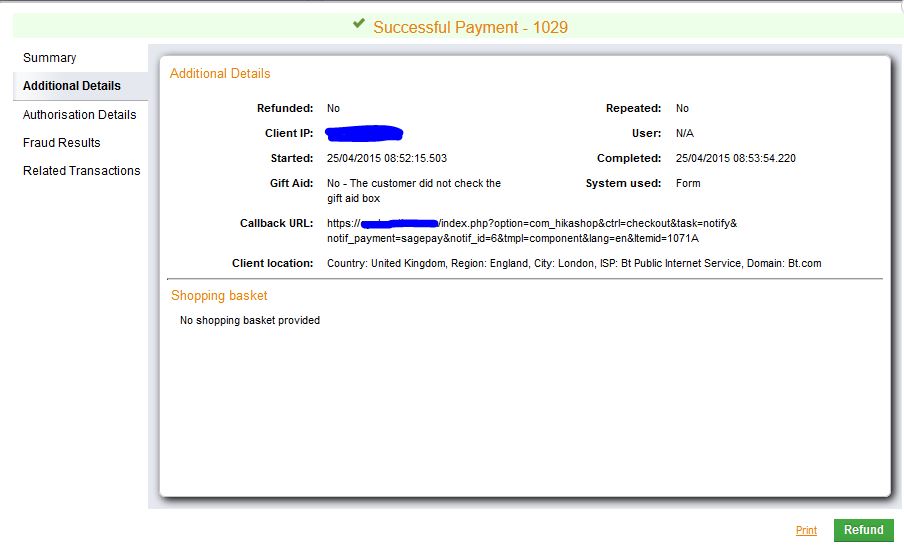
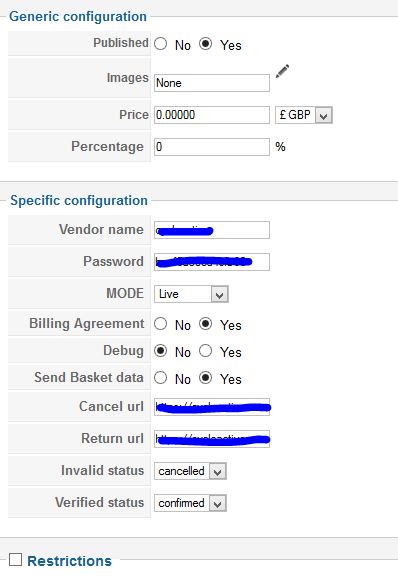
1. My Sagepay pluggin doesn't send the shopping cart to sagepay even when the "Send Basket Data" is turned on. I'm still able to take payments for the correct amount. Its just that no data is given to sagepay so I can't tell what the payment is for ie. no Basket, invoice no, description etc in Sagepay account.
2. I can't get Hikashop to send the customer details to Sagepay. Name, email, address, country etc. At the moment only UK clients can book and checkout on the website .
Sagepay insists on a billing address field to be send from the website to them, if you are booking from countries like the USA. We are missing these booking at the moment.
UK Clients end up filling out their details on our website and then again in sagepay.
I have the website set up as guest checkout as I don't need people to register. Its obviously something to do with my set up but I cant for the life of me figure it out.
Sagepay customer service stated this "US address not working due to no Billing State field" and told me to look at page 43 in the linked document. (This means nothing to me, and is well over my head)
Saypay guide
What can I do to get all this working.
Cheers
Rich
-- Joomla version -- : 2.5.27
-- PHP version -- : 5.4.40
-- Browser(s) name and version -- : all
Hi
I have two problems which are related to one another.
1. My Sagepay pluggin doesn't send the shopping cart to sagepay even when the "Send Basket Data" is turned on. I'm still able to take payments for the correct amount. Its just that no data is given to sagepay so I can't tell what the payment is for ie. no Basket, invoice no, description etc in Sagepay account.
2. I can't get Hikashop to send the customer details to Sagepay. Name, email, address, country etc. At the moment only UK clients can book and checkout on the website .
Sagepay insists on a billing address field to be send from the website to them, if you are booking from countries like the USA. We are missing these booking at the moment.
UK Clients end up filling out their details on our website and then again in sagepay.
I have the website set up as guest checkout as I don't need people to register. Its obviously something to do with my set up but I cant for the life of me figure it out.
Sagepay customer service stated this "US address not working due to no Billing State field" and told me to look at page 43 in the linked document. (This means nothing to me, and is well over my head)
Saypay guide
What can I do to get all this working.
Cheers
Rich
Last edit: 11 years 5 months ago by Barnard. Reason: spelling
Please Log in or Create an account to join the conversation.

11 years 5 months ago #200315
by nicolas
Replied by nicolas on topic Hikashop not sending cart to Sagepay
Hi,
I don't see why the basket or the shipping/billing addresses data wouldn't be sent.
There is actually no way that the information is not sent as far as I can see in the code of the sagepay plugin.
Could you turn on the debug option of the sagepay plugin and try again ?
The data that is sent to sagepay should then be displayed on the last page of the checkout allowing you/us to see what is sent to sagepay.
I don't see why the basket or the shipping/billing addresses data wouldn't be sent.
There is actually no way that the information is not sent as far as I can see in the code of the sagepay plugin.
Could you turn on the debug option of the sagepay plugin and try again ?
The data that is sent to sagepay should then be displayed on the last page of the checkout allowing you/us to see what is sent to sagepay.
Please Log in or Create an account to join the conversation.
11 years 5 months ago - 11 years 5 months ago #200581
by Barnard
Replied by Barnard on topic Hikashop not sending cart to Sagepay
HI Nicolas
I've turned on the debug mode in the Sagepay plugin. When I checkout it flashes up for less then a second and then goes to the Sagepay payment page. So I have no chance of seeing the text.
The payment goes through in the same way (No basket or contact details).
I've had a word with Sagepay and they are still stating its my coding from the basket or how I have set the contact details up. They then told me they have changed the workflow of the payment details in v3.00. The new workflow means if you don't provide the basket information/contact details in the correct order then the payment will fail unless the client is from the same country (UK, for me).
Has the Sagepay upgrade to Sage Pay Protocol v3.00 got anything to do with it? I'm a new sagepay customer and I'm on the new system.
I found this page talking about how to upgrade
I also found this talking about Sage Pay Version 3.00 - understanding the process
Any help would be great!
Cheers
Rich
I've turned on the debug mode in the Sagepay plugin. When I checkout it flashes up for less then a second and then goes to the Sagepay payment page. So I have no chance of seeing the text.
The payment goes through in the same way (No basket or contact details).
I've had a word with Sagepay and they are still stating its my coding from the basket or how I have set the contact details up. They then told me they have changed the workflow of the payment details in v3.00. The new workflow means if you don't provide the basket information/contact details in the correct order then the payment will fail unless the client is from the same country (UK, for me).
Has the Sagepay upgrade to Sage Pay Protocol v3.00 got anything to do with it? I'm a new sagepay customer and I'm on the new system.
I found this page talking about how to upgrade
I also found this talking about Sage Pay Version 3.00 - understanding the process
Any help would be great!
Cheers
Rich
Last edit: 11 years 5 months ago by Barnard. Reason: no URL's linked
Please Log in or Create an account to join the conversation.
11 years 5 months ago #200595
by nicolas
Replied by nicolas on topic Hikashop not sending cart to Sagepay
Hi,
Our sagepay plugin was upgraded to the 3.00 version so it's not related.
You need to click on the stop icon of your browser when the page displays so that it stops the redirection to sagepay. That way, you will have the time to get the debug data on the page.
Our sagepay plugin was upgraded to the 3.00 version so it's not related.
You need to click on the stop icon of your browser when the page displays so that it stops the redirection to sagepay. That way, you will have the time to get the debug data on the page.
Please Log in or Create an account to join the conversation.
11 years 5 months ago #200667
by Barnard
Replied by Barnard on topic Hikashop not sending cart to Sagepay
Now I'm really lost.
I can see that the information is being given to Sagepay (see below) but sage pay still don't accept it. Any clues why this would happen? I'm a sending the correct information but in the wrong order? I understand this is sort of stepping out of hikashop and now moving on to sagepay, but any ideas would be well received. Cheers, Rich
VendorTxCode=1037&Amount=178&Currency=GBP&Description=03/May/201501037&SuccessURL=https://cycleactive.com/index.php?option=com_hikashop&ctrl=checkout&task=notify¬if_payment=sagepay¬if_id=6&tmpl=component&lang=en&Itemid=1071&FailureURL=https://cycleactive.com/index.php?option=com_hikashop&ctrl=checkout&task=notify¬if_payment=sagepay¬if_id=6&tmpl=component&lang=en&Itemid=1071&CustomerName=r rr&SendEMail=0&BillingFirstnames=r&BillingSurname=rr&BillingAddress1=r&BillingAddress2=&BillingCity=r&BillingPostCode=ca1&BillingCountry=GB&DeliveryFirstnames=r&DeliverySurname=rr&DeliveryAddress1=r&DeliveryAddress2=&DeliveryCity=r&DeliveryPostCode=ca1&DeliveryCountry=GB&ReferrerID=B5C3FBCA-9E9C-4C49-B3ED-3AFEEF7592A4&BillingAgreement=1&AllowGiftAid=0&ApplyAVSCV2=0&Apply3DSecure=0
I can see that the information is being given to Sagepay (see below) but sage pay still don't accept it. Any clues why this would happen? I'm a sending the correct information but in the wrong order? I understand this is sort of stepping out of hikashop and now moving on to sagepay, but any ideas would be well received. Cheers, Rich
VendorTxCode=1037&Amount=178&Currency=GBP&Description=03/May/201501037&SuccessURL=https://cycleactive.com/index.php?option=com_hikashop&ctrl=checkout&task=notify¬if_payment=sagepay¬if_id=6&tmpl=component&lang=en&Itemid=1071&FailureURL=https://cycleactive.com/index.php?option=com_hikashop&ctrl=checkout&task=notify¬if_payment=sagepay¬if_id=6&tmpl=component&lang=en&Itemid=1071&CustomerName=r rr&SendEMail=0&BillingFirstnames=r&BillingSurname=rr&BillingAddress1=r&BillingAddress2=&BillingCity=r&BillingPostCode=ca1&BillingCountry=GB&DeliveryFirstnames=r&DeliverySurname=rr&DeliveryAddress1=r&DeliveryAddress2=&DeliveryCity=r&DeliveryPostCode=ca1&DeliveryCountry=GB&ReferrerID=B5C3FBCA-9E9C-4C49-B3ED-3AFEEF7592A4&BillingAgreement=1&AllowGiftAid=0&ApplyAVSCV2=0&Apply3DSecure=0
Please Log in or Create an account to join the conversation.
11 years 5 months ago #200720
by nicolas
Replied by nicolas on topic Hikashop not sending cart to Sagepay
Hi,
I can see in your debug data that you're missing the basket content at the end of the debug data. That should only happen if the "send basket data" option of the plugin is turned off.
The US state issue shouldn't be a problem either.
It looks like as if you weren't using the latest version of plugin.
Download this zip and install it on your website.
That will force the update of the plugin.
Then, save the settings of the payment method and it should definitely work.
If not, please provide a backend access to the website via our contact form with a link to this thread so that we can check your settings.
I can see in your debug data that you're missing the basket content at the end of the debug data. That should only happen if the "send basket data" option of the plugin is turned off.
The US state issue shouldn't be a problem either.
It looks like as if you weren't using the latest version of plugin.
Download this zip and install it on your website.
This attachment is hidden for guests.
Please log in or register to see it.
Please log in or register to see it.
That will force the update of the plugin.
Then, save the settings of the payment method and it should definitely work.
If not, please provide a backend access to the website via our contact form with a link to this thread so that we can check your settings.
Please Log in or Create an account to join the conversation.
11 years 5 months ago #201246
by Barnard
Replied by Barnard on topic Hikashop not sending cart to Sagepay
Hi Nicolas
I've had a few days of testing on live clients and the news has come back as very mixed.
1. Some UK Clients have be able to make a purchase via the hikashop Sagpay pluggin. (50%)
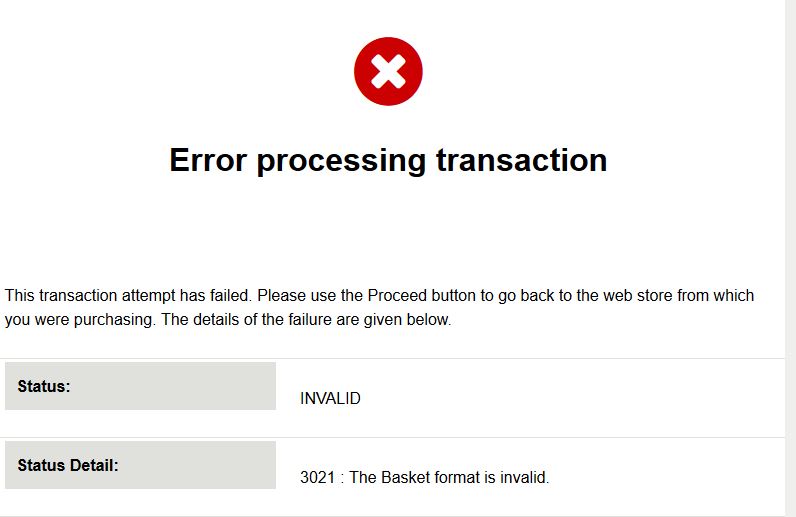
2. Some UK Clients get the following sagepay error code 3021 : INVALID : The Basket format is invalid. 3021 Code information
3. The original problem with the billing state field stands for US client who still can't book with us.
"Sagepay insists on a billing address field to be send from the website to them, if you are booking from countries like the USA. We are missing these booking at the moment."
Note: In Debug mode Problem 2 & 3 The page can't be frozen on the browser to see the code. It goes too fast and Sagepay get the error code in place in milliseconds. The ESC key doesn't work in any browser.
Any ideas?
Cheers
Rich
I've had a few days of testing on live clients and the news has come back as very mixed.
1. Some UK Clients have be able to make a purchase via the hikashop Sagpay pluggin. (50%)
2. Some UK Clients get the following sagepay error code 3021 : INVALID : The Basket format is invalid. 3021 Code information
3. The original problem with the billing state field stands for US client who still can't book with us.
"Sagepay insists on a billing address field to be send from the website to them, if you are booking from countries like the USA. We are missing these booking at the moment."
Note: In Debug mode Problem 2 & 3 The page can't be frozen on the browser to see the code. It goes too fast and Sagepay get the error code in place in milliseconds. The ESC key doesn't work in any browser.
Any ideas?
Cheers
Rich
Please Log in or Create an account to join the conversation.

11 years 5 months ago #201252
by Jerome
Jerome - Obsidev.com
HikaMarket & HikaSerial developer / HikaShop core dev team.
Replied by Jerome on topic Hikashop not sending cart to Sagepay
Hi,
It will be more than useful to have details about the cart content or have the content sent to SagePay.
If some customer are able to create an order and some don't ; it seems that there is a difference which generate the issue.
Without such information, we won't be able to reproduce or analyze the issue you have.
But I know that I already got the "3021" error code when the basket was not the source of the issue so I currently can't trust the error code to target the real issue.
Regards,
It will be more than useful to have details about the cart content or have the content sent to SagePay.
If some customer are able to create an order and some don't ; it seems that there is a difference which generate the issue.
Without such information, we won't be able to reproduce or analyze the issue you have.
But I know that I already got the "3021" error code when the basket was not the source of the issue so I currently can't trust the error code to target the real issue.
Regards,
Jerome - Obsidev.com
HikaMarket & HikaSerial developer / HikaShop core dev team.
Please Log in or Create an account to join the conversation.
Time to create page: 0.230 seconds