
- Posts: 158
- Thank you received: 5
Collect on delivery payment plugin
- serbofleconcepts
-
 Topic Author
- Offline
Less
More
11 years 4 months ago #200992
by serbofleconcepts
Collect on delivery payment plugin was created by serbofleconcepts
-- HikaShop version -- : HikaShop Business: 2.4.0
-- Joomla version -- : 3.4.1
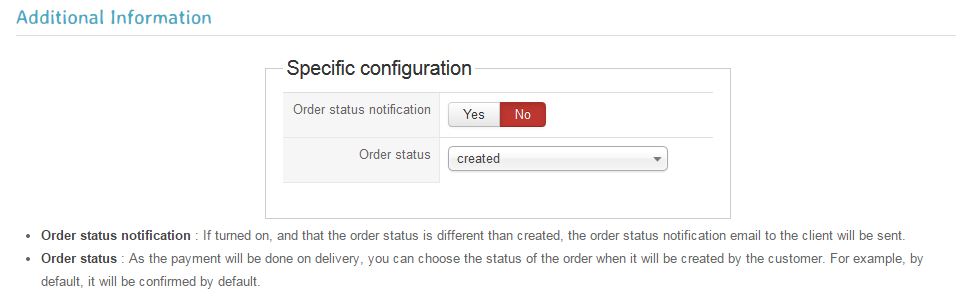
I've been trying different configurations here to prevent the order email being sent to the customer after each order. I'd prefer it if it was sent when the order is confirmed or shipped.
Is this possible? I read the help documentation .. www.hikashop.com/support/support/documen...ondelivery-form.html but it's not 100% clear what the options below actually do.
-- Joomla version -- : 3.4.1
I've been trying different configurations here to prevent the order email being sent to the customer after each order. I'd prefer it if it was sent when the order is confirmed or shipped.
Is this possible? I read the help documentation .. www.hikashop.com/support/support/documen...ondelivery-form.html but it's not 100% clear what the options below actually do.
Please Log in or Create an account to join the conversation.

11 years 4 months ago #200998
by Jerome
Jerome - Obsidev.com
HikaMarket & HikaSerial developer / HikaShop core dev team.
Replied by Jerome on topic Collect on delivery payment plugin
Hi,
HikaShop send an email when the order is created ; you also have to unpublish that email.
The "order status notification" option in the payment plugin is to send (or not) an extra email when the order status is set to what you selected for the option "order status".
In case where you set the setting to "pending" (for example), you can decide to send an email to the customer for that "pending" status. But because you are using "created" ; the setting "order status notification" have any impact.
Regards,
HikaShop send an email when the order is created ; you also have to unpublish that email.
The "order status notification" option in the payment plugin is to send (or not) an extra email when the order status is set to what you selected for the option "order status".
In case where you set the setting to "pending" (for example), you can decide to send an email to the customer for that "pending" status. But because you are using "created" ; the setting "order status notification" have any impact.
Regards,
Jerome - Obsidev.com
HikaMarket & HikaSerial developer / HikaShop core dev team.
Please Log in or Create an account to join the conversation.
- serbofleconcepts
-
Topic Author
- Offline
Less
More
- Posts: 158
- Thank you received: 5
11 years 4 months ago #201149
by serbofleconcepts
Replied by serbofleconcepts on topic Collect on delivery payment plugin
Ah, ok, I understand how it works now. Is it possible to unpublish the 'order created' email for just this payment type please?
Please Log in or Create an account to join the conversation.
11 years 4 months ago #201158
by Jerome
Jerome - Obsidev.com
HikaMarket & HikaSerial developer / HikaShop core dev team.
Replied by Jerome on topic Collect on delivery payment plugin
Hi,
To do so, you have to create an override of the email and add a condition to not send the email when the order payment method is "collect on delivery".
The email is to modify the email object in the preload:
Regards,
To do so, you have to create an override of the email and add a condition to not send the email when the order payment method is "collect on delivery".
The email is to modify the email object in the preload:
Code:
if($data->order_payment_method == 'collectondelivery')
$mail->published = false;
Jerome - Obsidev.com
HikaMarket & HikaSerial developer / HikaShop core dev team.
Please Log in or Create an account to join the conversation.
- serbofleconcepts
-
Topic Author
- Offline
Less
More
- Posts: 158
- Thank you received: 5
11 years 4 months ago #201216
by serbofleconcepts
Replied by serbofleconcepts on topic Collect on delivery payment plugin
Thanks, where do I add this data? Where is the preload section located?
Please Log in or Create an account to join the conversation.

11 years 4 months ago #201218
by nicolas
Replied by nicolas on topic Collect on delivery payment plugin
Hi,
When you edit an email via the menu System>Emails, you can scroll at the bottom of the page and you'll find the "preload" section where you can add that code.
When you edit an email via the menu System>Emails, you can scroll at the bottom of the page and you'll find the "preload" section where you can add that code.
The following user(s) said Thank You: serbofleconcepts
Please Log in or Create an account to join the conversation.
- serbofleconcepts
-
Topic Author
- Offline
Less
More
- Posts: 158
- Thank you received: 5
11 years 4 months ago #201264
by serbofleconcepts
Replied by serbofleconcepts on topic Collect on delivery payment plugin
Thanks, this is now working as I want it.
Please Log in or Create an account to join the conversation.
Time to create page: 0.209 seconds