

- Posts: 27
- Thank you received: 0
user point doesn't display in the checkout folw
11 years 4 months ago #201705
by rouben618
user point doesn't display in the checkout folw was created by rouben618
-- url of the page with the problem -- :
nature2u.co.nz/
-- HikaShop version -- : 2.3.4
-- Joomla version -- : 3.2.2
-- PHP version -- : PHP 5.3.29
-- Browser(s) name and version -- : Mozilla/5.0
-- Error-message(debug-mod must be tuned on) -- : My user point doesn't display in the checkout folw
Hi Hikashop team,
When I setup the hikashop user points, it dosen't show in the frontend when check out, I attached some screenshop, could you please show me where should I change?
Thanks!
-- HikaShop version -- : 2.3.4
-- Joomla version -- : 3.2.2
-- PHP version -- : PHP 5.3.29
-- Browser(s) name and version -- : Mozilla/5.0
-- Error-message(debug-mod must be tuned on) -- : My user point doesn't display in the checkout folw
Hi Hikashop team,
When I setup the hikashop user points, it dosen't show in the frontend when check out, I attached some screenshop, could you please show me where should I change?
Thanks!
Please Log in or Create an account to join the conversation.

11 years 4 months ago #201707
by Jerome
Jerome - Obsidev.com
HikaMarket & HikaSerial developer / HikaShop core dev team.
Replied by Jerome on topic user point doesn't display in the checkout folw
Hi,
First please update to HikaShop 2.4.0.
Then edit the plugin "plugins/hikashop/userpoints/userpoints.php" and replace
By
And it will force the display of the checkout user points blocks even if the user does not have any points yet.
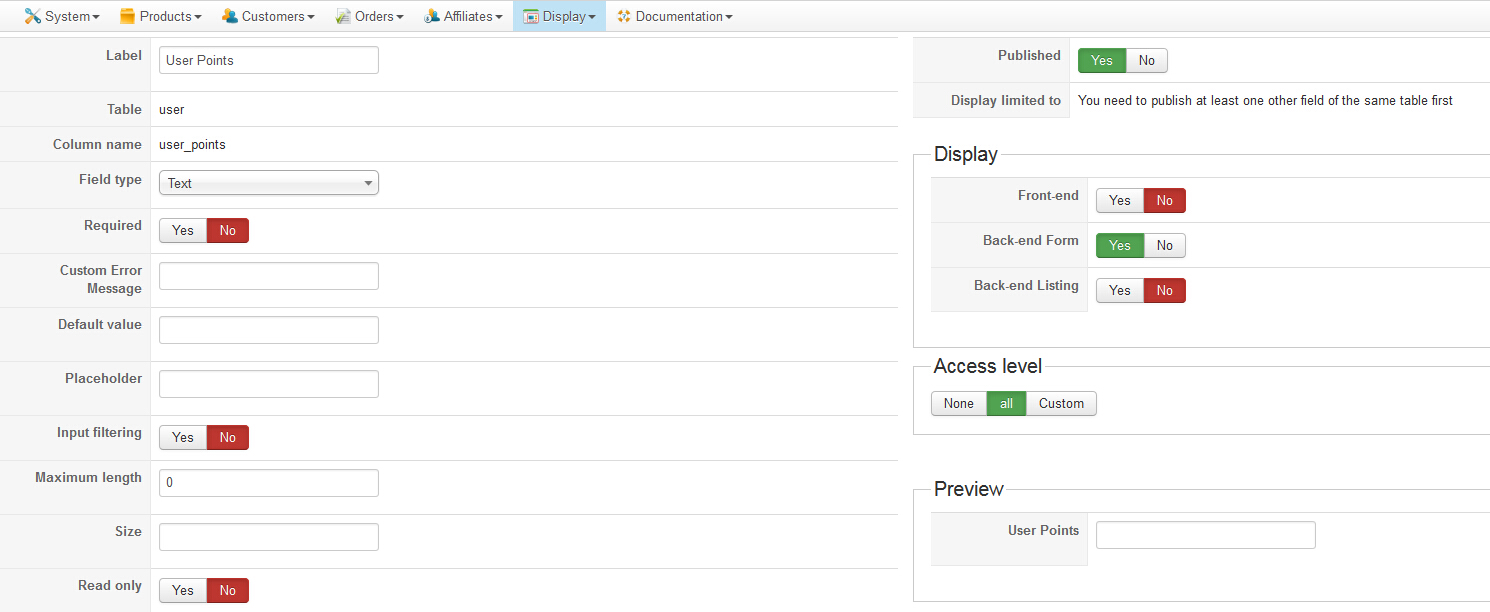
You should also change the configuration of the "user_points" custom field to not display it in the front-end ; otherwise the user will be able to modify his points himself and I don't think that you want to allow that.
About the configuration of the Joomla plugin, you specify a order status ; which is good if you do not want to use the values from the HikaShop "invoice order statuses" setting ; but I see that you put an order status with an uppercase and that's not the exact order status namekey. We will see to improve the interface in the Joomla plugin configuration in order to use a namebox, before that, please use instead
Regards,
First please update to HikaShop 2.4.0.
Then edit the plugin "plugins/hikashop/userpoints/userpoints.php" and replace
Code:
if($mode == 'hk') {
if(isset($user->user_points))
return (int)$user->user_points;
return false;
}
if(isset($user->user_points)) {
if($mode == 'all')
$ret['hk'] = (int)$user->user_points;
else
$ret = (int)$user->user_points;
}
Code:
if($mode == 'hk') {
if(isset($user->user_points) || in_array('user_points', array_keys(get_object_vars($user))))
return (int)@$user->user_points;
return false;
}
if(isset($user->user_points) || in_array('user_points', array_keys(get_object_vars($user)))) {
if($mode == 'all')
$ret['hk'] = (int)@$user->user_points;
else
$ret = (int)@$user->user_points;
}
You should also change the configuration of the "user_points" custom field to not display it in the front-end ; otherwise the user will be able to modify his points himself and I don't think that you want to allow that.
About the configuration of the Joomla plugin, you specify a order status ; which is good if you do not want to use the values from the HikaShop "invoice order statuses" setting ; but I see that you put an order status with an uppercase and that's not the exact order status namekey. We will see to improve the interface in the Joomla plugin configuration in order to use a namebox, before that, please use instead
Code:
shipped
Regards,
Jerome - Obsidev.com
HikaMarket & HikaSerial developer / HikaShop core dev team.
The following user(s) said Thank You: rouben618
Please Log in or Create an account to join the conversation.
11 years 4 months ago #201920
by rouben618
Replied by rouben618 on topic user point doesn't display in the checkout folw
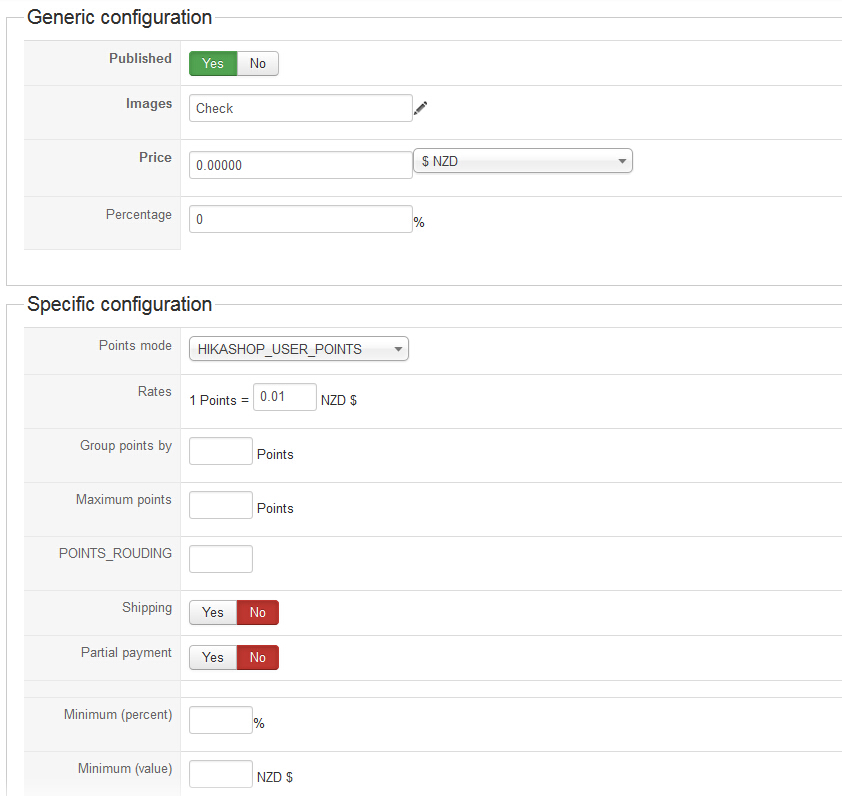
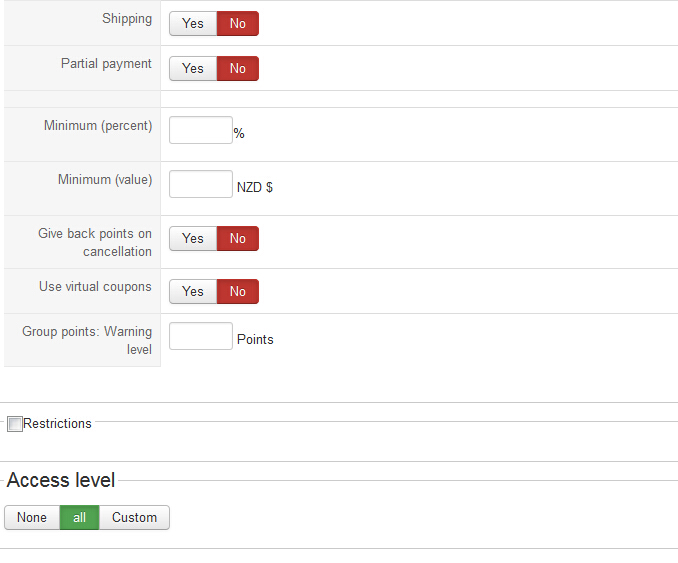
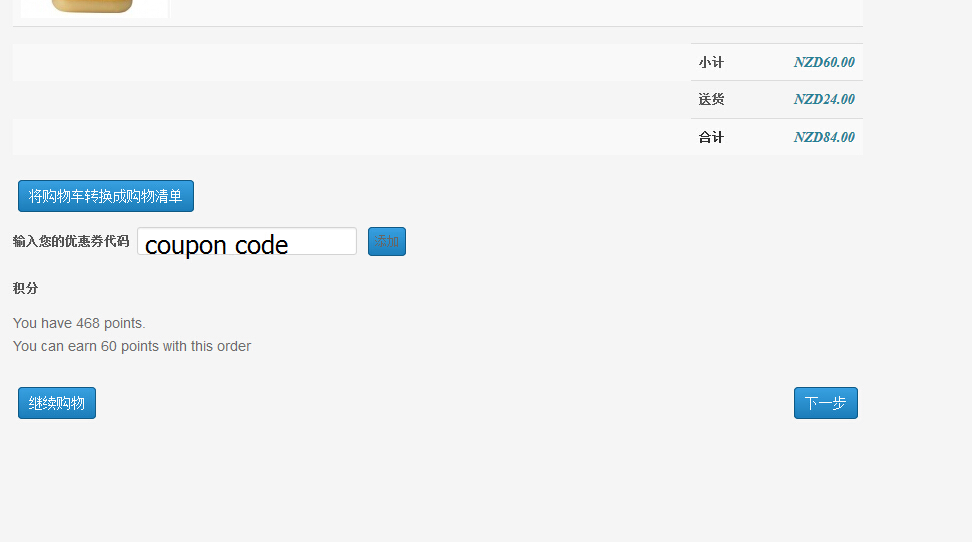
Thank you very much, I upgraded hikashop and changed the code, now the user points earning displays in front end but the payment dosen't show. Could you please have a quick look at my configuration?
Thanks!
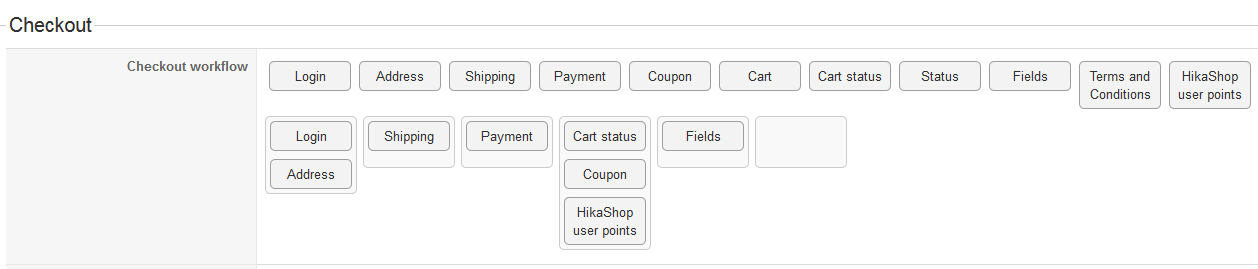
Thanks!
Please Log in or Create an account to join the conversation.
11 years 4 months ago #201921
by Jerome
Jerome - Obsidev.com
HikaMarket & HikaSerial developer / HikaShop core dev team.
Replied by Jerome on topic user point doesn't display in the checkout folw
Hi,
You do not authorize the "partial payment" which means that you need to have 6000 points to be able to pay the order using points ; and regarding your screenshot, you have just 468 points.
So I recommend you to activate the "partial payment" if you want to use your 468 to create a "NZD 4,68" discount.
You can also use the "virtual coupon" mode to have a different approach of the points and not decide to use them by selecting a payment method.
Regards,
You do not authorize the "partial payment" which means that you need to have 6000 points to be able to pay the order using points ; and regarding your screenshot, you have just 468 points.
So I recommend you to activate the "partial payment" if you want to use your 468 to create a "NZD 4,68" discount.
You can also use the "virtual coupon" mode to have a different approach of the points and not decide to use them by selecting a payment method.
Regards,
Jerome - Obsidev.com
HikaMarket & HikaSerial developer / HikaShop core dev team.
Please Log in or Create an account to join the conversation.
Time to create page: 0.175 seconds