

- Posts: 25
- Thank you received: 2
EWAY Payment Plugin Sandbox Testing
11 years 4 months ago #202616
by shanem
EWAY Payment Plugin Sandbox Testing was created by shanem
-- HikaShop version -- : 2.3.5
-- Joomla version -- : 2.5.14
-- PHP version -- : 5.3.1
-- Browser(s) name and version -- : Firefox Ver 34.0.5
Hi Support , Can you please tell me if the Hikashop integrated EWAY Payment Plugin supports "sandbox" testing?
I cant find any documentation to confirm this or not and I cant see any specific options in the EWAY plugin to support "sandbox" testing?
I am shortly to go "live" with my shopping cart and would like to test the checkout and EWAY plugin first.
Thanking you.
Regards
Shane
-- Joomla version -- : 2.5.14
-- PHP version -- : 5.3.1
-- Browser(s) name and version -- : Firefox Ver 34.0.5
Hi Support , Can you please tell me if the Hikashop integrated EWAY Payment Plugin supports "sandbox" testing?
I cant find any documentation to confirm this or not and I cant see any specific options in the EWAY plugin to support "sandbox" testing?
I am shortly to go "live" with my shopping cart and would like to test the checkout and EWAY plugin first.
Thanking you.
Regards
Shane
Please Log in or Create an account to join the conversation.

11 years 4 months ago #202626
by Jerome
Jerome - Obsidev.com
HikaMarket & HikaSerial developer / HikaShop core dev team.
Replied by Jerome on topic EWAY Payment Plugin Sandbox Testing
Hi,
The sandbox mode in the "eway" plugin is linked to the setting "debug".
So by activating the debug, you're also using the sandbox platform.
Regards,
The sandbox mode in the "eway" plugin is linked to the setting "debug".
So by activating the debug, you're also using the sandbox platform.
Regards,
Jerome - Obsidev.com
HikaMarket & HikaSerial developer / HikaShop core dev team.
Please Log in or Create an account to join the conversation.
11 years 4 months ago #202682
by shanem
Replied by shanem on topic EWAY Payment Plugin Sandbox Testing
Hi Jerome,
can you give me a bit more information please.
So all I have to do is just tick the Debug checkbox , nothing else is needed ?
What Eway Sandbox customer id is the debug option using?
Do I have to enter a eWAY customer id also or just leave it blank while testing ?
What do I put in the return URL ??
Will this send the transactions to the Eway Sandbox website where I can view the dummy transactions in their reporting section ?
Thanks very much for your replies.
Shane
[img]http://[/img]
can you give me a bit more information please.
So all I have to do is just tick the Debug checkbox , nothing else is needed ?
What Eway Sandbox customer id is the debug option using?
Do I have to enter a eWAY customer id also or just leave it blank while testing ?
What do I put in the return URL ??
Will this send the transactions to the Eway Sandbox website where I can view the dummy transactions in their reporting section ?
Thanks very much for your replies.
Shane
[img]http://[/img]
Please Log in or Create an account to join the conversation.
11 years 4 months ago #202683
by Jerome
Jerome - Obsidev.com
HikaMarket & HikaSerial developer / HikaShop core dev team.
Replied by Jerome on topic EWAY Payment Plugin Sandbox Testing
Hi,
You just have to activate the debug mode and it will use the Eway sandbox platform ; that's it, nothing more !
For the rest about the eway reporting, the best will be to contact eway because that's not our part.
All I can say is that everybody is using the client id "87654321" for the sandbox.
Regards,
You just have to activate the debug mode and it will use the Eway sandbox platform ; that's it, nothing more !
For the rest about the eway reporting, the best will be to contact eway because that's not our part.
All I can say is that everybody is using the client id "87654321" for the sandbox.
Regards,
Jerome - Obsidev.com
HikaMarket & HikaSerial developer / HikaShop core dev team.
The following user(s) said Thank You: shanem
Please Log in or Create an account to join the conversation.
11 years 4 months ago - 11 years 1 month ago #202767
by shanem
Replied by shanem on topic EWAY Payment Plugin Sandbox Testing
Hi Support,
I have been communicating with EWAY about getting my new website to talk to their SANDBOX payment gateway test facility.
I have tried processing a transaction with the DEBUG = yes radio button selected in the eWay plugin but I receive this message.
"[i]Your transaction was declined. Please reenter your credit card or another credit card information.
40,Function Not Supported(Test CVN Gateway)[/i]"
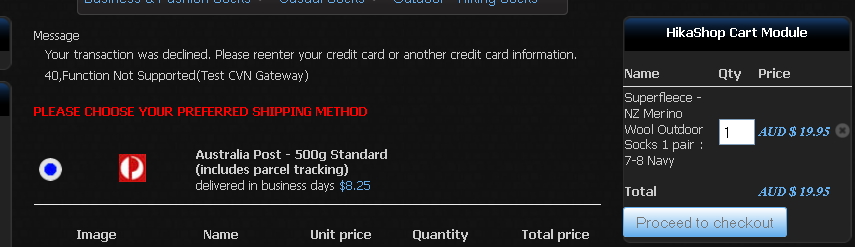
Then I created a new Eway Sandbox user/customer ID on their website and I entered that id in the Customer id text field of the Eway plugin and selected DEBUG = NO radio button to force it to use the new customer ID. Tried to process a transaction again , but I receive this message.
there was an error while processing your transaction: no element found
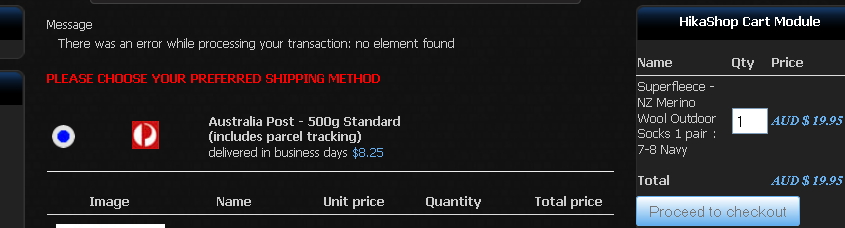
I have been using the VISA dummy credit card number and expiry date etc that EWAY had sent to me in their documentation.
Eway support suggested the 2nd error was happening before the transaction reached them.
So I am having no luck at all !
Do you have any advice please on these errors ?
Best Regards
Shane
I have been communicating with EWAY about getting my new website to talk to their SANDBOX payment gateway test facility.
I have tried processing a transaction with the DEBUG = yes radio button selected in the eWay plugin but I receive this message.
"[i]Your transaction was declined. Please reenter your credit card or another credit card information.
40,Function Not Supported(Test CVN Gateway)[/i]"
Then I created a new Eway Sandbox user/customer ID on their website and I entered that id in the Customer id text field of the Eway plugin and selected DEBUG = NO radio button to force it to use the new customer ID. Tried to process a transaction again , but I receive this message.
there was an error while processing your transaction: no element found
I have been using the VISA dummy credit card number and expiry date etc that EWAY had sent to me in their documentation.
Eway support suggested the 2nd error was happening before the transaction reached them.
So I am having no luck at all !
Do you have any advice please on these errors ?
Best Regards
Shane
Last edit: 11 years 1 month ago by shanem.
Please Log in or Create an account to join the conversation.
11 years 4 months ago - 11 years 1 month ago #202779
by shanem
Replied by shanem on topic EWAY Payment Plugin Sandbox Testing
Well after lots of investigation it turns out that when using the Sandbox, the total transaction amount has to end in .00 cents. !!!
My transaction total was ending in .40 cents and so it returned an error code of " 40,Function Not Supported" .
So I changed the price of a product + freight to end in .00 cents and the transaction finally succeeded !!
I would be happy to write some help words for this EWAY plugin if someone could point me to the correct procedure and template to use and how to submit the help words to Hikashop.
It would be better if the next person doesn't have to spend 2 days trying to figure out how to configure & use the EWAY plugin sandbox.
Best Regards
Shane
My transaction total was ending in .40 cents and so it returned an error code of " 40,Function Not Supported" .
So I changed the price of a product + freight to end in .00 cents and the transaction finally succeeded !!
I would be happy to write some help words for this EWAY plugin if someone could point me to the correct procedure and template to use and how to submit the help words to Hikashop.
It would be better if the next person doesn't have to spend 2 days trying to figure out how to configure & use the EWAY plugin sandbox.
Best Regards
Shane
Last edit: 11 years 1 month ago by shanem.
Please Log in or Create an account to join the conversation.

11 years 4 months ago #202840
by Philip
Replied by Philip on topic EWAY Payment Plugin Sandbox Testing
Hello Shanem,
Thanks for you return AND sorry for inconvenience! I will update the Eway plugin from this new information in order to be more easy to processing sandbox test.
Maybe everything will be more clear if we change in plugin Specific Configuration "debug" by "sandbox" and with an error message if test is proceesed without round price.
Thank you again!
Regards,
Philippe
Team Hikashop
Thanks for you return AND sorry for inconvenience! I will update the Eway plugin from this new information in order to be more easy to processing sandbox test.
Maybe everything will be more clear if we change in plugin Specific Configuration "debug" by "sandbox" and with an error message if test is proceesed without round price.
Thank you again!
Regards,
Philippe
Team Hikashop
The following user(s) said Thank You: shanem
Please Log in or Create an account to join the conversation.
11 years 4 months ago - 11 years 1 month ago #202889
by shanem
Replied by shanem on topic EWAY Payment Plugin Sandbox Testing
Hi Philippe,
Thanks for your reply. Any documentation you can add would be great.
Perhaps you can add some explanation in the "Tool tips" for each field on the Eway Plugin configuration page like this example.
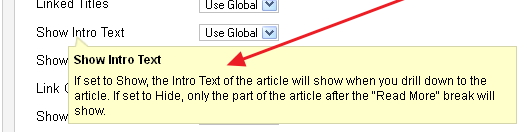
If you could add an explanation for at least these 4 configuration fields that would be a huge benefit.
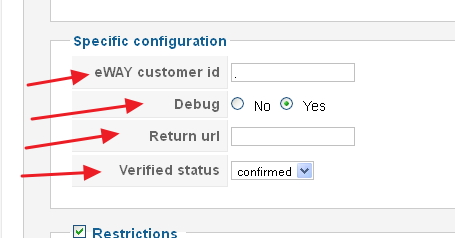
For instance I didn't know what format was required for the "Return URL" or what it really did.
Should it be ""https:// www.mybusiness.com "" or just "" www.mybusiness.com ""?
I didn't know that by leaving that field blank the cart would use a default "Thankyou" page.
What does "Verfied Status" really do ??
I am sure others will benefit greatly by having some documentation for this plugin.
For your further information this is the last post I received from the EWAY support team about the error I was getting when my transaction total was $27.40:-
"Your transaction was declined. Please reenter your credit card or another credit card information: 40,Function Not Supported"
They suggested :-
Okay, I think that is the issue. By default, the sandbox will use the cents value to give your transaction response, so since your value ends in .40, you get response #40
So if you pass through a transaction ending in .00, you'll get a reponse 00, which is transaction successful.
Hope this helps.
Best Regards
Shane
Thanks for your reply. Any documentation you can add would be great.
Perhaps you can add some explanation in the "Tool tips" for each field on the Eway Plugin configuration page like this example.
If you could add an explanation for at least these 4 configuration fields that would be a huge benefit.
For instance I didn't know what format was required for the "Return URL" or what it really did.
Should it be ""https:// www.mybusiness.com "" or just "" www.mybusiness.com ""?
I didn't know that by leaving that field blank the cart would use a default "Thankyou" page.
What does "Verfied Status" really do ??
I am sure others will benefit greatly by having some documentation for this plugin.
For your further information this is the last post I received from the EWAY support team about the error I was getting when my transaction total was $27.40:-
"Your transaction was declined. Please reenter your credit card or another credit card information: 40,Function Not Supported"
They suggested :-
Okay, I think that is the issue. By default, the sandbox will use the cents value to give your transaction response, so since your value ends in .40, you get response #40
So if you pass through a transaction ending in .00, you'll get a reponse 00, which is transaction successful.
Hope this helps.
Best Regards
Shane
Last edit: 11 years 1 month ago by shanem.
The following user(s) said Thank You: Philip
Please Log in or Create an account to join the conversation.
11 years 4 months ago #202907
by Philip
Replied by Philip on topic EWAY Payment Plugin Sandbox Testing
Yes, for now I modify the plugin specific configuration title like tell above.
I create an "error message" that give to the user some explanation about centimes "rules".
And of course a documentation page will be usefull, and is right now in my todo list!
Thanks again for your returns!
Regards
Philippe
Team Hikashop
I create an "error message" that give to the user some explanation about centimes "rules".
And of course a documentation page will be usefull, and is right now in my todo list!
Thanks again for your returns!
Regards
Philippe
Team Hikashop
Please Log in or Create an account to join the conversation.
11 years 4 months ago #203119
by Philip
Replied by Philip on topic EWAY Payment Plugin Sandbox Testing
Hello Shanem,
I just realize that I miss to answer on some of your questions.
-You must respect this format : "https:// www.mybusiness.com " but note that your Eway plugin define by default a correct Return url.
Note: If you let this input empty a default return url will be set (your root url)
-Verified status, define which status Hikashop will give to accepted status from Eway.
Plus, I working on the Eway tutorial!
Sorry for the long response delay!
I just realize that I miss to answer on some of your questions.
-You must respect this format : "https:// www.mybusiness.com " but note that your Eway plugin define by default a correct Return url.
Note: If you let this input empty a default return url will be set (your root url)
-Verified status, define which status Hikashop will give to accepted status from Eway.
Plus, I working on the Eway tutorial!
Sorry for the long response delay!
The following user(s) said Thank You: shanem
Please Log in or Create an account to join the conversation.
11 years 4 months ago #203169
by shanem
Replied by shanem on topic EWAY Payment Plugin Sandbox Testing
Thanks very much for your reply Philippe
best regards
Shane
best regards
Shane
Please Log in or Create an account to join the conversation.
Time to create page: 0.434 seconds