
- Posts: 11
- Thank you received: 0
Fatal error on checkout using paypal advanced
- mlevin@cfisa.org
-
 Topic Author
- Offline
Less
More
11 years 4 months ago #204942
by mlevin@cfisa.org
Fatal error on checkout using paypal advanced was created by mlevin@cfisa.org
-- HikaShop version -- : 2.5.0
-- Joomla version -- : 3.4.1
-- PHP version -- : 5.5.23
-- Browser(s) name and version -- : firefox 38.0.5
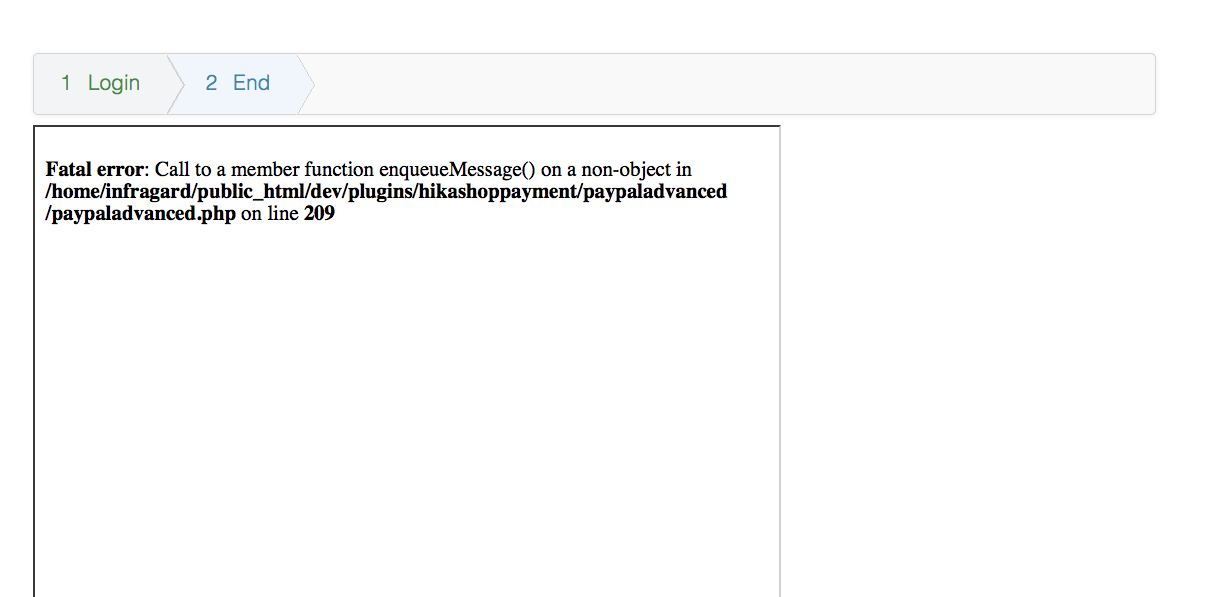
-- Error-message(debug-mod must be tuned on) -- : Fatal error: Call to a member function enqueueMessage() on a non-object in /home/server/public_html/dev/plugins/hikashoppayment/paypaladvanced/paypaladvanced.php on line 209
I'm using the Paypal Advanced payment plugin and get the following error when a user clicks the "Return to the merchant" link on the final step in checkout.
Fatal error: Call to a member function enqueueMessage() on a non-object in /home/server/public_html/dev/plugins/hikashoppayment/paypaladvanced/paypaladvanced.php on line 209
The payment goes through as it should and the user is logged into the site. Also, the cart doesn't clear out either. The product is still there.
-- Joomla version -- : 3.4.1
-- PHP version -- : 5.5.23
-- Browser(s) name and version -- : firefox 38.0.5
-- Error-message(debug-mod must be tuned on) -- : Fatal error: Call to a member function enqueueMessage() on a non-object in /home/server/public_html/dev/plugins/hikashoppayment/paypaladvanced/paypaladvanced.php on line 209
I'm using the Paypal Advanced payment plugin and get the following error when a user clicks the "Return to the merchant" link on the final step in checkout.
Fatal error: Call to a member function enqueueMessage() on a non-object in /home/server/public_html/dev/plugins/hikashoppayment/paypaladvanced/paypaladvanced.php on line 209
Code:
$app->enqueueMessage('Notification refused because of wrong secret code given : '.$vars['secret_code']);
return false;
The payment goes through as it should and the user is logged into the site. Also, the cart doesn't clear out either. The product is still there.
Please Log in or Create an account to join the conversation.

11 years 4 months ago #204944
by Jerome
Jerome - Obsidev.com
HikaMarket & HikaSerial developer / HikaShop core dev team.
Replied by Jerome on topic Fatal error on checkout using paypal advanced
Hi,
Thanks for the report ; we will update the plugin as soon as possible.
You can already edit the plugin and replace
By
To fix the issue.
Regards,
Thanks for the report ; we will update the plugin as soon as possible.
You can already edit the plugin and replace
Code:
if(empty($this->payment_params))
return false;
if($vars['secret_code'] != $this->payment_params->secret_code) {
Code:
if(empty($this->payment_params))
return false;
$app = JFactory::getApplication();
if($vars['secret_code'] != $this->payment_params->secret_code) {
Regards,
Jerome - Obsidev.com
HikaMarket & HikaSerial developer / HikaShop core dev team.
Please Log in or Create an account to join the conversation.
- mlevin@cfisa.org
-
Topic Author
- Offline
Less
More
- Posts: 11
- Thank you received: 0
11 years 4 months ago #205064
by mlevin@cfisa.org
Replied by mlevin@cfisa.org on topic Fatal error on checkout using paypal advanced
Thanks for the quick reply.
The code edit seems to have fixed the issue with the error.
However, clicking on the "Return to Merchant" link loads my site in the iframe window. And the cart still shows the product in it.
The code edit seems to have fixed the issue with the error.
However, clicking on the "Return to Merchant" link loads my site in the iframe window. And the cart still shows the product in it.
Please Log in or Create an account to join the conversation.

11 years 4 months ago #205070
by nicolas
Replied by nicolas on topic Fatal error on checkout using paypal advanced
Mmm.
Could you try with the javascript console of your browser opened so that you can see the potential javascript errors happening during that last step ?
Do you get any error ?
Regarding the cart still showing, I think that this could be solved directly by changing the option "Clean cart when order is" of the Hikashop configuration.
Otherwise, would it be possible for you to provide us with a way to reproduce the issue on your website so that we can look at the situation closely ?
Could you try with the javascript console of your browser opened so that you can see the potential javascript errors happening during that last step ?
Do you get any error ?
Regarding the cart still showing, I think that this could be solved directly by changing the option "Clean cart when order is" of the Hikashop configuration.
Otherwise, would it be possible for you to provide us with a way to reproduce the issue on your website so that we can look at the situation closely ?
Please Log in or Create an account to join the conversation.
- mlevin@cfisa.org
-
Topic Author
- Offline
Less
More
- Posts: 11
- Thank you received: 0
11 years 4 months ago #205335
by mlevin@cfisa.org
Replied by mlevin@cfisa.org on topic Fatal error on checkout using paypal advanced
I tried checking out with the javascript console and didn't get any errors from paypal or hikashop.
I fixed the cart clearing issue.
In the paypal manager under Payment Confirmation there is an option to add a Return URL and Show confirmation page on my website. I've set this to yes and used the full url to the page on my site i'd like them redirected to. I've also added the same Return url in the Paypal Advanced plugin. Clicking on the "Return to Merchant" link still loads my sites homepage in the iframe window.
I can give you access to my site in a PM if that's ok.
I fixed the cart clearing issue.
In the paypal manager under Payment Confirmation there is an option to add a Return URL and Show confirmation page on my website. I've set this to yes and used the full url to the page on my site i'd like them redirected to. I've also added the same Return url in the Paypal Advanced plugin. Clicking on the "Return to Merchant" link still loads my sites homepage in the iframe window.
I can give you access to my site in a PM if that's ok.
Please Log in or Create an account to join the conversation.

11 years 4 months ago #206337
by Xavier
Replied by Xavier on topic Fatal error on checkout using paypal advanced
Hi,
You can send the access via our contact form and don't forget to give us the url of that topic in the message
You can send the access via our contact form and don't forget to give us the url of that topic in the message
Please Log in or Create an account to join the conversation.
11 years 3 months ago #207158
by nicolas
Replied by nicolas on topic Fatal error on checkout using paypal advanced
Hi,
A backend access is great but that doesn't help as we still can look at the issue.
As I asked 2 weeks ago
Second, we'll need a way to do a fake payment on PayPal advanced to see what happens after it.
So please provide that so that we can move forward.
A backend access is great but that doesn't help as we still can look at the issue.
As I asked 2 weeks ago
First we'll need a link to a product page, to be able to add the product to the cart and do the checkout.Otherwise, would it be possible for you to provide us with a way to reproduce the issue on your website so that we can look at the situation closely ?
Second, we'll need a way to do a fake payment on PayPal advanced to see what happens after it.
So please provide that so that we can move forward.
Please Log in or Create an account to join the conversation.
11 years 3 months ago - 11 years 3 months ago #208019
by nicolas
Replied by nicolas on topic Fatal error on checkout using paypal advanced
Hi,
Thank you for the access. We found the issue and fixed it on your website.
Here is a new version of the plugin which will be included in the next version of HikaShop to fix that if anyone else needs it.
Thank you for the access. We found the issue and fixed it on your website.
Here is a new version of the plugin which will be included in the next version of HikaShop to fix that if anyone else needs it.
This attachment is hidden for guests.
Please log in or register to see it.
Please log in or register to see it.
Last edit: 11 years 3 months ago by nicolas.
Please Log in or Create an account to join the conversation.
- mlevin@cfisa.org
-
Topic Author
- Offline
Less
More
- Posts: 11
- Thank you received: 0
11 years 3 months ago #208413
by mlevin@cfisa.org
Replied by mlevin@cfisa.org on topic Fatal error on checkout using paypal advanced
thanks nicolas! the updated plugin fixed the issue and works smoothly now.
where can i make adjustments to the paypal iframe style?
specifically, i'd like to remove the shadowed border of the paypal payment box.
where can i make adjustments to the paypal iframe style?
specifically, i'd like to remove the shadowed border of the paypal payment box.
Please Log in or Create an account to join the conversation.
11 years 3 months ago #208425
by nicolas
Replied by nicolas on topic Fatal error on checkout using paypal advanced
You should be able to adjust that with CSS code that you can add either in the HikaShop frontend CSS file or your template CSS files.
Here is a general tutorial explaining ho to find what CSS to use and where to place it:
www.hikashop.com/support/support/documen...ize-the-display.html
Here is a general tutorial explaining ho to find what CSS to use and where to place it:
www.hikashop.com/support/support/documen...ize-the-display.html
Please Log in or Create an account to join the conversation.
Time to create page: 0.312 seconds