
- Posts: 2
- Thank you received: 0
Change the background color of Stripe plugin
- asoundidea
-
 Topic Author
- Offline
Less
More
11 years 4 months ago #206407
by asoundidea
Change the background color of Stripe plugin was created by asoundidea
-- url of the page with the problem -- :
asoundidea.com
-- HikaShop version -- : 2.5.0
-- Joomla version -- : 3.4.1
-- PHP version -- : 5.4.40
-- Browser(s) name and version -- : Chrome 43.0.2357.130
Pardon my asking but i've now spent four hours looking for where to make this change.
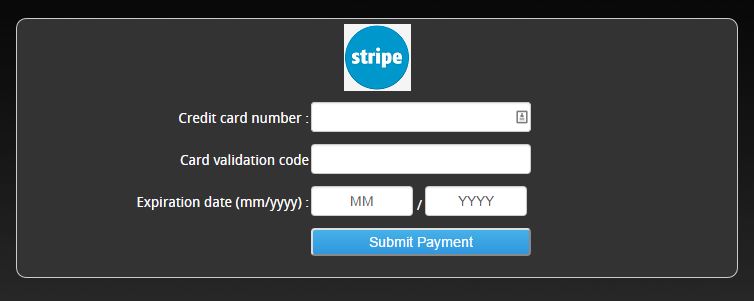
I want to change the background color of the Stripe payment plugin (there's a conflict with the template settings and the easiest way to fix it is to change this background color from white to something darker).
This is what it looks like:

Can you please tell me where I can find this CSS file, or how I can change the background color?
Thanks.
Mike
-- HikaShop version -- : 2.5.0
-- Joomla version -- : 3.4.1
-- PHP version -- : 5.4.40
-- Browser(s) name and version -- : Chrome 43.0.2357.130
Pardon my asking but i've now spent four hours looking for where to make this change.
I want to change the background color of the Stripe payment plugin (there's a conflict with the template settings and the easiest way to fix it is to change this background color from white to something darker).
This is what it looks like:
Can you please tell me where I can find this CSS file, or how I can change the background color?
Thanks.
Mike
Please Log in or Create an account to join the conversation.

11 years 3 months ago #206437
by nicolas
Replied by nicolas on topic Change the background color of Stripe plugin
Hi,
There is only one CSS file for the frontend of HikaShop. You can edit it via the CSS section of the Display tab of the HikaShop configuration.
There, you can add your custom CSS in order to change the background color.
I suppose that you'll want to add such kind of CSS code:
#stripeform{ background-color: blue !important; }
There is only one CSS file for the frontend of HikaShop. You can edit it via the CSS section of the Display tab of the HikaShop configuration.
There, you can add your custom CSS in order to change the background color.
I suppose that you'll want to add such kind of CSS code:
#stripeform{ background-color: blue !important; }
Please Log in or Create an account to join the conversation.
- asoundidea
-
Topic Author
- Offline
Less
More
- Posts: 2
- Thank you received: 0
11 years 3 months ago #206459
by asoundidea
Replied by asoundidea on topic Change the background color of Stripe plugin
Thanks. That worked perfectly.
~Mike.
~Mike.
Please Log in or Create an account to join the conversation.
Time to create page: 0.230 seconds