

- Posts: 13
- Thank you received: 0
Paypal and new currency for GeoLocation
10 years 10 months ago - 10 years 10 months ago #222350
by elenora
PayPay and new currency for GeoLocation was created by elenora
Hello
For the shop I want that the prices of individual products would be various for different countries (using the Geolocation plugin). I managed to install a new currency, which then varies depending on the country. But the new currency is "fictitious" and the PayPal plugin can’t recognize it. So the payment through PayPal is disabled. I want the prices and payment in Euros for ali products in all countries
Does anyone have any suggestion how to solve the resulting problems?
Thanks in advance
For the shop I want that the prices of individual products would be various for different countries (using the Geolocation plugin). I managed to install a new currency, which then varies depending on the country. But the new currency is "fictitious" and the PayPal plugin can’t recognize it. So the payment through PayPal is disabled. I want the prices and payment in Euros for ali products in all countries
Does anyone have any suggestion how to solve the resulting problems?
Thanks in advance
Last edit: 10 years 10 months ago by elenora.
Please Log in or Create an account to join the conversation.

10 years 10 months ago #222357
by nicolas
Replied by nicolas on topic PayPay and new currency for GeoLocation
Hi,
You need to set your "main currency" setting as euros. Then, in the System>Currencies menu, set your fictitious currency as displayed but not published.
And finally, in the zones where you want to use that currency, select that currency.
Then, configure your geolocation plugin.
That way, the geolocation plugin will set that currency when you arrive on the website if your geolocated zone is set to that currency. So you'll see the prices of the products in that currency. However, when you reach the checkout, the currency will be changed to euros automatically so that you can pay with PayPal (you'll see the before/after prices on the checkout along with a message saying that the currency has been changed).
You need to set your "main currency" setting as euros. Then, in the System>Currencies menu, set your fictitious currency as displayed but not published.
And finally, in the zones where you want to use that currency, select that currency.
Then, configure your geolocation plugin.
That way, the geolocation plugin will set that currency when you arrive on the website if your geolocated zone is set to that currency. So you'll see the prices of the products in that currency. However, when you reach the checkout, the currency will be changed to euros automatically so that you can pay with PayPal (you'll see the before/after prices on the checkout along with a message saying that the currency has been changed).
Please Log in or Create an account to join the conversation.
10 years 10 months ago - 10 years 10 months ago #222409
by elenora
Replied by elenora on topic PayPay and new currency for GeoLocation
Thank you for you answer
If I set »fictitious« currency on displayed, but not published, then I can't set two prices for a certain product. I simply don't see the »fictitious« currency in the pull down menu.
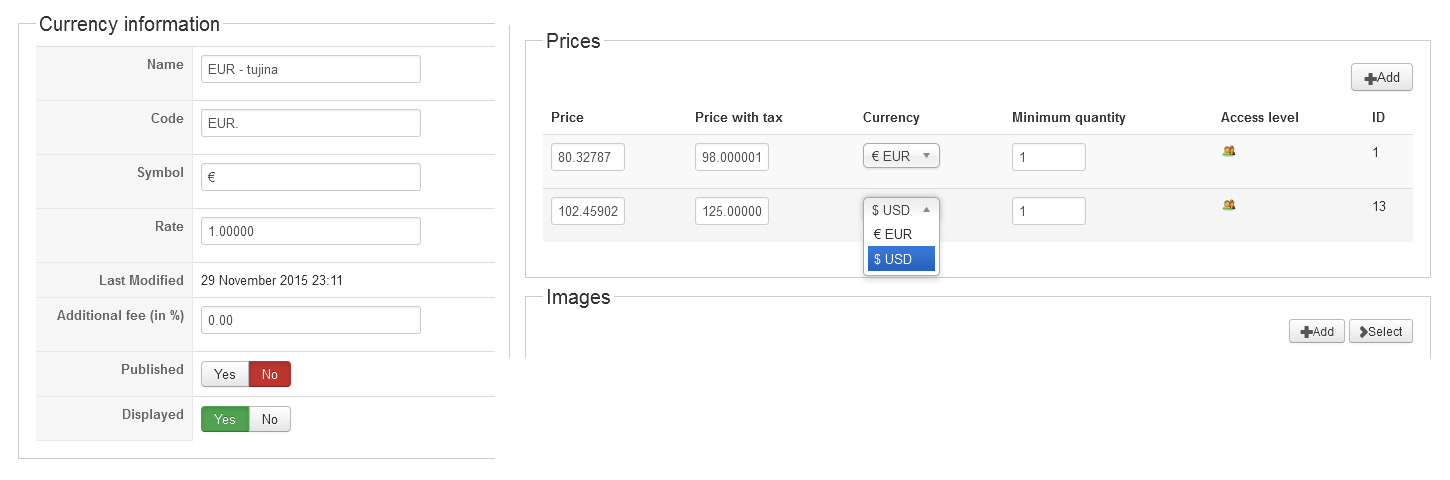
If I set »fictitious« currency on displayed, but not published, then I can't set two prices for a certain product. I simply don't see the »fictitious« currency in the pull down menu.
Last edit: 10 years 10 months ago by elenora.
Please Log in or Create an account to join the conversation.
10 years 10 months ago #222448
by nicolas
Replied by nicolas on topic PayPay and new currency for GeoLocation
Hi,
Try to add the line:
$this->currencyType->displayType = 'all';
before the line:
$this->currencyType->load($main_currency);
in the file administrator/components/com_hikashop/views/product/view.html.php and let us know if that works.
Try to add the line:
$this->currencyType->displayType = 'all';
before the line:
$this->currencyType->load($main_currency);
in the file administrator/components/com_hikashop/views/product/view.html.php and let us know if that works.
Please Log in or Create an account to join the conversation.
10 years 10 months ago #222493
by elenora
Replied by elenora on topic PayPay and new currency for GeoLocation
Hello
Is the location of the file correct? After an hour of search, I simply still haven’t found the code line:
$this->currencyType->load($main_currency);
I haven’t found neither the lines that would be at least similar to this line (no string "currencyType" found in the whole file)
Thx.
Is the location of the file correct? After an hour of search, I simply still haven’t found the code line:
$this->currencyType->load($main_currency);
I haven’t found neither the lines that would be at least similar to this line (no string "currencyType" found in the whole file)
Thx.
Please Log in or Create an account to join the conversation.
10 years 10 months ago #222507
by nicolas
Replied by nicolas on topic PayPay and new currency for GeoLocation
Hi,
The location is correct.
Can you provide the content of the file that you're looking into ?
Are you sure that do didn't open the file components/com_hikashop/views/products/view.html.php instead of administrator/components/com_hikashop/views/product/view.html.php ?
The location is correct.
Can you provide the content of the file that you're looking into ?
Are you sure that do didn't open the file components/com_hikashop/views/products/view.html.php instead of administrator/components/com_hikashop/views/product/view.html.php ?
Please Log in or Create an account to join the conversation.
10 years 10 months ago - 10 years 10 months ago #222582
by elenora
Replied by elenora on topic PayPay and new currency for GeoLocation
This is the file under the directoy:
../administrator/components/com_hikashop/views/product/
view.html.php [50kB]
I'm really confused
../administrator/components/com_hikashop/views/product/
view.html.php [50kB]
I'm really confused
Last edit: 10 years 10 months ago by Jerome. Reason: Removing attached view file.
Please Log in or Create an account to join the conversation.
10 years 10 months ago #222646
by nicolas
Replied by nicolas on topic PayPay and new currency for GeoLocation
Hi,
It seems that you're using a really old version of HikaShop as the code is not the code from the latest version or even the one before.
In your case, try to add the line:
$currency->displayType = 'all';
after the line:
$currency = hikashop_get('type.currency');
It seems that you're using a really old version of HikaShop as the code is not the code from the latest version or even the one before.
In your case, try to add the line:
$currency->displayType = 'all';
after the line:
$currency = hikashop_get('type.currency');
The following user(s) said Thank You: elenora
Please Log in or Create an account to join the conversation.
10 years 10 months ago - 10 years 10 months ago #222673
by elenora
Replied by elenora on topic PayPay and new currency for GeoLocation
Sorry for inconvenience caused (my story is presented below) and thank you for your help.
It seems that the entry the second currency is now no longer a problem, but now the problem occurs when showing it. Plugin GoeLocation works perfectly and it recognizes foreign country and shows other currency. However it shows the "original" price (98,00 EUR) instead of second price (125,00 EUR.), which is defined for that currency. See attached pictures (there are two currencies “EUR” and “EUR.”)
Why is also presented the "original" prices in EUR?
I feel that we are close to a final solution
My story: I use to be WordPress user, but a half a year ago my friend came to me with Akeeba backup to restore his shop and put it on our servers. Shop was placed on our server and everything worked perfectly. About 14 days ago he came to me with a desire to make his boutique store also presented abroad, where prices will be slightly different. Most of the knowhow I got on your excellent forum, but when I faced with a “bigger” problem, I simply started a new forum topic.
Thx
It seems that the entry the second currency is now no longer a problem, but now the problem occurs when showing it. Plugin GoeLocation works perfectly and it recognizes foreign country and shows other currency. However it shows the "original" price (98,00 EUR) instead of second price (125,00 EUR.), which is defined for that currency. See attached pictures (there are two currencies “EUR” and “EUR.”)
Why is also presented the "original" prices in EUR?
I feel that we are close to a final solution
My story: I use to be WordPress user, but a half a year ago my friend came to me with Akeeba backup to restore his shop and put it on our servers. Shop was placed on our server and everything worked perfectly. About 14 days ago he came to me with a desire to make his boutique store also presented abroad, where prices will be slightly different. Most of the knowhow I got on your excellent forum, but when I faced with a “bigger” problem, I simply started a new forum topic.
Thx
Last edit: 10 years 10 months ago by elenora.
Please Log in or Create an account to join the conversation.
10 years 10 months ago #222687
by nicolas
Replied by nicolas on topic PayPay and new currency for GeoLocation
Hi,
Could you provide a screenshot of the settings of both the EUR and your currency so that we can see how you set them up ?
Which version of HikaShop are you using ?
Could you provide a screenshot of the settings of both the EUR and your currency so that we can see how you set them up ?
Which version of HikaShop are you using ?
Please Log in or Create an account to join the conversation.
10 years 10 months ago #222767
by elenora
Replied by elenora on topic PayPay and new currency for GeoLocation
Is this the screens you are looking for?
* @package HikaShop for Joomla!
* @version 2.3.0
* @author hikashop.com
* @copyright (C) 2010-2014 HIKARI SOFTWARE. All rights reserved.
* @license GNU/GPLv3 www.gnu.org/licenses/gpl-3.0.html
* @package HikaShop for Joomla!
* @version 2.3.0
* @author hikashop.com
* @copyright (C) 2010-2014 HIKARI SOFTWARE. All rights reserved.
* @license GNU/GPLv3 www.gnu.org/licenses/gpl-3.0.html
Please Log in or Create an account to join the conversation.
10 years 10 months ago #222814
by nicolas
Replied by nicolas on topic PayPay and new currency for GeoLocation
Hi,
Can you check that you have all the user groups checked in the ACL icon of your 125€ price ?
Otherwise, that price might not be taken into account by the system which would have to rely on the other price for the display.
Can you check that you have all the user groups checked in the ACL icon of your 125€ price ?
Otherwise, that price might not be taken into account by the system which would have to rely on the other price for the display.
The following user(s) said Thank You: elenora
Please Log in or Create an account to join the conversation.
10 years 10 months ago - 10 years 10 months ago #222879
by elenora
Replied by elenora on topic PayPay and new currency for GeoLocation
Access levels are by both prices set to ALL
Let me point out that system worked fine (showing the prices) before the new currency adjustment. Only PayPal payment system did not function. Maybe this information might help you?
Let me point out that system worked fine (showing the prices) before the new currency adjustment. Only PayPal payment system did not function. Maybe this information might help you?
Last edit: 10 years 10 months ago by elenora.
Please Log in or Create an account to join the conversation.
10 years 10 months ago #222926
by nicolas
Replied by nicolas on topic PayPay and new currency for GeoLocation
So what did you change between now and before ?
What setting makes it so that it works like you want in one way and not in another ?
What setting makes it so that it works like you want in one way and not in another ?
Please Log in or Create an account to join the conversation.
10 years 10 months ago #222930
by elenora
Replied by elenora on topic PayPay and new currency for GeoLocation
I did just what you advise me:
In your case, try to add the line:
$currency->displayType = 'all';
after the line:
$currency = hikashop_get('type.currency');
set your "main currency" setting as euros. Then, in the System>Currencies menu, set your fictitious currency as displayed but not published.
That's all...
In your case, try to add the line:
$currency->displayType = 'all';
after the line:
$currency = hikashop_get('type.currency');
set your "main currency" setting as euros. Then, in the System>Currencies menu, set your fictitious currency as displayed but not published.
That's all...
Please Log in or Create an account to join the conversation.
Time to create page: 0.395 seconds