

- Posts: 8
- Thank you received: 0
Payeezy Geteway integration
10 years 7 months ago #231537
by woodbras
Payeezy Geteway integration was created by woodbras
-- url of the page with the problem -- :
cybernextpro.com
-- HikaShop version -- : 2.6.1
-- Joomla version -- : 3.4.8
-- Browser(s) name and version -- : Chrome
Hello! I have Payeezy Gateway account and I need to integrate into my Hikashop. I was reading your forum and I did everything. I added Authorize.net payment method, I changed API's. But I still can't integrate my Payeezy account into the plugin.
Please, help me with this. Describe every step how I should do this. This is very important for most people who use same Geteway.
Thank you very much!
-- HikaShop version -- : 2.6.1
-- Joomla version -- : 3.4.8
-- Browser(s) name and version -- : Chrome
Hello! I have Payeezy Gateway account and I need to integrate into my Hikashop. I was reading your forum and I did everything. I added Authorize.net payment method, I changed API's. But I still can't integrate my Payeezy account into the plugin.
Please, help me with this. Describe every step how I should do this. This is very important for most people who use same Geteway.
Thank you very much!
Please Log in or Create an account to join the conversation.

10 years 7 months ago #231556
by nicolas
Replied by nicolas on topic Payeezy Geteway integration
Hi,
Well that's basically all you need to do in HikaShop.
Make sure that your Payeezy merchant account is properly configured.
If your problem is that you don't see the payment method on the checkout, I've had a look on your website and I see that you didn't set any price for your products. If the products don't have a price, the total of the order is 0, and thus in that case, not payment method is proposed to the customer on the checkout and he can finish the checkout without paying. So that's normal.
Well that's basically all you need to do in HikaShop.
Make sure that your Payeezy merchant account is properly configured.
If your problem is that you don't see the payment method on the checkout, I've had a look on your website and I see that you didn't set any price for your products. If the products don't have a price, the total of the order is 0, and thus in that case, not payment method is proposed to the customer on the checkout and he can finish the checkout without paying. So that's normal.
Please Log in or Create an account to join the conversation.

10 years 7 months ago #231585
by Richard Rottman
Replied by Richard Rottman on topic Payeezy Geteway integration
Hello,
As Nicolas said, all your prices are set to zero. Payeezy uses the total amount to set up the security hash. If it's zero, the hash cannot be generated. The total amount (x_amount) needs to be a positive number.
If you or anyone else has any questions about Payeezy, feel free to contact me. Until last week, I worked for First Data providing technical support for Payeezy.
As Nicolas said, all your prices are set to zero. Payeezy uses the total amount to set up the security hash. If it's zero, the hash cannot be generated. The total amount (x_amount) needs to be a positive number.
If you or anyone else has any questions about Payeezy, feel free to contact me. Until last week, I worked for First Data providing technical support for Payeezy.
Please Log in or Create an account to join the conversation.
10 years 7 months ago #231630
by woodbras
Replied by woodbras on topic Payeezy Geteway integration
Hello! I have prices, but for special group of users. So, I can login with my account and order everything, I see prices. The problem is that I configured Payeezy and added same information into my plugin, but still have problems. If that will be easier, I can talk through the Skype and show exactly what I have. My Skype: valentin_scerbakov
Thank you!
Thank you!
Please Log in or Create an account to join the conversation.
10 years 7 months ago #231671
by woodbras
Replied by woodbras on topic Payeezy Geteway integration
I need this make working!
Please Log in or Create an account to join the conversation.
10 years 7 months ago #231680
by nicolas
Replied by nicolas on topic Payeezy Geteway integration
Hi,
It would be great if you could tell us what is the problem.
If the problem is that you don't see the payment method on the checkout, it can come from the prices but it can also be a lot of other things. Here is a FAQ where we list all the potential things that could be wrong with that:
www.hikashop.com/support/documentation/106-faq.html#paym
So if that's your problem, please review these points.
It would be great if you could tell us what is the problem.
If the problem is that you don't see the payment method on the checkout, it can come from the prices but it can also be a lot of other things. Here is a FAQ where we list all the potential things that could be wrong with that:
www.hikashop.com/support/documentation/106-faq.html#paym
So if that's your problem, please review these points.
Please Log in or Create an account to join the conversation.
10 years 7 months ago #231727
by Richard Rottman
Replied by Richard Rottman on topic Payeezy Geteway integration
I see what the problem is. I installed Joomla and HikaShop and and did some testing. HikaShop is sending 'x_relay_response' : FALSE '. This is an invalid value. It needs to be either TRUE if you are using Relay Response (doesn't look like HikaShop is) or left empty.
To ensure that it's either only TRUE or empty, Payeezy has a four-character rule on this parameter. If it's over four-characters, it will cause it to fail. The word 'FALSE' is five-characters in length.
To ensure that it's either only TRUE or empty, Payeezy has a four-character rule on this parameter. If it's over four-characters, it will cause it to fail. The word 'FALSE' is five-characters in length.
The following user(s) said Thank You: Mohamed Thelji
Please Log in or Create an account to join the conversation.
10 years 6 months ago #234377
by woodbras
Replied by woodbras on topic Payeezy Geteway integration
Can you tell me where is this parameter located exactly? Thank you very much!
Please Log in or Create an account to join the conversation.
10 years 6 months ago #234384
by nicolas
Replied by nicolas on topic Payeezy Geteway integration
Hi,
The x_relay_response parameter will be true if you turn on the "allow notifications from Authorize.net" in your payment method.
There is no need to change any code. Just make sure that you don't turn it off in your payment method.
The x_relay_response parameter will be true if you turn on the "allow notifications from Authorize.net" in your payment method.
There is no need to change any code. Just make sure that you don't turn it off in your payment method.
Please Log in or Create an account to join the conversation.
10 years 6 months ago #234396
by woodbras
Replied by woodbras on topic Payeezy Geteway integration
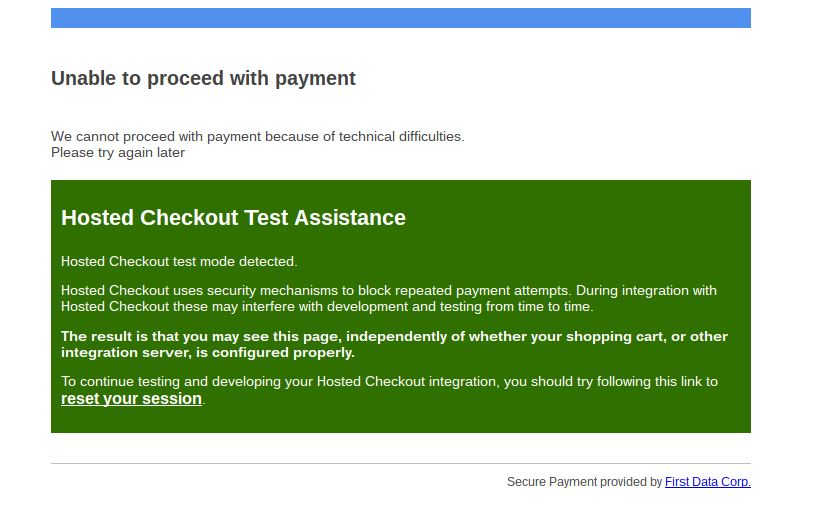
Ok, thank you. I did it. Now it drops me to he page from Payeezy and shows me a message (photo in attachment).
Please Log in or Create an account to join the conversation.
10 years 6 months ago #234410
by nicolas
Replied by nicolas on topic Payeezy Geteway integration
Hi,
I've never seen that. Try to follow that text and click on "reset your session".
I've never seen that. Try to follow that text and click on "reset your session".
Please Log in or Create an account to join the conversation.
10 years 6 months ago #234457
by woodbras
Replied by woodbras on topic Payeezy Geteway integration
I did. Page just refreshed and then it shows me the link with help.
support.payeezy.com/hc/en-us
Please Log in or Create an account to join the conversation.
10 years 6 months ago #234459
by nicolas
Replied by nicolas on topic Payeezy Geteway integration
Hi,
Then I would recommend to contact the PayEezy support and check with them what this error is about.
Then I would recommend to contact the PayEezy support and check with them what this error is about.
Please Log in or Create an account to join the conversation.

9 years 4 months ago #272434
by elipsis
Replied by elipsis on topic Payeezy Geteway integration
Hi woodbras,
I get the same error page. Did you ever figure out the issue?
If you did, please share I am going bald pulling my hair out!
Thank you
Stan
I get the same error page. Did you ever figure out the issue?
If you did, please share I am going bald pulling my hair out!
Thank you
Stan
Please Log in or Create an account to join the conversation.

9 years 4 months ago - 9 years 4 months ago #272467
by Philip
Replied by Philip on topic Payeezy Geteway integration
Hello,
Unfortunately, as this thread don't have final return from Payeezy Support, I can only invite you to do the same...
Here, what we now about Payeezy :
- Lots of our customer use it without issue
- This thread is old and as we don't have return that invite us to correct something in our plugin code.
Now some hypotheses :
- This old issue depended on Payeezy side ?
- Maybe the point is some specific configuration required by Payeezy or some Payeezy account configuration ?
- Maybe it's impossible (as the thread suggest it) to use Payeezy in some conditions... Even if you needed it... And Which condition ?
But I advice you to precise us your issue with elements (like screenshot, configuration set up & a step by step to leads to issue) in order to be sure that we can't have something to say about this.
Sometimes issue seems to be the same, and just one details change everything for us, and so basically it's not the same issue...And so not the same correction.
Awaiting news from you.
Regards
Unfortunately, as this thread don't have final return from Payeezy Support, I can only invite you to do the same...
Here, what we now about Payeezy :
- Lots of our customer use it without issue
- This thread is old and as we don't have return that invite us to correct something in our plugin code.
Now some hypotheses :
- This old issue depended on Payeezy side ?
- Maybe the point is some specific configuration required by Payeezy or some Payeezy account configuration ?
- Maybe it's impossible (as the thread suggest it) to use Payeezy in some conditions... Even if you needed it... And Which condition ?
But I advice you to precise us your issue with elements (like screenshot, configuration set up & a step by step to leads to issue) in order to be sure that we can't have something to say about this.
Sometimes issue seems to be the same, and just one details change everything for us, and so basically it's not the same issue...And so not the same correction.
Awaiting news from you.
Regards
Last edit: 9 years 4 months ago by Philip.
Please Log in or Create an account to join the conversation.
Time to create page: 0.566 seconds