

- Posts: 10
- Thank you received: 0
WorldPay Business Gateway not returning
10 years 5 months ago - 10 years 5 months ago #240055
by laus
WorldPay Business Gateway not returning was created by laus
-- HikaShop version -- : 2.6.3
-- Joomla version -- : 3.4.8
I have read everything I can on this subject but I can find no solution.
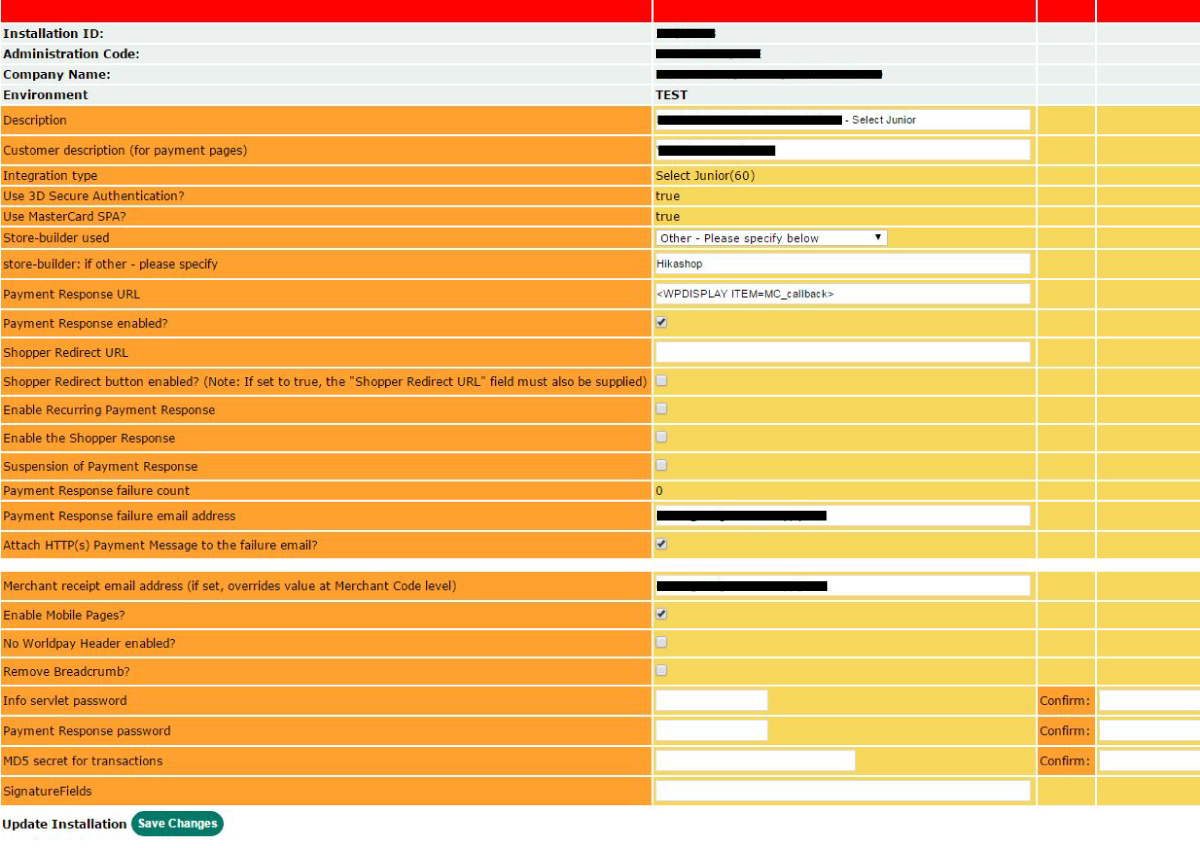
I have got the correct callback in the WorldPay admin setting and this all matching, orders are successfully being completed in the test environment, however I cannot despite trying , get the browser to return to the store upon completion of the Worldpay transaction. It just sits there on the 'Thank you for your simulated payment' page of WorldPay.
Can anyone suggest where I might be going wrong please :0(
I have payment response enabled and URL set to <WPDISPLAY ITEM=MC_callback>
I have tried it with and without shopper response, but all just stops at the same point whether successful or failed.
Please don't direct me to the Documentation here or on Brainforge, neither helped.
-- Joomla version -- : 3.4.8
I have read everything I can on this subject but I can find no solution.
I have got the correct callback in the WorldPay admin setting and this all matching, orders are successfully being completed in the test environment, however I cannot despite trying , get the browser to return to the store upon completion of the Worldpay transaction. It just sits there on the 'Thank you for your simulated payment' page of WorldPay.
Can anyone suggest where I might be going wrong please :0(
I have payment response enabled and URL set to <WPDISPLAY ITEM=MC_callback>
I have tried it with and without shopper response, but all just stops at the same point whether successful or failed.
Please don't direct me to the Documentation here or on Brainforge, neither helped.
Last edit: 10 years 5 months ago by laus. Reason: spelling
Please Log in or Create an account to join the conversation.

10 years 5 months ago #240119
by nicolas
Replied by nicolas on topic WorldPay Business Gateway not returning
Hi,
Can you provide a screenshot of the settings of your payment method so that we can check the settings ?
Can you provide a screenshot of the settings of your payment method so that we can check the settings ?
Please Log in or Create an account to join the conversation.
10 years 5 months ago #240230
by laus
Replied by laus on topic WorldPay Business Gateway not returning
Thanks Nicolas, I attach the screenshot and also the array...
Thanks for your help.
Code:
(
[instId] => XXXXXXX
[cartId] => 26
[amount] => 24.4776
[currency] => GBP
[desc] =>
[MC_callback] => http://XXXXXXX.com/index.php?option=com_hikashop&ctrl=checkout&task=notify¬if_payment=bf_rbsbusinessgateway&tmpl=component&lang=&Itemid=1157
[fixContact] =>
[hideContact] =>
[name] => XXXXXXX,
[address] => Here Street,
Carmarthen
[postcode] => XXXXXXX
[country] => GB
[email] => XXXXXXX@gmail.com
[tel] => XXXXXXX
[testMode] => 100
[C_item_name_1] => Training Polo: L
[C_item_number_1] => MALPAS-VXTPBR_4
[C_quantity_1] => 1
[C_amount_1] => 20.99
[C_item_name_2] => Shipping
[C_amount_2] => 3.49
[C_quantity_2] => 1
[item_number_2] => manual
[C_discount_amount_cart] => 0
)
Thanks for your help.
Please Log in or Create an account to join the conversation.

10 years 5 months ago - 10 years 5 months ago #240244
by Philip
Replied by Philip on topic WorldPay Business Gateway not returning
Hello,
Thanks for your return and informations, but can you please add a screenshot of your WorldPay plugin backend configuration, like this for example :
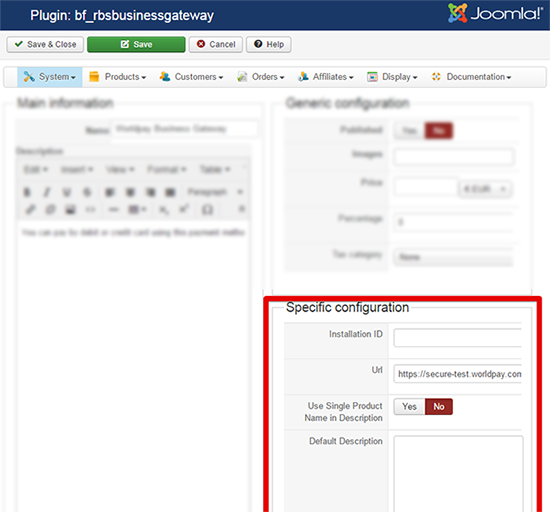
Please note, that here the screenshot is uncomplete, the most important part for help you is the specific configuration part.
Awaiting news from you.
Regards.
Thanks for your return and informations, but can you please add a screenshot of your WorldPay plugin backend configuration, like this for example :
Please note, that here the screenshot is uncomplete, the most important part for help you is the specific configuration part.
Awaiting news from you.
Regards.
Last edit: 10 years 5 months ago by Philip.
Please Log in or Create an account to join the conversation.
10 years 5 months ago - 10 years 5 months ago #240311
by laus
Replied by laus on topic WorldPay Business Gateway not returning
Hi Philip,
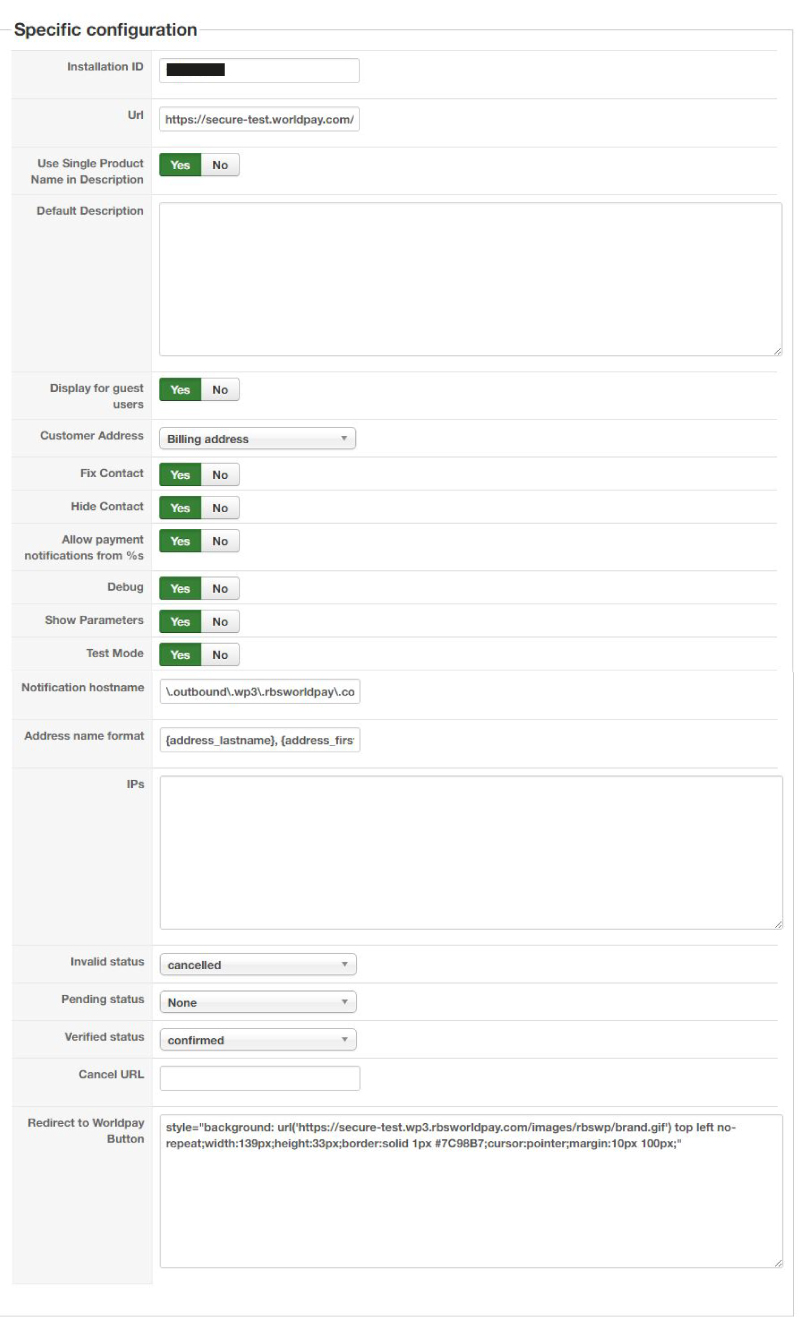
Thanks for looking at this, I attach the spec screenshot.
Thanks for looking at this, I attach the spec screenshot.
Last edit: 10 years 5 months ago by laus.
Please Log in or Create an account to join the conversation.
10 years 5 months ago - 10 years 5 months ago #240317
by Philip
Replied by Philip on topic WorldPay Business Gateway not returning
Hello,
I noticed something strange in your Specific Configuration, you haven't the Return url input option.
Have you really updated your HikaShop version AND plugins ?
Awaiting news from you.
Regards.
I noticed something strange in your Specific Configuration, you haven't the Return url input option.
Have you really updated your HikaShop version AND plugins ?
Awaiting news from you.
Regards.
Last edit: 10 years 5 months ago by Philip.
Please Log in or Create an account to join the conversation.
10 years 5 months ago #240524
by laus
Replied by laus on topic WorldPay Business Gateway not returning
Hi Philip,
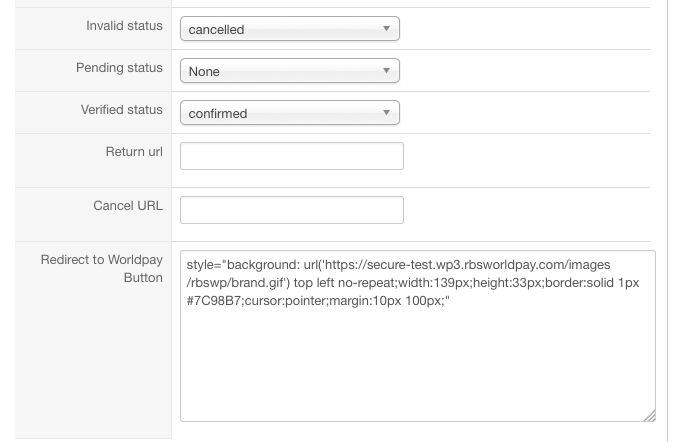
Plugin was latest, I have upgraded Hikashop, from 2.6.1 to 2.6.3
Attached new screenshot.
I await your instruction, many thanks
Plugin was latest, I have upgraded Hikashop, from 2.6.1 to 2.6.3
Attached new screenshot.
I await your instruction, many thanks
Please Log in or Create an account to join the conversation.
10 years 5 months ago - 10 years 5 months ago #240569
by Philip
Replied by Philip on topic WorldPay Business Gateway not returning
Hello,
I just noticed something right now, see by yourself :
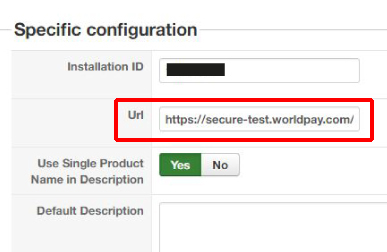
For me you have to change this Url to switch to production phase and I hope that will leads your process to reach the thank you page.
Because for me, it look like a sandbox url, but I can't be sure of it.
Replace it by the Production phase Url that Worldpay give you (we don't have this elements on our side).
And define, the return url for where you want redirect your customer.
Awaiting news from you.
Regards.
I just noticed something right now, see by yourself :
For me you have to change this Url to switch to production phase and I hope that will leads your process to reach the thank you page.
Because for me, it look like a sandbox url, but I can't be sure of it.
Replace it by the Production phase Url that Worldpay give you (we don't have this elements on our side).
And define, the return url for where you want redirect your customer.
Awaiting news from you.
Regards.
Last edit: 10 years 5 months ago by Philip.
Please Log in or Create an account to join the conversation.
10 years 4 months ago #242581
by laus
Replied by laus on topic WorldPay Business Gateway not returning
Hi Phillipe,
Sorry for the delay in responding, we have been having mega-problems getting worldpay to communicate.
The site is now switched live and validated.
We have put through a live transaction, we have received notification of transaction completion to Hikashop Orders Section.
However, we are still stuck on this final page and no callback to the site. Could you help any further please?
Sorry for the delay in responding, we have been having mega-problems getting worldpay to communicate.
The site is now switched live and validated.
We have put through a live transaction, we have received notification of transaction completion to Hikashop Orders Section.
However, we are still stuck on this final page and no callback to the site. Could you help any further please?
Please Log in or Create an account to join the conversation.
10 years 4 months ago - 10 years 4 months ago #242694
by Philip
Replied by Philip on topic WorldPay Business Gateway not returning
Hello,
Did you try to fill this input in your backend plugin configuration ?
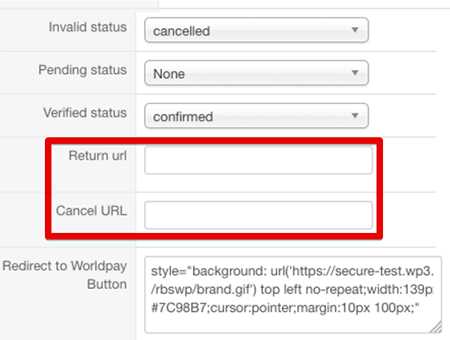
For successful return use this kind of code : YOURWEBSITE/index.php?option=com_hikashop&ctrl=checkout&task=after_end
And for cancel url : YOURWEBSITE/index.php?option=com_hikashop&ctrl=order&task=cancel_order
Hope this will help you !
Regards.
Did you try to fill this input in your backend plugin configuration ?
For successful return use this kind of code : YOURWEBSITE/index.php?option=com_hikashop&ctrl=checkout&task=after_end
And for cancel url : YOURWEBSITE/index.php?option=com_hikashop&ctrl=order&task=cancel_order
Hope this will help you !
Regards.
Last edit: 10 years 4 months ago by Philip.
Please Log in or Create an account to join the conversation.
10 years 1 month ago #249919
by ltempest
Replied by ltempest on topic WorldPay Business Gateway not returning
Hello,
I have exactly the same issue. Does the return url only work when using the production mode of WorldPay and not Test Mode?
This is what I have on my config and plugin screesn
Please help!
Lee
I have exactly the same issue. Does the return url only work when using the production mode of WorldPay and not Test Mode?
This is what I have on my config and plugin screesn
Please help!
Lee
Please Log in or Create an account to join the conversation.
10 years 1 month ago - 10 years 1 month ago #249991
by Philip
Replied by Philip on topic WorldPay Business Gateway not returning
Hello,
Unfortunately I can be sure of it, but yes maybe return Urls set here (see screenshot on below) may be only use for production phase ?...
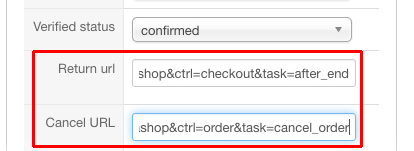
For this precise point, maybe you can have more details from Worldpay support ?
Awaiting news from you.
Regards
Unfortunately I can be sure of it, but yes maybe return Urls set here (see screenshot on below) may be only use for production phase ?...
For this precise point, maybe you can have more details from Worldpay support ?
Awaiting news from you.
Regards
Last edit: 10 years 1 month ago by Philip.
Please Log in or Create an account to join the conversation.
10 years 1 month ago #250001
by ltempest
Replied by ltempest on topic WorldPay Business Gateway not returning
Phillip,
I have now had help from Worldpay and the redirect is now running correctly and directing back to my site. However the url I am using results in an error page:
www.MYDOMAIN.COM/index.php?option=com_hi...ckout&task=after_end
The page isn’t redirecting properly
Firefox has detected that the server is redirecting the request for this address in a way that will never complete.
Is this the correct return URL? do i need to configure something within HikaSHop?
I have now had help from Worldpay and the redirect is now running correctly and directing back to my site. However the url I am using results in an error page:
www.MYDOMAIN.COM/index.php?option=com_hi...ckout&task=after_end
The page isn’t redirecting properly
Firefox has detected that the server is redirecting the request for this address in a way that will never complete.
Is this the correct return URL? do i need to configure something within HikaSHop?
Please Log in or Create an account to join the conversation.
10 years 1 month ago - 10 years 1 month ago #250159
by Philip
Replied by Philip on topic WorldPay Business Gateway not returning
Hello,
Strange, your Url is correct and must work... Can you make a screenshot of the screen after redirection ?
Do you have an error message ? Other possible way to find issue roots, do you have some override view on your after_end view ?
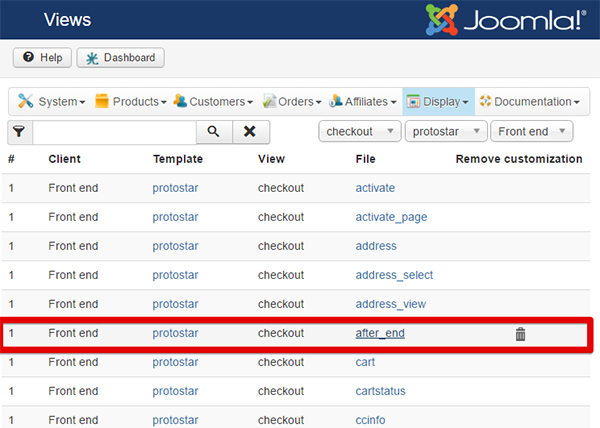
Do you have this little trash icon ?
Awaiting news from you.
Regards
Strange, your Url is correct and must work... Can you make a screenshot of the screen after redirection ?
Do you have an error message ? Other possible way to find issue roots, do you have some override view on your after_end view ?
Do you have this little trash icon ?
Awaiting news from you.
Regards
Last edit: 10 years 1 month ago by Philip.
Please Log in or Create an account to join the conversation.
10 years 1 month ago #250319
by ltempest
Replied by ltempest on topic WorldPay Business Gateway not returning
Philippe,
I do not have a custom after_end setup, this is the error message I get attached.
Lee
I do not have a custom after_end setup, this is the error message I get attached.
Lee
Please Log in or Create an account to join the conversation.
10 years 1 month ago - 10 years 1 month ago #250380
by Philip
Replied by Philip on topic WorldPay Business Gateway not returning
Hello,
Here, you are in Chrome, Right ?
Can you try to test with other navigators, see if that work ?
Other thing you can try, is to rename your htacess.txt for something like htacess1.txt, and make another test.
This different tests may allow us to know the root issue.
Regards
Here, you are in Chrome, Right ?
Can you try to test with other navigators, see if that work ?
Other thing you can try, is to rename your htacess.txt for something like htacess1.txt, and make another test.
This different tests may allow us to know the root issue.
Regards
Last edit: 10 years 1 month ago by Philip.
Please Log in or Create an account to join the conversation.
10 years 1 month ago - 10 years 1 month ago #250582
by ltempest
Replied by ltempest on topic WorldPay Business Gateway not returning
Philip,
I have tried in numerous browser with SEO turned off. There are no custom templates being used and I'm still getting the same error message no matter which browser.
is there any configuration I need to check?
Lee
This is the code in my after_end file:
I have tried in numerous browser with SEO turned off. There are no custom templates being used and I'm still getting the same error message no matter which browser.
is there any configuration I need to check?
Lee
This is the code in my after_end file:
Code:
<?php
/**
* @package HikaShop for Joomla!
* @version 2.6.3
* @author hikashop.com
* @copyright (C) 2010-2016 HIKARI SOFTWARE. All rights reserved.
* @license GNU/GPLv3 http://www.gnu.org/licenses/gpl-3.0.html
*/
defined('_JEXEC') or die('Restricted access');
?><?php
$app = JFactory::getApplication();
$app->enqueueMessage( JText::_('THANK_YOU_FOR_PURCHASE') );
Last edit: 10 years 1 month ago by ltempest.
Please Log in or Create an account to join the conversation.
10 years 1 month ago #250633
by Philip
Replied by Philip on topic WorldPay Business Gateway not returning
Hello,
And do you rename the htaccess file ? This test is important to understand the issue.
Awaiting news from you.
Regards
And do you rename the htaccess file ? This test is important to understand the issue.
Awaiting news from you.
Regards
Please Log in or Create an account to join the conversation.
10 years 1 month ago #250648
by ltempest
Replied by ltempest on topic WorldPay Business Gateway not returning
Philip,
That iss weird! I had SEO URL's turned off in the backend but still had a .htaccess file on my root. When I renamed the file it then processed correctly. What is the issue with the htaccess file? As I will need it to activate the SEO URL's once the site is live.
I have attached the htaccess file.
Lee
That iss weird! I had SEO URL's turned off in the backend but still had a .htaccess file on my root. When I renamed the file it then processed correctly. What is the issue with the htaccess file? As I will need it to activate the SEO URL's once the site is live.
I have attached the htaccess file.
Lee
Please Log in or Create an account to join the conversation.
10 years 1 month ago #250667
by nicolas
Replied by nicolas on topic WorldPay Business Gateway not returning
Hi,
This means that the issue is linked to the SEF system.
One thing to try:
just before going back to your website, open your browser's inspector and go in the tab network. Activate it if it's not already done and configure it to "preserve log" or something like that (the name will vary based on your browser). That way, you'll see the requests to the thank you page and the several redirects that are done on it. Looking at the requests and responses there should provide information as to why this happens. For example, it could be that the URL is redirected to the https version of the website, which itself redirects to the same URL in the http version, etc. which would indicate a problem with the setup of the SSL redirection ( which is usually done in the htacess file, but that's not the case on your website).
This means that the issue is linked to the SEF system.
One thing to try:
just before going back to your website, open your browser's inspector and go in the tab network. Activate it if it's not already done and configure it to "preserve log" or something like that (the name will vary based on your browser). That way, you'll see the requests to the thank you page and the several redirects that are done on it. Looking at the requests and responses there should provide information as to why this happens. For example, it could be that the URL is redirected to the https version of the website, which itself redirects to the same URL in the http version, etc. which would indicate a problem with the setup of the SSL redirection ( which is usually done in the htacess file, but that's not the case on your website).
Please Log in or Create an account to join the conversation.
Time to create page: 0.679 seconds