

- Posts: 16
- Thank you received: 0
add picture to cart
10 years 4 months ago - 10 years 4 months ago #241979
by ard
add picture to cart was created by ard
-- HikaShop version -- : 2.6.3
-- Joomla version -- : 3.3.1
Hi
I know this topic is repetitious but since that my english is very bad and I din't notice last topic I make new topic.
I want have hikashop cart just like image when it empty or not :lol: :lol: . but I don't know what should I to do. please help me. I have exactly photo of the cart.
Thank you.
-- Joomla version -- : 3.3.1
Hi
I know this topic is repetitious but since that my english is very bad
and I din't notice last topic I make new topic.I want have hikashop cart just like image when it empty or not :lol: :lol: . but I don't know what should I to do. please help me. I have exactly photo of the cart.
Thank you.
Last edit: 10 years 4 months ago by ard.
Please Log in or Create an account to join the conversation.

10 years 4 months ago #241995
by nicolas
Replied by nicolas on topic add picture to cart
Hi,
Configure the "HikaShop cart module" via the Joomla modules manager to display in "minicart" in the position of your template where you want it, with the quantity displayed.
Then, use a translation override ( www.hikashop.com/download/languages.html#modify ) to change the text of the cart module to remove the text and leave only the quantity, and add around an HTML tag with a specific class.
Finally, you can use standard CSS on that class to add the image with the positioning of the image you need to display like on your screenshot.
Configure the "HikaShop cart module" via the Joomla modules manager to display in "minicart" in the position of your template where you want it, with the quantity displayed.
Then, use a translation override ( www.hikashop.com/download/languages.html#modify ) to change the text of the cart module to remove the text and leave only the quantity, and add around an HTML tag with a specific class.
Finally, you can use standard CSS on that class to add the image with the positioning of the image you need to display like on your screenshot.
Please Log in or Create an account to join the conversation.
10 years 4 months ago #242048
by ard
Replied by ard on topic add picture to cart
Hi
Thank you Nicolas but now I have another problem How can I change The ITEM and ITEM's??
Thank you Nicolas but now I have another problem How can I change The ITEM and ITEM's??
Please Log in or Create an account to join the conversation.
10 years 4 months ago #242075
by nicolas
Replied by nicolas on topic add picture to cart
Hi,
What do you mean ?
What do you mean ?
Please Log in or Create an account to join the conversation.
10 years 4 months ago #242088
by ard
Replied by ard on topic add picture to cart
Hi
For exampel I want changes ITEM and ITEM's to سبد خرید. What should I to do?
note: ITEM and ITEM's on photo that I sent.
For exampel I want changes ITEM and ITEM's to سبد خرید. What should I to do?
note: ITEM and ITEM's on photo that I sent.
Please Log in or Create an account to join the conversation.

10 years 4 months ago - 10 years 4 months ago #242100
by lousyfool
Need help with customisations of layouts, style or other site development? PM me!
(Don't forget to turn on "E-mail notification of new messages" )
Replied by lousyfool on topic add picture to cart
Hi,
Just like for other text strings across the site you should make it translation overrides: www.hikashop.com/download/languages.html#modify
The constants you are looking for and their English defaults are
Just like for other text strings across the site you should make it translation overrides: www.hikashop.com/download/languages.html#modify
The constants you are looking for and their English defaults are
Code:
X_ITEM_FOR_X="%s item for %s"
X_ITEMS_FOR_X="%s items for %s"
Need help with customisations of layouts, style or other site development? PM me!
(Don't forget to turn on "E-mail notification of new messages" )
Last edit: 10 years 4 months ago by lousyfool.
Please Log in or Create an account to join the conversation.
10 years 4 months ago #242104
by nicolas
Replied by nicolas on topic add picture to cart
Hi,
You can use a translation override to change the text of the cart module, as I explained in my first message.
You can use a translation override to change the text of the cart module, as I explained in my first message.
Please Log in or Create an account to join the conversation.
10 years 4 months ago #242218
by ard
Replied by ard on topic add picture to cart
Hi
First Thank's Nicolas and lousyfool for your ٍExplanation, if My English is Good I was Sure that time my problem was solved but ...
I download my country language but ITEM and ITEM's don't change I Want This word change to "سبدخرید" know what should I to do please explain with screen shot.
Thank
First Thank's Nicolas and lousyfool for your ٍExplanation, if My English is Good I was Sure that time my problem was solved but ...
I download my country language but ITEM and ITEM's don't change I Want This word change to "سبدخرید" know what should I to do please explain with screen shot.
Thank
Please Log in or Create an account to join the conversation.
10 years 4 months ago #242221
by lousyfool
Need help with customisations of layouts, style or other site development? PM me!
(Don't forget to turn on "E-mail notification of new messages" )
Replied by lousyfool on topic add picture to cart
It's all explained under the link you have received already twice in this thread. Here it is for the third time:
www.hikashop.com/download/languages.html#modify
Need help with customisations of layouts, style or other site development? PM me!
(Don't forget to turn on "E-mail notification of new messages" )
Please Log in or Create an account to join the conversation.

10 years 4 months ago - 10 years 4 months ago #242233
by Philip
Replied by Philip on topic add picture to cart
Hello,
To complete Lousyfool and Nicolas answer :
Follow these steps, in order to create an languages override
- Go to Components => HikaSHop => Configuration
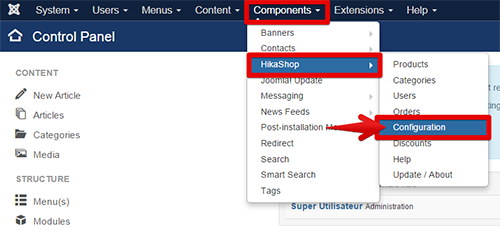
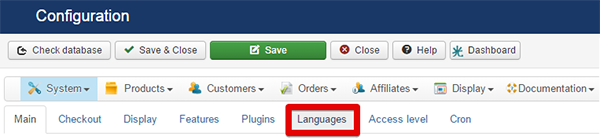
- Click on Languages tab
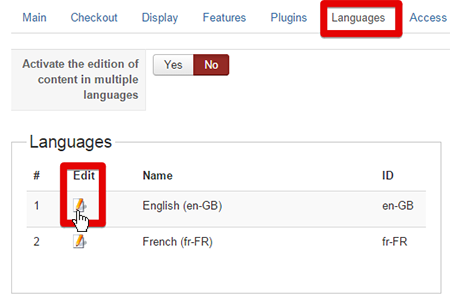
- Click on the little Edit icon to open the pop up edition
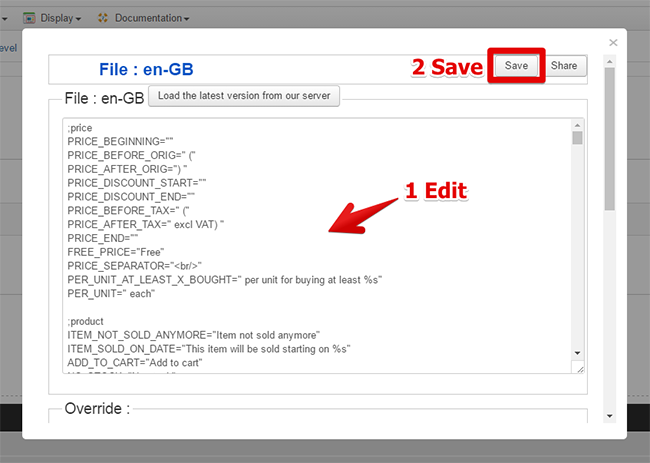
- Look for your required translation and modify it, AND don't forget to Save !
Hope this will help you.
Regards
To complete Lousyfool and Nicolas answer :
Follow these steps, in order to create an languages override
- Go to Components => HikaSHop => Configuration
- Click on Languages tab
- Click on the little Edit icon to open the pop up edition
- Look for your required translation and modify it, AND don't forget to Save !
Hope this will help you.
Regards
Last edit: 10 years 4 months ago by Philip.
The following user(s) said Thank You: ard
Please Log in or Create an account to join the conversation.
10 years 4 months ago #242343
by ard
Replied by ard on topic add picture to cart
Hi
Thank you very much Philips.
Now I change
X_ITEM_FOR_X="%s item for %s"
X_ITEMS_FOR_X="%s items for %s"
to
X_ITEM_FOR_X="%sسبدخرید%s"
X_ITEMS_FOR_X="%sسبدخرید%s"
But ITEM and ITEMS(like photo that i send) don't change. Where is my problem?
Thank you very much Philips.
Now I change
X_ITEM_FOR_X="%s item for %s"
X_ITEMS_FOR_X="%s items for %s"
to
X_ITEM_FOR_X="%sسبدخرید%s"
X_ITEMS_FOR_X="%sسبدخرید%s"
But ITEM and ITEMS(like photo that i send) don't change. Where is my problem?
Please Log in or Create an account to join the conversation.

10 years 4 months ago #242363
by Xavier
Replied by Xavier on topic add picture to cart
Hi,
Are you sure that you are editing the file for the correct used language on frontend ?
Not in another language ?
If it is, the best is to add the overrides in the "Override" part at the bottom of the screenshot given by Philip.
There you have to enter the key and the value as you wrote in your message:
Are you sure that you are editing the file for the correct used language on frontend ?
Not in another language ?
If it is, the best is to add the overrides in the "Override" part at the bottom of the screenshot given by Philip.
There you have to enter the key and the value as you wrote in your message:
X_ITEM_FOR_X="%sسبدخرید%s"
X_ITEMS_FOR_X="%sسبدخرید%s"
Please Log in or Create an account to join the conversation.
10 years 4 months ago #242792
by ard
Replied by ard on topic add picture to cart
Hi
It not changing:((
It not changing:((
Please Log in or Create an account to join the conversation.
10 years 4 months ago - 10 years 4 months ago #242819
by Philip
Replied by Philip on topic add picture to cart
Hello,
Do you have created some view override and more especially on the "Product/cart" ?
For check for this point follow these steps :
- Go to Components => HikaShop => Configuration
- Then, on Display dropdown select Views
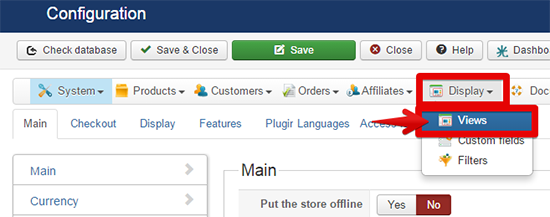
- Use the 3 fillers dropdown with these value (expect for Protostar, useyour front end template)

- see if you have a little trash icon on this specific view
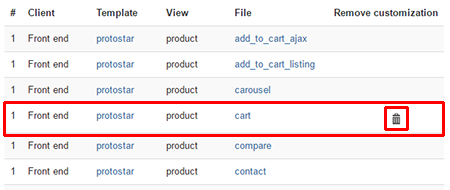
My idea is that maybe an override where the keys value were remove, (as example : "X_ITEMS_FOR_X" ) and so dynamic translation with language file can't work.
If yes, 2 solutions remove the override by clicking on the trash icon (you will loose it, so save it if needed) OR rewrite value keys.
Regards
Do you have created some view override and more especially on the "Product/cart" ?
For check for this point follow these steps :
- Go to Components => HikaShop => Configuration
- Then, on Display dropdown select Views
- Use the 3 fillers dropdown with these value (expect for Protostar, useyour front end template)
- see if you have a little trash icon on this specific view
My idea is that maybe an override where the keys value were remove, (as example : "X_ITEMS_FOR_X" ) and so dynamic translation with language file can't work.
If yes, 2 solutions remove the override by clicking on the trash icon (you will loose it, so save it if needed) OR rewrite value keys.
Regards
Last edit: 10 years 4 months ago by Philip.
Please Log in or Create an account to join the conversation.
Time to create page: 0.448 seconds