
- Posts: 22
- Thank you received: 1
Shipping information error Paypal plugin has stopped working
- richarddhill
-
 Topic Author
- Offline
Less
More
8 years 6 months ago - 8 years 6 months ago #290906
by richarddhill
-- HikaShop version -- : 3.4.0
-- Joomla version -- : 3.8.6
-- PHP version -- : 7.0.29
-- Browser(s) name and version -- : All browsers
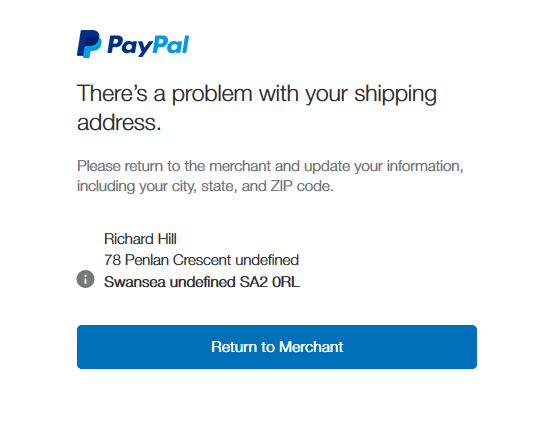
Paypal orders are no longer processing and are being rejected with an error message saying the shipping address is not correct and has undefined fields
The orders process perfectly until the connection with PayPal.
-- Joomla version -- : 3.8.6
-- PHP version -- : 7.0.29
-- Browser(s) name and version -- : All browsers
Paypal orders are no longer processing and are being rejected with an error message saying the shipping address is not correct and has undefined fields
The orders process perfectly until the connection with PayPal.
Last edit: 8 years 6 months ago by richarddhill.
Please Log in or Create an account to join the conversation.

8 years 6 months ago #290930
by nicolas
Replied by nicolas on topic Shipping information error Paypal plugin has stopped working
Hi,
So what is the address you've used for your tests ?
Are you using the default custom fields of HikaShop ?
Did you disable some of them ?
Please understand that the fields used by the PayPal plugin for the address are only the default fields.
If you create new ones or disable some of them, the address information might be incomplete and PayPal will then refuse it.
In that case, you can configure your PayPal payment method to not use the address from HikaShop and in then PayPal won't display that error.
So what is the address you've used for your tests ?
Are you using the default custom fields of HikaShop ?
Did you disable some of them ?
Please understand that the fields used by the PayPal plugin for the address are only the default fields.
If you create new ones or disable some of them, the address information might be incomplete and PayPal will then refuse it.
In that case, you can configure your PayPal payment method to not use the address from HikaShop and in then PayPal won't display that error.
Please Log in or Create an account to join the conversation.
- richarddhill
-
Topic Author
- Offline
Less
More
- Posts: 22
- Thank you received: 1
8 years 6 months ago #290961
by richarddhill
Replied by richarddhill on topic Shipping information error Paypal plugin has stopped working
Hi Nicolas,
I have not touched the plugin. It has always used the "default" settings.... Previously it was working fine.
You say I can edit the configuration for PayPal plugin fields. Please can you advise where I can find this to change them?
Many thanks
Richard
I have not touched the plugin. It has always used the "default" settings.... Previously it was working fine.
You say I can edit the configuration for PayPal plugin fields. Please can you advise where I can find this to change them?
Many thanks
Richard
Please Log in or Create an account to join the conversation.
8 years 6 months ago #290972
by nicolas
Replied by nicolas on topic Shipping information error Paypal plugin has stopped working
Hi,
This isn't an issue with the plugin. It's PayPal who made their rules more stringent regarding addresses.
You can edit the settings of your PayPal payment method in the menu System>Payment methods of your HikaShop backend. There, you'll see the options relative to the address:
www.hikashop.com/support/documentation/3...form.html#additional
This isn't an issue with the plugin. It's PayPal who made their rules more stringent regarding addresses.
You can edit the settings of your PayPal payment method in the menu System>Payment methods of your HikaShop backend. There, you'll see the options relative to the address:
www.hikashop.com/support/documentation/3...form.html#additional
Please Log in or Create an account to join the conversation.
Time to create page: 0.171 seconds