
- Posts: 34
- Thank you received: 1
Payment confirmation email
- cmoorhouse
-
 Topic Author
- Offline
Less
More
8 years 4 months ago #292606
by cmoorhouse
Payment confirmation email was created by cmoorhouse
-- HikaShop version -- : 3.4.0
-- Joomla version -- : 3.8.6
-- PHP version -- : 5.6.32
-- Browser(s) name and version -- : Chrome
Hi
I am using 2 payment methods (paypal and check)
In the order notification email i would like to include an addtional check information section for customers paying by check. This should not be seen for paypal customers.
Can you confirm how i do this?
thank you
Caroline
-- Joomla version -- : 3.8.6
-- PHP version -- : 5.6.32
-- Browser(s) name and version -- : Chrome
Hi
I am using 2 payment methods (paypal and check)
In the order notification email i would like to include an addtional check information section for customers paying by check. This should not be seen for paypal customers.
Can you confirm how i do this?
thank you
Caroline
Please Log in or Create an account to join the conversation.

8 years 4 months ago #292636
by nicolas
Replied by nicolas on topic Payment confirmation email
Hi,
That should already be the case by default.
The text you add in the "information" setting of the check payment method is automatically added to the email sent when the order is created.
Now maybe you're talking about another email ? If so which one ? The "order notification" one which is sent when you click on the "email" button on the backend ? Or the "order status notification" which is sent automatically when PayPal confirms the order, or when you change yourself the status of the order in the backend and activate the notification to the customer ?
That should already be the case by default.
The text you add in the "information" setting of the check payment method is automatically added to the email sent when the order is created.
Now maybe you're talking about another email ? If so which one ? The "order notification" one which is sent when you click on the "email" button on the backend ? Or the "order status notification" which is sent automatically when PayPal confirms the order, or when you change yourself the status of the order in the backend and activate the notification to the customer ?
Please Log in or Create an account to join the conversation.
- cmoorhouse
-
Topic Author
- Offline
Less
More
- Posts: 34
- Thank you received: 1
8 years 4 months ago #292646
by cmoorhouse
Replied by cmoorhouse on topic Payment confirmation email
Hi
Apologies i should have been clearer - it is the order status notification where i would like to include the additional check information section for customers paying by check. This should not be seen for paypal customers.
Is it also possible that if paying by check the order status notification is bcc'd to a different person than the paypal order status notification?
thank you
Caroline
Apologies i should have been clearer - it is the order status notification where i would like to include the additional check information section for customers paying by check. This should not be seen for paypal customers.
Is it also possible that if paying by check the order status notification is bcc'd to a different person than the paypal order status notification?
thank you
Caroline
Please Log in or Create an account to join the conversation.
8 years 4 months ago #292651
by nicolas
Replied by nicolas on topic Payment confirmation email
Hi,
1. Then you want to take the code which does that from the preload of the order creation notification and paste it at the same place in the order status notification via the menu System>Emails:
2. Setting the bcc dynamically based on the payment method is also possible with custom code in the preload of the email.
Here is a thread about that:
www.hikashop.com/forum/4-how-to/872622-a...firmation-email.html
But it's up to you to do it or have a developer work on it for you.
1. Then you want to take the code which does that from the preload of the order creation notification and paste it at the same place in the order status notification via the menu System>Emails:
Code:
ob_start();
if(in_array($data->order_payment_method, array('banktransfer', 'check', 'purchaseorder'))) {
$amount = $currencyHelper->format($data->cart->full_total->prices[0]->price_value_with_tax, $data->cart->order_currency_id);
$paymentClass = hikashop_get('class.payment');
$payment = $paymentClass->get($data->order_payment_id);
$information = $payment->payment_params->information;
if(preg_match('#^[a-z0-9_]*$#i',$information)){
$information = JText::_($information);
}
if($data->order_payment_method=='banktransfer'){
echo '<p>' . JText::sprintf('PLEASE_TRANSFERT_MONEY',$amount).'<br/>'.$information.'<br/>'.JText::sprintf('INCLUDE_ORDER_NUMBER_TO_TRANSFER',$data->order_number) . '</p>';
}elseif($data->order_payment_method=='check'){
echo '<p>' . JText::sprintf('PLEASE_SEND_CHECK',$amount).'<br/>'.$information.'<br/>'.JText::sprintf('INCLUDE_ORDER_NUMBER_TO_CHECK',$data->order_number) . '</p>';
}elseif($data->order_payment_method=='purchaseorder'){
echo '<p>' . JText::sprintf('PLEASE_SEND_PURCHASEORDER',$amount).'<br/>'.$information.'<br/>'.JText::sprintf('INCLUDE_ORDER_NUMBER_TO_PURCHASEORDER',$data->order_number) . '</p>';
}
}
$content = ob_get_clean();
$vars['ORDER_SUMMARY'] .= $content;
2. Setting the bcc dynamically based on the payment method is also possible with custom code in the preload of the email.
Here is a thread about that:
www.hikashop.com/forum/4-how-to/872622-a...firmation-email.html
But it's up to you to do it or have a developer work on it for you.
Please Log in or Create an account to join the conversation.
- cmoorhouse
-
Topic Author
- Offline
Less
More
- Posts: 34
- Thank you received: 1
8 years 4 months ago #292699
by cmoorhouse
Replied by cmoorhouse on topic Payment confirmation email
thank you
I have successfully edited the order_status _notification email
but ....
Only customers who pay via paypal are receiving it - those paying by check are not. For internaI processing reasons we have set the check payment method to automatically approve and and the status is therefore set to confirmed but i would still expect the order_status_notification to send to the customer
If the customer pays via paypal they receive the order_status _notification email
what do i need to change to achieve this?
thank you
Caroline
I have successfully edited the order_status _notification email
but ....
Only customers who pay via paypal are receiving it - those paying by check are not. For internaI processing reasons we have set the check payment method to automatically approve and and the status is therefore set to confirmed but i would still expect the order_status_notification to send to the customer
If the customer pays via paypal they receive the order_status _notification email
what do i need to change to achieve this?
thank you
Caroline
Please Log in or Create an account to join the conversation.
- cmoorhouse
-
Topic Author
- Offline
Less
More
- Posts: 34
- Thank you received: 1
8 years 4 months ago #292705
by cmoorhouse
Replied by cmoorhouse on topic Payment confirmation email
Hi
Refernece part -
2. Setting the bcc dynamically based on the payment method is also possible with custom code in the preload of the email.
Here is a thread about that:
www.hikashop.com/forum/4-how-to/872622-a...firmation-email.html
Can you confirm where i associate the bcc mail address with the payment method. eg the bcc address for check payment is different to the bcc address for paypal. There is not a setting on the payment method to define the bcc address?
thank you
Caroline
Refernece part -
2. Setting the bcc dynamically based on the payment method is also possible with custom code in the preload of the email.
Here is a thread about that:
www.hikashop.com/forum/4-how-to/872622-a...firmation-email.html
Can you confirm where i associate the bcc mail address with the payment method. eg the bcc address for check payment is different to the bcc address for paypal. There is not a setting on the payment method to define the bcc address?
thank you
Caroline
Please Log in or Create an account to join the conversation.
8 years 4 months ago - 8 years 4 months ago #292703
by nicolas
Replied by nicolas on topic Payment confirmation email
Hi,
1.
Did you activate the "Order status notification" setting of your check payment method ?
If not, then the order is directly created as confirmed and thus only the order creation notification email is sent.
2.
There is no setting for that. It can only be done with adding PHP code to the preload of the email as explained in my previous message.
1.
Did you activate the "Order status notification" setting of your check payment method ?
If not, then the order is directly created as confirmed and thus only the order creation notification email is sent.
2.
There is no setting for that. It can only be done with adding PHP code to the preload of the email as explained in my previous message.
Last edit: 8 years 4 months ago by nicolas.
Please Log in or Create an account to join the conversation.
- cmoorhouse
-
Topic Author
- Offline
Less
More
- Posts: 34
- Thank you received: 1
8 years 4 months ago #292743
by cmoorhouse
Replied by cmoorhouse on topic Payment confirmation email
Thank you for coming back to me.
1. Yes the setting it marked to yes in the Order status notification" setting of your check payment method
Something isn't right - are you able to take a look.
2. Would you be able to give me a further pointer on how to include an either or bcc email address for the payment method. I could do with some help re the php to include
thank you - it is much appreciated.
Caroline
1. Yes the setting it marked to yes in the Order status notification" setting of your check payment method
Something isn't right - are you able to take a look.
2. Would you be able to give me a further pointer on how to include an either or bcc email address for the payment method. I could do with some help re the php to include
thank you - it is much appreciated.
Caroline
Please Log in or Create an account to join the conversation.
8 years 4 months ago #292796
by nicolas
Replied by nicolas on topic Payment confirmation email
Hi,
1.
Mm, I had a look at the code of the plugin and it's correct. I've also done a test on my end and it worked fine.
Can you provide a screenshot of the settings of your payment method ?
2. I don't see what else I could give as pointers besides writing and testing the code myself. But that will require some time as I'm not sure of the code here. Unfotunately, coding services is outside of the user support we're supposed to provide as part of the support included. Please contact our partners for help on custom development:
www.hikashop.com/home/our-partners.html
1.
Mm, I had a look at the code of the plugin and it's correct. I've also done a test on my end and it worked fine.
Can you provide a screenshot of the settings of your payment method ?
2. I don't see what else I could give as pointers besides writing and testing the code myself. But that will require some time as I'm not sure of the code here. Unfotunately, coding services is outside of the user support we're supposed to provide as part of the support included. Please contact our partners for help on custom development:
www.hikashop.com/home/our-partners.html
Please Log in or Create an account to join the conversation.
- cmoorhouse
-
Topic Author
- Offline
Less
More
- Posts: 34
- Thank you received: 1
8 years 4 months ago #292806
by cmoorhouse
Replied by cmoorhouse on topic Payment confirmation email
thank you for coming back to me
re point 1 - attached is a screenshot of the check payment method settings:
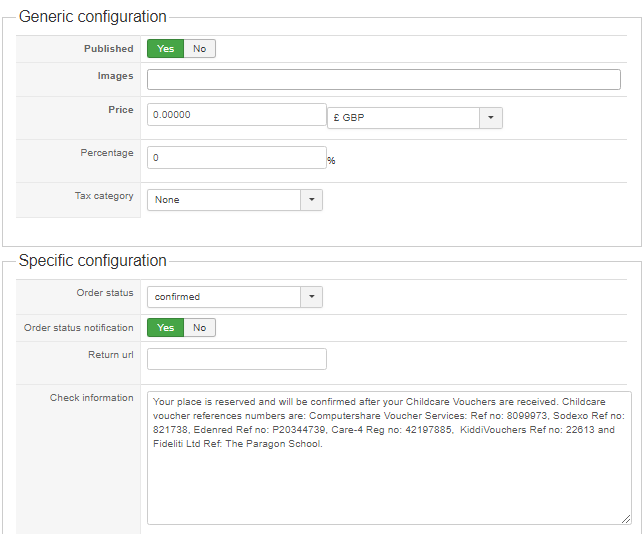
thank you
Caroline
re point 1 - attached is a screenshot of the check payment method settings:
thank you
Caroline
Please Log in or Create an account to join the conversation.
- cmoorhouse
-
Topic Author
- Offline
Less
More
- Posts: 34
- Thank you received: 1
8 years 4 months ago #292807
by cmoorhouse
Replied by cmoorhouse on topic Payment confirmation email
And a copy of the ORDER_STATUS_NOTIFICATION email incase that is what is causing it not to send to customers paying via check
thank you
Caroline
thank you
Caroline
This attachment is hidden for guests.
Please log in or register to see it.
Please log in or register to see it.
Please Log in or Create an account to join the conversation.
8 years 4 months ago #292818
by nicolas
Replied by nicolas on topic Payment confirmation email
Hi,
I see what's the issue.
Change the line:
$this->modifyOrder($order->order_id, $method->payment_params->order_status, @$method->payment_params->status_notif_email, false);
to:
$this->modifyOrder($order->order_id, $method->payment_params->order_status, (bool)@$method->payment_params->status_notif_email, false);
in the file plugins/hikashoppayment/check/check.php and that should help.
I see what's the issue.
Change the line:
$this->modifyOrder($order->order_id, $method->payment_params->order_status, @$method->payment_params->status_notif_email, false);
to:
$this->modifyOrder($order->order_id, $method->payment_params->order_status, (bool)@$method->payment_params->status_notif_email, false);
in the file plugins/hikashoppayment/check/check.php and that should help.
Please Log in or Create an account to join the conversation.
- cmoorhouse
-
Topic Author
- Offline
Less
More
- Posts: 34
- Thank you received: 1
8 years 4 months ago #292878
by cmoorhouse
Replied by cmoorhouse on topic Payment confirmation email
Hi
That part now works - the status notification email is sent to the customer if you pay by check - thank you
But the additional check information section for customers paying by check is not displaying in the order status notification email . (Note this check information should not be seen for paypal customers.)
I had added in the code as you previously suggested and the preview version of the email implies it is there but it is not visible in the email i receive
Are you able to check this part for me?
thank you
Caroline
That part now works - the status notification email is sent to the customer if you pay by check - thank you
But the additional check information section for customers paying by check is not displaying in the order status notification email . (Note this check information should not be seen for paypal customers.)
I had added in the code as you previously suggested and the preview version of the email implies it is there but it is not visible in the email i receive
Are you able to check this part for me?
thank you
Caroline
Please Log in or Create an account to join the conversation.
8 years 4 months ago #292881
by nicolas
Replied by nicolas on topic Payment confirmation email
Hi,
That's not a bug, that's done on purpose.
The order status of an order determines if the order has been paid or not.
When the order status of an order is "confirmed", it means that the order has already been paid (based on the default configuration of the order statuses in the menu System>Order statuses).
So of course, the payment method information text (which contains information to allow the customer to pay the order) is not displayed in the order status notification.
The code I gave in www.hikashop.com/forum/payment-methods/8...on-email.html#292651 is only taken from the order creation notification preload. You need to adapt it to the code of the preload of the order status notification.
Please understand that this is custom development work, not user support. I've already given all the necessary information for a developer to do that. If you need someone to help you with that, please contact our partners:
www.hikashop.com/home/our-partners.html
That's not a bug, that's done on purpose.
The order status of an order determines if the order has been paid or not.
When the order status of an order is "confirmed", it means that the order has already been paid (based on the default configuration of the order statuses in the menu System>Order statuses).
So of course, the payment method information text (which contains information to allow the customer to pay the order) is not displayed in the order status notification.
The code I gave in www.hikashop.com/forum/payment-methods/8...on-email.html#292651 is only taken from the order creation notification preload. You need to adapt it to the code of the preload of the order status notification.
Please understand that this is custom development work, not user support. I've already given all the necessary information for a developer to do that. If you need someone to help you with that, please contact our partners:
www.hikashop.com/home/our-partners.html
Please Log in or Create an account to join the conversation.
Time to create page: 0.233 seconds