

- Posts: 12
- Thank you received: 1
Help with Payment Status Auto Update
8 years 1 month ago #297635
by datacore
Help with Payment Status Auto Update was created by datacore
-- HikaShop version -- : 3.5.0
-- Joomla version -- : 3.8.12
-- PHP version -- : 5
I am having trouble with the automatic setup for updating order status.
I use Westpac Net and have setup as per the documentation.
I'm not missing any settings in terms of the payment plugin.
Am I missing settings elsewhere in the system ?
-- Joomla version -- : 3.8.12
-- PHP version -- : 5
I am having trouble with the automatic setup for updating order status.
I use Westpac Net and have setup as per the documentation.
I'm not missing any settings in terms of the payment plugin.
Am I missing settings elsewhere in the system ?
Please Log in or Create an account to join the conversation.

Less
More
- Posts: 12953
- Thank you received: 1778
8 years 1 month ago #297640
by Mohamed Thelji
Replied by Mohamed Thelji on topic Help with Payment Status Auto Update
Hello,
Can you make sure that :
- the '"allow notification from westpac net" option is set to YES
- "Invalid status" and "Verified status" options are correctly configured
Best regards,
Mohamed Thelji.
Can you make sure that :
- the '"allow notification from westpac net" option is set to YES
- "Invalid status" and "Verified status" options are correctly configured
Best regards,
Mohamed Thelji.
Please Log in or Create an account to join the conversation.
8 years 1 month ago #297671
by datacore
Replied by datacore on topic Help with Payment Status Auto Update
Hi,
Thank you for your prompt reply.
Do you mean these settings:
Invalid status=cancelled
Verified status=confirmed
I can see it's got log entries when using debug mode too. So it looks like it's sort of working, I just dont know where it's failing or what setting to check further.
Thank you for your prompt reply.
Do you mean these settings:
Invalid status=cancelled
Verified status=confirmed
I can see it's got log entries when using debug mode too. So it looks like it's sort of working, I just dont know where it's failing or what setting to check further.
Please Log in or Create an account to join the conversation.

8 years 1 month ago #297676
by nicolas
Replied by nicolas on topic Help with Payment Status Auto Update
Hi,
Please don't post your questions several times. It increases the work for us for no reason and because of that, you and everyone lese get slower answers.
Following the discussion I had with you by email:
The log you sent only contains the debug data from when the customer is redirected to the payment gateway. There is no debug data of the payment notification. So the payment notification is not received by HikaShop and thus that's why the order status cannot be updated automatically.
In that case, I would recommend to contact the merchant support of westpac so that they can check the logs on their end and tell you what they found regarding the payment notifications.
Please don't post your questions several times. It increases the work for us for no reason and because of that, you and everyone lese get slower answers.
Following the discussion I had with you by email:
The log you sent only contains the debug data from when the customer is redirected to the payment gateway. There is no debug data of the payment notification. So the payment notification is not received by HikaShop and thus that's why the order status cannot be updated automatically.
In that case, I would recommend to contact the merchant support of westpac so that they can check the logs on their end and tell you what they found regarding the payment notifications.
Please Log in or Create an account to join the conversation.
8 years 1 month ago #297717
by datacore
Replied by datacore on topic Help with Payment Status Auto Update
Thanks, I have engaged the bank to see what to do from here. I posted here in an effort to get advice from others too, rather than one specific person  apologies I did not mean to increase the work load.
I'll let you know how I go, and if it's fixed by the bank - how they fixed it.
apologies I did not mean to increase the work load.I'll let you know how I go, and if it's fixed by the bank - how they fixed it.
The following user(s) said Thank You: nicolas
Please Log in or Create an account to join the conversation.
8 years 1 month ago #297764
by datacore
Replied by datacore on topic Help with Payment Status Auto Update
Hi,
I've had word back from the bank and they say and attach below. Please help as I woudl like to have the payment status updated.
I’ve taken a look at the logs from our end and I can see that we are successfully posting back the transaction information to your URL with no errors.
Here is an example post.
I've had word back from the bank and they say and attach below. Please help as I woudl like to have the payment status updated.
I’ve taken a look at the logs from our end and I can see that we are successfully posting back the transaction information to your URL with no errors.
Here is an example post.
Please Log in or Create an account to join the conversation.
8 years 1 month ago #297785
by nicolas
Replied by nicolas on topic Help with Payment Status Auto Update
Hi,
The URL is not correct.
It should be the URL notification that is provided to you in the settings of the payment method.
Can you check that you properly entered that URL in the settings page of Westpac net (in your merchant account) in the correct field ?
The URL is not correct.
It should be the URL notification that is provided to you in the settings of the payment method.
Can you check that you properly entered that URL in the settings page of Westpac net (in your merchant account) in the correct field ?
Please Log in or Create an account to join the conversation.
8 years 1 month ago #297825
by datacore
Replied by datacore on topic Help with Payment Status Auto Update
Hi Nicolas,
I used this one;
https://xxxxxxxxxx/index.php?option=com_hikashop&ctrl=checkout&task=notify¬if_payment=westpacnet&tmpl=component?payment_reference&payment_status
Please note that I have blanked out our domain for privacy reasons as this is a public area.
Their URL is coming back to our domain fine, but it says index.php?EncryptedParameters=
Maybe I put it into the wrong area in the banking setup? But I am following the guide
I used this one;
https://xxxxxxxxxx/index.php?option=com_hikashop&ctrl=checkout&task=notify¬if_payment=westpacnet&tmpl=component?payment_reference&payment_status
Please note that I have blanked out our domain for privacy reasons as this is a public area.
Their URL is coming back to our domain fine, but it says index.php?EncryptedParameters=
Maybe I put it into the wrong area in the banking setup? But I am following the guide
Please Log in or Create an account to join the conversation.
8 years 1 month ago #297827
by datacore
Replied by datacore on topic Help with Payment Status Auto Update
Hi,
The bank has replied that our setup is correct and that the parameters are encrypted and we will need to decrypt it with the key provided (which is setup).
How do I verify if it's getting decrypted correctly ?
Thank you.
The bank has replied that our setup is correct and that the parameters are encrypted and we will need to decrypt it with the key provided (which is setup).
How do I verify if it's getting decrypted correctly ?
Thank you.
Please Log in or Create an account to join the conversation.

8 years 1 month ago #297835
by Jerome
Jerome - Obsidev.com
HikaMarket & HikaSerial developer / HikaShop core dev team.
Replied by Jerome on topic Help with Payment Status Auto Update
Hello,
You have twice the interrogation mark ; which makes the URL invalid and have for result a call from your payment gateway with missing required parameters, like "option=com_hikashop", "ctrl=checkout", "task=notify" and "notif_payment=westpacnet".
Regards,
I'm afraid that URL is not a valid URL.I used this one;
https://xxxxxxxxxx/index.php?option=com_hikashop&ctrl=checkout&task=notify¬if_payment=westpacnet&tmpl=component?payment_reference&payment_status
You have twice the interrogation mark ; which makes the URL invalid and have for result a call from your payment gateway with missing required parameters, like "option=com_hikashop", "ctrl=checkout", "task=notify" and "notif_payment=westpacnet".
Regards,
Jerome - Obsidev.com
HikaMarket & HikaSerial developer / HikaShop core dev team.
Please Log in or Create an account to join the conversation.
8 years 1 month ago - 8 years 1 month ago #297893
by datacore
Replied by datacore on topic Help with Payment Status Auto Update
Hi Jerome,
Thank you for your reply.
I copied and pasted from this (inside the configuration page of HIKASHOP). Am I meant to change things to suit my needs ?
Thank you and I look forward to your reply.
P.S. this is an example of what happens after processing payment with the bank (note where xxxxxxx is, that's our domain);
https://xxxxxxxxx/index.php?EncryptedParameters=wKWtv6QW3DQe83vlEf4gbI82SI6T5A33ZLso1I1TSmTV%2FfSdh6QJGIzjIwuQzIXYkHk%2FNcv8HyhydaOHVKLOGvvMBqXT207ABblN21oyXWYyKCcCc%2BnUADnjSvKjmNqqlBGh7I6rsgOAr%2FoUk3RsPSbXZdf6TOguCtPJCZN38IjRs6cr5WzTFORgN8dfYct1ApFLDFebr6yBwTyJB8MYJ7V5cVDX7wXR%2Fq%2BZCsSX7%2BUKI4kStRxsKKahSYmbW5PK84TCJIIjXcwV2pj6ZkxOClX2h%2FnvihRpw%2FQ1%2F%2BBOYWDXeGKuhZMmeGwISzgQxgrDf3pJGxLceRUNoZChay3HhlblP8oqyD2Jqj9dXAqgaJAmiLz2foKhH6Pj%2F1Ubb4ICVudTTMltZhn531gm%2FuLqsULZRXOB%2Br1SjDhNHa5vOkze9vBNWfwcPqQDspuB1bGTuCOZNaN7Zzykb3FRbBCjPzpZYkiYc4k8UEcSyqufcQ23DnZZy2QtR0jiDGC3tDTWNGqATDnLjCHpTBADkgLQuo7WkzvV%2Bsrqit4qOBzaMXA32torF%2BVHrlifY0%2FQ9BPO&Signature=z7%2Br334%2FCD1P4w2%2BmXJwr6aZBp5xtuplSpFA1sP8bzE%3D
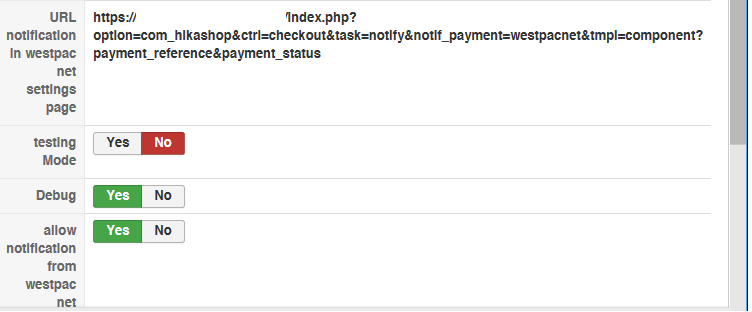
Thank you for your reply.
I copied and pasted from this (inside the configuration page of HIKASHOP). Am I meant to change things to suit my needs ?
Thank you and I look forward to your reply.
P.S. this is an example of what happens after processing payment with the bank (note where xxxxxxx is, that's our domain);
https://xxxxxxxxx/index.php?EncryptedParameters=wKWtv6QW3DQe83vlEf4gbI82SI6T5A33ZLso1I1TSmTV%2FfSdh6QJGIzjIwuQzIXYkHk%2FNcv8HyhydaOHVKLOGvvMBqXT207ABblN21oyXWYyKCcCc%2BnUADnjSvKjmNqqlBGh7I6rsgOAr%2FoUk3RsPSbXZdf6TOguCtPJCZN38IjRs6cr5WzTFORgN8dfYct1ApFLDFebr6yBwTyJB8MYJ7V5cVDX7wXR%2Fq%2BZCsSX7%2BUKI4kStRxsKKahSYmbW5PK84TCJIIjXcwV2pj6ZkxOClX2h%2FnvihRpw%2FQ1%2F%2BBOYWDXeGKuhZMmeGwISzgQxgrDf3pJGxLceRUNoZChay3HhlblP8oqyD2Jqj9dXAqgaJAmiLz2foKhH6Pj%2F1Ubb4ICVudTTMltZhn531gm%2FuLqsULZRXOB%2Br1SjDhNHa5vOkze9vBNWfwcPqQDspuB1bGTuCOZNaN7Zzykb3FRbBCjPzpZYkiYc4k8UEcSyqufcQ23DnZZy2QtR0jiDGC3tDTWNGqATDnLjCHpTBADkgLQuo7WkzvV%2Bsrqit4qOBzaMXA32torF%2BVHrlifY0%2FQ9BPO&Signature=z7%2Br334%2FCD1P4w2%2BmXJwr6aZBp5xtuplSpFA1sP8bzE%3D
Last edit: 8 years 1 month ago by datacore.
Please Log in or Create an account to join the conversation.

8 years 1 month ago - 8 years 1 month ago #297906
by Philip
Replied by Philip on topic Help with Payment Status Auto Update
Hello,
Check that you have set the Url Notification (display in your payment plugin specific) in the Setup Net pages in PayWay. You must be using the Billing Payments/Shopping Cart configuration, under the Server-to-Server Payment Notification section.
It's just a guess but your result seems to be linked to misconfiguration on the Payway servers, but can't be sure of it.
Regards
Check that you have set the Url Notification (display in your payment plugin specific) in the Setup Net pages in PayWay. You must be using the Billing Payments/Shopping Cart configuration, under the Server-to-Server Payment Notification section.
It's just a guess but your result seems to be linked to misconfiguration on the Payway servers, but can't be sure of it.
Regards
Last edit: 8 years 1 month ago by Philip.
Please Log in or Create an account to join the conversation.
8 years 1 month ago - 8 years 1 month ago #297932
by datacore
Replied by datacore on topic Help with Payment Status Auto Update
Hi,
Please see my banking setup. I can confirm it's setup as per the URL listed in the payment settings in Hikashop.
Please help.
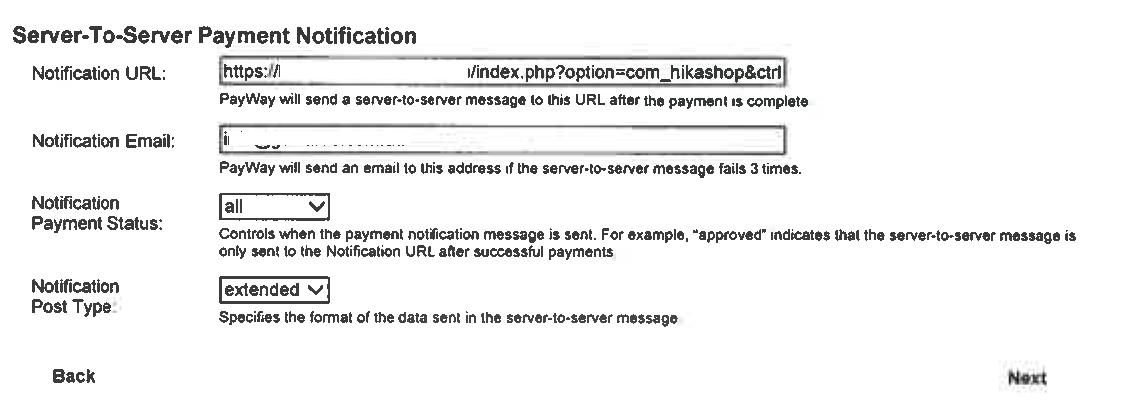
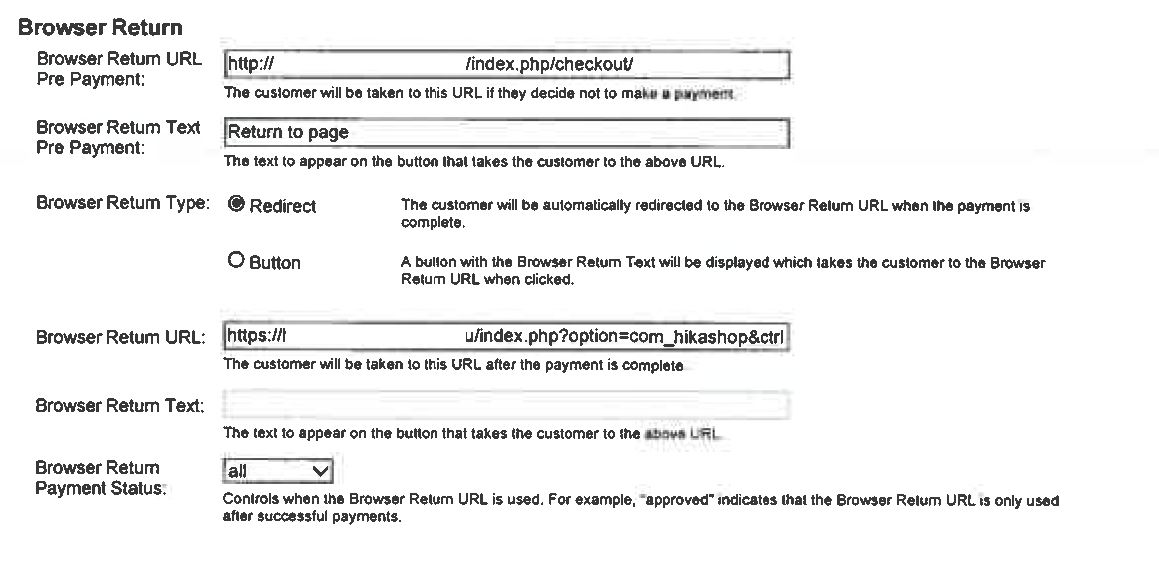
Please also see more of the setup within Hikashop.
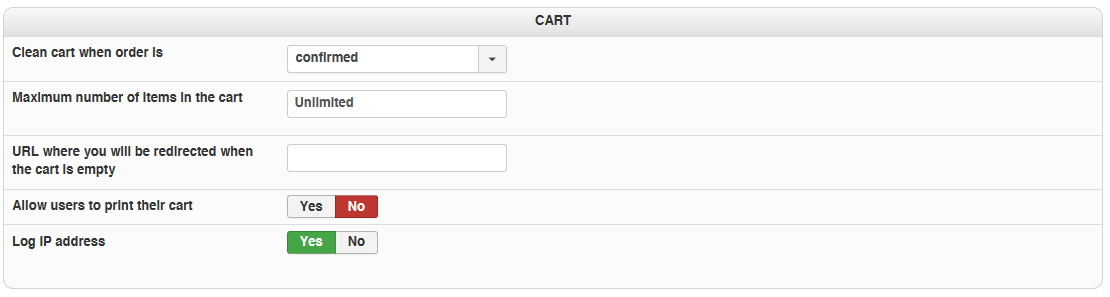
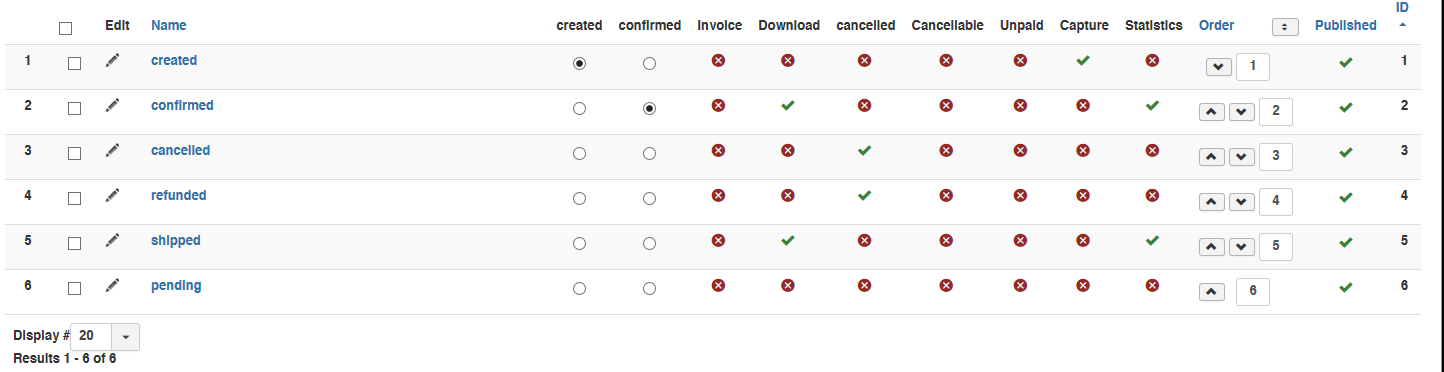
Please see my banking setup. I can confirm it's setup as per the URL listed in the payment settings in Hikashop.
Please help.
Please also see more of the setup within Hikashop.
Last edit: 8 years 1 month ago by datacore. Reason: adding more attachments
Please Log in or Create an account to join the conversation.
8 years 1 month ago #297944
by nicolas
Replied by nicolas on topic Help with Payment Status Auto Update
Hi,
So can you ask westpac about any information they have on the server-to-server notification ?
Because what they gave you is not the notification of the server-to-server but the browser return URL, which isn't used by HikaShop.
So can you ask westpac about any information they have on the server-to-server notification ?
Because what they gave you is not the notification of the server-to-server but the browser return URL, which isn't used by HikaShop.
Please Log in or Create an account to join the conversation.
8 years 1 month ago - 8 years 1 month ago #297997
by datacore
Replied by datacore on topic Help with Payment Status Auto Update
Hi,
These are the only options you get for server-to-server and what I have setup already which isn't working:
Notification URL: (the return URL above that I use)
Notification Email: info@myemail.com
Notification Payment Status: ALL
Notification Post Type: extended
These are the only options you get for server-to-server and what I have setup already which isn't working:
Notification URL: (the return URL above that I use)
Notification Email: info@myemail.com
Notification Payment Status: ALL
Notification Post Type: extended
Last edit: 8 years 1 month ago by datacore.
Please Log in or Create an account to join the conversation.
8 years 1 month ago - 8 years 1 month ago #298022
by Philip
Replied by Philip on topic Help with Payment Status Auto Update
Hello,
Let's check any point :
- Try to change in your Payway Merchant settings your Notification Url :
https://xxxxxxxxxx/index.php?option=com_hikashop&ctrl=checkout&task=notify¬if_payment=westpacnet&tmpl=component?payment_reference&payment_status
For :
https://xxxxxxxxxx/index.php?option=com_hikashop&ctrl=checkout&task=notify¬if_payment=westpacnet&tmpl=component;payment_reference&payment_status
- Did you contact the Payway support ? If yes did they have any clue about the issue ? Like by see your return tests ? If server to server standards have been changed or else ?
=> Later, if we are unable to get the root issue, do you have any merchant test that we can use ? The point will be for us to process some tests by ourself in order to understand what's going on.
Awaiting news from you.
Regards
Let's check any point :
- Try to change in your Payway Merchant settings your Notification Url :
https://xxxxxxxxxx/index.php?option=com_hikashop&ctrl=checkout&task=notify¬if_payment=westpacnet&tmpl=component?payment_reference&payment_status
For :
https://xxxxxxxxxx/index.php?option=com_hikashop&ctrl=checkout&task=notify¬if_payment=westpacnet&tmpl=component;payment_reference&payment_status
- Did you contact the Payway support ? If yes did they have any clue about the issue ? Like by see your return tests ? If server to server standards have been changed or else ?
=> Later, if we are unable to get the root issue, do you have any merchant test that we can use ? The point will be for us to process some tests by ourself in order to understand what's going on.
Awaiting news from you.
Regards
Last edit: 8 years 1 month ago by Philip.
Please Log in or Create an account to join the conversation.
8 years 1 month ago - 8 years 1 month ago #298041
by datacore
Replied by datacore on topic Help with Payment Status Auto Update
Yes, I got a reply from the mercant. I don't understand it much but I hope you do
With the shopping cart handoff, that is the only way to receive the server to server information.
In our guide on page 13 it will have some information regarding decrypting parameters.
www.payway.com.au/downloads/WBC/PayWay_H...Developers_Guide.pdf
The encryption key that is displayed on screen is in Base-64 format(which can be found on the
Security page of PayWay Net Shopping Cart setup). You will need to Base-64 decode it to get the 16 byte key. The parameters are encrypted using AES 128 with Cipher Block Chaining, using PKCS-7 Padding. The decryption algorithm should be initialised with a 16 byte, zero-filled
initialization vector, and should use your encryption key.
Let me know if you have any further questions.
With the shopping cart handoff, that is the only way to receive the server to server information.
In our guide on page 13 it will have some information regarding decrypting parameters.
www.payway.com.au/downloads/WBC/PayWay_H...Developers_Guide.pdf
The encryption key that is displayed on screen is in Base-64 format(which can be found on the
Security page of PayWay Net Shopping Cart setup). You will need to Base-64 decode it to get the 16 byte key. The parameters are encrypted using AES 128 with Cipher Block Chaining, using PKCS-7 Padding. The decryption algorithm should be initialised with a 16 byte, zero-filled
initialization vector, and should use your encryption key.
Let me know if you have any further questions.
Last edit: 8 years 1 month ago by datacore.
Please Log in or Create an account to join the conversation.
8 years 1 month ago - 8 years 1 month ago #298051
by Philip
Replied by Philip on topic Help with Payment Status Auto Update
Hello,
Ok it seems that we will need to purchase some tests in order to better understand what are missing and corrected it, can you help us like my previous asked for it.
Can you have merchant test account, that you can pass to us in order to process some test ?
Note : As these references have to be secret, you can provide via our Contact us form, add an Url link to this topic.
Awaiting news from you.
Regards
Ok it seems that we will need to purchase some tests in order to better understand what are missing and corrected it, can you help us like my previous asked for it.
Can you have merchant test account, that you can pass to us in order to process some test ?
Note : As these references have to be secret, you can provide via our Contact us form, add an Url link to this topic.
Awaiting news from you.
Regards
Last edit: 8 years 1 month ago by Philip.
Please Log in or Create an account to join the conversation.
8 years 1 month ago #298099
by datacore
Replied by datacore on topic Help with Payment Status Auto Update
Hi,
The bank said it's free to setup a test.
www.payway.com.au/core/DeveloperTestFacilityView
Did you need anything else?
The bank said it's free to setup a test.
www.payway.com.au/core/DeveloperTestFacilityView
Did you need anything else?
Please Log in or Create an account to join the conversation.
8 years 1 month ago #298115
by Philip
Replied by Philip on topic Help with Payment Status Auto Update
Hello,
We have already try to create an account to process some tests, but the point of your specific case is to have a better view on your situation and so, by seeing the way you have config your account can help us to better understand situation.
Regards
We have already try to create an account to process some tests, but the point of your specific case is to have a better view on your situation and so, by seeing the way you have config your account can help us to better understand situation.
Regards
Please Log in or Create an account to join the conversation.
Time to create page: 0.201 seconds