

- Posts: 20
- Thank you received: 0
Orders Still marked as 'created' after receiving PP verification notification
8 years 4 weeks ago #298218
by derek_cts
Orders Still marked as 'created' after receiving PP verification notification was created by derek_cts
-- HikaShop version -- : 3.5.1 HikaShop Starter
-- Joomla version -- : 3.8.12
-- PHP version -- : 7.x
-- Browser(s) name and version -- : FF / Chrome
-- Error-message(debug-mod must be tuned on) -- : N/A
My orders are still marked as 'created' after receiving PayPal verification notification.
If someone can tell me what's going on, that'd be great...
Here's the (sanitized) report:
-- Joomla version -- : 3.8.12
-- PHP version -- : 7.x
-- Browser(s) name and version -- : FF / Chrome
-- Error-message(debug-mod must be tuned on) -- : N/A
My orders are still marked as 'created' after receiving PayPal verification notification.
If someone can tell me what's going on, that'd be great...
Here's the (sanitized) report:
This message contains confidential information
Please Log in or Create an account to join the conversation.

8 years 4 weeks ago #298219
by nicolas
Replied by nicolas on topic Orders Still marked as 'created' after receiving PP verification notification
Hi,
The payment log indicates that the transaction notification was received properly by the PayPal payment plugin.
If your order is still with the "created" status, then I can only think that you have that status selected instead of the "confirmed" status in the "verified status" setting of the PayPal payment method under the System>Payment methods menu.
Please check on that.
The payment log indicates that the transaction notification was received properly by the PayPal payment plugin.
If your order is still with the "created" status, then I can only think that you have that status selected instead of the "confirmed" status in the "verified status" setting of the PayPal payment method under the System>Payment methods menu.
Please check on that.
Please Log in or Create an account to join the conversation.
8 years 3 weeks ago #298244
by derek_cts
Replied by derek_cts on topic Orders Still marked as 'created' after receiving PP verification notification
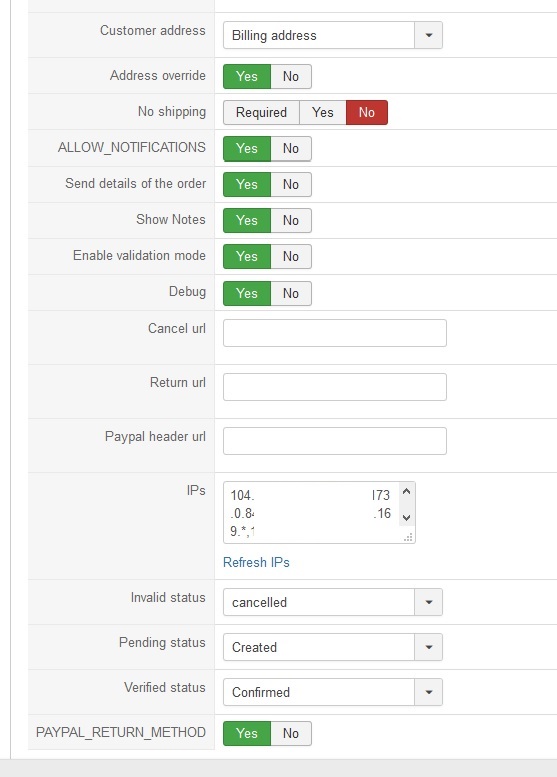
Says it's set as confirmed.
Please Log in or Create an account to join the conversation.
8 years 3 weeks ago #298253
by nicolas
Replied by nicolas on topic Orders Still marked as 'created' after receiving PP verification notification
Hi,
You have the "enable validation mode" activated.
This means that the payment will only be validated by PayPal after you accept it in your PayPal merchant account.
So before that, the payment_status is "pending" and thus the order is not confirmed.
If you don't have to have to validate the payments in your merchant account, you want to turn off that option.
You have the "enable validation mode" activated.
This means that the payment will only be validated by PayPal after you accept it in your PayPal merchant account.
So before that, the payment_status is "pending" and thus the order is not confirmed.
If you don't have to have to validate the payments in your merchant account, you want to turn off that option.
Please Log in or Create an account to join the conversation.
8 years 5 days ago #299083
by derek_cts
Replied by derek_cts on topic Orders Still marked as 'created' after receiving PP verification notification
Disabling Validation Mode made it work correctly.
Thanks.
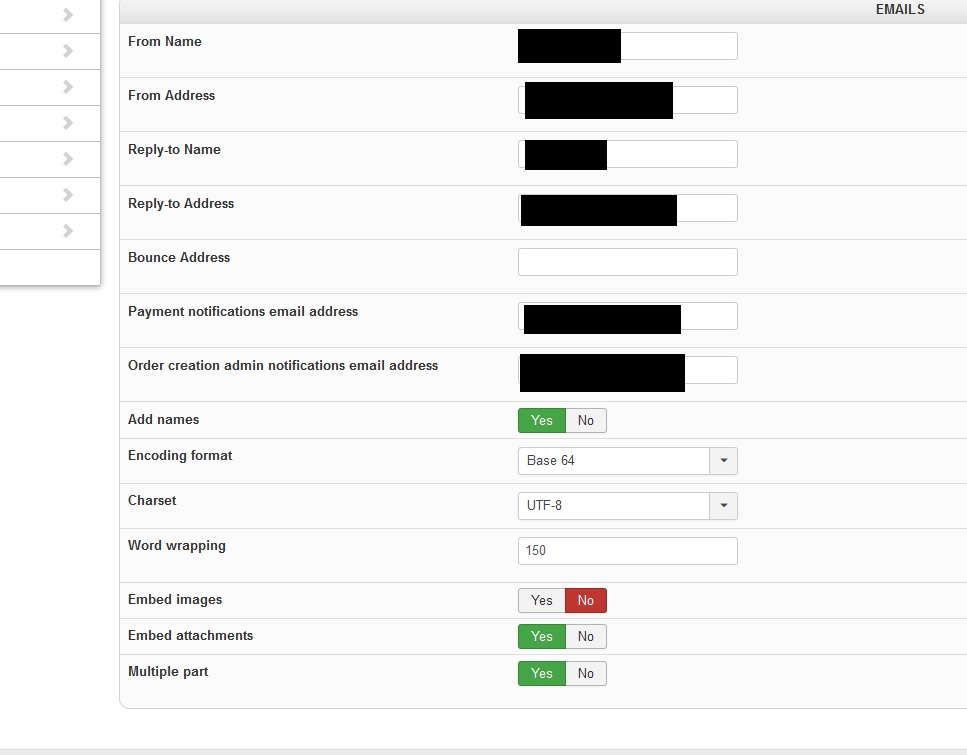
The one last issue I'm having is that I need the registrations info emailed to the same email I have set for the payment notifications. Is this possible? I have the alternate email I want these sent to set in config:
Thanks.
The one last issue I'm having is that I need the registrations info emailed to the same email I have set for the payment notifications. Is this possible? I have the alternate email I want these sent to set in config:
Please Log in or Create an account to join the conversation.
8 years 5 days ago #299087
by derek_cts
Replied by derek_cts on topic Orders Still marked as 'created' after receiving PP verification notification
This is the additional information I have the users fill out during registration that I need sent when they register:
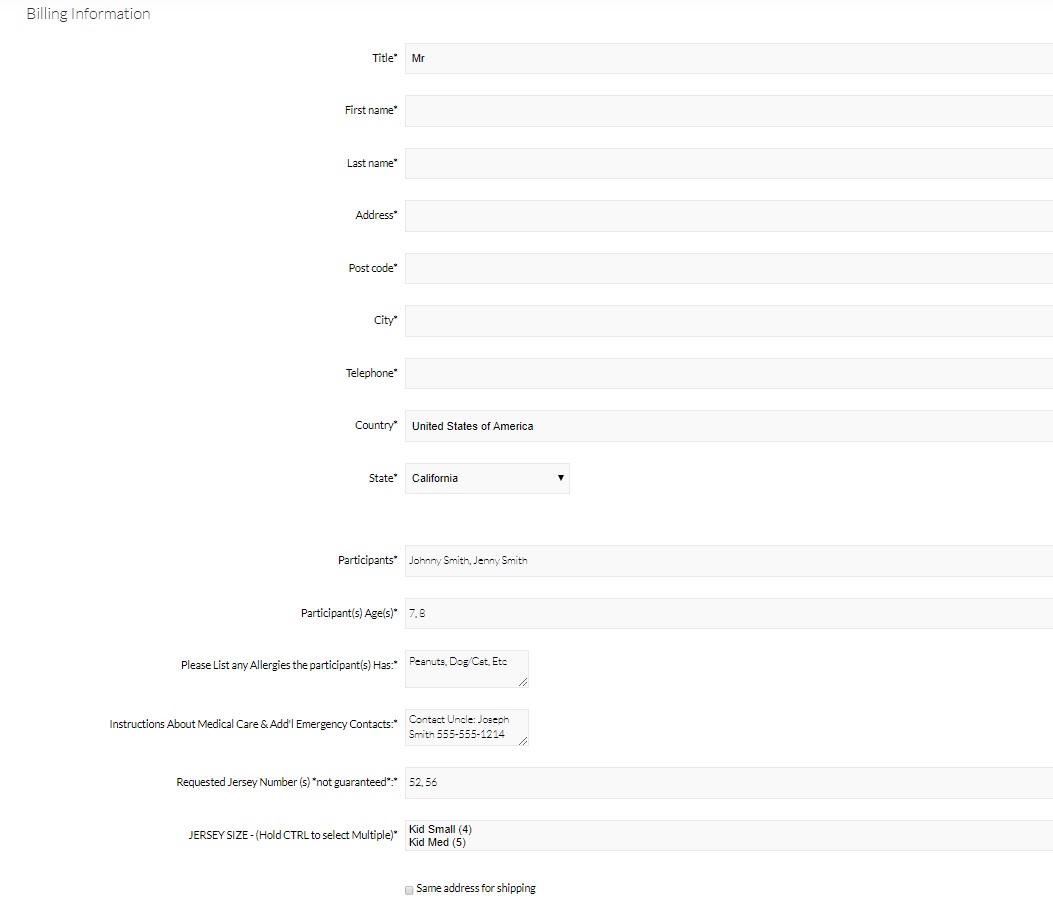
I don't even see inside HS where that information is stored.
It's not inside the user accounts if I go into them in the backend...
I don't even see inside HS where that information is stored.
It's not inside the user accounts if I go into them in the backend...
Please Log in or Create an account to join the conversation.
8 years 5 days ago #299091
by nicolas
Replied by nicolas on topic Orders Still marked as 'created' after receiving PP verification notification
Hi,
How did you add those fields ? I suppose that you created custom fields of the table "address" via the menu Display>Custom fields.
In that case, you want to add their corresponding tag to the "address format" setting of the HikaShop configuration and they will appear with the rest of the billing address in the notification emails.
Alternatively, when you edit the emails via the menu System>Emails, you can add such tag {VAR:billing_address.XXX} where XXX is the column name of the custom field and the value will appear in the email sent instead of the tag.
How did you add those fields ? I suppose that you created custom fields of the table "address" via the menu Display>Custom fields.
In that case, you want to add their corresponding tag to the "address format" setting of the HikaShop configuration and they will appear with the rest of the billing address in the notification emails.
Alternatively, when you edit the emails via the menu System>Emails, you can add such tag {VAR:billing_address.XXX} where XXX is the column name of the custom field and the value will appear in the email sent instead of the tag.
Please Log in or Create an account to join the conversation.
8 years 4 days ago - 8 years 4 days ago #299158
by derek_cts
Replied by derek_cts on topic Orders Still marked as 'created' after receiving PP verification notification
Do you have an example of how to do this?
I understand what you are saying, but not really sure how to go about it.
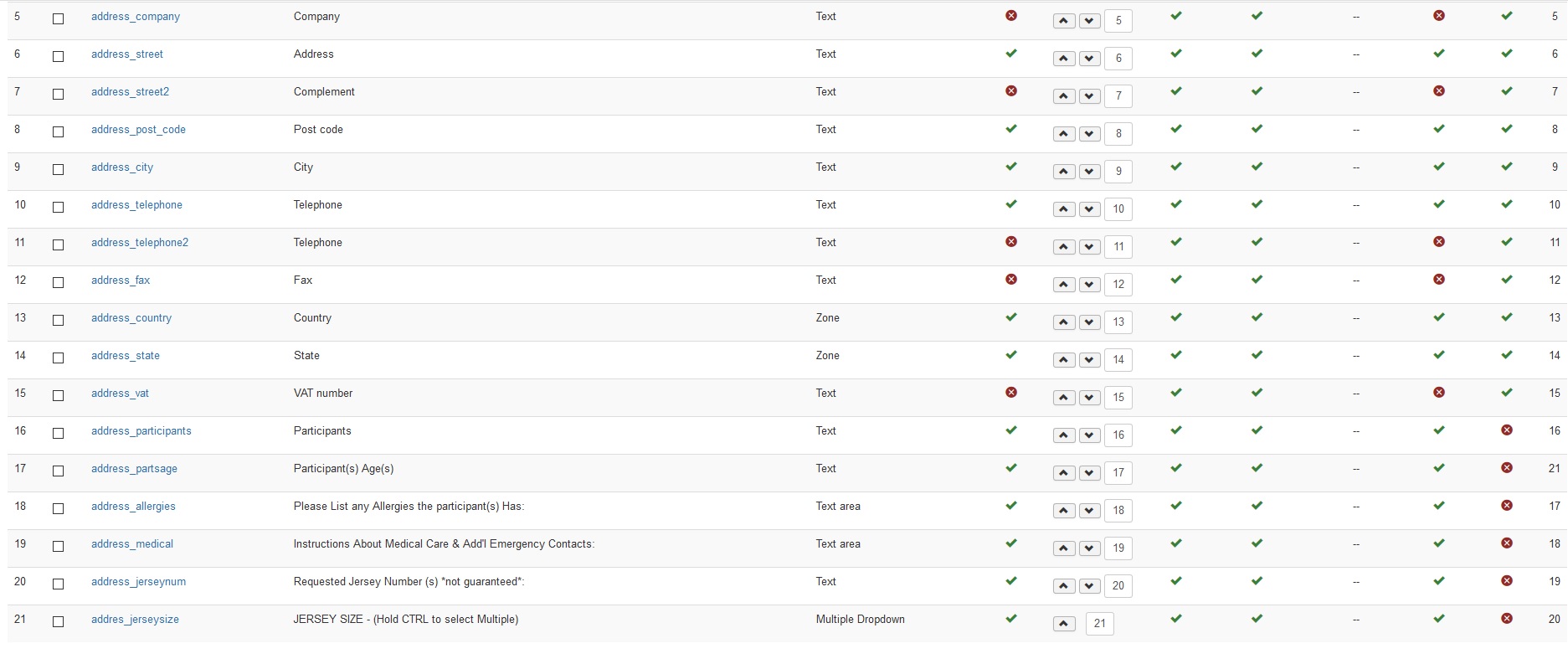
Yes, here they are:
I understand what you are saying, but not really sure how to go about it.
Yes, here they are:
Last edit: 8 years 4 days ago by derek_cts.
Please Log in or Create an account to join the conversation.
8 years 4 days ago #299161
by derek_cts
Replied by derek_cts on topic Orders Still marked as 'created' after receiving PP verification notification
Actually, I think I found it:
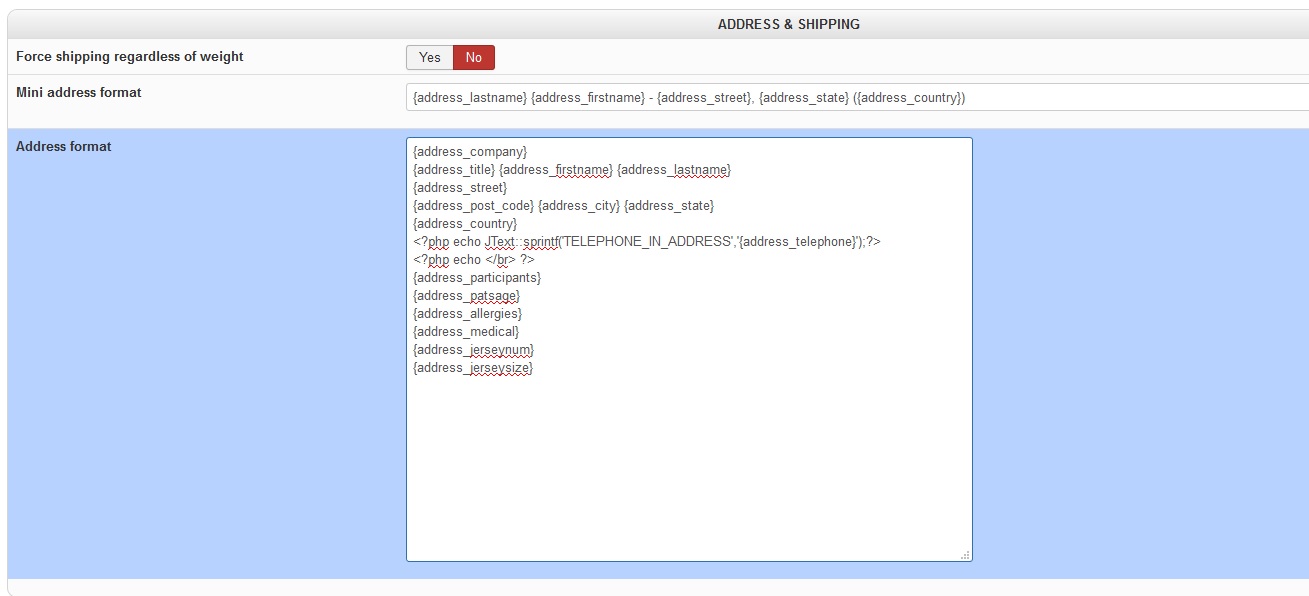
Just want to make sure that is where you were referring to, and that the code is correct...
(I'm assuming you can use regular php inside of it?)
Also, for the orders that have already been processed, where is that information stored / how do I get it / can I at this juncture?
Just want to make sure that is where you were referring to, and that the code is correct...
(I'm assuming you can use regular php inside of it?)
Also, for the orders that have already been processed, where is that information stored / how do I get it / can I at this juncture?
Please Log in or Create an account to join the conversation.
8 years 4 days ago #299164
by derek_cts
Replied by derek_cts on topic Orders Still marked as 'created' after receiving PP verification notification
I tested out some combinations and found out regular HTML works in there.
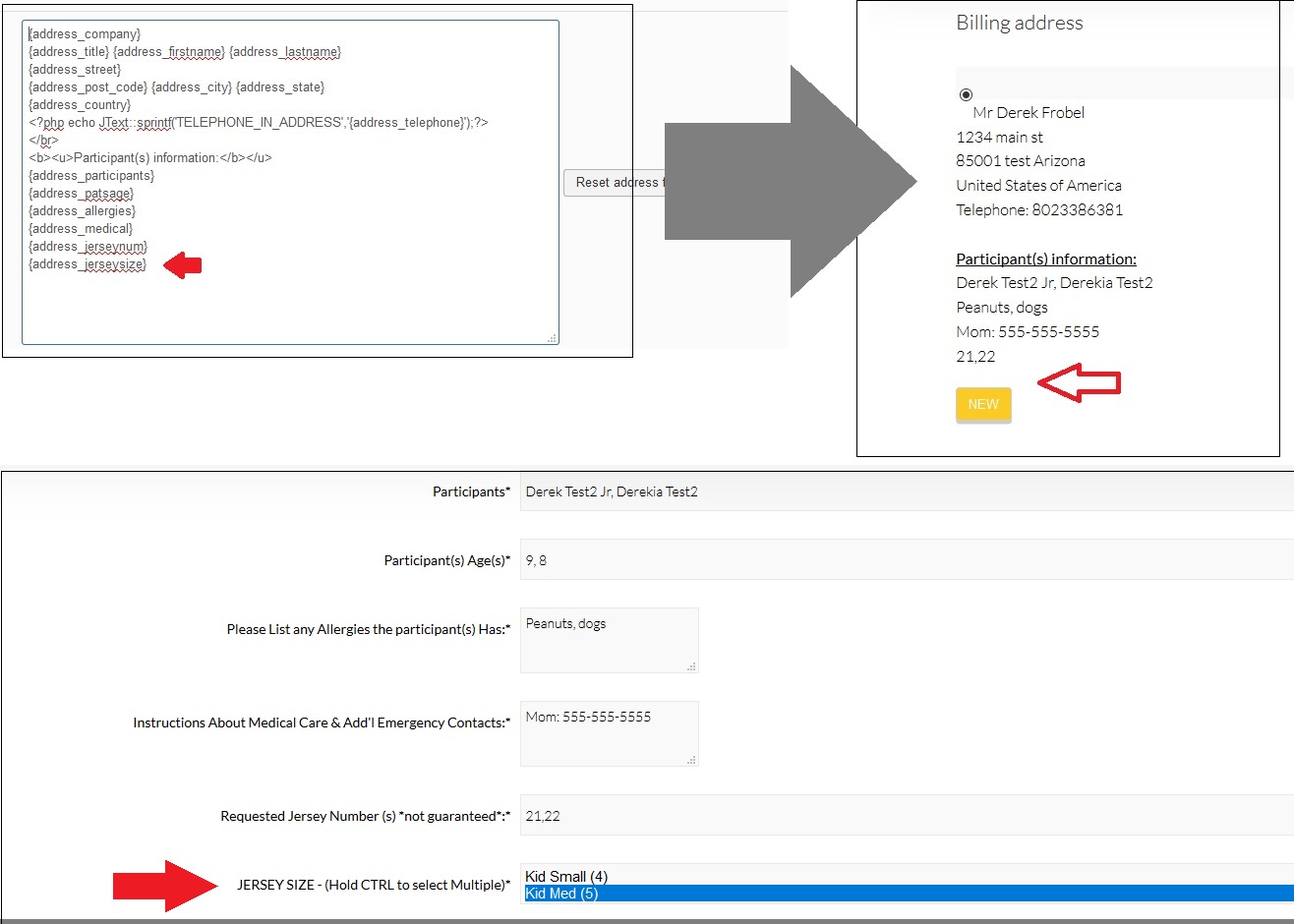
Here's the final issue I'm having:
One of the fields (address_jerseysize) is not showing up...
It's a multiple select field, so I'm wondering if that is causing the issue?
Here's an image to illustrate the issue from the 3 different pages:
Here's the final issue I'm having:
One of the fields (address_jerseysize) is not showing up...
It's a multiple select field, so I'm wondering if that is causing the issue?
Here's an image to illustrate the issue from the 3 different pages:
Please Log in or Create an account to join the conversation.
8 years 4 days ago #299175
by nicolas
Replied by nicolas on topic Orders Still marked as 'created' after receiving PP verification notification
Hi,
It has nothing to do with the type of the custom field. The issue is that you made a typo.
Your custom field column name is addres_jerseysize and not address_jerseysize :
monosnap.com/file/Ow9MqKjGONhjP6iOJTs4P6O148CzYt
It has nothing to do with the type of the custom field. The issue is that you made a typo.
Your custom field column name is addres_jerseysize and not address_jerseysize :
monosnap.com/file/Ow9MqKjGONhjP6iOJTs4P6O148CzYt
Please Log in or Create an account to join the conversation.
8 years 3 days ago #299253
by derek_cts
Replied by derek_cts on topic Orders Still marked as 'created' after receiving PP verification notification
Whoops...
No way to change that VAR name unless I recreate, right?
I'll just change the Checkout VAR for the time being.
Thanks!
No way to change that VAR name unless I recreate, right?
I'll just change the Checkout VAR for the time being.
Thanks!
Please Log in or Create an account to join the conversation.
8 years 2 days ago #299267
by nicolas
Replied by nicolas on topic Orders Still marked as 'created' after receiving PP verification notification
Hi,
That's right, you would have to delete it and recreate it.
That's right, you would have to delete it and recreate it.
Please Log in or Create an account to join the conversation.
Time to create page: 0.280 seconds