

- Posts: 30
- Thank you received: 1
Stripe - Requirement for Strong Customer Authentication
Less
More
7 years 1 week ago - 7 years 1 week ago #310980
by anut_peach
Replied by anut_peach on topic Stripe - Requirement for Strong Customer Authentication
still Error 500!
i deactivated and removed the stripe v2 plugin from the hikashop payment options.
i also deactivated the stripe plugin extension in the extension manager.
so, only the new stripe v3 is active (downloaded yesterday).
i still get the error 500.
what can i do?
thanks for your support.
i deactivated and removed the stripe v2 plugin from the hikashop payment options.
i also deactivated the stripe plugin extension in the extension manager.
so, only the new stripe v3 is active (downloaded yesterday).
i still get the error 500.
what can i do?
thanks for your support.
Last edit: 7 years 1 week ago by anut_peach. Reason: added attachments
Please Log in or Create an account to join the conversation.
7 years 1 week ago - 7 years 1 week ago #310982
by sophie11
Replied by sophie11 on topic Stripe - Requirement for Strong Customer Authentication
Hi Jerome
I've had payments through the new V3 plugin and Stripe doesn't seem to be receiving the receipt_email and therefore can't send receipt email to the customer after its successfull payment.
As well the description in stripe doesn't show the order number as it used to but an incomprehensible number so on the dashboard we can't identify the order with the amount paid. It would be good to have the order number as the description (as it used to be)
None of the new payments and new customers have been sent receipt of their payments by stripe but with the V2 plugin they did.
Can you, please, check it up
Thank you
I've had payments through the new V3 plugin and Stripe doesn't seem to be receiving the receipt_email and therefore can't send receipt email to the customer after its successfull payment.
As well the description in stripe doesn't show the order number as it used to but an incomprehensible number so on the dashboard we can't identify the order with the amount paid. It would be good to have the order number as the description (as it used to be)
None of the new payments and new customers have been sent receipt of their payments by stripe but with the V2 plugin they did.
Can you, please, check it up
Thank you
Last edit: 7 years 1 week ago by sophie11.
Please Log in or Create an account to join the conversation.

7 years 1 week ago #310983
by Jerome
Jerome - Obsidev.com
HikaMarket & HikaSerial developer / HikaShop core dev team.
Also helping the HikaShop support team when having some time or couldn't sleep.
By the way, do not send me private message, use the "contact us" form instead.
Replied by Jerome on topic Stripe - Requirement for Strong Customer Authentication
Hello,
@anut_peach - Sorry but you're not using the latest version of the plugin.
They are two new settings for "Payment mode" and "Payment interface".
@Sophie11 - Can you please provide more details about your issue and the workflow you're following ?
Regards,
@anut_peach - Sorry but you're not using the latest version of the plugin.
They are two new settings for "Payment mode" and "Payment interface".
@Sophie11 - Can you please provide more details about your issue and the workflow you're following ?
Regards,
Jerome - Obsidev.com
HikaMarket & HikaSerial developer / HikaShop core dev team.
Also helping the HikaShop support team when having some time or couldn't sleep.
By the way, do not send me private message, use the "contact us" form instead.
Please Log in or Create an account to join the conversation.
7 years 1 week ago #310990
by sophie11
Replied by sophie11 on topic Stripe - Requirement for Strong Customer Authentication
Hi Jerome
I am now using your new V3 plugin and the customer doesn't get the receipt for successful payment from Stripe.
1- Stripe doesn't seem to get the email where to send the receipt.
"Stripe can automatically send email receipts to your customers whenever they make a successful payment, or when a payment is refunded. This is done by providing an email address when making the API request, using the email address of a Customer object, or updating a PaymentIntent with a customer’s email address after checkout. "
2- In the stripe dashboard the description of the transaction used to be the order number with the free stripe plugin but with your plugin it is an incomprehensible number see top order on the photo below
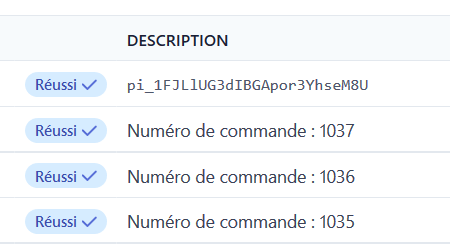
The description is also send to the customer in the successful payment email receipt so it should be the order number
Here is the Stripe docs about email receipts: stripe.com/docs/receipts
Thank you
I am now using your new V3 plugin and the customer doesn't get the receipt for successful payment from Stripe.
1- Stripe doesn't seem to get the email where to send the receipt.
"Stripe can automatically send email receipts to your customers whenever they make a successful payment, or when a payment is refunded. This is done by providing an email address when making the API request, using the email address of a Customer object, or updating a PaymentIntent with a customer’s email address after checkout. "
2- In the stripe dashboard the description of the transaction used to be the order number with the free stripe plugin but with your plugin it is an incomprehensible number see top order on the photo below
The description is also send to the customer in the successful payment email receipt so it should be the order number
Here is the Stripe docs about email receipts: stripe.com/docs/receipts
Thank you
Please Log in or Create an account to join the conversation.

7 years 1 week ago #310991
by Bouncer
Replied by Bouncer on topic Stripe - Requirement for Strong Customer Authentication
Hi Jerome,
There is no two-stage verification in the payment process; is this because of my settings or by design?
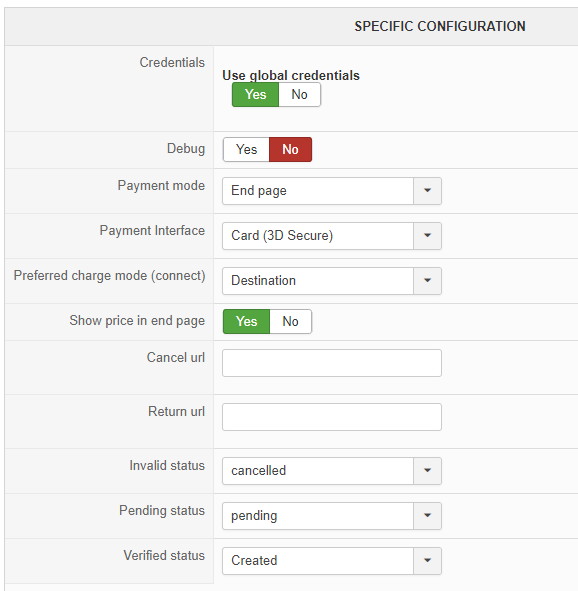
PS: the reason I have created under verified is because I'm selling personal videos that needs to be uploaded before the order is confirmed.
An order is created before the payment is completed; is this because of my settings or by design?
Regarding the styling of the form; a better description on how this can be done is needed. I tried to find the stripeconnect_end_intent under Display > Views ( as mentioned here ) but there is no such file... So please be a little more specific about this; as others also have pointed out CVC is currently hidden on Mobile.
Where can the latest version of the plugin be found when there is an update?
Rgds,
Petter
There is no two-stage verification in the payment process; is this because of my settings or by design?
PS: the reason I have created under verified is because I'm selling personal videos that needs to be uploaded before the order is confirmed.
An order is created before the payment is completed; is this because of my settings or by design?
Regarding the styling of the form; a better description on how this can be done is needed. I tried to find the stripeconnect_end_intent under Display > Views ( as mentioned here ) but there is no such file... So please be a little more specific about this; as others also have pointed out CVC is currently hidden on Mobile.
Where can the latest version of the plugin be found when there is an update?
Rgds,
Petter
Please Log in or Create an account to join the conversation.
Less
More
- Posts: 30
- Thank you received: 1
7 years 1 week ago #310992
by anut_peach
Replied by anut_peach on topic Stripe - Requirement for Strong Customer Authentication
where can i download the latest version?
i used the link directly from the order - see attachment.
the files have a timestamp from 13.9.19
How can i see its the latest version?
i used the link directly from the order - see attachment.
the files have a timestamp from 13.9.19
How can i see its the latest version?
The following user(s) said Thank You: netzgrafik
Please Log in or Create an account to join the conversation.
7 years 1 week ago #310993
by Bouncer
I'm also using Event Booking and their EB Stripe Checkout payment plugin and it's the same there; I asked them about this:
"...it does not return a good DESCRIPTION to Stripe Backend; now it's just a code where it used to be the Event name."
Answer: "Something handled by Stripe and it's out of our control. I will try to contact Stripe to see if they can change the behavior."
Rgds,
Petter
Replied by Bouncer on topic Stripe - Requirement for Strong Customer Authentication
sophie11 wrote: In the stripe dashboard the description of the transaction used to be the order number with the free stripe plugin but with your plugin it is an incomprehensible number
I'm also using Event Booking and their EB Stripe Checkout payment plugin and it's the same there; I asked them about this:
"...it does not return a good DESCRIPTION to Stripe Backend; now it's just a code where it used to be the Event name."
Answer: "Something handled by Stripe and it's out of our control. I will try to contact Stripe to see if they can change the behavior."
Rgds,
Petter
Please Log in or Create an account to join the conversation.
Less
More
- Posts: 30
- Thank you received: 1
7 years 1 week ago #310997
by anut_peach
Replied by anut_peach on topic Stripe - Requirement for Strong Customer Authentication
ok, i found another version, and i see the new options now (payment mode and interface).
new Problem:
Instead of error 500,
when i hit "submit payment" it just keeps rolling that icon, but it does not continue. Waiting for minutes, but it just keeps on that screen.
i tried direct and destination mode - both the same.
any idea?
thank.
new Problem:
Instead of error 500,
when i hit "submit payment" it just keeps rolling that icon, but it does not continue. Waiting for minutes, but it just keeps on that screen.
i tried direct and destination mode - both the same.
any idea?
thank.
Please Log in or Create an account to join the conversation.
Less
More
- Posts: 17
- Thank you received: 2
7 years 1 week ago - 7 years 1 week ago #311018
by netzgrafik
Replied by netzgrafik on topic Stripe - Requirement for Strong Customer Authentication
For all present customers: I bought the plugin today and the links in the email I got (2019-09-17) are download an old version. Under "my orders" you can find the links to the new version!
Last edit: 7 years 1 week ago by netzgrafik.
The following user(s) said Thank You: anut_peach
Please Log in or Create an account to join the conversation.
7 years 1 week ago #311035
by Jerome
Jerome - Obsidev.com
HikaMarket & HikaSerial developer / HikaShop core dev team.
Also helping the HikaShop support team when having some time or couldn't sleep.
By the way, do not send me private message, use the "contact us" form instead.
Replied by Jerome on topic Stripe - Requirement for Strong Customer Authentication
Hello,
The download is available via your order summary.
As written before, there is the payment plugin, the plugin for multi-vendor and the legacy (old) plugin.
The version number is not displayed there but we're thinking about improvements for that.
Regarding the infinite waiting, I suppose there is a JS error or a stripe return code which is not fully handled by the script.
It would required some details in order to see the issue directly (via the contact us form for such private information)
Regards
The download is available via your order summary.
As written before, there is the payment plugin, the plugin for multi-vendor and the legacy (old) plugin.
The version number is not displayed there but we're thinking about improvements for that.
Regarding the infinite waiting, I suppose there is a JS error or a stripe return code which is not fully handled by the script.
It would required some details in order to see the issue directly (via the contact us form for such private information)
Regards
Jerome - Obsidev.com
HikaMarket & HikaSerial developer / HikaShop core dev team.
Also helping the HikaShop support team when having some time or couldn't sleep.
By the way, do not send me private message, use the "contact us" form instead.
Please Log in or Create an account to join the conversation.
7 years 1 week ago #311036
by sophie11
Replied by sophie11 on topic Stripe - Requirement for Strong Customer Authentication
Hi Jerome
I've given more details about the email receipt and description in stripe as you asked me to and I would like to know what you think about it
see #310990
thank you
I've given more details about the email receipt and description in stripe as you asked me to and I would like to know what you think about it
see #310990
thank you
Please Log in or Create an account to join the conversation.
7 years 1 week ago #311054
by Impress51
Replied by Impress51 on topic Stripe - Requirement for Strong Customer Authentication
Hello,
Are there any updates on the development of the multi-vendor version of stripe connect plugin? I have clients that are now not happy about missing the deadline of the new law.
Regards
Are there any updates on the development of the multi-vendor version of stripe connect plugin? I have clients that are now not happy about missing the deadline of the new law.
Regards
Please Log in or Create an account to join the conversation.
7 years 1 week ago #311057
by davec
Replied by davec on topic Stripe - Requirement for Strong Customer Authentication
Hi
I have activated the new plugin. However when placing order it is asking people to enter the card details on the website rather than being directed to Stripe. Can the option of entering card details in stripe be configured and if so how?
Thanks
Dave
I have activated the new plugin. However when placing order it is asking people to enter the card details on the website rather than being directed to Stripe. Can the option of entering card details in stripe be configured and if so how?
Thanks
Dave
The following user(s) said Thank You: Bouncer
Please Log in or Create an account to join the conversation.
7 years 1 week ago #311074
by Jerome
Jerome - Obsidev.com
HikaMarket & HikaSerial developer / HikaShop core dev team.
Also helping the HikaShop support team when having some time or couldn't sleep.
By the way, do not send me private message, use the "contact us" form instead.
Replied by Jerome on topic Stripe - Requirement for Strong Customer Authentication
Hello
There is no Stripe plugin with a redirection to the Stripe website.
Even the old v2 plugin is working with the same behavior of a JavaScript and the creation of a token for the credit card.
Regards
There is no Stripe plugin with a redirection to the Stripe website.
Even the old v2 plugin is working with the same behavior of a JavaScript and the creation of a token for the credit card.
Regards
Jerome - Obsidev.com
HikaMarket & HikaSerial developer / HikaShop core dev team.
Also helping the HikaShop support team when having some time or couldn't sleep.
By the way, do not send me private message, use the "contact us" form instead.
Please Log in or Create an account to join the conversation.
7 years 1 week ago #311077
by davec
Replied by davec on topic Stripe - Requirement for Strong Customer Authentication
Hi Jerome
so people entered credit card info on the site in V2 as well?
Dave
so people entered credit card info on the site in V2 as well?
Dave
Please Log in or Create an account to join the conversation.

7 years 6 days ago #311081
by nicolas
Replied by nicolas on topic Stripe - Requirement for Strong Customer Authentication
Hi,
Yes. The credit card information was entered in a credit card form at the end of the checkout (after clicking on the "finish" button) but still on your website (it was displayed by the checkout / end.php view file.
But you don't have to worry about PCI-DSS as even though the credit card form appears on your website, the data you enter in the form is submitted directly to Stripe via javascript so the credit card data actually doesn't go through your website (be it with the v2 or the v3).
Yes. The credit card information was entered in a credit card form at the end of the checkout (after clicking on the "finish" button) but still on your website (it was displayed by the checkout / end.php view file.
But you don't have to worry about PCI-DSS as even though the credit card form appears on your website, the data you enter in the form is submitted directly to Stripe via javascript so the credit card data actually doesn't go through your website (be it with the v2 or the v3).
The following user(s) said Thank You: davec
Please Log in or Create an account to join the conversation.
7 years 6 days ago #311095
by Bouncer
Replied by Bouncer on topic Stripe - Requirement for Strong Customer Authentication
Hi Jerome, could you please take a look at my post #310991?
Rgds,
Petter
Rgds,
Petter
Please Log in or Create an account to join the conversation.
7 years 6 days ago #311097
by Jerome
Jerome - Obsidev.com
HikaMarket & HikaSerial developer / HikaShop core dev team.
Also helping the HikaShop support team when having some time or couldn't sleep.
By the way, do not send me private message, use the "contact us" form instead.
Replied by Jerome on topic Stripe - Requirement for Strong Customer Authentication
Hello,
@bouncer for #310991
3d secure is activate by stripe radar. The plugin do not have any control on that.
I would highly recommand you to use "pending" (or custom status) over "created" since you can create an order without paying it.
View override for payment plugins are not available via the HikaShop view listing. But the HikaShop documentation have a section which talks about how to it. Please feel free to open a new thread or look into the forum for same question (most probably for paypal end override)
Regards
@bouncer for #310991
3d secure is activate by stripe radar. The plugin do not have any control on that.
I would highly recommand you to use "pending" (or custom status) over "created" since you can create an order without paying it.
View override for payment plugins are not available via the HikaShop view listing. But the HikaShop documentation have a section which talks about how to it. Please feel free to open a new thread or look into the forum for same question (most probably for paypal end override)
Regards
Jerome - Obsidev.com
HikaMarket & HikaSerial developer / HikaShop core dev team.
Also helping the HikaShop support team when having some time or couldn't sleep.
By the way, do not send me private message, use the "contact us" form instead.
Please Log in or Create an account to join the conversation.

7 years 4 days ago #311172
by spotstv
Replied by spotstv on topic Stripe - Requirement for Strong Customer Authentication
Just purchased and installed the Stripe v3 plugin "Hikashop Stripe Connect Payment Plugin" v1.0.4 and am getting very poor results.
Firstly is 1.0.4 the latest version?
Stripe have now stopped the previous version working so we are dead in the water until this plugin works.
With Payment Interface set to:
Card (3D-secure) - after entering the card details you just get the spinner icon forever.
Card (by Stripe Token - Legacy) I get the following: "Received unknown parameters: name, address_line1, address_city, address_state, address_zip, address_country"
Help please
Firstly is 1.0.4 the latest version?
Stripe have now stopped the previous version working so we are dead in the water until this plugin works.
With Payment Interface set to:
Card (3D-secure) - after entering the card details you just get the spinner icon forever.
Card (by Stripe Token - Legacy) I get the following: "Received unknown parameters: name, address_line1, address_city, address_state, address_zip, address_country"
Help please
The following user(s) said Thank You: anut_peach
Please Log in or Create an account to join the conversation.
Less
More
- Posts: 30
- Thank you received: 1
7 years 4 days ago #311174
by anut_peach
Replied by anut_peach on topic Stripe - Requirement for Strong Customer Authentication
Same issue here! Waiting for solution..
Please Log in or Create an account to join the conversation.
Time to create page: 0.317 seconds