
- Posts: 23
- Thank you received: 1
Payment option - selected payment is not clear
- Genusskanzlei
-
 Topic Author
- Offline
Less
More
7 years 9 months ago #302907
by Genusskanzlei
Payment option - selected payment is not clear was created by Genusskanzlei
-- url of the page with the problem -- :
www.genusskanzlei.at/
-- HikaShop version -- : 4.0.2
-- Joomla version -- : 3.9.1
-- PHP version -- : 7.2.12
-- Browser(s) name and version -- : Chrome
Hi!
During the checkout process, when I get to the payment options, I can't see with payment is selected I can click between the two options
(Banküberweisung or Paypal) and nothing changes.
If I carry on it will go to one the payment options, but I can't say which one was chosen
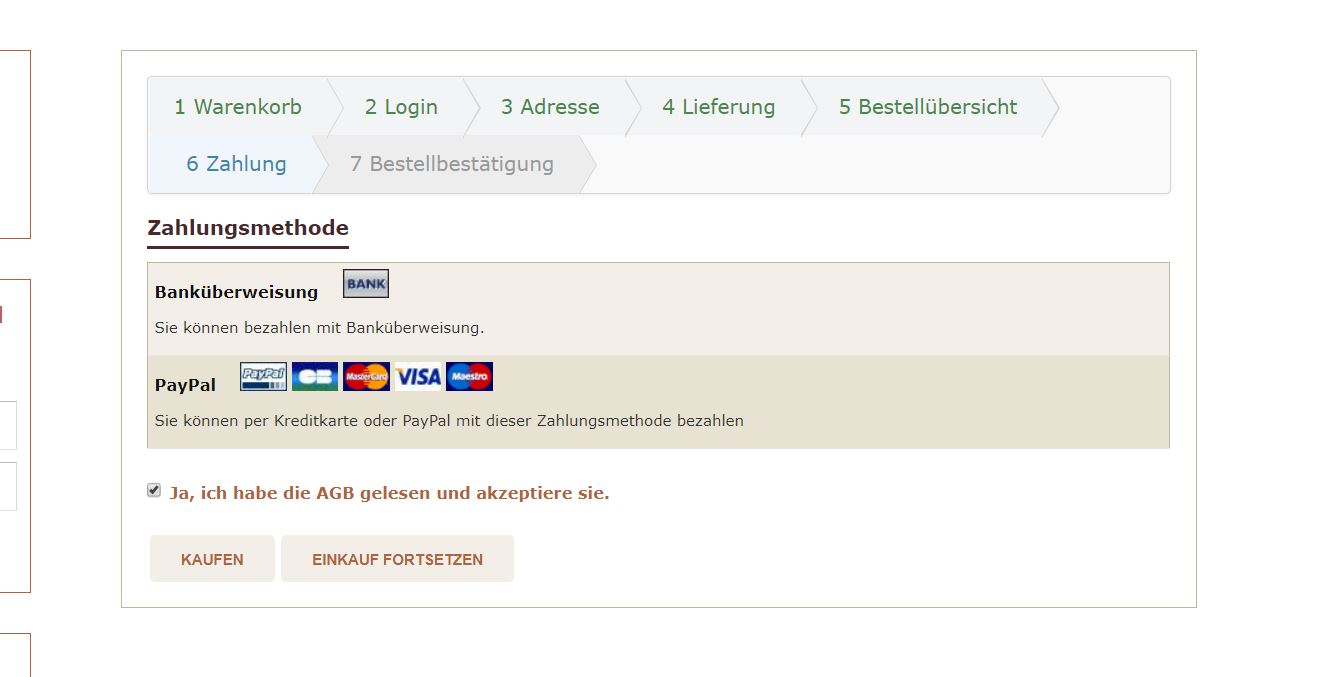
Any suggestions??
Thanks in advance!
Best Regards!
-- HikaShop version -- : 4.0.2
-- Joomla version -- : 3.9.1
-- PHP version -- : 7.2.12
-- Browser(s) name and version -- : Chrome
Hi!
During the checkout process, when I get to the payment options, I can't see with payment is selected
I can click between the two options(Banküberweisung or Paypal) and nothing changes.
If I carry on it will go to one the payment options, but I can't say which one was chosen
Any suggestions??
Thanks in advance!
Best Regards!
Please Log in or Create an account to join the conversation.

7 years 9 months ago #302914
by nicolas
Replied by nicolas on topic Payment option - selected payment is not clear
Hi,
The checkout has been customized on your website to remove the radio buttons which allow the customers to easily see which payment method is selected.
Also, I can see that you're using the old checkout system of HikaShop.
I would recommend switching to the new checkout of Hikashop by turning off the "checkout legacy" setting of the HikaShop configuration.
That will remove the customization of the checkout as it will use new views etc.
Otherwise, you can look at the CSS around the payment method selection area with your browser inspector (F12) and look for the CSS hiding the input radios.
The checkout has been customized on your website to remove the radio buttons which allow the customers to easily see which payment method is selected.
Also, I can see that you're using the old checkout system of HikaShop.
I would recommend switching to the new checkout of Hikashop by turning off the "checkout legacy" setting of the HikaShop configuration.
That will remove the customization of the checkout as it will use new views etc.
Otherwise, you can look at the CSS around the payment method selection area with your browser inspector (F12) and look for the CSS hiding the input radios.
Please Log in or Create an account to join the conversation.
Time to create page: 0.147 seconds