
- Posts: 21
- Thank you received: 2
Payment Method - Authorize Accept JS
7 years 7 months ago #304657
by ACMLLC
Payment Method - Authorize Accept JS was created by ACMLLC
-- HikaShop version -- : 4.0.2
-- Joomla version -- : 3.9.3
-- PHP version -- : 7.1.26
-- Browser(s) name and version -- : Firefox 65.0.2
Hello,
We purchased the Authorize Accept JS plugin last night and wanted to try it.
There seems to be two issues:
1) a misspelled file name in the package, and
2) we are unable to Finish/Complete Checkout due to a dead button with no action on a click.
We've been running successfully with the old Authorize.net "AIM" plugin on this test site as well as on production. We are even using the latest development release of this plugin (authorize.zip) that accomodates the new SHA512 security key.
But back to the Accept JS payment method that we now want to use....
We noticed an issue right away upon installation. We get a warning about a non-existent file:
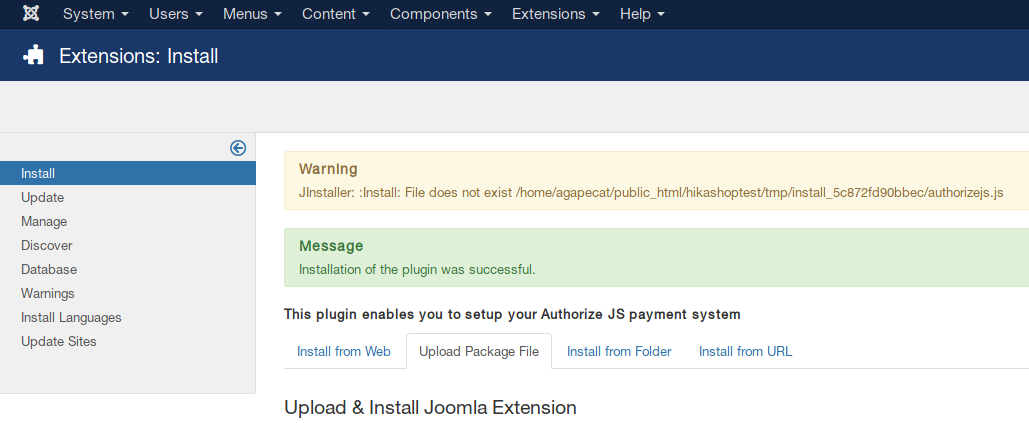
I looked in package and saw a file named "authorisejs.js". Other files were named using a "z" instead of an "s".
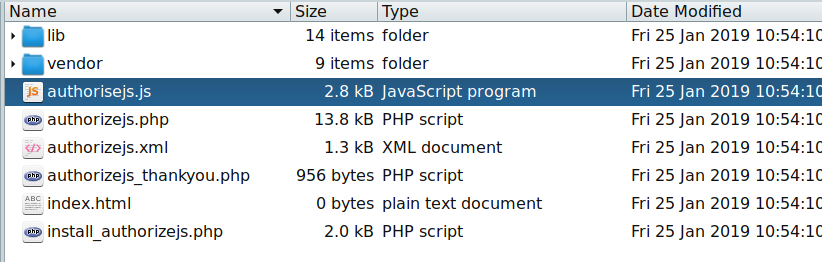
I checked the XML file and saw that the file name is referred to with a "z".
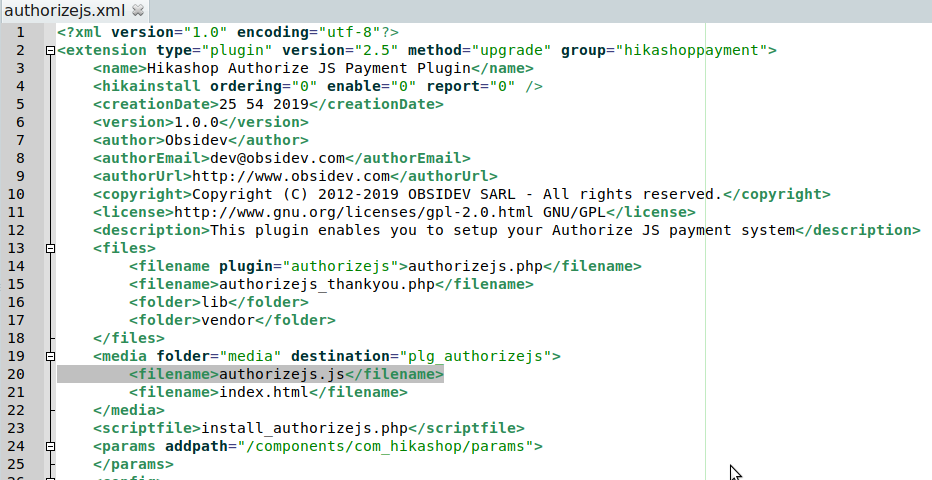
I renamed the file to "authorizejs.js" and reinstalled. The error disappeared.
I began testing a product purchase and began checkout. I entered the Credit Card info, but when I click Complete Checkout (Finish) button, nothing happens. We are running with a Joomlart template JAT3v2 framework and no other scripts on the page but Hikashop's.
I'm running on a test site with maximum messages and in Debug mode. We are also forcing SSL on backend and frontend.
Can you recommend a test or something in particular to check? If needed, I can mail you credentials to our test site. Thanks!
-- Joomla version -- : 3.9.3
-- PHP version -- : 7.1.26
-- Browser(s) name and version -- : Firefox 65.0.2
Hello,
We purchased the Authorize Accept JS plugin last night and wanted to try it.
There seems to be two issues:
1) a misspelled file name in the package, and
2) we are unable to Finish/Complete Checkout due to a dead button with no action on a click.
We've been running successfully with the old Authorize.net "AIM" plugin on this test site as well as on production. We are even using the latest development release of this plugin (authorize.zip) that accomodates the new SHA512 security key.
But back to the Accept JS payment method that we now want to use....
We noticed an issue right away upon installation. We get a warning about a non-existent file:
I looked in package and saw a file named "authorisejs.js". Other files were named using a "z" instead of an "s".
I checked the XML file and saw that the file name is referred to with a "z".
I renamed the file to "authorizejs.js" and reinstalled. The error disappeared.
I began testing a product purchase and began checkout. I entered the Credit Card info, but when I click Complete Checkout (Finish) button, nothing happens. We are running with a Joomlart template JAT3v2 framework and no other scripts on the page but Hikashop's.
I'm running on a test site with maximum messages and in Debug mode. We are also forcing SSL on backend and frontend.
Can you recommend a test or something in particular to check? If needed, I can mail you credentials to our test site. Thanks!
Please Log in or Create an account to join the conversation.

7 years 7 months ago #304659
by Jerome
Jerome - Obsidev.com
HikaMarket & HikaSerial developer / HikaShop core dev team.
Replied by Jerome on topic Payment Method - Authorize Accept JS
Hello,
First, sorry for the inconvenient.
Authorize JS was using the same kind of structure than Stripe V3 but unfortunately, the packaging script for production was not up to date compared to our development packaging script.
I've updated the plugin, so you can re-download it in order to have the version where the javascript is right in the "media" folder.
It looks like your template is hiding the Payment "submit" button ; but when I display it and click on the "submit" button, I got the message from AuthorizeJS :
[code]E_WC_04: Please provide mandatory field to library.[/quote]
That issue indicate that there is a missing element in the submitted data.
Unfortunately, with the javascript compression in your website, I'm not able to perform deeper analysis ; I would require a FTP access so I can put some debugging data directly in the file and check what is that missing field.
Please use the "contact us" form to send us such private information.
Regards,
First, sorry for the inconvenient.
Authorize JS was using the same kind of structure than Stripe V3 but unfortunately, the packaging script for production was not up to date compared to our development packaging script.
I've updated the plugin, so you can re-download it in order to have the version where the javascript is right in the "media" folder.
It looks like your template is hiding the Payment "submit" button ; but when I display it and click on the "submit" button, I got the message from AuthorizeJS :
[code]E_WC_04: Please provide mandatory field to library.[/quote]
That issue indicate that there is a missing element in the submitted data.
Unfortunately, with the javascript compression in your website, I'm not able to perform deeper analysis ; I would require a FTP access so I can put some debugging data directly in the file and check what is that missing field.
Please use the "contact us" form to send us such private information.
Regards,
Jerome - Obsidev.com
HikaMarket & HikaSerial developer / HikaShop core dev team.
Please Log in or Create an account to join the conversation.
7 years 7 months ago - 7 years 7 months ago #304791
by ACMLLC
Replied by ACMLLC on topic Payment Method - Authorize Accept JS
Hi Jerome,
In your latest build -- in the media folder -- the filename is still misspelled. It is "authorisejs.js", but it should be "authorizejs.js" (with a "z").
In addition, I have modified my own file with the following:
Replace
with this
You may want to add this mod to your next build.
Many thanks!
In your latest build -- in the media folder -- the filename is still misspelled. It is "authorisejs.js", but it should be "authorizejs.js" (with a "z").
In addition, I have modified my own file with the following:
Replace
Code:
console.log(resp.messages.message[i].code + ": " + resp.messages.message[i].text);
with this
Code:
console.log(resp.messages.message[i].code + ": " + resp.messages.message[i].text);
alert( resp.messages.message[i].text );
You may want to add this mod to your next build.
Many thanks!
Last edit: 7 years 7 months ago by ACMLLC.
The following user(s) said Thank You: Jerome
Please Log in or Create an account to join the conversation.
7 years 7 months ago #304832
by Jerome
Jerome - Obsidev.com
HikaMarket & HikaSerial developer / HikaShop core dev team.
Replied by Jerome on topic Payment Method - Authorize Accept JS
Hello,
The filename typo and the display patches have been added into the new package.
Regards,
The filename typo and the display patches have been added into the new package.
Regards,
Jerome - Obsidev.com
HikaMarket & HikaSerial developer / HikaShop core dev team.
Please Log in or Create an account to join the conversation.
7 years 5 months ago - 7 years 5 months ago #307172
by efocus
Replied by efocus on topic Payment Method - Authorize Accept JS
Please add a version number to your zip file in future. I had downloaded this months ago. Finally ready to install, I saw that the file name was the same so I used the one I already had. I had to start over. If there had been some indication of change, I would have made sure I used the current one. Thanks!
Last edit: 7 years 5 months ago by efocus.
Please Log in or Create an account to join the conversation.
7 years 5 months ago #307208
by Jerome
Jerome - Obsidev.com
HikaMarket & HikaSerial developer / HikaShop core dev team.
Replied by Jerome on topic Payment Method - Authorize Accept JS
Hello,
Thank you for you feedback, I will send it to the rest of the team for future improvement regarding the marketplace.
Regards,
Thank you for you feedback, I will send it to the rest of the team for future improvement regarding the marketplace.
Regards,
Jerome - Obsidev.com
HikaMarket & HikaSerial developer / HikaShop core dev team.
Please Log in or Create an account to join the conversation.
7 years 5 months ago #307214
by efocus
Replied by efocus on topic Payment Method - Authorize Accept JS
You’re welcome!
Do you have more detailed instructions for installation somewhere like you do for the older SIM payment method? It would be helpful for others. I had never used the Public Key for SIM and so I thought that the Signature Key was the same thing but I kept getting the error message that meant I needed a new Transaction Key. I even called Authorize and the tech thought I was doing it right (she was wrong). After going into the Authorize.net’s developer area, I discovered that they are not the same. Once I generated a Public Key, everything worked. Don’t even need the Signature Key.
Another issue: I used the same Return URL in Authorize Accept JS as I did for the SIM version. It brings up a 404 Page Not Found error. I left it blank and it gives the proper message so I may just leave it alone. But the message is so tiny, I prefer the Return URL but I don’t know why it doesn’t work. I tried the URL without the domain at front (which works on SIM payment method); and, I tried the URL with the MyDomain.com/ in front. Neither work. I tested the Cancel URL too and it didn’t work for me either. Not a big deal. I’m embarrassed to say I spent 4 hours trying to figure all this out with a few mistakes on my end — so I’m not in a hurry to revisit this! It usually only takes me 15-30 minutes to install a payment plugin when there are instructions.
Thanks for your help!
Do you have more detailed instructions for installation somewhere like you do for the older SIM payment method? It would be helpful for others. I had never used the Public Key for SIM and so I thought that the Signature Key was the same thing but I kept getting the error message that meant I needed a new Transaction Key. I even called Authorize and the tech thought I was doing it right (she was wrong). After going into the Authorize.net’s developer area, I discovered that they are not the same. Once I generated a Public Key, everything worked. Don’t even need the Signature Key.
Another issue: I used the same Return URL in Authorize Accept JS as I did for the SIM version. It brings up a 404 Page Not Found error. I left it blank and it gives the proper message so I may just leave it alone. But the message is so tiny, I prefer the Return URL but I don’t know why it doesn’t work. I tried the URL without the domain at front (which works on SIM payment method); and, I tried the URL with the MyDomain.com/ in front. Neither work. I tested the Cancel URL too and it didn’t work for me either. Not a big deal. I’m embarrassed to say I spent 4 hours trying to figure all this out with a few mistakes on my end — so I’m not in a hurry to revisit this! It usually only takes me 15-30 minutes to install a payment plugin when there are instructions.
Thanks for your help!
Please Log in or Create an account to join the conversation.
7 years 5 months ago #307215
by efocus
Replied by efocus on topic Payment Method - Authorize Accept JS
One other question: Which version of Accept.js did you use? The PCI-DSS SAQ A-EP solution or the PCI-DSS SAQ A compliant way. I need to be able to tell my client when she goes through her PCI compliance process.
Please Log in or Create an account to join the conversation.
7 years 5 months ago #307264
by Jerome
Jerome - Obsidev.com
HikaMarket & HikaSerial developer / HikaShop core dev team.
Replied by Jerome on topic Payment Method - Authorize Accept JS
Hello,
The plugin use the first option (its own payment form, without AcceptUI), so it's the "PCI-DSS SAQ A-EP" mode.
Regarding the documentation, I have to see how we will handle that since the plugin is not part of the HikaShop core (so does the support).
Authorize do have documentation about Accept JS and there is a part which talk about the generation of the credentials (public key) :
developer.authorize.net/api/reference/fe...he_Public_Client_Key
About the return URL, that's strange since there is nothing in the plugin to handle it ; that's something related to the HikaShop core for all payment plugins (once the plugin confirm the order, the core do the redirection with the configured URL).
Maybe the HikaShop team would be able to help you with that problem.
Regards,
The plugin use the first option (its own payment form, without AcceptUI), so it's the "PCI-DSS SAQ A-EP" mode.
Regarding the documentation, I have to see how we will handle that since the plugin is not part of the HikaShop core (so does the support).
Authorize do have documentation about Accept JS and there is a part which talk about the generation of the credentials (public key) :
developer.authorize.net/api/reference/fe...he_Public_Client_Key
About the return URL, that's strange since there is nothing in the plugin to handle it ; that's something related to the HikaShop core for all payment plugins (once the plugin confirm the order, the core do the redirection with the configured URL).
Maybe the HikaShop team would be able to help you with that problem.
Regards,
Jerome - Obsidev.com
HikaMarket & HikaSerial developer / HikaShop core dev team.
Please Log in or Create an account to join the conversation.
7 years 5 months ago #307267
by efocus
Replied by efocus on topic Payment Method - Authorize Accept JS
Thank you for your answers! Yep, that’s the developer page I found that clued me in about the public key. I will contact HikaShop regarding the Return URL.
Please Log in or Create an account to join the conversation.
- dlaughter
-

Less
More
- Thank you received: 0
6 years 6 months ago #318029
by dlaughter
Replied by dlaughter on topic Payment Method - Authorize Accept JS
I'm curious what you might have found out about the return URL. I also placed my preferred return url in and the flow does not return to the desired url after finish/payment. What it seems to be doing is that it stays on category/checkout/confirm and I just receive a blank page. Then, I had the same result as you when leaving the return url blank, it also stays on category/checkout/confirm but this time, it delivers a full template page but just populates text simply stating Thank You for your purchase.
Of course a dedicate order confirmation page or customer account page is what I would like the user to return to after purchase. So I'm wondering if you were able to find something out on this. Thanks!
Of course a dedicate order confirmation page or customer account page is what I would like the user to return to after purchase. So I'm wondering if you were able to find something out on this. Thanks!
Please Log in or Create an account to join the conversation.

6 years 6 months ago #318047
by nicolas
Replied by nicolas on topic Payment Method - Authorize Accept JS
Hi,
If you have a completely blank page, then you have a fatal error during the processing of the page.
It can come from many things.
In that case, turn on the "error reporting" and "debug mode" settings of the Joomla configuration and look at that page again. You should hopefully get the error message which contains important information to understand where the problem is coming from.
If you have a completely blank page, then you have a fatal error during the processing of the page.
It can come from many things.
In that case, turn on the "error reporting" and "debug mode" settings of the Joomla configuration and look at that page again. You should hopefully get the error message which contains important information to understand where the problem is coming from.
Please Log in or Create an account to join the conversation.
- dlaughter
-
Less
More
- Thank you received: 0
6 years 6 months ago #318070
by dlaughter
Replied by dlaughter on topic Payment Method - Authorize Accept JS
Thanks Nicolas. So I do get a fatal error which is this:
Fatal error: require_once(): Failed opening required '(server)/httpdocs/libraries/joomla/document/html/renderer/head.php' (include_path='.:/opt/alt/php74/usr/share/pear') in /(server)/httpdocs/templates/(templatename)/error.php on line 28.
Line 28 of error.php is this:
require_once(JPATH_LIBRARIES.'/joomla/document/html/renderer/head.php');
From what I can tell, there is no such document/html/renderer/head.php inside /httpdocs/libraries/joomla/.
Could this be the issue?
For what it's worth, I do have success with Accept JS without a url in Return URL setting and I can place more descriptive text to the customer after purchase via the language file. But I would like to have a more detailed post purchase landing page.
Fatal error: require_once(): Failed opening required '(server)/httpdocs/libraries/joomla/document/html/renderer/head.php' (include_path='.:/opt/alt/php74/usr/share/pear') in /(server)/httpdocs/templates/(templatename)/error.php on line 28.
Line 28 of error.php is this:
require_once(JPATH_LIBRARIES.'/joomla/document/html/renderer/head.php');
From what I can tell, there is no such document/html/renderer/head.php inside /httpdocs/libraries/joomla/.
Could this be the issue?
For what it's worth, I do have success with Accept JS without a url in Return URL setting and I can place more descriptive text to the customer after purchase via the language file. But I would like to have a more detailed post purchase landing page.
Please Log in or Create an account to join the conversation.
6 years 6 months ago #318071
by Jerome
Jerome - Obsidev.com
HikaMarket & HikaSerial developer / HikaShop core dev team.
Replied by Jerome on topic Payment Method - Authorize Accept JS
Hello,
You should contact your template provider in order to fix that issue to be compatible with Joomla 3.9.
The head renderer can be fond under : libraries\src\Document\Renderer\Html\HeadRenderer.php
Once the template will be fix you will be able to see the error details.
Regards,
You should contact your template provider in order to fix that issue to be compatible with Joomla 3.9.
The head renderer can be fond under : libraries\src\Document\Renderer\Html\HeadRenderer.php
Once the template will be fix you will be able to see the error details.
Regards,
Jerome - Obsidev.com
HikaMarket & HikaSerial developer / HikaShop core dev team.
Please Log in or Create an account to join the conversation.
6 years 5 months ago #319482
by sap-corp
Replied by sap-corp on topic Payment Method - Authorize Accept JS
I appreciate your help and providing a plugin to use a supported API for Authorize.Net! We just purchased this and set it up on our site, but I get the “Your card token has expired” error when checking out.
Please Log in or Create an account to join the conversation.
6 years 5 months ago #319492
by Jerome
Jerome - Obsidev.com
HikaMarket & HikaSerial developer / HikaShop core dev team.
Replied by Jerome on topic Payment Method - Authorize Accept JS
Hello,
Which HikaShop version number are you using ?
Do you have the HikaShop "legacy" checkout ?
You should have the Authorize payment form directly in the payment listing ; if you do not have it, the expiration message is normal.
The Authorize JS lib requires HTTPS, if your website is not using a SSL certificate, the javascript won't run and you won't have the display of the payment form.
Regards,
Which HikaShop version number are you using ?
Do you have the HikaShop "legacy" checkout ?
You should have the Authorize payment form directly in the payment listing ; if you do not have it, the expiration message is normal.
The Authorize JS lib requires HTTPS, if your website is not using a SSL certificate, the javascript won't run and you won't have the display of the payment form.
Regards,
Jerome - Obsidev.com
HikaMarket & HikaSerial developer / HikaShop core dev team.
The following user(s) said Thank You: sap-corp
Please Log in or Create an account to join the conversation.
6 years 5 months ago - 6 years 5 months ago #319556
by sap-corp
Replied by sap-corp on topic Payment Method - Authorize Accept JS
-- HikaShop version -- : 4.3.0
-- Joomla version -- : 3.9.18
-- PHP version -- : 7.2
-- Browser(s) name and version -- : Google Chrome 83.0.4103.61
-- HTTPS/SSL - Yes
-- Payment form in payment listing - Yes
-- "Legacy" checkout - Yes this was enabled
After I disabled legacy options for add to cart and checkout it worked! I'm sorry I missed that part on the product page. Thank you again for your assistance.
-- Joomla version -- : 3.9.18
-- PHP version -- : 7.2
-- Browser(s) name and version -- : Google Chrome 83.0.4103.61
-- HTTPS/SSL - Yes
-- Payment form in payment listing - Yes
-- "Legacy" checkout - Yes this was enabled
After I disabled legacy options for add to cart and checkout it worked! I'm sorry I missed that part on the product page. Thank you again for your assistance.
Last edit: 6 years 5 months ago by sap-corp.
The following user(s) said Thank You: Jerome
Please Log in or Create an account to join the conversation.
6 years 5 months ago #319607
by sap-corp
Replied by sap-corp on topic Payment Method - Authorize Accept JS
After putting this plugin in place payments are being processed, but we aren't receiving the same payment notification emails and the order numbers and details are not in the auto-receipt from Authorize. The built-in plugin that uses depreciated API methods has the options for "Allow payment notifications from Authorize.net" and "Send details of the order" in its settings. Would these be the settings that allowed for this information? Is there a way to implement these same settings in the supported Accept.JS plugin?
Please Log in or Create an account to join the conversation.
- dlaughter
-
Less
More
- Thank you received: 0
6 years 5 months ago #319613
by dlaughter
Replied by dlaughter on topic Payment Method - Authorize Accept JS
I noticed this right away also and mentioned it (off forum) as well. It is useful to have all info on the notifications but I can get by without it. Although I would like to see it included in an update.
From what I recall on testing it a couple weeks ago, the Send Details of the Order setting on the deprecated api only sends the line item info and doesn't control the customer billing or customer shipping info.
From what I recall on testing it a couple weeks ago, the Send Details of the Order setting on the deprecated api only sends the line item info and doesn't control the customer billing or customer shipping info.
Please Log in or Create an account to join the conversation.
6 years 5 months ago #319629
by Jerome
Jerome - Obsidev.com
HikaMarket & HikaSerial developer / HikaShop core dev team.
Replied by Jerome on topic Payment Method - Authorize Accept JS
Hello,
They are two types of payment plugin in HikaShop.
Some do provide a payment screen once the order is created.
Other can process the payment during the order creation (and before the order has an order number).
The deprecated Authorize plugin was using the first mode while AuthorizeJS is using the second one.
Because the workflow is different, the way than emails are handle are different too.
When using AuthorizeJS, the order creation email sent by HikaShop is directly confirmed.
So I suppose that you unpublished that email because the payment method you were using before was using the first mode (thus need to send two emails, one for the creation and the second one for the confirmation).
Regards,
They are two types of payment plugin in HikaShop.
Some do provide a payment screen once the order is created.
Other can process the payment during the order creation (and before the order has an order number).
The deprecated Authorize plugin was using the first mode while AuthorizeJS is using the second one.
Because the workflow is different, the way than emails are handle are different too.
When using AuthorizeJS, the order creation email sent by HikaShop is directly confirmed.
So I suppose that you unpublished that email because the payment method you were using before was using the first mode (thus need to send two emails, one for the creation and the second one for the confirmation).
Regards,
Jerome - Obsidev.com
HikaMarket & HikaSerial developer / HikaShop core dev team.
The following user(s) said Thank You: sap-corp
Please Log in or Create an account to join the conversation.
Time to create page: 0.121 seconds