

- Posts: 4
- Thank you received: 0
Payplug configuration
7 years 2 weeks ago #311064
by MARCHAL
Payplug configuration was created by MARCHAL
-- HikaShop version -- : essential 4.2.1
-- Joomla version -- : 3.9.8
-- PHP version -- : 7.1.30
-- Browser(s) name and version -- : firefox 69.0
-- Error-message(debug-mod must be tuned on) -- : Message
HTTP error (403) : Forbidden
Succès de la sauvegarde
When saving the payplug payment plugin configuration, the following error message appears: "HTTP error message (403): Forbidden; Backup success"
The directory media/com_hikashop/ has the good rights (777)
The adress and password of payplug account are correct
Impact: When I order an item, I get the following error message: The file /home/bernacrenh/www/essai_payplug/media/com_hikashop/payplug_parameters.json is missing. This file is generated when you save the settings of your PayPlug payment method. So please check that the permissions are OK in that folder and save the settings of the the PayPlug payment method again.
Can you help me?
Thank you
-- Joomla version -- : 3.9.8
-- PHP version -- : 7.1.30
-- Browser(s) name and version -- : firefox 69.0
-- Error-message(debug-mod must be tuned on) -- : Message
HTTP error (403) : Forbidden
Succès de la sauvegarde
When saving the payplug payment plugin configuration, the following error message appears: "HTTP error message (403): Forbidden; Backup success"
The directory media/com_hikashop/ has the good rights (777)
The adress and password of payplug account are correct
Impact: When I order an item, I get the following error message: The file /home/bernacrenh/www/essai_payplug/media/com_hikashop/payplug_parameters.json is missing. This file is generated when you save the settings of your PayPlug payment method. So please check that the permissions are OK in that folder and save the settings of the the PayPlug payment method again.
Can you help me?
Thank you
Please Log in or Create an account to join the conversation.

7 years 2 weeks ago - 7 years 2 weeks ago #311069
by nicolas
Replied by nicolas on topic Payplug configuration
Hi,
I don't know why you would have that error. Maybe your server has some kind of protection system and is blocking the saving for some reason.
What I can recommend as an alternative is to install and configure this PayPlug v2 plugin:
It uses the latest API from PayPlug and is compatible with the DSP2 directive:
www.latribune.fr/entreprises-finance/ban...est-quoi-764449.html
This new Paylug plugin will be added in the next version of HikaShop and doesn't require the creation of a payplug_parameters.json file like the old one needed. So hopefully, it will circumvent the problem.
I don't know why you would have that error. Maybe your server has some kind of protection system and is blocking the saving for some reason.
What I can recommend as an alternative is to install and configure this PayPlug v2 plugin:
This attachment is hidden for guests.
Please log in or register to see it.
Please log in or register to see it.
It uses the latest API from PayPlug and is compatible with the DSP2 directive:
www.latribune.fr/entreprises-finance/ban...est-quoi-764449.html
This new Paylug plugin will be added in the next version of HikaShop and doesn't require the creation of a payplug_parameters.json file like the old one needed. So hopefully, it will circumvent the problem.
Last edit: 7 years 2 weeks ago by nicolas.
Please Log in or Create an account to join the conversation.
7 years 2 weeks ago #311124
by MARCHAL
Replied by MARCHAL on topic Payplug configuration
Hi,
Thank you for your quick reply
Unfortunately it doesn't work
I installed the new plug-in and turned off the old one
In the field "token" I entered the API key given by PAYPLUG but when I click to pay, I receive the message below
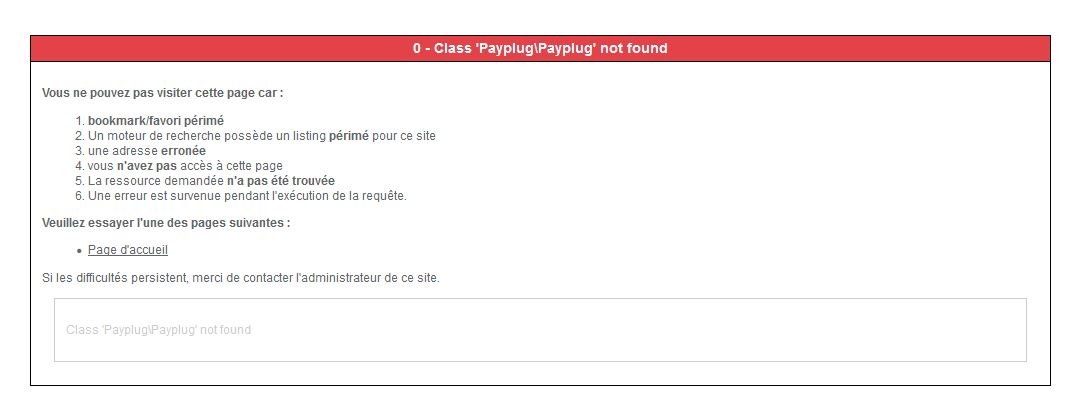
Thank you for your quick reply
Unfortunately it doesn't work
I installed the new plug-in and turned off the old one
In the field "token" I entered the API key given by PAYPLUG but when I click to pay, I receive the message below
Please Log in or Create an account to join the conversation.
7 years 1 week ago - 7 years 1 week ago #311135
by nicolas
Replied by nicolas on topic Payplug configuration
Hi,
Uninstall the plugin and make sure that your don't have the folder plugins/hikashoppayment/payplug2/
Then, install the one below and it should prevent that error.
Uninstall the plugin and make sure that your don't have the folder plugins/hikashoppayment/payplug2/
Then, install the one below and it should prevent that error.
This attachment is hidden for guests.
Please log in or register to see it.
Please log in or register to see it.
Last edit: 7 years 1 week ago by nicolas.
The following user(s) said Thank You: MARCHAL
Please Log in or Create an account to join the conversation.
7 years 1 week ago #311185
by MARCHAL
Replied by MARCHAL on topic Payplug configuration
Thank you very much
It works now perfectly!
It works now perfectly!
Please Log in or Create an account to join the conversation.
Time to create page: 0.182 seconds