

- Posts: 6
- Thank you received: 0
Update of PayPal payment plugin ?
3 years 6 months ago #350622
by webbee
Update of PayPal payment plugin ? was created by webbee
-- HikaShop version -- : 4.7.2
-- Joomla version -- : 4.2.8
-- PHP version -- : 8.0.28
-- Browser(s) name and version -- : Chrome 111.0.5563.147
Hi there at Hikashop,
We have received a mail from PayPal saying that PayPal integration on our website is not up-to-date, not allowing new services from PayPal.
Here is the link PayPal gives in this message for making this update:
developer.paypal.com/docs/checkout/stand...952306084.1680518269
They also propose in this mail links to WooCommerce and Prestashop that already have their plugin updated.
What do you think about that ? Are you aware about this PayPal update ?
Thanks in anticipation for your feedback.
-- Joomla version -- : 4.2.8
-- PHP version -- : 8.0.28
-- Browser(s) name and version -- : Chrome 111.0.5563.147
Hi there at Hikashop,
We have received a mail from PayPal saying that PayPal integration on our website is not up-to-date, not allowing new services from PayPal.
Here is the link PayPal gives in this message for making this update:
developer.paypal.com/docs/checkout/stand...952306084.1680518269
They also propose in this mail links to WooCommerce and Prestashop that already have their plugin updated.
What do you think about that ? Are you aware about this PayPal update ?
Thanks in anticipation for your feedback.
Please Log in or Create an account to join the conversation.

3 years 6 months ago #350624
by nicolas
Replied by nicolas on topic Update of PayPal payment plugin ?
Hi,
Yes, we are aware. We actually developed a new plugin for PayPal at the end of last year in order to integrate with Checkout.
We've been using it on our website since then.
All you need to do is to go in the menu System>Payment methods, click on the "new" button, select the PayPal Checkout payment plugin, and configure it. You'll need to retrieve the client ID and client secret from your PayPal account to do that:
help.import2.com/en/articles/5263267-how...client-id-and-secret
Yes, we are aware. We actually developed a new plugin for PayPal at the end of last year in order to integrate with Checkout.
We've been using it on our website since then.
All you need to do is to go in the menu System>Payment methods, click on the "new" button, select the PayPal Checkout payment plugin, and configure it. You'll need to retrieve the client ID and client secret from your PayPal account to do that:
help.import2.com/en/articles/5263267-how...client-id-and-secret
Please Log in or Create an account to join the conversation.
Less
More
- Posts: 608
- Thank you received: 13
3 years 5 months ago #350659
by mohairbears
Replied by mohairbears on topic Update of PayPal payment plugin ?
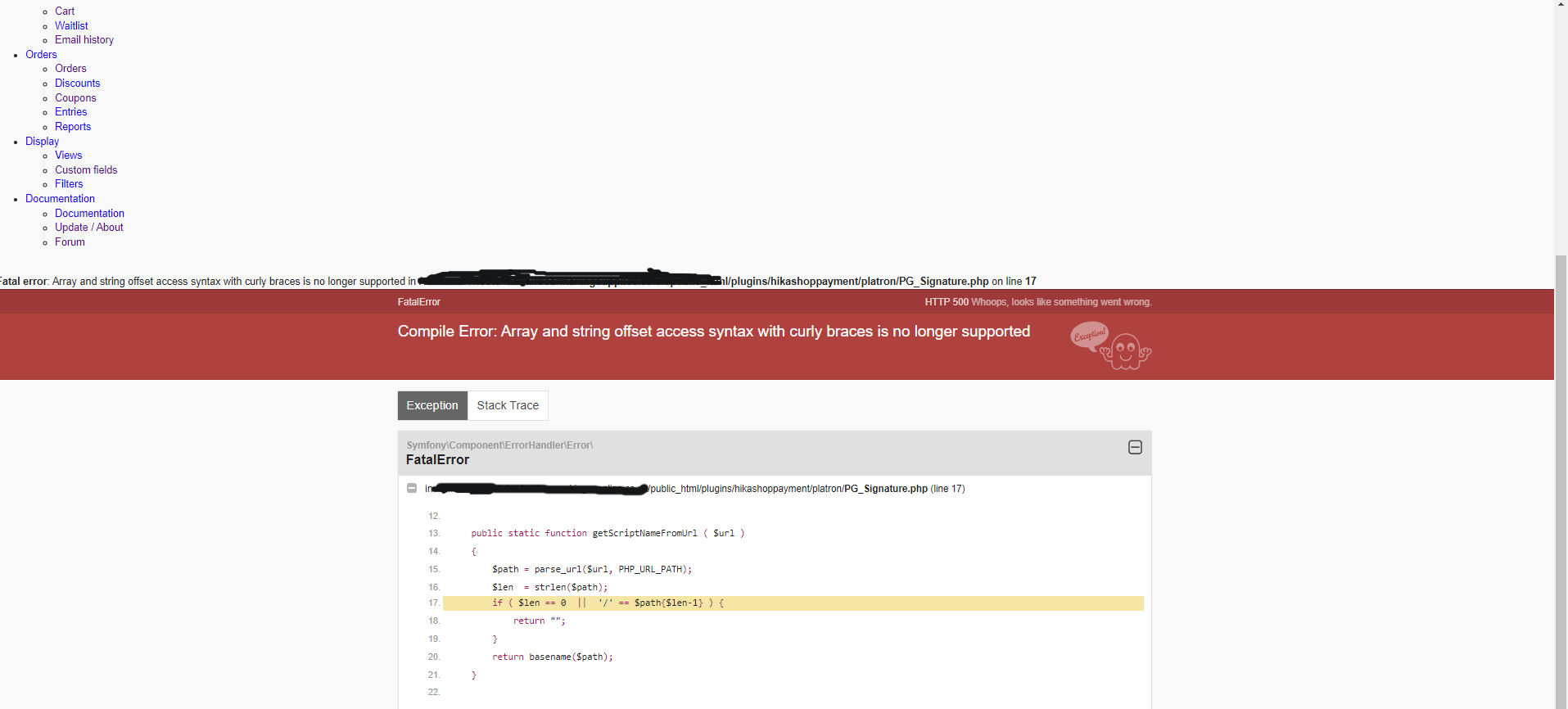
Hi, When I click on the "new" button I get a 500 error, see attached?
Please Log in or Create an account to join the conversation.
3 years 5 months ago #350661
by nicolas
Replied by nicolas on topic Update of PayPal payment plugin ?
Hi,
This error comes from the platron payment plugin.
That plugin is not included anymore in HikaShop and the old version you have on your website is not compatible with PHP8.
Uninstall the plugin if you're not using it. The problem will then be solved.
This error comes from the platron payment plugin.
That plugin is not included anymore in HikaShop and the old version you have on your website is not compatible with PHP8.
Uninstall the plugin if you're not using it. The problem will then be solved.
The following user(s) said Thank You: mohairbears
Please Log in or Create an account to join the conversation.
Less
More
- Posts: 608
- Thank you received: 13
3 years 4 months ago - 3 years 4 months ago #351462
by mohairbears
Replied by mohairbears on topic Update of PayPal payment plugin ?
Hi, Since using this new PayPal Checkout, I am now finding that the correct total is NOT being sent to PayPal and has cost me a lot of money!!!!
WHY? this seems to be when multiple products are in the cart i.e. more than 1 of the same items?
The correct subtotal is shown in Hikashop but is charged wrong in PayPal?
Yes the 'round prices' is set to 'yes'
Rgds
WHY? this seems to be when multiple products are in the cart i.e. more than 1 of the same items?
The correct subtotal is shown in Hikashop but is charged wrong in PayPal?
Yes the 'round prices' is set to 'yes'
Rgds
Last edit: 3 years 4 months ago by mohairbears.
Please Log in or Create an account to join the conversation.
Less
More
- Posts: 608
- Thank you received: 13
3 years 4 months ago - 3 years 4 months ago #351463
by mohairbears
Replied by mohairbears on topic Update of PayPal payment plugin ?
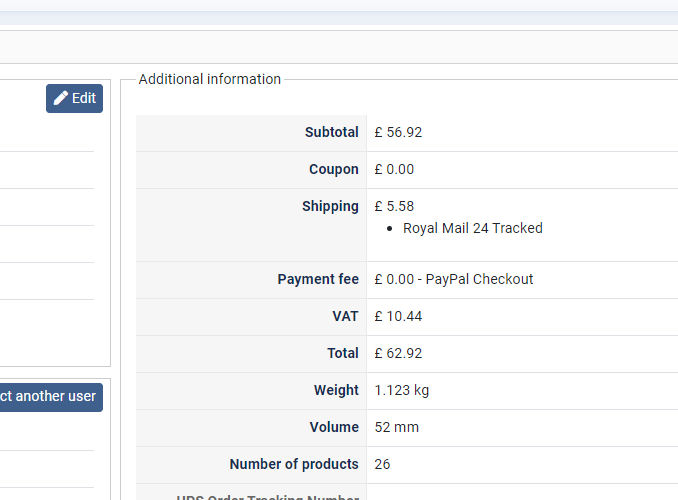
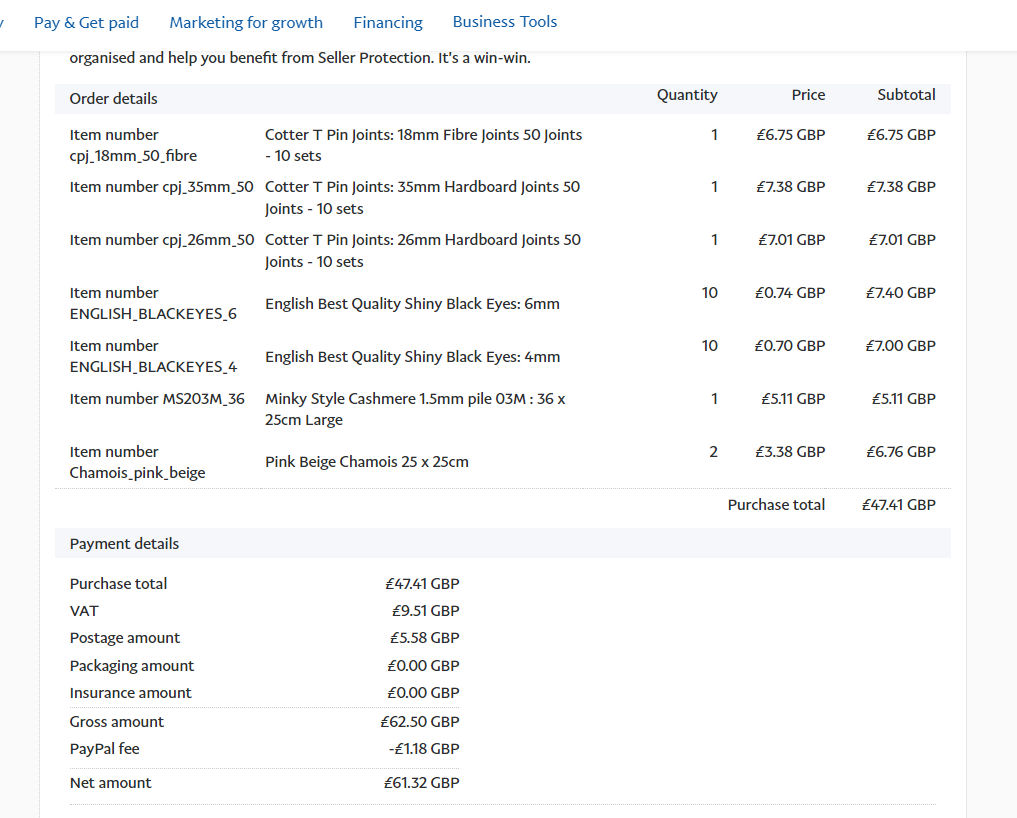
Hi, I think I have found the issue but don't know how to solve it?
see attached Hika and PayPal totals. It appears VAT is NOT being charged on shipping in PayPal even though it is in Hika? Why is PayPal changing the total when it should match Hika?
see attached Hika and PayPal totals. It appears VAT is NOT being charged on shipping in PayPal even though it is in Hika? Why is PayPal changing the total when it should match Hika?
Last edit: 3 years 4 months ago by mohairbears.
Please Log in or Create an account to join the conversation.
3 years 4 months ago #351464
by nicolas
Replied by nicolas on topic Update of PayPal payment plugin ?
Hi,
From what I can see of your screenshots, this order was made while the "round prices during calculations" setting was turned off and that's the difference you get.
The sub total of 56.92 in your order corresponds to the subtotal without VAT of 47.41 + the VAT of 9.51
The shipping fee of 5.58 already includes the taxes.
So if you sum up 56.92 + 5.58 you end up with 62.50 which is the total displayed by PayPal. So everything matches.
The only difference is the total calculated by HikaShop which is 51 cents higher and I think it's because of the roundings during the sums being done to get the full total.
Can you please check again ?
Now that the "round prices during calculations" setting is turned on, please place an order with the exact same amount of products and same address and same shipping method on your frontend, and you should normally end up with a total of 62.50 in HikaShop, and thus it will be the exact same total calculated by PayPal.
From what I can see of your screenshots, this order was made while the "round prices during calculations" setting was turned off and that's the difference you get.
The sub total of 56.92 in your order corresponds to the subtotal without VAT of 47.41 + the VAT of 9.51
The shipping fee of 5.58 already includes the taxes.
So if you sum up 56.92 + 5.58 you end up with 62.50 which is the total displayed by PayPal. So everything matches.
The only difference is the total calculated by HikaShop which is 51 cents higher and I think it's because of the roundings during the sums being done to get the full total.
Can you please check again ?
Now that the "round prices during calculations" setting is turned on, please place an order with the exact same amount of products and same address and same shipping method on your frontend, and you should normally end up with a total of 62.50 in HikaShop, and thus it will be the exact same total calculated by PayPal.
Please Log in or Create an account to join the conversation.
Less
More
- Posts: 608
- Thank you received: 13
3 years 3 months ago #352121
by mohairbears
Replied by mohairbears on topic Update of PayPal payment plugin ?
Hi Sorry but I'm still having issues with this plugin?
The round prices was turned off but turned back on after a couple of days, looks like it did not reset it though? that's now resolved.
New issue is it is not charging VAT on the shipping cost when its passed to PayPal, the VAT is showing on the Hikashop invoice but then not applied in PayPal?
Not sure what's going off as the WorldPay payments are correct and used the same shipping methods? so guessing its something to do the the PayPal plugin?
Rgds
The round prices was turned off but turned back on after a couple of days, looks like it did not reset it though? that's now resolved.
New issue is it is not charging VAT on the shipping cost when its passed to PayPal, the VAT is showing on the Hikashop invoice but then not applied in PayPal?
Not sure what's going off as the WorldPay payments are correct and used the same shipping methods? so guessing its something to do the the PayPal plugin?
Rgds
Please Log in or Create an account to join the conversation.
3 years 3 months ago #352123
by nicolas
Replied by nicolas on topic Update of PayPal payment plugin ?
Hi,
First, can you confirm that you're using HikaShop 4.7.3 ?
Could you provide a screenshot of the details of an order with the issue and a screenshot of the details of the corresponding transaction in your PayPal merchant account ? (you can blur personnal information)
First, can you confirm that you're using HikaShop 4.7.3 ?
Could you provide a screenshot of the details of an order with the issue and a screenshot of the details of the corresponding transaction in your PayPal merchant account ? (you can blur personnal information)
Please Log in or Create an account to join the conversation.
Less
More
- Posts: 608
- Thank you received: 13
3 years 3 months ago #352140
by mohairbears
Replied by mohairbears on topic Update of PayPal payment plugin ?
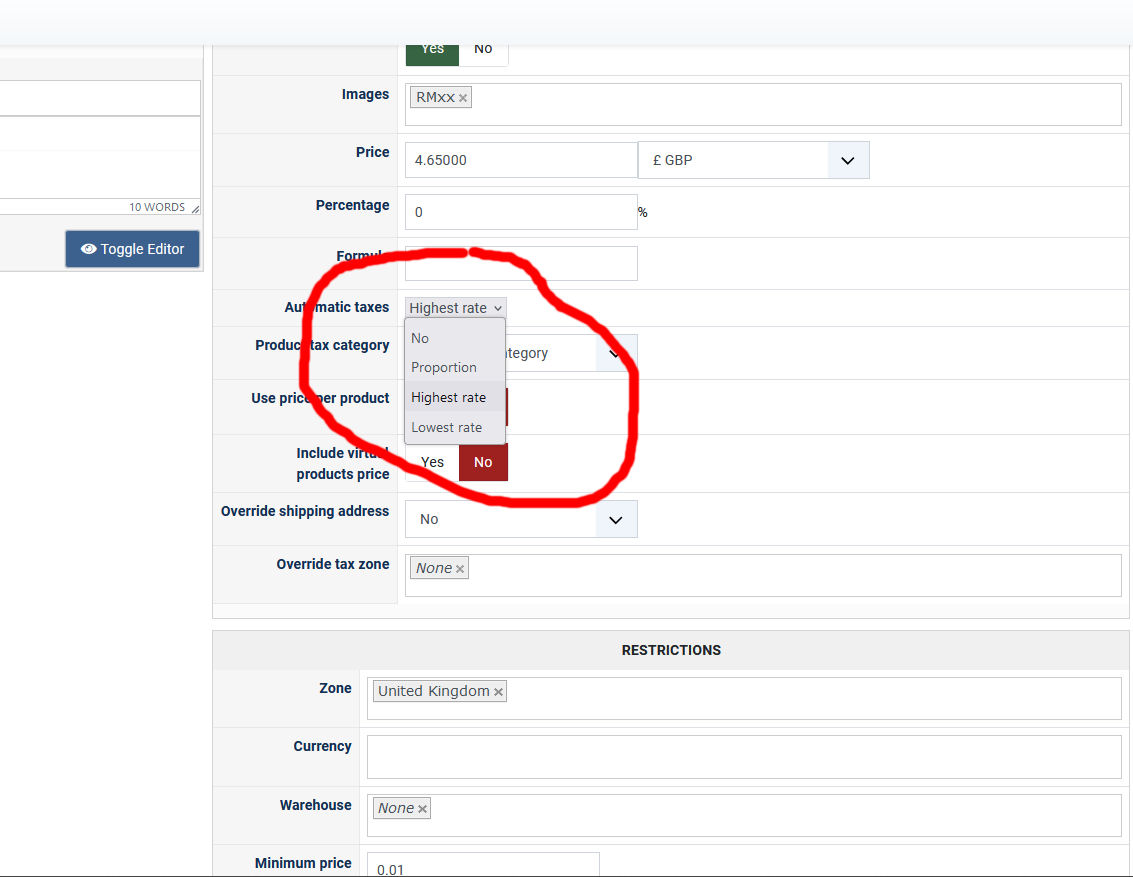
Hiya, I have found the issue... not sure when you added this function into an update as I don't need to change anything in the shipping methods? but its 'automatic taxes' in a shipping method that was causing the issue? it loos like the default is set to 'NO' which when using the PayPal payment was not sending the VAT through to PayPal?
I have changed the setting to 'highest rate' and this now works. see attched
However, the VAT is not showing in PayPal for the shipping even though the correct amount is now being charged? see attached Hika order and PayPal payment
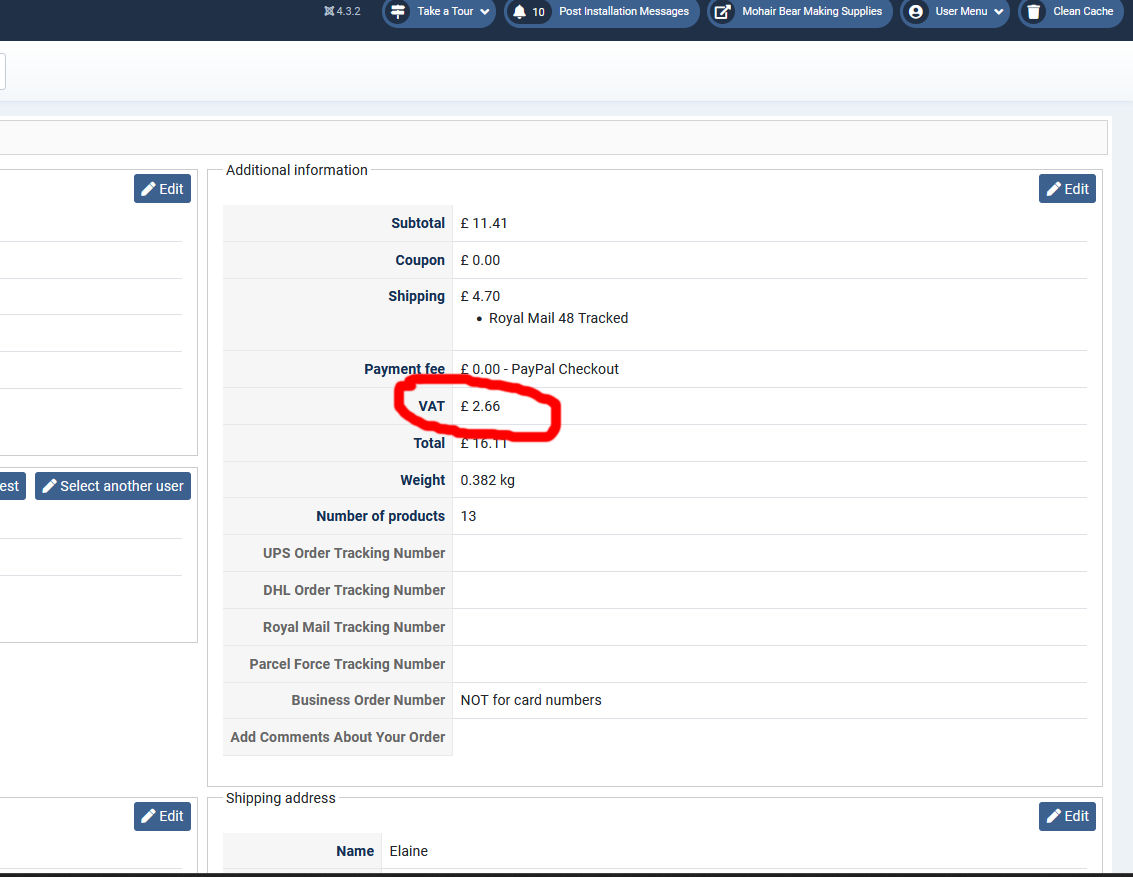
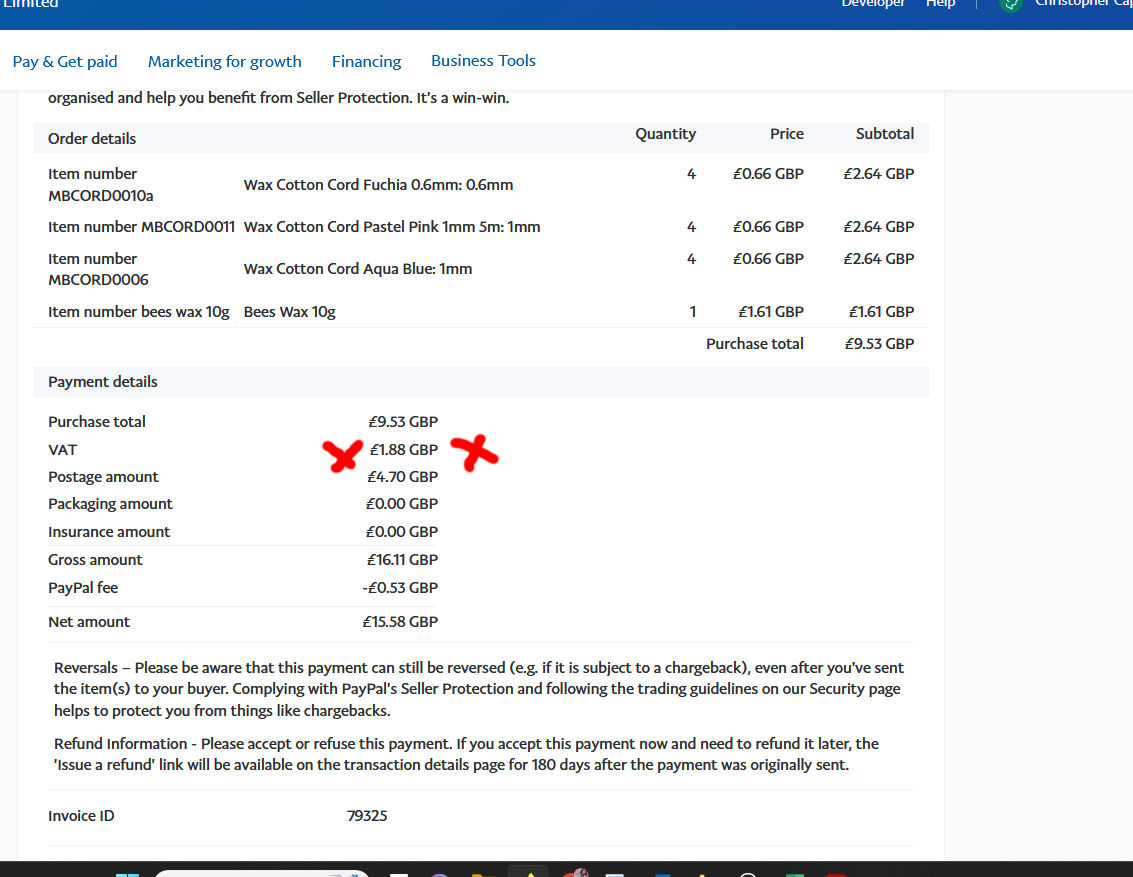
I have changed the setting to 'highest rate' and this now works. see attched
However, the VAT is not showing in PayPal for the shipping even though the correct amount is now being charged? see attached Hika order and PayPal payment
Please Log in or Create an account to join the conversation.
3 years 3 months ago #352142
by nicolas
Replied by nicolas on topic Update of PayPal payment plugin ?
Hi,
The "automatic taxes" setting's default value is "proportion". If you set it to "no" it will not add any taxes to the shipping fee.
It has been like that for years. If that setting is turned off, then VAT is not calculated for the shipping fee. So in that case, the issue has nothing to do with the payment method used.
Note that everything looks good on your screenshots. I think you're just confused because PayPal displays the details of the order differently than HikaShop.
On PayPal, the VAT amount you see is the VAT only for the "purchase total" which excludes the postage amount. So the postage amount is actually displayed with taxes.
In HikaShop, the total amount is displayed like this: subtotal with VAT + shipping fee with VAT = total
And the taxes amount it provided as information
In PayPal the gross amount is displayed like this: purchase total without VAT + VAT on that purchase total + shipping fee with VAT = gross total
The "automatic taxes" setting's default value is "proportion". If you set it to "no" it will not add any taxes to the shipping fee.
It has been like that for years. If that setting is turned off, then VAT is not calculated for the shipping fee. So in that case, the issue has nothing to do with the payment method used.
Note that everything looks good on your screenshots. I think you're just confused because PayPal displays the details of the order differently than HikaShop.
On PayPal, the VAT amount you see is the VAT only for the "purchase total" which excludes the postage amount. So the postage amount is actually displayed with taxes.
In HikaShop, the total amount is displayed like this: subtotal with VAT + shipping fee with VAT = total
And the taxes amount it provided as information
In PayPal the gross amount is displayed like this: purchase total without VAT + VAT on that purchase total + shipping fee with VAT = gross total
Please Log in or Create an account to join the conversation.
Less
More
- Posts: 608
- Thank you received: 13
3 years 3 months ago #352146
by mohairbears
Replied by mohairbears on topic Update of PayPal payment plugin ?
Hi, If that been like that for years, then I'm guessing, as I have only just switched to the new PayPal Method (been using express and the older version) that this being set to 'no' did not effect those methods as I have only had this issue for the last 2 months since switching.
Anyway its sorted now.
Rgds
Anyway its sorted now.
Rgds
Please Log in or Create an account to join the conversation.
Time to create page: 0.272 seconds