
- Posts: 34
- Thank you received: 1
Error with 2 payment methods
- cmoorhouse
-
 Topic Author
- Offline
Less
More
3 years 1 month ago #355200
by cmoorhouse
Error with 2 payment methods was created by cmoorhouse
-- HikaShop version -- : 4.7.5
-- Joomla version -- : 4.3.4
-- PHP version -- : 8.1.23
-- Browser(s) name and version -- : Chrome
I am having 2 issues following a recent upgrade
Error 1: - manual payment method erro
I have a manual payment method of using childcare vouchers that was previously working and is now showing the error
Call to undefined method Joomla\CMS\Application\SiteApplication::isAdmin()
To replicate -from the from end book one of the test events and at the cart stage select to pay via childcare vouchers
Error 2 - I seem unable to upgrade paypal payment method
this message is show but the link to add new payment method then doesn't work
Your PayPal payment method is obsolete and will soon be discontinued by PayPal. Please go in the System>Payment methods menu, click on the 'new' button and select the 'HikaShop PayPal Checkout payment plugin' to configure the PayPal Checkout payment method which is now replacing it.
-- Joomla version -- : 4.3.4
-- PHP version -- : 8.1.23
-- Browser(s) name and version -- : Chrome
I am having 2 issues following a recent upgrade
Error 1: - manual payment method erro
I have a manual payment method of using childcare vouchers that was previously working and is now showing the error
Call to undefined method Joomla\CMS\Application\SiteApplication::isAdmin()
To replicate -from the from end book one of the test events and at the cart stage select to pay via childcare vouchers
Error 2 - I seem unable to upgrade paypal payment method
this message is show but the link to add new payment method then doesn't work
Your PayPal payment method is obsolete and will soon be discontinued by PayPal. Please go in the System>Payment methods menu, click on the 'new' button and select the 'HikaShop PayPal Checkout payment plugin' to configure the PayPal Checkout payment method which is now replacing it.
Please Log in or Create an account to join the conversation.

3 years 1 month ago #355202
by nicolas
Replied by nicolas on topic Error with 2 payment methods
Hi,
1. Please try again after activating the "debug" setting of the Joomla configuration.
You'll see the full error message which we'll need to be able to help you.
2. Go in the menu System>Payment methods, click on the "new" button and select the HikaShop PayPal Checkout payment method and you can then configure it. If you get an error somewhere, please report it (with the debug setting activated of course).
1. Please try again after activating the "debug" setting of the Joomla configuration.
You'll see the full error message which we'll need to be able to help you.
2. Go in the menu System>Payment methods, click on the "new" button and select the HikaShop PayPal Checkout payment method and you can then configure it. If you get an error somewhere, please report it (with the debug setting activated of course).
Please Log in or Create an account to join the conversation.
- cmoorhouse
-
Topic Author
- Offline
Less
More
- Posts: 34
- Thank you received: 1
3 years 1 month ago #355215
by cmoorhouse
Replied by cmoorhouse on topic Error with 2 payment methods
Hi
I have enabled maximum error reporting on the joomla system config
For error 1:
when I choose to pay with childcare vouchers I will see the original error on screen the error message is
Call to undefined method Joomla\CMS\Application\SiteApplication::isAdmin()
Error 2:
When I follow the steps you said I see the attached error
thank you
Caroline
I have enabled maximum error reporting on the joomla system config
For error 1:
when I choose to pay with childcare vouchers I will see the original error on screen the error message is
Call to undefined method Joomla\CMS\Application\SiteApplication::isAdmin()
Error 2:
When I follow the steps you said I see the attached error
thank you
Caroline
Please Log in or Create an account to join the conversation.
3 years 1 month ago #355220
by nicolas
Replied by nicolas on topic Error with 2 payment methods
Hi,
1. It's the "debug" setting you need to activate, not the "error reporting". Please try again with the correct setting turned on and you should get the full error message.
If you still don't, it's possible that your template or the extension 4SEF hides the full error message. In that case, you would have to temporarily disable them to get the full error message.
2. This error indicates that you're using an old version of the platron payment plugin.
Update the plugin ( github.com/HikaShop/hikashoppayment-platron ) or uninstall it from your website and you won't get the error.
1. It's the "debug" setting you need to activate, not the "error reporting". Please try again with the correct setting turned on and you should get the full error message.
If you still don't, it's possible that your template or the extension 4SEF hides the full error message. In that case, you would have to temporarily disable them to get the full error message.
2. This error indicates that you're using an old version of the platron payment plugin.
Update the plugin ( github.com/HikaShop/hikashoppayment-platron ) or uninstall it from your website and you won't get the error.
Please Log in or Create an account to join the conversation.
- cmoorhouse
-
Topic Author
- Offline
Less
More
- Posts: 34
- Thank you received: 1
3 years 1 month ago #355223
by cmoorhouse
Replied by cmoorhouse on topic Error with 2 payment methods
thank you debug now on
Error 1 - see screen grab
Error 2 - I am checking this out and setting up - will come back if any problems still
thank you
Caroline
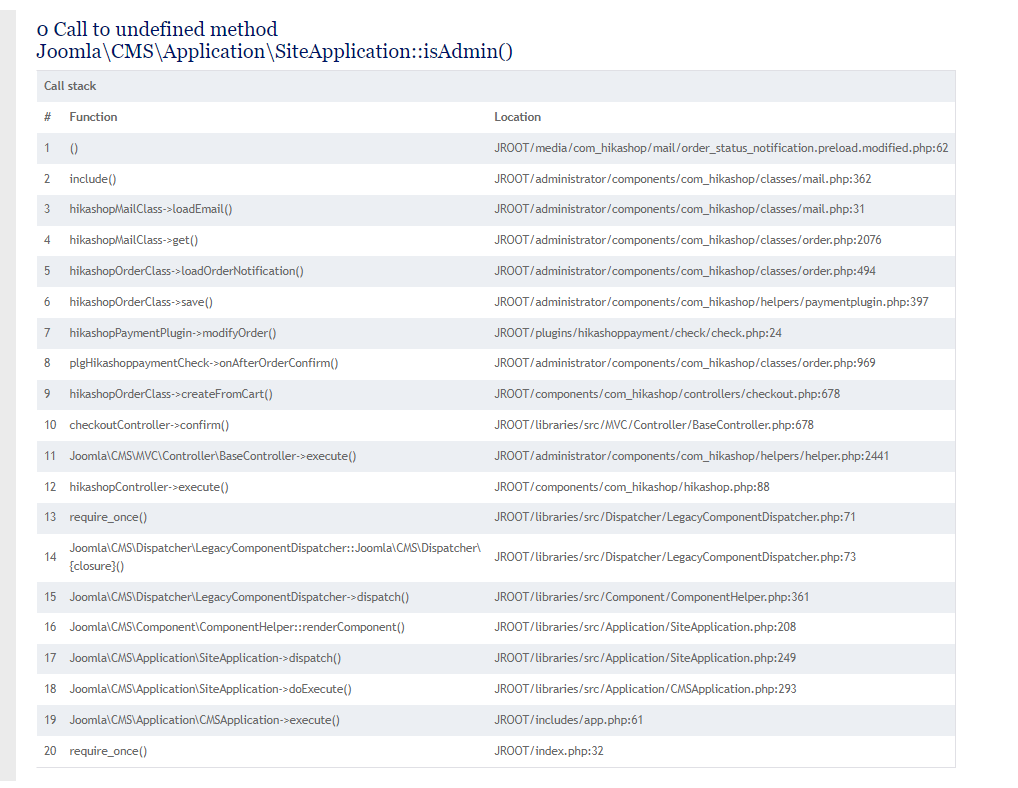
Error 1 - see screen grab
Error 2 - I am checking this out and setting up - will come back if any problems still
thank you
Caroline
Please Log in or Create an account to join the conversation.

3 years 1 month ago - 3 years 1 month ago #355227
by Philip
Replied by Philip on topic Error with 2 payment methods
Hello,
About your error 1, their are good chance that your issue is because you use an mail override of your "order_status_notification".
To check this idea, can you save on your side your overrided email code, and process a test ?
If your error isn't anymore, then you have to redo your email override (from the last email version).
Hope this will help you.
Regards
About your error 1, their are good chance that your issue is because you use an mail override of your "order_status_notification".
To check this idea, can you save on your side your overrided email code, and process a test ?
If your error isn't anymore, then you have to redo your email override (from the last email version).
Hope this will help you.
Regards
Last edit: 3 years 1 month ago by Philip.
Please Log in or Create an account to join the conversation.
- cmoorhouse
-
Topic Author
- Offline
Less
More
- Posts: 34
- Thank you received: 1
3 years 1 month ago #355244
by cmoorhouse
Replied by cmoorhouse on topic Error with 2 payment methods
brilliant that worked - thank you
The following user(s) said Thank You: Philip
Please Log in or Create an account to join the conversation.
Time to create page: 0.290 seconds