
- Posts: 610
- Thank you received: 13
PayPal payment cannot be seen?
- mohairbears
-
 Topic Author
- Away
Less
More
3 months 4 weeks ago #372498
by mohairbears
PayPal payment cannot be seen? was created by mohairbears
-- HikaShop version -- : 6.5.0
-- Joomla version -- : 5.4.6
-- PHP version -- : 8.3.31
-- Browser(s) name and version -- : Chrome
-- Error-message(debug-mod must be tuned on) -- : none
Hi, I have an ongoing issue with PayPal users not being able to see the PayPal payment function after they have left checkout?
It appears to be device related bit I cannot be 100% on that. It always works correctly for me when testing on: iPhone, MacBook, iPad, PC and Laptop.
This is causing dropped orders, it occasionally happens with Worldpay as well but not as often as PayPal?
These are last night drop outs.
-- Joomla version -- : 5.4.6
-- PHP version -- : 8.3.31
-- Browser(s) name and version -- : Chrome
-- Error-message(debug-mod must be tuned on) -- : none
Hi, I have an ongoing issue with PayPal users not being able to see the PayPal payment function after they have left checkout?
It appears to be device related bit I cannot be 100% on that. It always works correctly for me when testing on: iPhone, MacBook, iPad, PC and Laptop.
This is causing dropped orders, it occasionally happens with Worldpay as well but not as often as PayPal?
These are last night drop outs.
Please Log in or Create an account to join the conversation.

3 months 4 weeks ago #372501
by nicolas
Replied by nicolas on topic PayPal payment cannot be seen?
Hi,
It's possible this comes from the same thing as you reported before:
www.hikashop.com/forum/payment-methods/9...h-paypal/370600.html
If you PayPal account already has payments with order ids matching with futur order ids on your website, all the payments for matching ids will fail while payments for ids not already in PayPal will work fine.
So, as I said 4 months ago, make sure the "No, allow multiple payments per invoice ID" setting is selected in your PayPal account.
This could be the same with Worldpay. I don't know if they have a similar mechanism.
It's possible this comes from the same thing as you reported before:
www.hikashop.com/forum/payment-methods/9...h-paypal/370600.html
If you PayPal account already has payments with order ids matching with futur order ids on your website, all the payments for matching ids will fail while payments for ids not already in PayPal will work fine.
So, as I said 4 months ago, make sure the "No, allow multiple payments per invoice ID" setting is selected in your PayPal account.
This could be the same with Worldpay. I don't know if they have a similar mechanism.
Please Log in or Create an account to join the conversation.
- mohairbears
-
Topic Author
- Away
Less
More
- Posts: 610
- Thank you received: 13
3 months 4 weeks ago #372507
by mohairbears
Replied by mohairbears on topic PayPal payment cannot be seen?
Hi, I moved it on over 10,000 which would have been way more than needed.
This is intermittent so surely every order would be effected?
Rgds
This is intermittent so surely every order would be effected?
Rgds
Please Log in or Create an account to join the conversation.
3 months 4 weeks ago #372513
by nicolas
Replied by nicolas on topic PayPal payment cannot be seen?
Hi,
You're right that intermittent rules out the invoice ID collision: that one is deterministic, so every matching order would fail, not the occasional one. And since Worldpay does it too, and it has no PayPal invoice ID, we can set that track aside. What PayPal and Worldpay share is that both send the buyer off your site to the gateway after checkout, so the issue is most likely at that hand-off rather than PayPal itself.
On the confirmation page HikaShop auto-submits a form that forwards the buyer to the gateway. If that submit does not fire, the customer is left on your site with no way to pay, which matches what you describe. The most common device-related reason is the buyer being inside an app's built-in browser (Facebook, Instagram, Gmail...) instead of a normal browser: there the forward can open in a blocked popup and simply do nothing, which would be intermittent and look device-related since it depends on how each buyer reached your site.
To pin it down, next time it happens could you check:
- Does the customer stay on your site, or do they reach paypal.com and it is blank there?
- On the page they are stuck on, is there a "Pay now" button with a "click here if you are not redirected" message, or is it blank?
- Do the affected orders tend to come from an app's in-built browser rather than Chrome/Safari?
That will tell us whether it is the redirect being blocked, the page not loading fully, or something on the gateway side.
You're right that intermittent rules out the invoice ID collision: that one is deterministic, so every matching order would fail, not the occasional one. And since Worldpay does it too, and it has no PayPal invoice ID, we can set that track aside. What PayPal and Worldpay share is that both send the buyer off your site to the gateway after checkout, so the issue is most likely at that hand-off rather than PayPal itself.
On the confirmation page HikaShop auto-submits a form that forwards the buyer to the gateway. If that submit does not fire, the customer is left on your site with no way to pay, which matches what you describe. The most common device-related reason is the buyer being inside an app's built-in browser (Facebook, Instagram, Gmail...) instead of a normal browser: there the forward can open in a blocked popup and simply do nothing, which would be intermittent and look device-related since it depends on how each buyer reached your site.
To pin it down, next time it happens could you check:
- Does the customer stay on your site, or do they reach paypal.com and it is blank there?
- On the page they are stuck on, is there a "Pay now" button with a "click here if you are not redirected" message, or is it blank?
- Do the affected orders tend to come from an app's in-built browser rather than Chrome/Safari?
That will tell us whether it is the redirect being blocked, the page not loading fully, or something on the gateway side.
Please Log in or Create an account to join the conversation.
- mohairbears
-
Topic Author
- Away
Less
More
- Posts: 610
- Thank you received: 13
3 months 4 weeks ago - 3 months 4 weeks ago #372516
by mohairbears
Replied by mohairbears on topic PayPal payment cannot be seen?
Hi, The response I always get when they contact me is
After pressing pay now, the next PayPal pay options are missing: login etc.?
Is there a log file that would display the users browser/device etc.?
Just got hold of an Android to test on. Showed ok but, it 'created' 2 orders? I only went through to see is the PayPal login showed, which it did and then cancelled??
I will be swapping to your new template in a few weeks so I hope this fixes a few issues I am having.
Rgds
After pressing pay now, the next PayPal pay options are missing: login etc.?
Is there a log file that would display the users browser/device etc.?
Just got hold of an Android to test on. Showed ok but, it 'created' 2 orders? I only went through to see is the PayPal login showed, which it did and then cancelled??
I will be swapping to your new template in a few weeks so I hope this fixes a few issues I am having.
Rgds
Last edit: 3 months 4 weeks ago by mohairbears. Reason: update
Please Log in or Create an account to join the conversation.
3 months 4 weeks ago #372518
by nicolas
Replied by nicolas on topic PayPal payment cannot be seen?
Hi,
Think would indicate a CSP issue.
Try disabling the HTTP header plugin and see if that helps.
Think would indicate a CSP issue.
Try disabling the HTTP header plugin and see if that helps.
The following user(s) said Thank You: mohairbears
Please Log in or Create an account to join the conversation.
- mohairbears
-
Topic Author
- Away
Less
More
- Posts: 610
- Thank you received: 13
3 months 3 weeks ago #372559
by mohairbears
Replied by mohairbears on topic PayPal payment cannot be seen?
Hi, This solution appears to have worked.
Thank you
Thank you
The following user(s) said Thank You: nicolas
Please Log in or Create an account to join the conversation.
- mohairbears
-
Topic Author
- Away
Less
More
- Posts: 610
- Thank you received: 13
3 months 6 days ago - 3 months 6 days ago #372889
by mohairbears
Replied by mohairbears on topic PayPal payment cannot be seen?
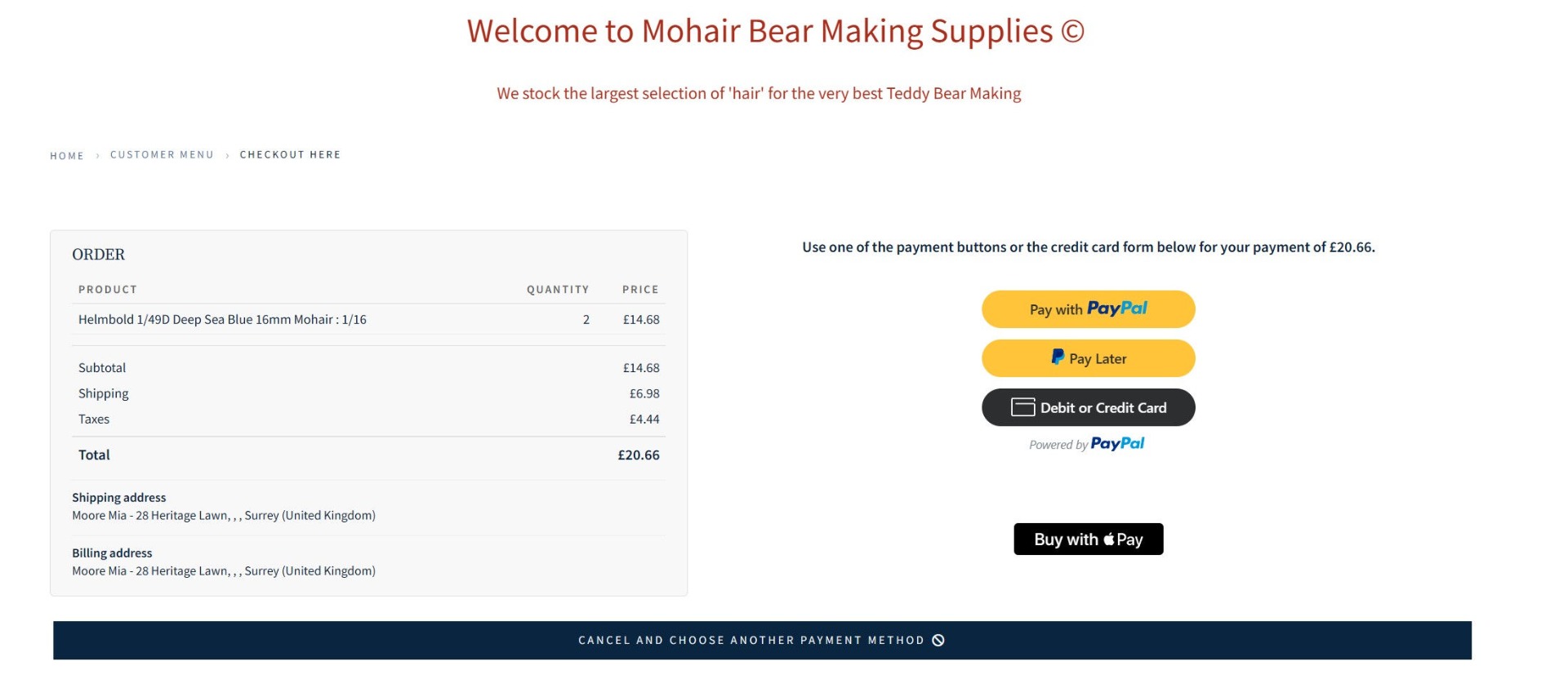
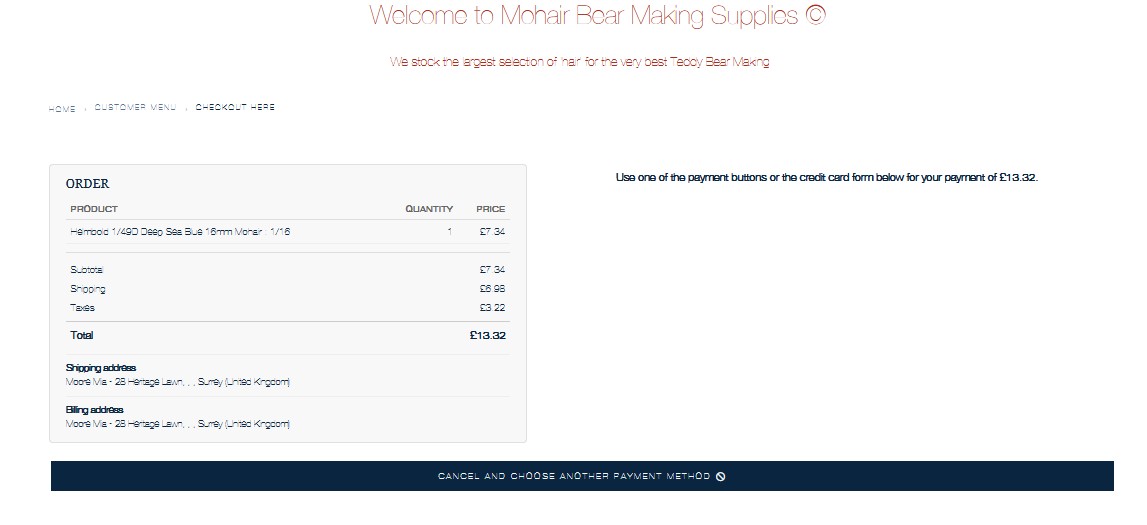
Hi, Revisiting this as its started again.
This appears to be Firefox related?
Do you have any idea why its not displaying correctly please?
2 photos attached, 1 Firefox, 1 Chrome
This appears to be Firefox related?
Do you have any idea why its not displaying correctly please?
2 photos attached, 1 Firefox, 1 Chrome
Last edit: 3 months 6 days ago by mohairbears.
Please Log in or Create an account to join the conversation.
3 months 6 days ago #372891
by nicolas
Replied by nicolas on topic PayPal payment cannot be seen?
Hi,
If you're able to reproduce the issue, open the console of your browser on the page with the issue. There, you should see a lot of information from PayPal about what is going on. That should allow us to tell you what to do.
If you're able to reproduce the issue, open the console of your browser on the page with the issue. There, you should see a lot of information from PayPal about what is going on. That should allow us to tell you what to do.
Please Log in or Create an account to join the conversation.
- mohairbears
-
Topic Author
- Away
Less
More
- Posts: 610
- Thank you received: 13
3 months 6 days ago #372895
by mohairbears
Replied by mohairbears on topic PayPal payment cannot be seen?
Hi, That's the problem, I cannot replicate it? every browser and phone works as it should when testing.
Chrome
Firefox
Safari
iPhone
iPad
Samsung
Rgds
Chrome
Firefox
Safari
iPhone
iPad
Samsung
Rgds
Please Log in or Create an account to join the conversation.
3 months 6 days ago #372900
by nicolas
Replied by nicolas on topic PayPal payment cannot be seen?
Hi,
Ok. I've made changes to the PayPal Checkout plugin to be able to log that.
Download the install package of HikaShop on our website and install it on yours. Make sure the debug setting of the PayPal Checkout payment method in enabled.
Then, next time someone has the issue on your website, you'll get the debug data from the console in the "Payment log file" in the HikaShop configuration. So we'll be able to debug the issue even if it only happens in some rare cases.
Ok. I've made changes to the PayPal Checkout plugin to be able to log that.
Download the install package of HikaShop on our website and install it on yours. Make sure the debug setting of the PayPal Checkout payment method in enabled.
Then, next time someone has the issue on your website, you'll get the debug data from the console in the "Payment log file" in the HikaShop configuration. So we'll be able to debug the issue even if it only happens in some rare cases.
The following user(s) said Thank You: mohairbears
Please Log in or Create an account to join the conversation.
- mohairbears
-
Topic Author
- Away
Less
More
- Posts: 610
- Thank you received: 13
3 months 5 days ago #372911
by mohairbears
Replied by mohairbears on topic PayPal payment cannot be seen?
Hiya, I have just had 2 orders with the issue, there is no reference to the orders in the log file?
I can send you the log file?
Rgds
I can send you the log file?
Rgds
Please Log in or Create an account to join the conversation.
3 months 5 days ago #372914
by nicolas
Replied by nicolas on topic PayPal payment cannot be seen?
Yes, please send it via email to the our contact email address.
Please Log in or Create an account to join the conversation.
3 months 4 days ago #372942
by nicolas
Replied by nicolas on topic PayPal payment cannot be seen?
Hi,
Thank you for the log file.
Your pages are currently sent with this header:
content-security-policy: default-src 'self' 'unsafe-inline'
That header tells the browser of your visitors to only load things coming from your own domain. It contains no script-src, no frame-src and no connect-src, so all three fall back on that default-src, and everything coming from PayPal is refused by the browser: the script www.paypal.com/sdk/js which draws the payment buttons, the frames the buttons are drawn inside, and the calls that script makes to PayPal. Your customer is then left with an empty payment area and no way to log into PayPal, which is exactly what they describe.
Where it comes from :
Not from the Joomla plugin this time, which is why disabling that plugin, as you did in February, does not fix it anymore. The header comes from your server, from the .htaccess file at the root of your website:
- your static files carry a Content-Security-Policy too ( www.mohairbearmakingsupplies.co.uk/media...hop/css/hikashop.css answers with "default-src 'self'; script-src 'none';"), and those files are served by Apache without Joomla ever running, so the header can only come from the server configuration
- your pages also carry the same policy a second time under the old name x-content-security-policy, which the Joomla plugin never sends
If you use a security extension which writes your .htaccess file for you, Admin Tools and its .htaccess Maker being the usual one, change the setting there and let it write the file again. If you edit the .htaccess file directly, your change will be lost the next time that extension regenerates it.
How to configure it :
Keep the header, but allow PayPal in it. The value to use in place of the current one:
default-src 'self' 'unsafe-inline'; script-src 'self' 'unsafe-inline' https://*.paypal.com https://*.paypalobjects.com; frame-src 'self' https://*.paypal.com; connect-src 'self' https://*.paypal.com; img-src 'self' data: https://*.paypal.com https://*.paypalobjects.com
Leave the rule for your static files alone, it is fine as it is and it does not concern PayPal.
If you ever go back to the "System - HTTP Headers" plugin of Joomla instead, the same thing is done in its "Content-Security-Policy (CSP)" tab, where you add one line per directive in the table at the bottom: script-src with the value 'self' 'unsafe-inline' https://*.paypal.com https://*.paypalobjects.com, then frame-src with 'self' https://*.paypal.com, then connect-src with 'self' https://*.paypal.com, and img-src with 'self' data: https://*.paypal.com https://*.paypalobjects.com.
One last thing, unrelated to the buttons :
Your log shows 62 payments refused by PayPal at the very last moment, against about 20 which went through. In each case the customer logged into PayPal and approved the payment, and when your website asked PayPal to take the money, PayPal answered:
DUPLICATE_INVOICE_ID: Duplicate Invoice ID detected. To avoid a potential duplicate transaction your account setting requires that Invoice Id be unique for each transaction.
The money is never taken and the order stays unpaid, while your customer believes they paid. The orders 92784, 92786, 92798, 92802, 92807, 92812, 92872, 92877, 92879 and 92884 are examples, and the most recent one is from the 4th of June. This is the setting I mentioned at the beginning of this thread: in your PayPal account, under Account Settings then Payment preferences, "Block accidental payments" has to be set to "No, allow multiple payments per invoice ID". PayPal names that setting itself in its answer, so it is still set the other way today.
Thank you for the log file.
Your pages are currently sent with this header:
content-security-policy: default-src 'self' 'unsafe-inline'
That header tells the browser of your visitors to only load things coming from your own domain. It contains no script-src, no frame-src and no connect-src, so all three fall back on that default-src, and everything coming from PayPal is refused by the browser: the script www.paypal.com/sdk/js which draws the payment buttons, the frames the buttons are drawn inside, and the calls that script makes to PayPal. Your customer is then left with an empty payment area and no way to log into PayPal, which is exactly what they describe.
Where it comes from :
Not from the Joomla plugin this time, which is why disabling that plugin, as you did in February, does not fix it anymore. The header comes from your server, from the .htaccess file at the root of your website:
- your static files carry a Content-Security-Policy too ( www.mohairbearmakingsupplies.co.uk/media...hop/css/hikashop.css answers with "default-src 'self'; script-src 'none';"), and those files are served by Apache without Joomla ever running, so the header can only come from the server configuration
- your pages also carry the same policy a second time under the old name x-content-security-policy, which the Joomla plugin never sends
If you use a security extension which writes your .htaccess file for you, Admin Tools and its .htaccess Maker being the usual one, change the setting there and let it write the file again. If you edit the .htaccess file directly, your change will be lost the next time that extension regenerates it.
How to configure it :
Keep the header, but allow PayPal in it. The value to use in place of the current one:
default-src 'self' 'unsafe-inline'; script-src 'self' 'unsafe-inline' https://*.paypal.com https://*.paypalobjects.com; frame-src 'self' https://*.paypal.com; connect-src 'self' https://*.paypal.com; img-src 'self' data: https://*.paypal.com https://*.paypalobjects.com
Leave the rule for your static files alone, it is fine as it is and it does not concern PayPal.
If you ever go back to the "System - HTTP Headers" plugin of Joomla instead, the same thing is done in its "Content-Security-Policy (CSP)" tab, where you add one line per directive in the table at the bottom: script-src with the value 'self' 'unsafe-inline' https://*.paypal.com https://*.paypalobjects.com, then frame-src with 'self' https://*.paypal.com, then connect-src with 'self' https://*.paypal.com, and img-src with 'self' data: https://*.paypal.com https://*.paypalobjects.com.
One last thing, unrelated to the buttons :
Your log shows 62 payments refused by PayPal at the very last moment, against about 20 which went through. In each case the customer logged into PayPal and approved the payment, and when your website asked PayPal to take the money, PayPal answered:
DUPLICATE_INVOICE_ID: Duplicate Invoice ID detected. To avoid a potential duplicate transaction your account setting requires that Invoice Id be unique for each transaction.
The money is never taken and the order stays unpaid, while your customer believes they paid. The orders 92784, 92786, 92798, 92802, 92807, 92812, 92872, 92877, 92879 and 92884 are examples, and the most recent one is from the 4th of June. This is the setting I mentioned at the beginning of this thread: in your PayPal account, under Account Settings then Payment preferences, "Block accidental payments" has to be set to "No, allow multiple payments per invoice ID". PayPal names that setting itself in its answer, so it is still set the other way today.
The following user(s) said Thank You: mohairbears
Please Log in or Create an account to join the conversation.
- mohairbears
-
Topic Author
- Away
Less
More
- Posts: 610
- Thank you received: 13
2 months 2 weeks ago #373106
by mohairbears
Replied by mohairbears on topic PayPal payment cannot be seen?
Hi Sorry back again. Still getting failures so trying again.
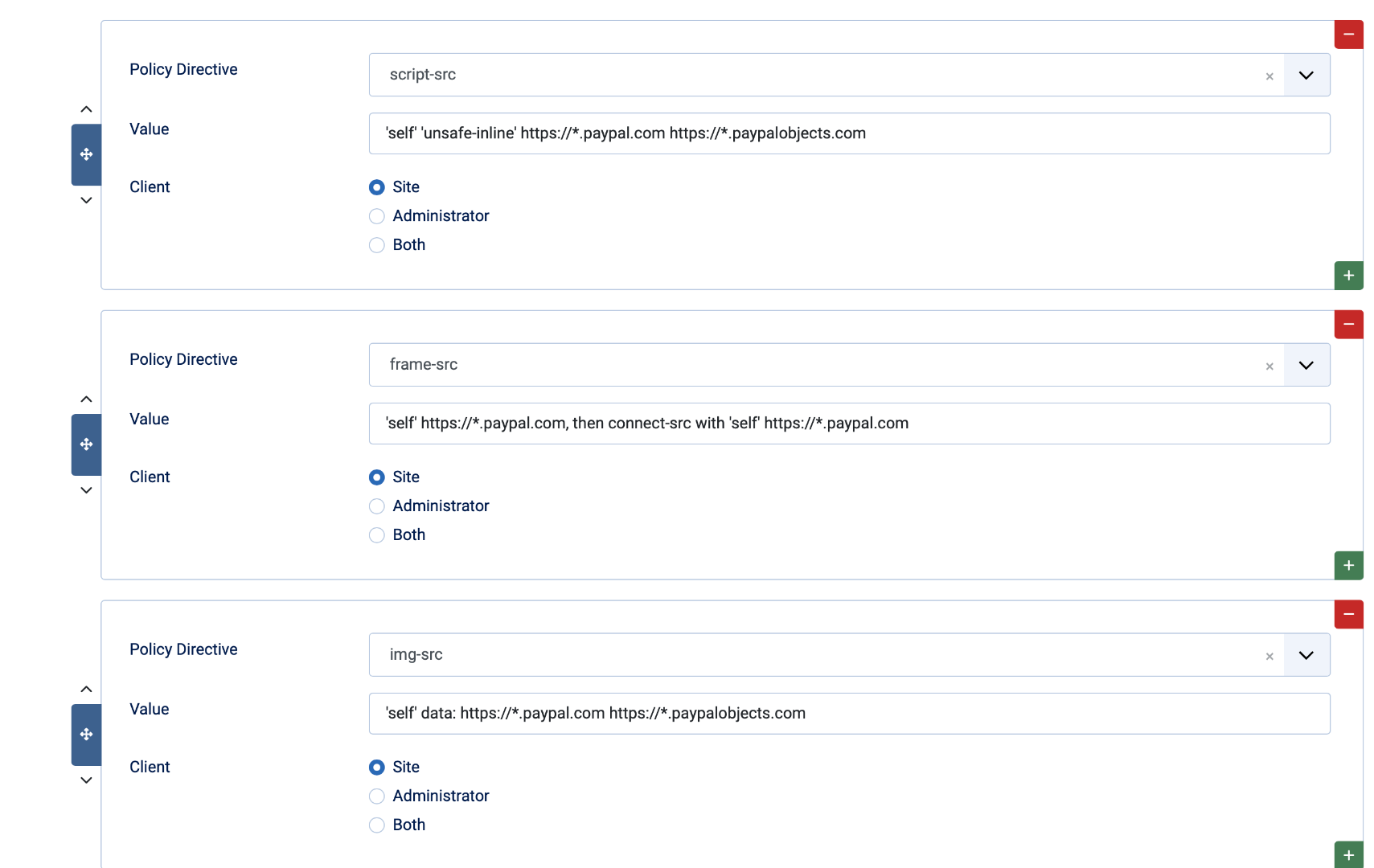
I went with the 'system HTTP headers' see screen dump
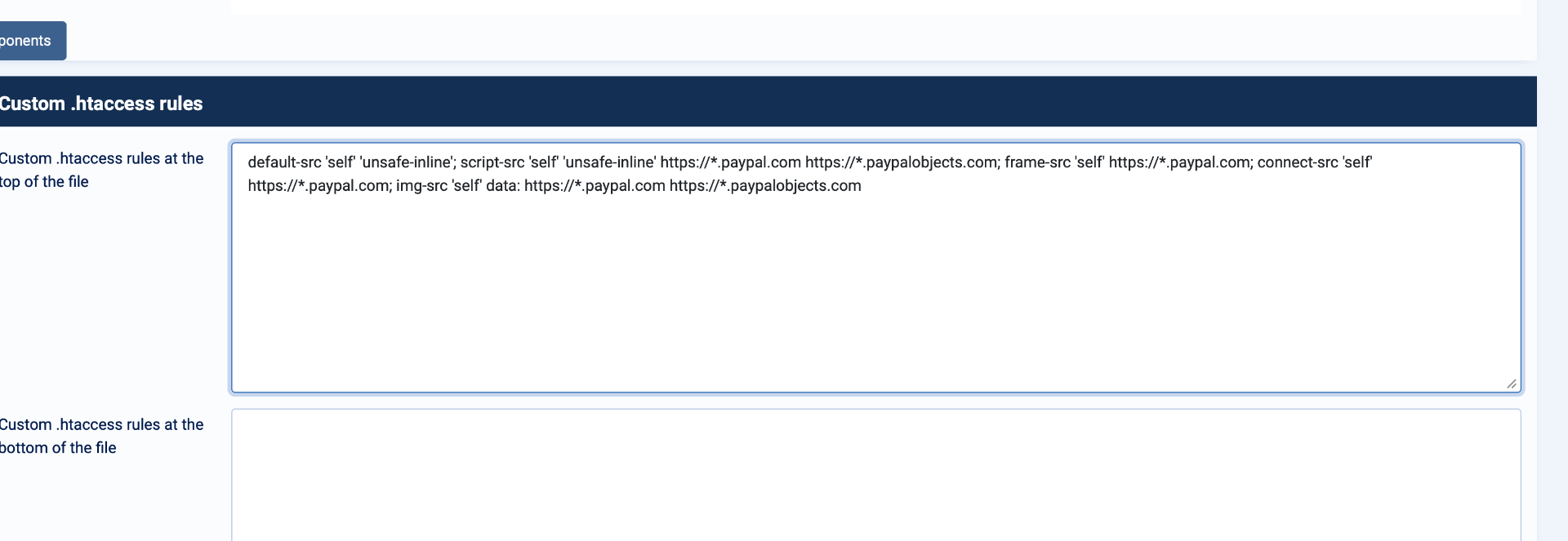
Have now tried with Admintools (you guessed correctly) but get a 500 error when placing:
default-src 'self' 'unsafe-inline'; script-src 'self' 'unsafe-inline' https://*.paypal.com https://*.paypalobjects.com; frame-src 'self' https://*.paypal.com; connect-src 'self' https://*.paypal.com; img-src 'self' data: https://*.paypal.com https://*.paypalobjects.com
is this in the correct place in the HT access maker? screen dump again
I went with the 'system HTTP headers' see screen dump
Have now tried with Admintools (you guessed correctly) but get a 500 error when placing:
default-src 'self' 'unsafe-inline'; script-src 'self' 'unsafe-inline' https://*.paypal.com https://*.paypalobjects.com; frame-src 'self' https://*.paypal.com; connect-src 'self' https://*.paypal.com; img-src 'self' data: https://*.paypal.com https://*.paypalobjects.com
is this in the correct place in the HT access maker? screen dump again
Please Log in or Create an account to join the conversation.
2 months 2 weeks ago #373113
by nicolas
Replied by nicolas on topic PayPal payment cannot be seen?
Hi,
The 500 error is expected: that box takes Apache directives, not the value of the header. A raw "default-src 'self' ..." line is not a directive, so Apache refuses to serve the site. To set it there, it has to be:
Before that, here is what your website answers right now:
So two things on the plugin side:
1. Your rows are sent as "report-only", which only asks the browser to report violations and blocks nothing, and allows nothing either. In the CSP tab of the plugin, set "Report Only" to No.
2. The frame-src row contains a piece of my sentence. Its value must be only 'self' https://*.paypal.com, and connect-src has to be a row of its own with the value 'self' https://*.paypal.com.
And the main point: the header actually enforced is still the old one, and it comes from your server, not from the plugin. When a page carries two enforced policies, the browser applies both and keeps the strictest, so PayPal stays blocked even once the plugin is set correctly. That old value has to be changed, not doubled with a second header. It is the one sent twice, under content-security-policy and under the old name x-content-security-policy, so look for those two names in your .htaccess files, and either replace the value with the full one above, or remove those lines and let the plugin send the policy alone.
Also, did you get to change "Block accidental payments" to "No, allow multiple payments per invoice ID" in your PayPal account? That one was refusing about three payments out of four in the log you sent.
The 500 error is expected: that box takes Apache directives, not the value of the header. A raw "default-src 'self' ..." line is not a directive, so Apache refuses to serve the site. To set it there, it has to be:
Code:
<IfModule mod_headers.c>
Header always set Content-Security-Policy "default-src 'self' 'unsafe-inline'; script-src 'self' 'unsafe-inline' https://*.paypal.com https://*.paypalobjects.com; frame-src 'self' https://*.paypal.com; connect-src 'self' https://*.paypal.com; img-src 'self' data: https://*.paypal.com https://*.paypalobjects.com"
</IfModule>
Before that, here is what your website answers right now:
Code:
content-security-policy: default-src 'self' 'unsafe-inline'
x-content-security-policy: default-src 'self' 'unsafe-inline'
content-security-policy-report-only: script-src 'self' 'unsafe-inline' https://*.paypal.com https://*.paypalobjects.com; frame-src 'self' https://*.paypal.com, then connect-src with 'self' https://*.paypal.com; img-src 'self' data: https://*.paypal.com https://*.paypalobjects.com; default-src 'self' 'unsafe-inline'; frame-ancestors 'self'
So two things on the plugin side:
1. Your rows are sent as "report-only", which only asks the browser to report violations and blocks nothing, and allows nothing either. In the CSP tab of the plugin, set "Report Only" to No.
2. The frame-src row contains a piece of my sentence. Its value must be only 'self' https://*.paypal.com, and connect-src has to be a row of its own with the value 'self' https://*.paypal.com.
And the main point: the header actually enforced is still the old one, and it comes from your server, not from the plugin. When a page carries two enforced policies, the browser applies both and keeps the strictest, so PayPal stays blocked even once the plugin is set correctly. That old value has to be changed, not doubled with a second header. It is the one sent twice, under content-security-policy and under the old name x-content-security-policy, so look for those two names in your .htaccess files, and either replace the value with the full one above, or remove those lines and let the plugin send the policy alone.
Also, did you get to change "Block accidental payments" to "No, allow multiple payments per invoice ID" in your PayPal account? That one was refusing about three payments out of four in the log you sent.
Please Log in or Create an account to join the conversation.
- mohairbears
-
Topic Author
- Away
Less
More
- Posts: 610
- Thank you received: 13
2 months 2 weeks ago #373115
by mohairbears
Replied by mohairbears on topic PayPal payment cannot be seen?
Thank you, Yes the Paypal change was made.
Rgds
Rgds
Please Log in or Create an account to join the conversation.
Time to create page: 0.184 seconds