
- Posts: 137
- Thank you received: 2
Bug when adding a address
- emergentec
-
 Topic Author
- Offline
Less
More
15 years 6 months ago - 15 years 6 months ago #10822
by emergentec
Bug when adding a address was created by emergentec
Hi!
We use the Business Edition of Hikashop with Joomla 1.6 and the yoo_phoenix template.
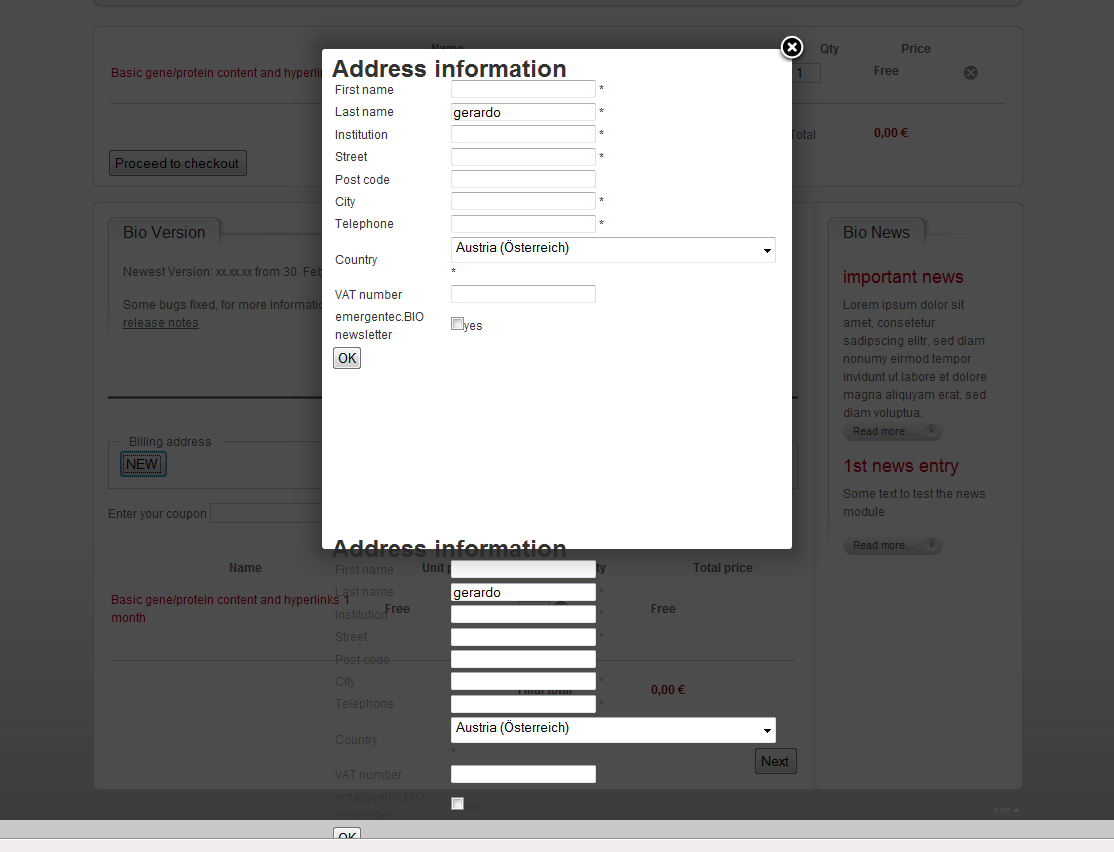
When adding a new address during the checkout process we get a bug, see attached file.
The address form is displayed twice.
Best regards
We use the Business Edition of Hikashop with Joomla 1.6 and the yoo_phoenix template.
When adding a new address during the checkout process we get a bug, see attached file.
The address form is displayed twice.
Best regards
Last edit: 15 years 6 months ago by emergentec.
Please Log in or Create an account to join the conversation.

15 years 6 months ago #10845
by nicolas
Replied by nicolas on topic Re: Bug when adding a address
Hi,
This is a bug which happened before version 1.4.5 of HikaShop on joomla 1.6. Do you use the latest version ? Otherwise, could you update and try again ?
This is a bug which happened before version 1.4.5 of HikaShop on joomla 1.6. Do you use the latest version ? Otherwise, could you update and try again ?
Please Log in or Create an account to join the conversation.
- emergentec
-
Topic Author
- Offline
Less
More
- Posts: 137
- Thank you received: 2
15 years 6 months ago #10942
by emergentec
Replied by emergentec on topic Re: Bug when adding a address
I updated to the latest version 1.4.7 and still have the problem!
Please Log in or Create an account to join the conversation.
15 years 6 months ago #10948
by nicolas
Replied by nicolas on topic Re: Bug when adding a address
We cannot reproduce the problem on our end. Could you give a link to your website so that we can check on the problem ?
Please Log in or Create an account to join the conversation.
- emergentec
-
Topic Author
- Offline
Less
More
- Posts: 137
- Thank you received: 2
15 years 6 months ago #11402
by emergentec
Replied by emergentec on topic Re: Bug when adding a address
As our system is not yet deployed I can't give you a link
Please Log in or Create an account to join the conversation.
15 years 6 months ago #11412
by nicolas
Replied by nicolas on topic Re: Bug when adding a address
As we can't reproduce the problem on our end, we will have to wait for you to deploy it then in order to help you.
Please Log in or Create an account to join the conversation.
- emergentec
-
Topic Author
- Offline
Less
More
- Posts: 137
- Thank you received: 2
15 years 2 months ago #20081
by emergentec
Replied by emergentec on topic Re: Bug when adding a address
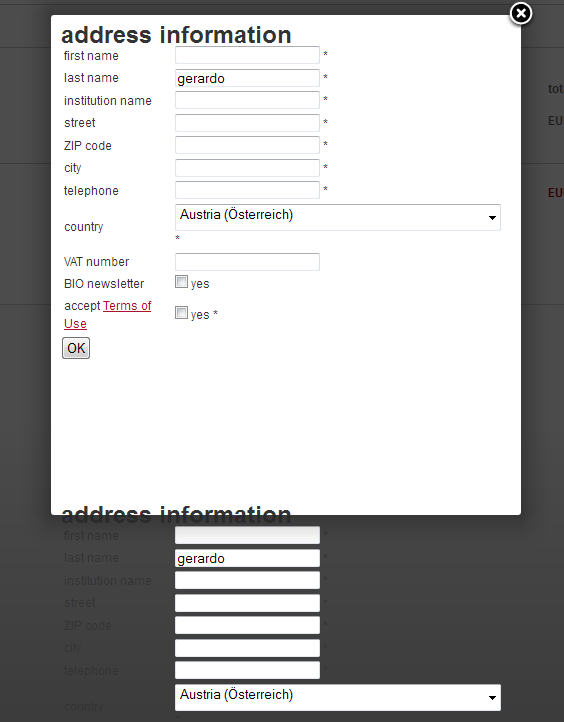
As we are heading to a new version of our product, we still have the bug that when adding a new address during the checkout process, the form is displayed twice. see attached screenshot
additionally I would like to know, if it is possible to display certain fields like "accept Terms of Use" only during the registration process and not anymore when editing an address or adding a new address.
additionally I would like to know, if it is possible to display certain fields like "accept Terms of Use" only during the registration process and not anymore when editing an address or adding a new address.
Please Log in or Create an account to join the conversation.
15 years 2 months ago #20107
by nicolas
Replied by nicolas on topic Re: Bug when adding a address
Do you have your website online. We still cannot reproduce the problem on our end.
For the terms and conditions, you could just hide the line of the form with CSS.
For the terms and conditions, you could just hide the line of the form with CSS.
Please Log in or Create an account to join the conversation.
- emergentec
-
Topic Author
- Offline
Less
More
- Posts: 137
- Thank you received: 2
15 years 2 months ago #20855
by emergentec
Replied by emergentec on topic Re: Bug when adding a address
nicolas wrote:
Hiding the line with CSS works well in most browsers, but not in IE9. Is there another possibility to hide specific lines (actually <tr>s)?
We solved this problem by removing the option to delete an address, just editing the address is good enough.Do you have your website online. We still cannot reproduce the problem on our end.
For the terms and conditions, you could just hide the line of the form with CSS.
Hiding the line with CSS works well in most browsers, but not in IE9. Is there another possibility to hide specific lines (actually <tr>s)?
Please Log in or Create an account to join the conversation.
15 years 2 months ago #20867
by nicolas
Replied by nicolas on topic Re: Bug when adding a address
You should be able to hide the lines for any browser with the display:'none'; CSS property.
Please Log in or Create an account to join the conversation.
- emergentec
-
Topic Author
- Offline
Less
More
- Posts: 137
- Thank you received: 2
15 years 2 months ago #20870
by emergentec
In IE9 I can still see the <tr>
Replied by emergentec on topic Re: Bug when adding a address
Code:
.hikashop_registration_address_vat_line{ /* Do not display VAT lable & input on registration */
display:none;
}
In IE9 I can still see the <tr>
Please Log in or Create an account to join the conversation.
15 years 2 months ago #20877
by nicolas
Replied by nicolas on topic Re: Bug when adding a address
Then maybe your template overrides it so you could try with that CSS:
.hikashop_registration_address_vat_line{
display:none !important;
}
Also, don't forget to clean your browser's cache when testing, otherwise, it won't retrieve the new CSS.
.hikashop_registration_address_vat_line{
display:none !important;
}
Also, don't forget to clean your browser's cache when testing, otherwise, it won't retrieve the new CSS.
Please Log in or Create an account to join the conversation.
Time to create page: 0.249 seconds