
- Posts: 52
- Thank you received: 0
Authorize_thankyou.php Error
- petermorris
-
 Topic Author
- Offline
Less
More
15 years 6 months ago #11241
by petermorris
Authorize_thankyou.php Error was created by petermorris
Upon successful payment on authorize.net, I get this error message:
Warning: require(/home/daltonwa/public_html/plugins/hikashoppayment//authorize_thankyou.php) [function.require]: failed to open stream: No such file or directory in /home/daltonwa/public_html/plugins/hikashoppayment/authorize/authorize.php on line 352
Fatal error: require() [function.require]: Failed opening required '/home/daltonwa/public_html/plugins/hikashoppayment//authorize_thankyou.php' (include_path='.:/usr/lib/php:/usr/local/lib/php') in /home/daltonwa/public_html/plugins/hikashoppayment/authorize/authorize.php on line 352
It looks like "//" is a mistake and should be only "/", but I don't know how to change this.
Warning: require(/home/daltonwa/public_html/plugins/hikashoppayment//authorize_thankyou.php) [function.require]: failed to open stream: No such file or directory in /home/daltonwa/public_html/plugins/hikashoppayment/authorize/authorize.php on line 352
Fatal error: require() [function.require]: Failed opening required '/home/daltonwa/public_html/plugins/hikashoppayment//authorize_thankyou.php' (include_path='.:/usr/lib/php:/usr/local/lib/php') in /home/daltonwa/public_html/plugins/hikashoppayment/authorize/authorize.php on line 352
It looks like "//" is a mistake and should be only "/", but I don't know how to change this.
Please Log in or Create an account to join the conversation.

15 years 6 months ago #11243
by nicolas
Replied by nicolas on topic Re: Authorize_thankyou.php Error
Please edit the file plugins/hikashoppayment/auhtorize/authorize.php and change the line 352 to:
$path = JPATH_PLUGINS .DS.'hikashoppayment'.DS.$element->payment_type.DS.$name;
That should fix the problem.
$path = JPATH_PLUGINS .DS.'hikashoppayment'.DS.$element->payment_type.DS.$name;
That should fix the problem.
Please Log in or Create an account to join the conversation.
- petermorris
-
Topic Author
- Offline
Less
More
- Posts: 52
- Thank you received: 0
15 years 6 months ago #11254
by petermorris
Replied by petermorris on topic Re: Authorize_thankyou.php Error
This fixed the error message. Thanks!
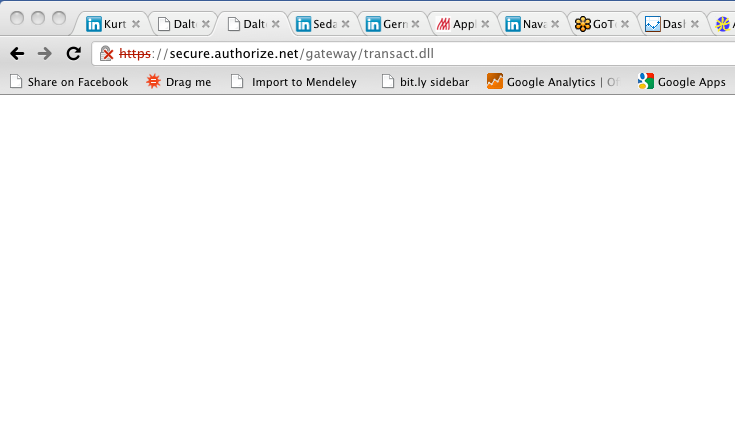
However, now upon completion of the transaction, I'm getting a blank screen with URL: secure.authorize.net/gateway/transact.dll
Any suggestions?
However, now upon completion of the transaction, I'm getting a blank screen with URL: secure.authorize.net/gateway/transact.dll
Any suggestions?
Please Log in or Create an account to join the conversation.
15 years 6 months ago #11259
by nicolas
Replied by nicolas on topic Re: Authorize_thankyou.php Error
Could you do a screenshot ?
Please Log in or Create an account to join the conversation.
- petermorris
-
Topic Author
- Offline
Less
More
- Posts: 52
- Thank you received: 0
15 years 6 months ago #11285
by petermorris
Replied by petermorris on topic Re: Authorize_thankyou.php Error
Attached is the screen I get once I hit the submit button on authenticate.net. Despite the blank screen the transaction goes through.
This is the underlying HTML of this blank page:
<!DOCTYPE html PUBLIC "-//W3C//DTD XHTML 1.0 Transitional//EN" " www.w3.org/TR/xhtml1/DTD/xhtml1-transitional.dtd ">
<html xmlns=" www.w3.org/1999/xhtml " xml:lang="en-gb" lang="en-gb" dir="ltr">
<head>
<base href=" cairo.directrouter.com/~daltonwa/index.php " />
<meta http-equiv="content-type" content="text/html; charset=utf-8" />
<meta name="robots" content="index, follow" />
<meta name="keywords" content="" />
<meta name="rights" content="" />
<meta name="language" content="en-GB" />
<meta name="generator" content="Joomla! 1.6 - Open Source Content Management" />
<title>Dalton Watson Fine Books</title>
<link href="/~daltonwa/templates/beez_20/favicon.ico" rel="shortcut icon" type="image/vnd.microsoft.icon" />
<link rel="stylesheet" href="/~daltonwa/media/com_hikashop/css/frontend_default.css" type="text/css" />
<script type="text/javascript" src="/~daltonwa/media/com_hikashop/js/hikashop.js"></script>
<link rel="stylesheet" href="/~daltonwa/templates/system/css/system.css" type="text/css" />
<link rel="stylesheet" href="/~daltonwa/templates/beez_20/css/template.css" type="text/css" />
<link rel="stylesheet" href="/~daltonwa/templates/beez_20/css/position.css" type="text/css" />
<link rel="stylesheet" href="/~daltonwa/templates/beez_20/css/layout.css" type="text/css" media="screen,projection" />
<link rel="stylesheet" href="/~daltonwa/templates/beez_20/css/print.css" type="text/css" media="Print" />
<link rel="stylesheet" href="/~daltonwa/templates/beez_20/css/personal.css" type="text/css" />
<link rel="stylesheet" href="/~daltonwa/templates/beez_20/css/general.css" type="text/css" />
<!--[if lte IE 6]>
<link href="/~daltonwa/templates/beez_20/css/ieonly.css" rel="stylesheet" type="text/css" />
<![endif]-->
</head>
<body class="contentpane">
<div id="all">
<div id="main">
</div>
</div>
</body>
</html>
Thanks for your help!
This is the underlying HTML of this blank page:
<!DOCTYPE html PUBLIC "-//W3C//DTD XHTML 1.0 Transitional//EN" " www.w3.org/TR/xhtml1/DTD/xhtml1-transitional.dtd ">
<html xmlns=" www.w3.org/1999/xhtml " xml:lang="en-gb" lang="en-gb" dir="ltr">
<head>
<base href=" cairo.directrouter.com/~daltonwa/index.php " />
<meta http-equiv="content-type" content="text/html; charset=utf-8" />
<meta name="robots" content="index, follow" />
<meta name="keywords" content="" />
<meta name="rights" content="" />
<meta name="language" content="en-GB" />
<meta name="generator" content="Joomla! 1.6 - Open Source Content Management" />
<title>Dalton Watson Fine Books</title>
<link href="/~daltonwa/templates/beez_20/favicon.ico" rel="shortcut icon" type="image/vnd.microsoft.icon" />
<link rel="stylesheet" href="/~daltonwa/media/com_hikashop/css/frontend_default.css" type="text/css" />
<script type="text/javascript" src="/~daltonwa/media/com_hikashop/js/hikashop.js"></script>
<link rel="stylesheet" href="/~daltonwa/templates/system/css/system.css" type="text/css" />
<link rel="stylesheet" href="/~daltonwa/templates/beez_20/css/template.css" type="text/css" />
<link rel="stylesheet" href="/~daltonwa/templates/beez_20/css/position.css" type="text/css" />
<link rel="stylesheet" href="/~daltonwa/templates/beez_20/css/layout.css" type="text/css" media="screen,projection" />
<link rel="stylesheet" href="/~daltonwa/templates/beez_20/css/print.css" type="text/css" media="Print" />
<link rel="stylesheet" href="/~daltonwa/templates/beez_20/css/personal.css" type="text/css" />
<link rel="stylesheet" href="/~daltonwa/templates/beez_20/css/general.css" type="text/css" />
<!--[if lte IE 6]>
<link href="/~daltonwa/templates/beez_20/css/ieonly.css" rel="stylesheet" type="text/css" />
<![endif]-->
</head>
<body class="contentpane">
<div id="all">
<div id="main">
</div>
</div>
</body>
</html>
Thanks for your help!
Please Log in or Create an account to join the conversation.
15 years 6 months ago #11287
by nicolas
Replied by nicolas on topic Re: Authorize_thankyou.php Error
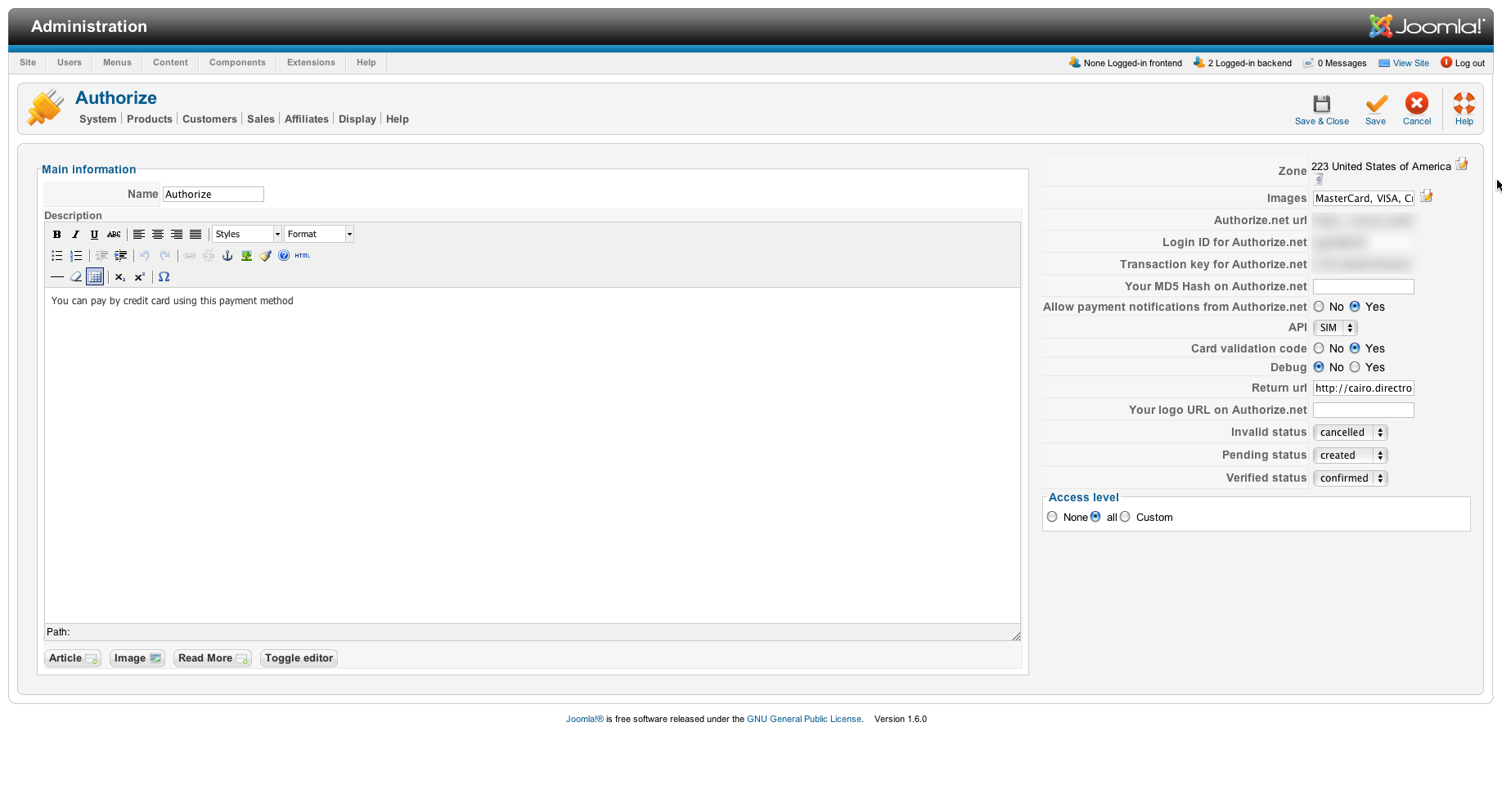
Could you do a screenshot of the authorize.net payment plugin ?
Did you activate the payment notification option ?
Did you activate the payment notification option ?
Please Log in or Create an account to join the conversation.
- petermorris
-
Topic Author
- Offline
Less
More
- Posts: 52
- Thank you received: 0
15 years 6 months ago #11289
by petermorris
Replied by petermorris on topic Re: Authorize_thankyou.php Error
Attached please find the screenshot. Thanks!
Please Log in or Create an account to join the conversation.
15 years 6 months ago #11300
by nicolas
Replied by nicolas on topic Re: Authorize_thankyou.php Error
Are your orders validated automatically or not ?
Maybe you need to configure the relay response URL in your authorize.net account settings ?
www.authorize.net/support/CNP/helpfiles/...s/Relay_Response.htm
The relay response in hikashop is: yourwebsite.com/index.php?option=com_hik...pl=component&lang=en
Maybe you need to configure the relay response URL in your authorize.net account settings ?
www.authorize.net/support/CNP/helpfiles/...s/Relay_Response.htm
The relay response in hikashop is: yourwebsite.com/index.php?option=com_hik...pl=component&lang=en
Please Log in or Create an account to join the conversation.
Time to create page: 0.259 seconds