

- Posts: 301
- Thank you received: 1
Virtuemart import
15 years 2 months ago #23212
by Huski
Virtuemart import was created by Huski
Great funtion and tried it - seemed to work but can't see anything at all in the control panel of Hika. Thought something failed but I noticed when I look at the actual tables, that data has been copied across from VM. Why won't the products show? Do categories need to be setup first in Hika to match the VM ones? There was one message when the import was happening saying that X, Y, Z categories did not exist.
Please Log in or Create an account to join the conversation.

15 years 2 months ago #23213
by nicolas
Replied by nicolas on topic Re: Virtuemart import
Everything should be imported properly without having the precreate anything. If it doesn't work please give more information. A screenshot of the different steps with the error messages, the version of VirtueMart, the version of HikaShop, etc.
Please Log in or Create an account to join the conversation.
15 years 2 months ago - 15 years 2 months ago #23216
by Huski
Replied by Huski on topic Re: Virtuemart import
That was quick. It seems to have worked ok now - I had VM version 1.1.5 and updated the patch to 1.1.9 and it has now imported fine.
Actually - the products are imported now but the categories are not. Have attached photo of what happened when it tried to import categories.
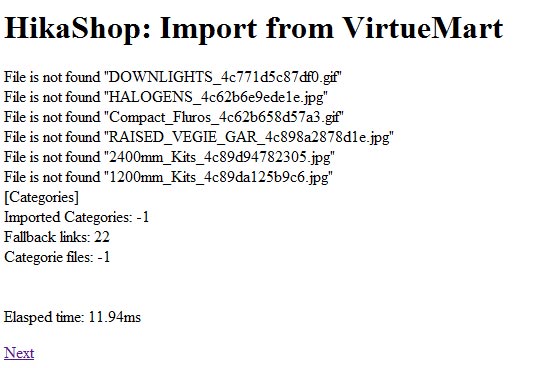
Actually - the products are imported now but the categories are not. Have attached photo of what happened when it tried to import categories.
Last edit: 15 years 2 months ago by Huski.
Please Log in or Create an account to join the conversation.
15 years 2 months ago #23218
by nicolas
Replied by nicolas on topic Re: Virtuemart import
Could you try to activate the debug mode of joomla in the joomla configuration and try again ? Please report any error you see during the import.
Please Log in or Create an account to join the conversation.
15 years 2 months ago #23219
by Huski
Replied by Huski on topic Re: Virtuemart import
No errors coming up - said nothing was imported for anything as everything was already imported. When it got to the catgories - this time it just said zero for imported.
When I look at the tables, nothing has been imported into hikashop_category table but the hikashop_vm_cat table has 22 records which matches the number of categories in VM.
When I look at the tables, nothing has been imported into hikashop_category table but the hikashop_vm_cat table has 22 records which matches the number of categories in VM.
Please Log in or Create an account to join the conversation.
15 years 2 months ago #23220
by nicolas
Replied by nicolas on topic Re: Virtuemart import
Please go in your database with phpmyadmin and in the table hikashop_config, remove all the entries starting with vm_import and delete the tables hikashop_vm_prod and hikashop_vm_cat. Make sure that the debug mode is still activated and try again to import the data from VirtueMart.
Please Log in or Create an account to join the conversation.
15 years 2 months ago #23224
by Huski
Replied by Huski on topic Re: Virtuemart import
Have removed those entries and deleted the tables and when I click on import and then Next (on the screen where it says to backup first) - this is the error I get.
JDatabaseMySQL::query: 1146 - Table 'XX_hikashop_vm_cat' doesn't exist SQL=SELECT max(vm_id) as 'max' FROM `XX_hikashop_vm_cat`;
Call stack
# Function Location
1 JAdministrator->dispatch() XX/administrator/index.php:67
2 JComponentHelper->renderComponent() XX/public_html/administrator/includes/application.php:136
3 require_once() XX/libraries/joomla/application/component/helper.php:162
4 JController->execute() XX/public_html/administrator/components/com_hikashop/admin.hikashop.php:32
5 ImportController->import() XX/public_html/libraries/joomla/application/component/controller.php:236
6 ImportController->_vm() XX/public_html/administrator/components/com_hikashop/controllers/import.php:45
7 hikashopImportHelper->importFromVM() XX/public_html/administrator/components/com_hikashop/controllers/import.php:61
8 hikashopImportHelper->doImport() XX/public_html/administrator/components/com_hikashop/helpers/import.php:1389
9 hikashopImportHelper->loadConfiguration() XX/public_html/administrator/components/com_hikashop/helpers/import.php:1411
10 JDatabaseMySQL->loadObjectList() XX/public_html/administrator/components/com_hikashop/helpers/import.php:1544
11 JDatabaseMySQL->query() XX/public_html/libraries/joomla/database/database/mysql.php:458
12 JError->raiseError() XX/public_html/libraries/joomla/database/database/mysql.php:231
13 JError->raise() XX/public_html/libraries/joomla/error/error.php:171
14 JException->__construct() XX/public_html/libraries/joomla/error/error.php:136
JDatabaseMySQL::query: 1146 - Table 'XX_hikashop_vm_cat' doesn't exist SQL=SELECT max(vm_id) as 'max' FROM `XX_hikashop_vm_cat`;
Call stack
# Function Location
1 JAdministrator->dispatch() XX/administrator/index.php:67
2 JComponentHelper->renderComponent() XX/public_html/administrator/includes/application.php:136
3 require_once() XX/libraries/joomla/application/component/helper.php:162
4 JController->execute() XX/public_html/administrator/components/com_hikashop/admin.hikashop.php:32
5 ImportController->import() XX/public_html/libraries/joomla/application/component/controller.php:236
6 ImportController->_vm() XX/public_html/administrator/components/com_hikashop/controllers/import.php:45
7 hikashopImportHelper->importFromVM() XX/public_html/administrator/components/com_hikashop/controllers/import.php:61
8 hikashopImportHelper->doImport() XX/public_html/administrator/components/com_hikashop/helpers/import.php:1389
9 hikashopImportHelper->loadConfiguration() XX/public_html/administrator/components/com_hikashop/helpers/import.php:1411
10 JDatabaseMySQL->loadObjectList() XX/public_html/administrator/components/com_hikashop/helpers/import.php:1544
11 JDatabaseMySQL->query() XX/public_html/libraries/joomla/database/database/mysql.php:458
12 JError->raiseError() XX/public_html/libraries/joomla/database/database/mysql.php:231
13 JError->raise() XX/public_html/libraries/joomla/error/error.php:171
14 JException->__construct() XX/public_html/libraries/joomla/error/error.php:136
Please Log in or Create an account to join the conversation.
15 years 2 months ago #23228
by nicolas
Replied by nicolas on topic Re: Virtuemart import
Please change the code:
to:
in the file administrator/components/com_hikashop/helpers/import.php and try again.
Code:
$table = $this->db->loadResult();
if(empty($table)){
$this->db->setQuery("SELECT max(vm_id) as 'max' FROM `#__hikashop_vm_cat`;");
to:
Code:
$table = $this->db->loadResult();
if(!empty($table)){
$this->db->setQuery("SELECT max(vm_id) as 'max' FROM `#__hikashop_vm_cat`;");
Please Log in or Create an account to join the conversation.
15 years 2 months ago #23236
by Huski
Replied by Huski on topic Re: Virtuemart import
hi get this error now. Did you want the extra information as I did in the previous posts or is this line enough?
JDatabaseMySQL::query: 1060 - Duplicate column name 'address_vm_order_info_id' SQL=ALTER IGNORE TABLE `XX_hikashop_address` ADD `address_vm_order_info_id` INT(11) NULL
I turned off debug and tried again but still no categories coming in. Also noticed there were some errors with not being able to find images. I did open up one of the products and there was multiples of the same image showing under images section of product page.
JDatabaseMySQL::query: 1060 - Duplicate column name 'address_vm_order_info_id' SQL=ALTER IGNORE TABLE `XX_hikashop_address` ADD `address_vm_order_info_id` INT(11) NULL
I turned off debug and tried again but still no categories coming in. Also noticed there were some errors with not being able to find images. I did open up one of the products and there was multiples of the same image showing under images section of product page.
Please Log in or Create an account to join the conversation.
15 years 2 months ago #23238
by nicolas
Replied by nicolas on topic Re: Virtuemart import
Mmm. That is error is because the column was already added by the first import. So that solution of testing is not good. You will have to do differently. Please do like this:
Delete all the hikashop tables from the database.
Then, install again hikashop. That will recreate all the tables in the database as they are by default.
Then, activate the debug mode, do the modification in the file like explained in the previous post and try again an import.
Delete all the hikashop tables from the database.
Then, install again hikashop. That will recreate all the tables in the database as they are by default.
Then, activate the debug mode, do the modification in the file like explained in the previous post and try again an import.
Please Log in or Create an account to join the conversation.
15 years 2 months ago #23240
by Huski
Replied by Huski on topic Re: Virtuemart import
hi
I removed hikashop tables, reinstalled hikashop and made the modification and get his error.
JDatabaseMySQL::query: 1054 - Unknown column 'order_vm_id' in 'field list' SQL=SELECT max(order_vm_id) as 'max' FROM `xx_hikashop_order`;
I removed hikashop tables, reinstalled hikashop and made the modification and get his error.
JDatabaseMySQL::query: 1054 - Unknown column 'order_vm_id' in 'field list' SQL=SELECT max(order_vm_id) as 'max' FROM `xx_hikashop_order`;
Please Log in or Create an account to join the conversation.
15 years 2 months ago #23253
by nicolas
Replied by nicolas on topic Re: Virtuemart import
It seems that you're using one of the first build of the 1.5.3 version of HikaShop which had that issue. Could you please download again the install package of HikaShop on our website and do again the procedure ?
Please Log in or Create an account to join the conversation.
15 years 2 months ago #23316
by Huski
Replied by Huski on topic Re: Virtuemart import
Thats worked now - thanks.
Please Log in or Create an account to join the conversation.
Time to create page: 0.156 seconds