

- Posts: 251
- Thank you received: 2
Caractheristics of Product Options
15 years 1 month ago - 15 years 1 month ago #25809
by Nello
Caractheristics of Product Options was created by Nello
Hi Nicolas,
In the Main Config/View I set Characteristics values ordering: Alphabetically.
But the characteristics of the product options are sorted by ID.
How can I set in alphabetic order?
Here an example
www.hidesign.it/it/catalogo/product/show/cid-2240/poltrona-jut
Thank you!
In the Main Config/View I set Characteristics values ordering: Alphabetically.
But the characteristics of the product options are sorted by ID.
How can I set in alphabetic order?
Here an example
www.hidesign.it/it/catalogo/product/show/cid-2240/poltrona-jut
Thank you!
Last edit: 15 years 1 month ago by Nello.
Please Log in or Create an account to join the conversation.

15 years 1 month ago - 15 years 1 month ago #25810
by nicolas
Replied by nicolas on topic Re: Caractheristics of Product Options
Hi,
There is indeed a problem on that end. You need to add the code :
after the lines:
In the file components/com_hikashop/views/product/view.html.php and that will solve the problem.
There is indeed a problem on that end. You need to add the code :
Code:
if(count($mainCharacteristics[$option->product_id][0])){
$optionsVariants = array();
$config =& hikashop_config();
if($config->get('characteristics_values_sorting')=='old'){
$order = 'characteristic_id';
}else{
$order = 'characteristic_value';
}
foreach($option->variants as $k2 => $variant){
$key = '';
foreach($variant->characteristics as $char){
$key .= $char->characteristic_value.'_';
}
$optionsVariants[$key]=&$element->options[$k]->variants[$k2];
}
ksort($optionsVariants);
$element->options[$k]->variants=$optionsVariants;
}
Code:
if(!empty($element->options)){
foreach($element->options as $k => $option){
if(!empty($option->variants)){
$this->addCharacteristics($element->options[$k],$mainCharacteristics,$characteristics);
In the file components/com_hikashop/views/product/view.html.php and that will solve the problem.
Last edit: 15 years 1 month ago by nicolas.
Please Log in or Create an account to join the conversation.
15 years 1 month ago #25812
by Nello
Replied by Nello on topic Re: Caractheristics of Product Options
Resolved!
Thank you so much!
Thank you so much!
Please Log in or Create an account to join the conversation.
Less
More
- Posts: 67
- Thank you received: 0
14 years 9 months ago #33552
by meteomalta
Replied by meteomalta on topic Re: Caractheristics of Product Options
I have the same issue but the suggestion given did not work - what can I do please? my site is
www.gamebreakermalta.com
Please Log in or Create an account to join the conversation.
14 years 9 months ago #33577
by nicolas
Replied by nicolas on topic Re: Caractheristics of Product Options
That modification has been added in HikaShop since then. Are you sure that you changed the corresponding option in the Display tab of the configuration of HikaShop as the poster of that thread did ?
Please Log in or Create an account to join the conversation.
Less
More
- Posts: 67
- Thank you received: 0
14 years 9 months ago #33605
by meteomalta
Replied by meteomalta on topic Re: Caractheristics of Product Options
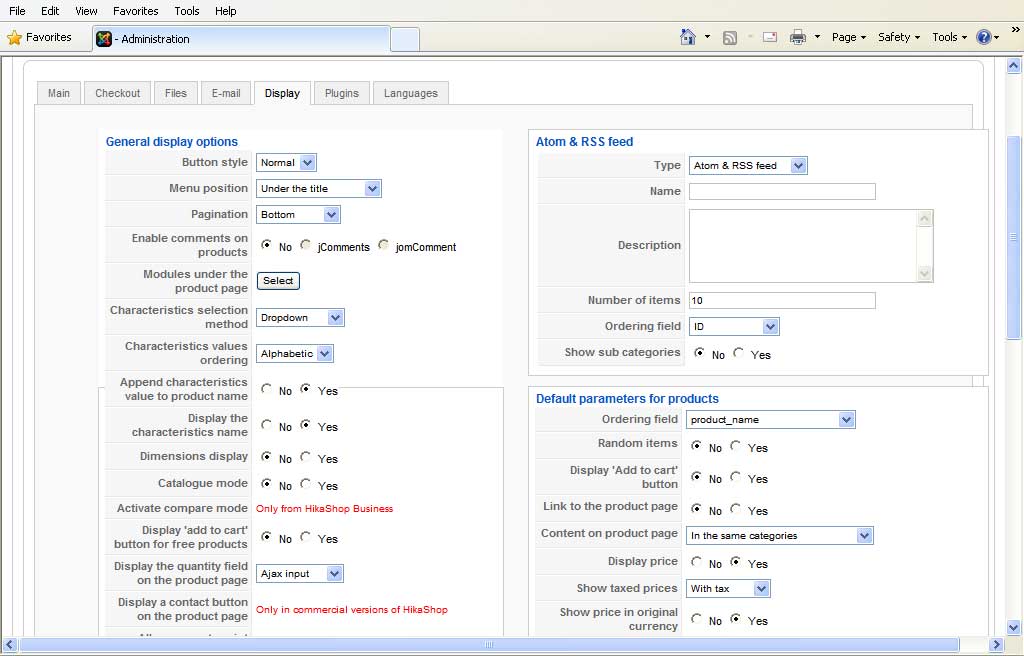
I am attaching screen shot to show you that I did do that but the products in the online shop do not show up in alphabetical order just the same.
Please Log in or Create an account to join the conversation.
14 years 9 months ago #33637
by nicolas
Replied by nicolas on topic Re: Caractheristics of Product Options
And could you give a link to a product page where you have options as I couldn't find a product with options on your website ?
Please Log in or Create an account to join the conversation.
Less
More
- Posts: 67
- Thank you received: 0
14 years 9 months ago #33657
by meteomalta
Replied by meteomalta on topic Re: Caractheristics of Product Options
you can view products and categories by clicking on the online shop at
www.gamebreakermalta.com
but you need to register first
Please Log in or Create an account to join the conversation.
14 years 9 months ago #33685
by nicolas
Replied by nicolas on topic Re: Caractheristics of Product Options
I know. I found your products on your website. But all the products I found didn't had any options. So I couldn't look at the problem. Could you give a link to a product page with options ?
Please Log in or Create an account to join the conversation.
Less
More
- Posts: 67
- Thank you received: 0
14 years 9 months ago #33688
by meteomalta
Replied by meteomalta on topic Re: Caractheristics of Product Options
what do you mean products with options? Can you explain coz I can't understand sorry
Please Log in or Create an account to join the conversation.
14 years 9 months ago #33691
by nicolas
Replied by nicolas on topic Re: Caractheristics of Product Options
That thread is about option dropdowns on product pages which were not in the alphabetical order.
You said that you had that problem even though you set that option correctly in the configuration. So we would need to see a product page with option dropdowns to confirm the problem. Like this one:
www.demo.hikashop.com/index.php?option=c...ow&Itemid=91&lang=en
You said that you had that problem even though you set that option correctly in the configuration. So we would need to see a product page with option dropdowns to confirm the problem. Like this one:
www.demo.hikashop.com/index.php?option=c...ow&Itemid=91&lang=en
Please Log in or Create an account to join the conversation.
Less
More
- Posts: 67
- Thank you received: 0
14 years 9 months ago #33693
by meteomalta
Replied by meteomalta on topic Re: Caractheristics of Product Options
what I meant is that I want the products in the categories in alphbetical order NOT the options in the products which I am not using anyway
Please Log in or Create an account to join the conversation.
14 years 9 months ago #33694
by nicolas
Replied by nicolas on topic Re: Caractheristics of Product Options
For that, you need to edit the hikashop options of your products listing menu/module and change the ordering column from "ordering" to "product_name". In your case, it's the module with the id 26 that you can edit via the menu Display->Content modules.
Please Log in or Create an account to join the conversation.
Less
More
- Posts: 67
- Thank you received: 0
14 years 9 months ago #33696
by meteomalta
Replied by meteomalta on topic Re: Caractheristics of Product Options
are you referring to the section called Default Parameters for Products? Coz if yes I already have the product_name chosen as can be seen on the attachment I uploaded a few posts back
Please Log in or Create an account to join the conversation.
14 years 9 months ago #33719
by nicolas
Replied by nicolas on topic Re: Caractheristics of Product Options
No, that's the Display tab of the configuration. I'm talking about the Display->Content modules menu that you can see under the title of the screen.
Please Log in or Create an account to join the conversation.
Less
More
- Posts: 67
- Thank you received: 0
14 years 9 months ago #33748
by meteomalta
Replied by meteomalta on topic Re: Caractheristics of Product Options
ok I've seen that module but all is does is list a number of products at the side of each page. I want the products I have in the categories in alphabetical order and NOT this module of having the products listed in alphabetical order at the side of the page.
Please Log in or Create an account to join the conversation.
14 years 9 months ago #33749
by nicolas
Replied by nicolas on topic Re: Caractheristics of Product Options
I'm 100% sure that the module with the id 26 on your website is the module which is used in categories on your main area.
Please follow my instructions and it will do what you want.
Please follow my instructions and it will do what you want.
Please Log in or Create an account to join the conversation.
Less
More
- Posts: 67
- Thank you received: 0
14 years 9 months ago #33751
by meteomalta
Replied by meteomalta on topic Re: Caractheristics of Product Options
ah ok now I get it - I didn't realise that ID 26 was on the right - I was looking on the left  anyway problem solved finally - thanks a million for your help and patience and Merry Christmas
anyway problem solved finally - thanks a million for your help and patience and Merry Christmas Please Log in or Create an account to join the conversation.
Time to create page: 0.220 seconds