
- Posts: 52
- Thank you received: 0
Confusing message on order page
- petermorris
-
 Topic Author
- Offline
Less
More
14 years 11 months ago #29102
by petermorris
Confusing message on order page was created by petermorris
The payment methods are shown as per attached
The way the page is laid out infers that Authorize is another form of payment along with the displayed credit cards
Then at the bottom it states you chose the method Authorize
The buyer has not chosen Authorize. They have just elected to pay by credit card.
So when it displays Authorize but they want to pay by say Visa, they give up as there is no way to get Visa for instance to appear on the bottom line
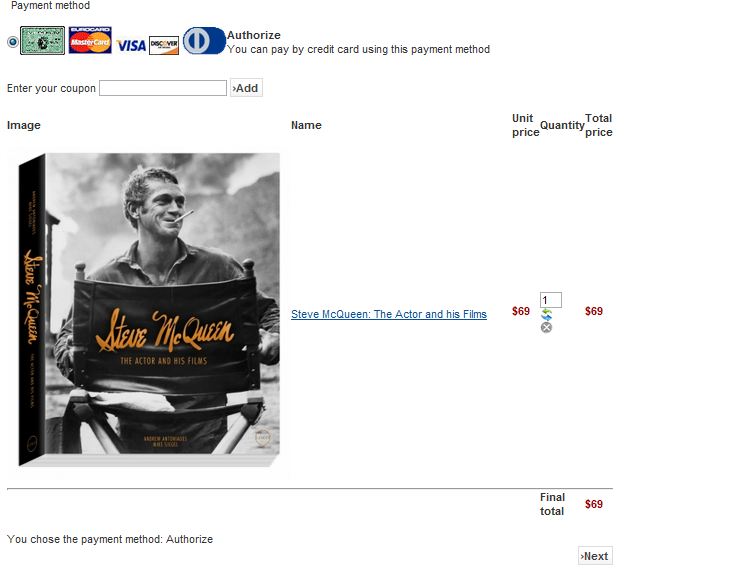
The way the page is laid out infers that Authorize is another form of payment along with the displayed credit cards
Then at the bottom it states you chose the method Authorize
The buyer has not chosen Authorize. They have just elected to pay by credit card.
So when it displays Authorize but they want to pay by say Visa, they give up as there is no way to get Visa for instance to appear on the bottom line
Please Log in or Create an account to join the conversation.

14 years 11 months ago #29107
by nicolas
Replied by nicolas on topic Re: Confusing message on order page
You could for example remove the bottom display from the check workflow. You can do that in the Checkout tab of the configuration by removing the "status" view from the checkout workflow.
That's not a bug report.
That's not a bug report.
Please Log in or Create an account to join the conversation.
- petermorris
-
Topic Author
- Offline
Less
More
- Posts: 52
- Thank you received: 0
14 years 11 months ago #29114
by petermorris
Replied by petermorris on topic Re: Confusing message on order page
So the expression You chose the payment method: Authorize is from the Status field.
I cannot see how to edit what it says. I would rather edit it rather than remove it so it might read for instance You have chosen to pay by credit card
I cannot see how to edit what it says. I would rather edit it rather than remove it so it might read for instance You have chosen to pay by credit card
Please Log in or Create an account to join the conversation.
14 years 11 months ago #29115
by nicolas
Replied by nicolas on topic Re: Confusing message on order page
Well, if you want to change the name of the payment method, you can just go in the menu System->Payment methods, edit the Authorize.net payment plugin and change its name to what you want, ie. credit card.
Please Log in or Create an account to join the conversation.
Time to create page: 0.100 seconds