
- Posts: 52
- Thank you received: 0
cart module issie
- websquirrel
-
 Topic Author
- Offline
Less
More
14 years 10 months ago #29601
by websquirrel
cart module issie was created by websquirrel
Hello,
I experience some issues on the shopping cart module as follows:
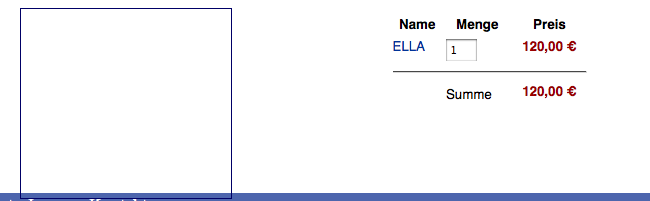
I experience some issues on the shopping cart module as follows:
- setting "show title" to yes, does not show the title.
- entering a module class suffix (in joomla module settings) does not add any module class suffix. there seems to be no moduletable for the cart at all
- entering a ul class suffix (in hikashop cart settings) does not add any ul class. there seems to be no ul in the cart at all
- I defined a border for class hikashop_cart_module template.css. But the border does not appear to be on the cart (see screenshot)
Please Log in or Create an account to join the conversation.

14 years 10 months ago #29616
by nicolas
Replied by nicolas on topic Re: cart module issie
Hi,
1. That option is for displaying the column titles on the products listing of the cart, not the module title. That is handled by another option in the joomla option page of the module and the module title is displayed by your template, not by HikaShop, so if that doesn't work, it means that your template does not display a title for modules in the position where you set your cart module.
2. That is also handled by your template, not by HikaShop.
3. You have a good point. That option should not be displayed for the cart module. We'll remove it.
4. It's impossible to say anything about such CSS issue without looking at the CSS/HTML with firebug. Please provide the URL of your shop and we'll have a look.
1. That option is for displaying the column titles on the products listing of the cart, not the module title. That is handled by another option in the joomla option page of the module and the module title is displayed by your template, not by HikaShop, so if that doesn't work, it means that your template does not display a title for modules in the position where you set your cart module.
2. That is also handled by your template, not by HikaShop.
3. You have a good point. That option should not be displayed for the cart module. We'll remove it.
4. It's impossible to say anything about such CSS issue without looking at the CSS/HTML with firebug. Please provide the URL of your shop and we'll have a look.
Please Log in or Create an account to join the conversation.
- websquirrel
-
Topic Author
- Offline
Less
More
- Posts: 52
- Thank you received: 0
14 years 10 months ago #29623
by websquirrel
Replied by websquirrel on topic Re: cart module issie
Please Log in or Create an account to join the conversation.
14 years 10 months ago #29633
by nicolas
Replied by nicolas on topic Re: cart module issie
If you just add a line
float:left;
in your CSS class definition in your template.css, it should fix the problem.
float:left;
in your CSS class definition in your template.css, it should fix the problem.
Please Log in or Create an account to join the conversation.
- websquirrel
-
Topic Author
- Offline
Less
More
- Posts: 52
- Thank you received: 0
14 years 10 months ago #29664
by websquirrel
Replied by websquirrel on topic Re: cart module issie
Thanks for your answers. I could solve some of the issues. Still Hikashop seems unusual complicated to me, so I am going to ask some more stupid questions soon...
Please Log in or Create an account to join the conversation.
Time to create page: 0.211 seconds