

- Posts: 10
- Thank you received: 0
Social networks plugin: Button formatting
14 years 10 months ago #31305
by finisher
Social networks plugin: Button formatting was created by finisher
When selecting the plugin parameters as shown in the screenshot the layout is a little messed up.
Looks like there are some misplaced "" in the plugins *.php (lines 170, 171, 185)
So I changed them into:
170 if($plugin->params==1){ $sizes='class="hikashop_social_fb_button_count"'; }
171 if($plugin->params==2){ $sizes='class="hikashop_social_fb_box_count"'; }
...
185 style="border:none; overflow:hidden;" '.$sizes.'
This only solving the HTML issues, I also changed the CSS as follows:
#hikashop_social span.hikashop_social_google_right_tw_vertical{
position:absolute;
right:250px; /*before 215px*/
}
This solved the issue for me, but it might be necessary to change some more of the CSS for other layouts.
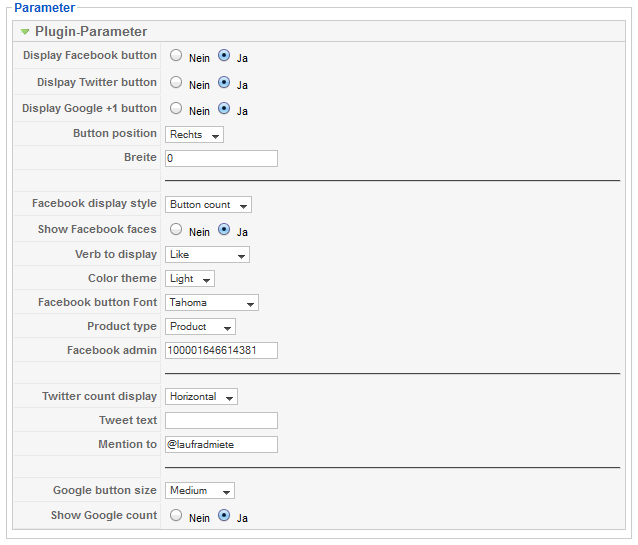
Looks like there are some misplaced "" in the plugins *.php (lines 170, 171, 185)
So I changed them into:
170 if($plugin->params==1){ $sizes='class="hikashop_social_fb_button_count"'; }
171 if($plugin->params==2){ $sizes='class="hikashop_social_fb_box_count"'; }
...
185 style="border:none; overflow:hidden;" '.$sizes.'
This only solving the HTML issues, I also changed the CSS as follows:
#hikashop_social span.hikashop_social_google_right_tw_vertical{
position:absolute;
right:250px; /*before 215px*/
}
This solved the issue for me, but it might be necessary to change some more of the CSS for other layouts.
Please Log in or Create an account to join the conversation.

14 years 10 months ago #31309
by nicolas
Replied by nicolas on topic Re: Social networks plugin: Button formatting
Yes, thank you. That has already been mentioned yesterday by someone else and we fixed it on our end:
www.hikashop.com/fr/support/forum/3-bug-...in-solved.html#31190
www.hikashop.com/fr/support/forum/3-bug-...in-solved.html#31190
Please Log in or Create an account to join the conversation.
14 years 10 months ago #31681
by finisher
Replied by finisher on topic Re: Social networks plugin: Button formatting
Just upgraded to Business and now having the same problem again... when will an update with the bugfix be published?
Please Log in or Create an account to join the conversation.
14 years 10 months ago #31710
by nicolas
Replied by nicolas on topic Re: Social networks plugin: Button formatting
That will be in next release which will be out next week.
Please Log in or Create an account to join the conversation.
14 years 9 months ago #34068
by finisher
Replied by finisher on topic Re: Social networks plugin: Button formatting
Running V1.5.5 but still missing a " ...
Source code:
<div id="hikashop_social" style="text-align:left;">
[...]
<span class="hikashop_social_left_fb_tw_horizontal" >
<iframe src="..."
scrolling="no"
frameborder="0"
style="border:none; overflow:hidden;"
class="hikashop_social_fb_button_count"
allowTransparency="true">
</iframe>
</span>
</div>
Source code:
<div id="hikashop_social" style="text-align:left;">
[...]
<span class="hikashop_social_left_fb_tw_horizontal" >
<iframe src="..."
scrolling="no"
frameborder="0"
style="border:none; overflow:hidden;"
class="hikashop_social_fb_button_count"
allowTransparency="true">
</iframe>
</span>
</div>
Please Log in or Create an account to join the conversation.
14 years 9 months ago #34115
by nicolas
Replied by nicolas on topic Re: Social networks plugin: Button formatting
Hi,
That was fixed in 1.5.5
I checked the code and the double quote is there.
If you don't have it, it must be because you updated from a previous version but that your plugins/content folder is not writable and thus joomla couldn't update the files of the plugin.
You should try to put the files manually (folder back/extensions in the installation package) via FTP.
That was fixed in 1.5.5
I checked the code and the double quote is there.
If you don't have it, it must be because you updated from a previous version but that your plugins/content folder is not writable and thus joomla couldn't update the files of the plugin.
You should try to put the files manually (folder back/extensions in the installation package) via FTP.
Please Log in or Create an account to join the conversation.
Time to create page: 0.197 seconds