

- Posts: 126
- Thank you received: 2
Small problem using products comparison
14 years 9 months ago #33516
by mett
Small problem using products comparison was created by mett
Hello,
Tested with 2 different joomla templates and having same problem: when i compare 2 or more products, all modules from left side are displayed below the comparison area (see attached image)
P.S: not a bug, but a feature request: the "Compare products" button would be better to appear only if at least 2 products are selected from list, or a warning message to be displayed and ask to tick more than one product from list.
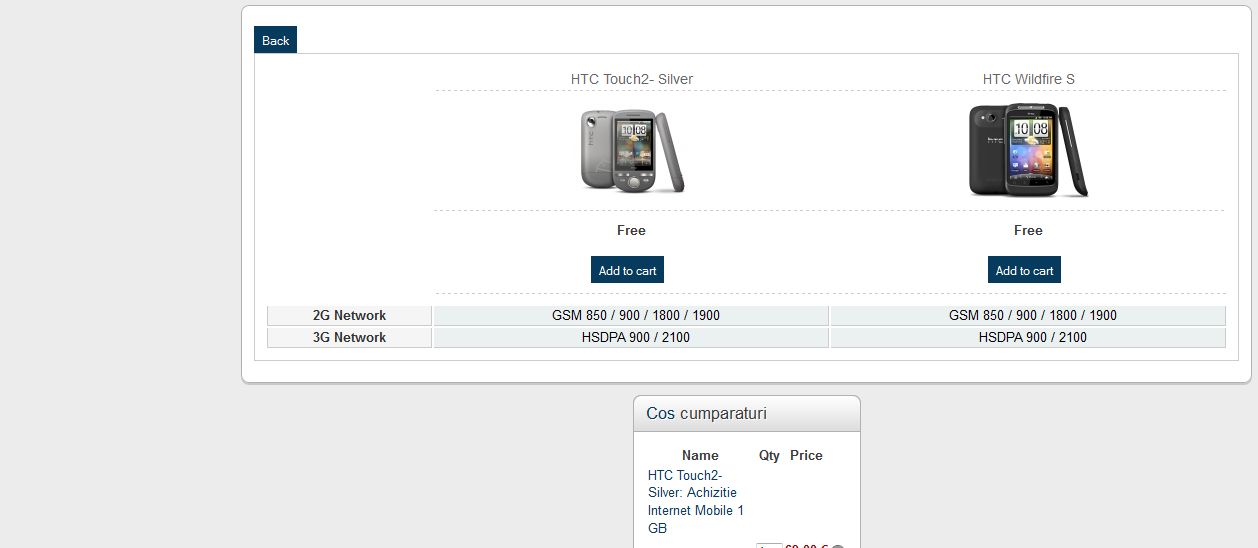
Tested with 2 different joomla templates and having same problem: when i compare 2 or more products, all modules from left side are displayed below the comparison area (see attached image)
P.S: not a bug, but a feature request: the "Compare products" button would be better to appear only if at least 2 products are selected from list, or a warning message to be displayed and ask to tick more than one product from list.
Please Log in or Create an account to join the conversation.

14 years 9 months ago #33558
by nicolas
Replied by nicolas on topic Re: Small problem using products comparison
Hi,
We don't have that problem on our end. I just tried and it worked ok. Could you give the link to that page so that we can see its HTML ?
Your proposition is good.You can change that by editing the file "listing" of the view "product" via the menu Display->Views and changing the line:
if(compare_list.length == 0 ) {
to:
if(compare_list.length < 2 ) {
We don't have that problem on our end. I just tried and it worked ok. Could you give the link to that page so that we can see its HTML ?
Your proposition is good.You can change that by editing the file "listing" of the view "product" via the menu Display->Views and changing the line:
if(compare_list.length == 0 ) {
to:
if(compare_list.length < 2 ) {
Please Log in or Create an account to join the conversation.
14 years 9 months ago #33600
by mett
Replied by mett on topic Re: Small problem using products comparison
our site is resticted to public access, but i can send you a PM with login data
Please Log in or Create an account to join the conversation.
14 years 9 months ago #33628
by nicolas
Replied by nicolas on topic Re: Small problem using products comparison
Yes. You can use our contact form for that:
www.hikashop.com/en/support/contact-us.html
Please also give the URL of that topic so that we know why you're sending the access.
Please also give the URL of that topic so that we know why you're sending the access.
Please Log in or Create an account to join the conversation.
14 years 9 months ago #33635
by mett
Replied by mett on topic Re: Small problem using products comparison
Message sent, thank you
Please Log in or Create an account to join the conversation.
14 years 9 months ago #33667
by nicolas
Replied by nicolas on topic Re: Small problem using products comparison
There is a closing div tag missing on that page.
Please edit the file "compare" of the view "product" via the menu Display->Views and add the line:
</div>
at the end of the file and that should solve the problem.
Please edit the file "compare" of the view "product" via the menu Display->Views and add the line:
</div>
at the end of the file and that should solve the problem.
Please Log in or Create an account to join the conversation.
Time to create page: 0.216 seconds