

- Posts: 3
- Thank you received: 0
Shopping cart/Check out
14 years 8 months ago #40251
by maryam.sn
Shopping cart/Check out was created by maryam.sn
Hi,
I've got a template designed for Virtuemart (named YOURSHP from GAVICK), but replaced Virtuemart with Hikashop cause I like it more and it's simpler to work with attributes and managing stock! but the problem is that the Shopping cart doesn't work now. it doesn't show the right number of items inside and the check out button doesn't work neither. I want to buy the essential package of hickashop but since I'm not sure that I can fix it I hesitate. Is there any module or plugin for that?
I've got a template designed for Virtuemart (named YOURSHP from GAVICK), but replaced Virtuemart with Hikashop cause I like it more and it's simpler to work with attributes and managing stock! but the problem is that the Shopping cart doesn't work now. it doesn't show the right number of items inside and the check out button doesn't work neither. I want to buy the essential package of hickashop but since I'm not sure that I can fix it I hesitate. Is there any module or plugin for that?
Please Log in or Create an account to join the conversation.

14 years 8 months ago #40454
by nicolas
Replied by nicolas on topic Re: Shopping cart/Check out
Hi,
That should work out of the box. We will need more information to help you. Please provide links of where you have the problems so that we can see what it's all about.
That should work out of the box. We will need more information to help you. Please provide links of where you have the problems so that we can see what it's all about.
Please Log in or Create an account to join the conversation.
Less
More
- Posts: 16
- Thank you received: 0
13 years 4 months ago #111439
by mmlservices
Replied by mmlservices on topic Re: Shopping cart/Check out
Hi, i have the same problem. I have a template designed to Virtuemart (named Boutique from GAVICK). I have replaced Virtuemart by Hikashop but now Shopping cart counter doesn't work. the cart always shows "0 items". I would to have a module, where the selected items and prices are presented. Basically, if you now click on the cart button, there is a pop-up, which has exactly all the information which i would like to have in the module.
Thanks in advance for your help.
Thanks in advance for your help.
Please Log in or Create an account to join the conversation.
13 years 4 months ago #111497
by nicolas
Replied by nicolas on topic Re: Shopping cart/Check out
Hi,
There is already such module. It's called HikaShop cart module. You can configure it via the modules manager of Joomla.
It will refresh with the information of the products in the cart automatically once you configure it.
There is already such module. It's called HikaShop cart module. You can configure it via the modules manager of Joomla.
It will refresh with the information of the products in the cart automatically once you configure it.
Please Log in or Create an account to join the conversation.
Less
More
- Posts: 16
- Thank you received: 0
13 years 4 months ago #111525
by mmlservices
Replied by mmlservices on topic Re: Shopping cart/Check out
Thanks for your responce.
i try to do it but when i choose "mini cart" to display the total number of products, into the popup there isn't the list of each product. Is there a way to display the list?
Thanks in advance for your help.
i try to do it but when i choose "mini cart" to display the total number of products, into the popup there isn't the list of each product. Is there a way to display the list?
Thanks in advance for your help.
Please Log in or Create an account to join the conversation.
13 years 4 months ago #111539
by nicolas
Replied by nicolas on topic Re: Shopping cart/Check out
If you turn off the mini cart option of the module, you will get the list.
If you want to display the mini cart data on one place, and the non mini cart data on another place, simply use two different instances of the HikaShop cart module. You can create new instances of modules via the new button of the joomla module manager.
If you want to display the mini cart data on one place, and the non mini cart data on another place, simply use two different instances of the HikaShop cart module. You can create new instances of modules via the new button of the joomla module manager.
Please Log in or Create an account to join the conversation.
Less
More
- Posts: 16
- Thank you received: 0
13 years 4 months ago #111589
by mmlservices
Replied by mmlservices on topic Re: Shopping cart/Check out
Hi,
i turn off the mini cart option and i get only the total, but not the list (attachments). It's normal?
thank you very much
Best regards
i turn off the mini cart option and i get only the total, but not the list (attachments). It's normal?
thank you very much
Best regards
Please Log in or Create an account to join the conversation.

Less
More
- Posts: 12953
- Thank you received: 1778
13 years 4 months ago #111595
by Mohamed Thelji
Replied by Mohamed Thelji on topic Shopping cart/Check out
Hi,
Can you send me a screenshots of your cart module and of how did you configured your "HikaShop Cart Module" through "Hikashop->Display->Content Module".
Thanks .
.
Can you send me a screenshots of your cart module and of how did you configured your "HikaShop Cart Module" through "Hikashop->Display->Content Module".
Thanks
. Please Log in or Create an account to join the conversation.
Less
More
- Posts: 16
- Thank you received: 0
13 years 4 months ago #111600
by mmlservices
Replied by mmlservices on topic Shopping cart/Check out
in attachment.
Thank you.
Thank you.
Please Log in or Create an account to join the conversation.

13 years 4 months ago #111608
by Eliot
Replied by Eliot on topic Shopping cart/Check out
I think you forgot the screenshot 
Please Log in or Create an account to join the conversation.
Less
More
- Posts: 16
- Thank you received: 0
13 years 4 months ago #111645
by mmlservices
Replied by mmlservices on topic Shopping cart/Check out
ops
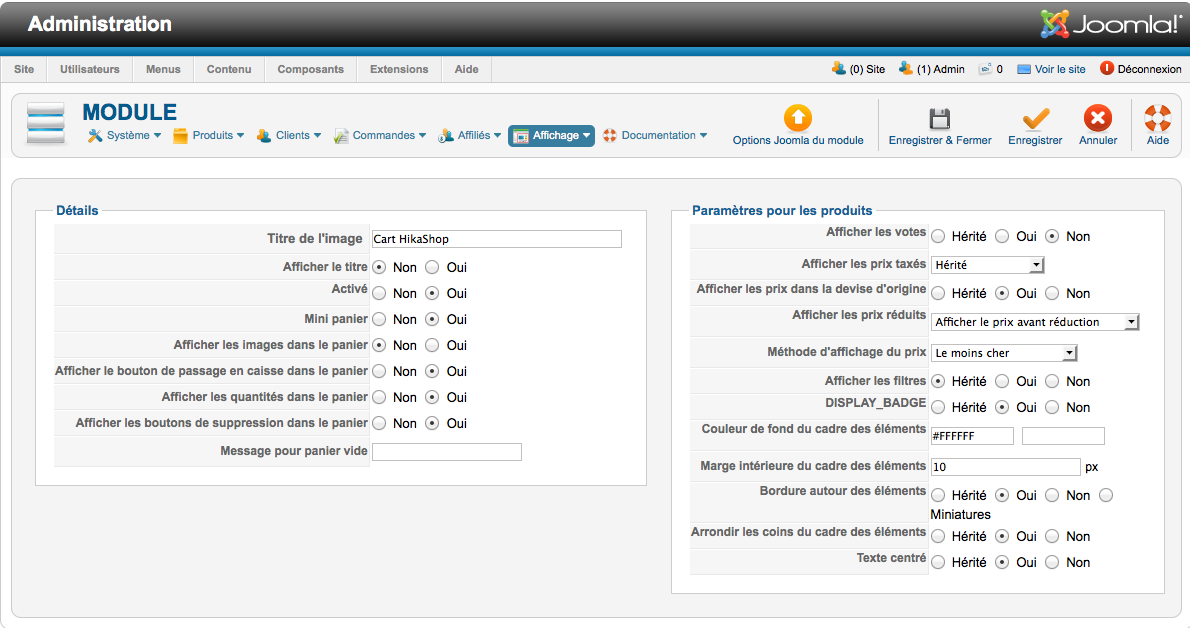
Please Log in or Create an account to join the conversation.
Less
More
- Posts: 12953
- Thank you received: 1778
13 years 4 months ago #111647
by Mohamed Thelji
Replied by Mohamed Thelji on topic Shopping cart/Check out
Then can you set the mini panier option to NON and show me a screenshot of your cart module through your shop ? if it don't change your cart module, can you give me a link to your shop for testing purpose ?
? if it don't change your cart module, can you give me a link to your shop for testing purpose ? Please Log in or Create an account to join the conversation.
Less
More
- Posts: 16
- Thank you received: 0
13 years 4 months ago #111662
by mmlservices
Replied by mmlservices on topic Shopping cart/Check out
ok.
thanks.
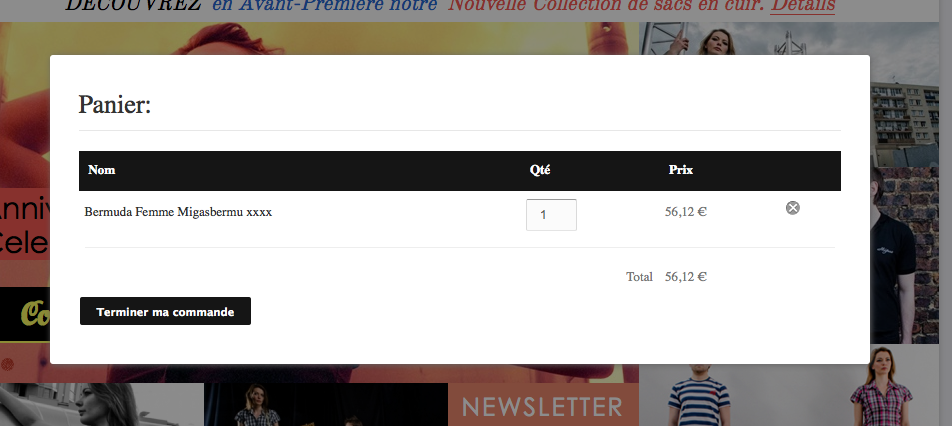
thanks.
Please Log in or Create an account to join the conversation.
Less
More
- Posts: 16
- Thank you received: 0
13 years 4 months ago #111665
by mmlservices
Replied by mmlservices on topic Shopping cart/Check out
Do you know how i can do to have the total number of products?
thank you.
thank you.
Please Log in or Create an account to join the conversation.
13 years 4 months ago #111675
by nicolas
Replied by nicolas on topic Shopping cart/Check out
If you turn on the "mini panier" to "oui" you will get the mini cart with the total number of products and the total price of the products in the cart.
Please Log in or Create an account to join the conversation.
Less
More
- Posts: 16
- Thank you received: 0
13 years 4 months ago #111683
by mmlservices
Replied by mmlservices on topic Shopping cart/Check out
yes.. my problem is that I'm using a Gavick's template designed for Virtuemart. Now, i preferred to use hikashop but with hikashop the shopping cart doesn't work very well. I would like to display into the site the number of products and when i click on this number open a popup with the list of all products, but i don't know how to do it..
Please Log in or Create an account to join the conversation.
Less
More
- Posts: 16
- Thank you received: 0
13 years 4 months ago #111691
by mmlservices
Replied by mmlservices on topic Shopping cart/Check out
thank you very much for you support.
I found a way to solve my problem. I have created two different module..
I found a way to solve my problem. I have created two different module..
Please Log in or Create an account to join the conversation.
Time to create page: 0.149 seconds