
- Posts: 27
- Thank you received: 0
add to cart multiple pop ups - why
- Christoph59
-
 Topic Author
- Offline
Less
More
14 years 2 months ago - 14 years 2 months ago #59936
by Christoph59
add to cart multiple pop ups - why was created by Christoph59
Hi,
I am experiencing multiple add to cart pop ups when I click on the add to cart button. I have enclosed a screenshot. It works fine if there are no variants or product options set but if there are - I get this strange behavior. Thanks for your help in advance
Regards
Christoph
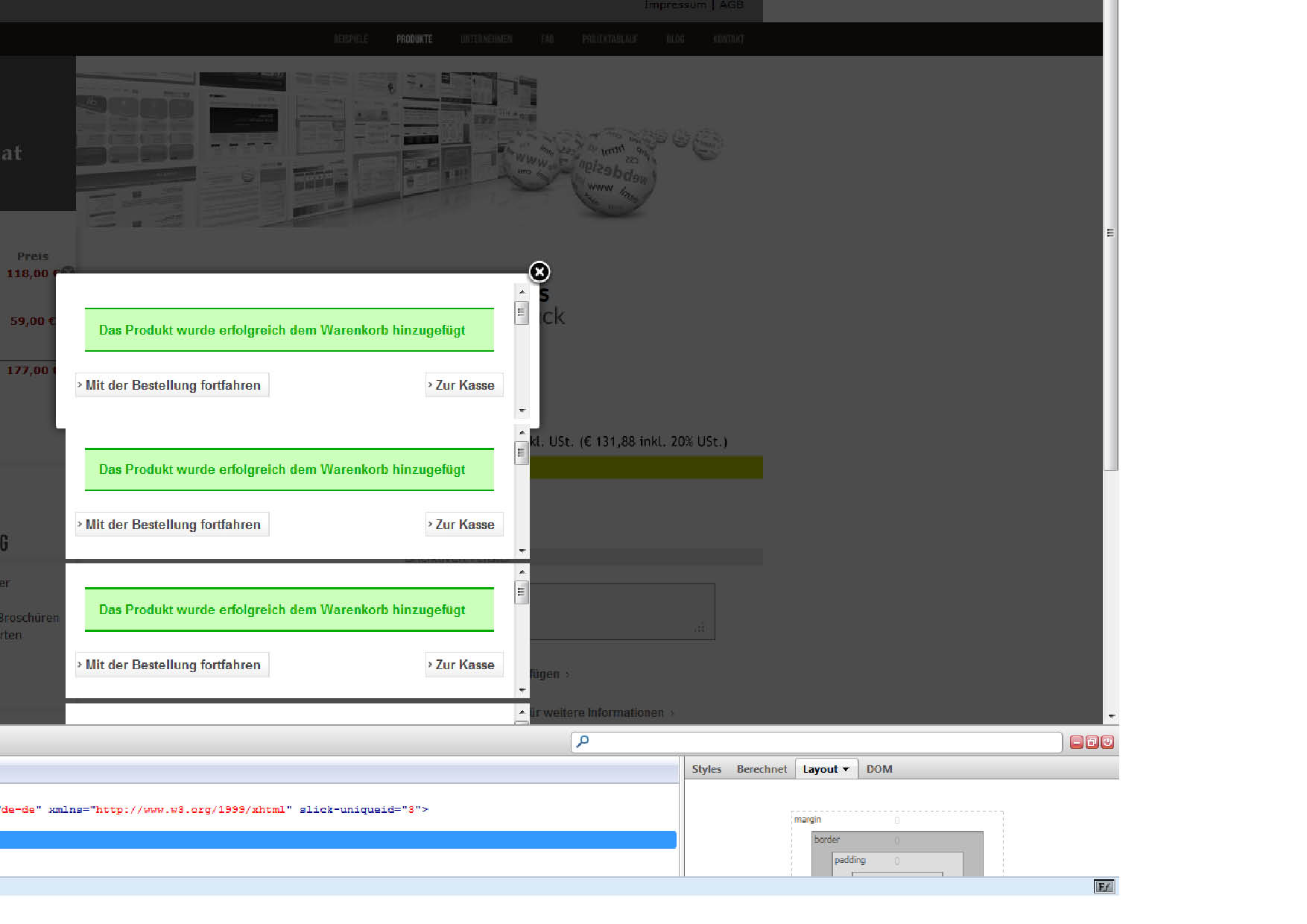
I am experiencing multiple add to cart pop ups when I click on the add to cart button. I have enclosed a screenshot. It works fine if there are no variants or product options set but if there are - I get this strange behavior. Thanks for your help in advance
Regards
Christoph
Last edit: 14 years 2 months ago by Christoph59.
Please Log in or Create an account to join the conversation.

14 years 2 months ago #59994
by nicolas
Replied by nicolas on topic Re: add to cart multiple pop ups - why
I believe that this comes form your template. Could you try to switch to another template to confirm that ?
Please Log in or Create an account to join the conversation.
- Christoph59
-
Topic Author
- Offline
Less
More
- Posts: 27
- Thank you received: 0
14 years 2 months ago #59996
by Christoph59
Replied by Christoph59 on topic Re: add to cart multiple pop ups - why
Hi Nicolas, just tried another template with same negative results. I had made several changes in the past with the formating of the default php and everything worked so far. I had also changed the product options / variants several times so maybe that is a source of conflict? Any help very appreciated
regards christoph
regards christoph
Please Log in or Create an account to join the conversation.
14 years 2 months ago #60084
by nicolas
Replied by nicolas on topic Re: add to cart multiple pop ups - why
Can you try with a new product and give a link to the product page so that we can see that ?
Please Log in or Create an account to join the conversation.
- Christoph59
-
Topic Author
- Offline
Less
More
- Posts: 27
- Thank you received: 0
14 years 2 months ago #60115
by Christoph59
Replied by Christoph59 on topic Re: add to cart multiple pop ups - why
Hi Nicolas,
tried with a new product without success. Again no trouble if there are no options / variants added to product (although this time no pop-up shown) but with a product option added I get these multiple pop-ups. I cannot provide a link as the site is under construction on my local xampp environment. I did some changes of the ordering of elements in some php files (checkout/cart and show default)- could this be a reason or anything else- please help.
christoph
tried with a new product without success. Again no trouble if there are no options / variants added to product (although this time no pop-up shown) but with a product option added I get these multiple pop-ups. I cannot provide a link as the site is under construction on my local xampp environment. I did some changes of the ordering of elements in some php files (checkout/cart and show default)- could this be a reason or anything else- please help.
christoph
Please Log in or Create an account to join the conversation.
14 years 2 months ago #60187
by nicolas
Replied by nicolas on topic Re: add to cart multiple pop ups - why
Hi,
It's not impossible that it comes from a modification you did since no one else has the problem.
What you can do is rename the folder templates/YOUR_TEMPLATE/html/com_hikashop
That will deactivate all the overrides you did via the menu Display->Views. If it works, then it's definitely a problem with your customizations.
It's not impossible that it comes from a modification you did since no one else has the problem.
What you can do is rename the folder templates/YOUR_TEMPLATE/html/com_hikashop
That will deactivate all the overrides you did via the menu Display->Views. If it works, then it's definitely a problem with your customizations.
Please Log in or Create an account to join the conversation.
- Christoph59
-
Topic Author
- Offline
Less
More
- Posts: 27
- Thank you received: 0
14 years 2 months ago #60192
by Christoph59
Replied by Christoph59 on topic Re: add to cart multiple pop ups - why
Ok will check. I have Overided some php files today with original code. It works now also with product variants but problem keeps ongoing if there is a product option added to the product. I found out that there might be a JavaScript conflict as it appears that js is used to display and calculate the "price with options". Can you please let me know if this could be a reason? I have a lot of mootools scripts running.
Thanks
Thanks
Please Log in or Create an account to join the conversation.
- Christoph59
-
Topic Author
- Offline
Less
More
- Posts: 27
- Thank you received: 0
14 years 2 months ago #60207
by Christoph59
Replied by Christoph59 on topic Re: add to cart multiple pop ups - why
Hi Nicolas; I need to add that I have done all changes by editing the php files from the view/tmpl in a seperate editor and not via the hikashop configuration view procedure. It seems now to me that I will have the same problem with all other templates. I am not an expert - can you let me know if this is true and how can I resolve the issue - would it be sufficient to replace changed files by the corresponding unzipped files from the original downloaded zip package? If there is a JavaScript problem (pls see my previous comment) - what would be your advice ? Thanks
Please Log in or Create an account to join the conversation.
14 years 2 months ago #60275
by nicolas
Replied by nicolas on topic Re: add to cart multiple pop ups - why
If you edited directly all the files, you will indeed have the same problem with all the other templates and you will indeed have to overwrite your modified files with the ones from the install package in order to restore them.
That's why we strongly recommend to do the changes via the interface. That way, you can easily revert your changes in the future. It might be a bit longer at the beginning if you know your way around, but you'll loose time on such things with updates, conflicts etc where you would have been able to easily revert your changes in a few clicks.
That's why we strongly recommend to do the changes via the interface. That way, you can easily revert your changes in the future. It might be a bit longer at the beginning if you know your way around, but you'll loose time on such things with updates, conflicts etc where you would have been able to easily revert your changes in a few clicks.
Please Log in or Create an account to join the conversation.
Time to create page: 0.059 seconds