
Can't get "Modules under the product page" to work

14 years 2 months ago #61823
by jansuhr
Jan Suhr
www.colorconsult.se www.jansuhr.se
Can't get "Modules under the product page" to work was created by jansuhr
I want to create a "Related Products" module to show at the bottom of the product page.
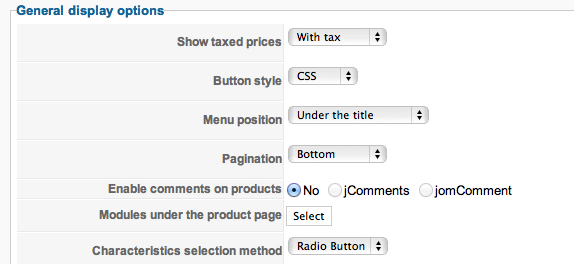
I have created the module as per instructions but when I am in Configuration/Display and when I am trying to select the module it will not take.
Nothing is showing up after the select button after I have selected the module. And consequently no related products show up either.
Thanks
Jan
I have created the module as per instructions but when I am in Configuration/Display and when I am trying to select the module it will not take.
Nothing is showing up after the select button after I have selected the module. And consequently no related products show up either.
Thanks
Jan
Jan Suhr
www.colorconsult.se www.jansuhr.se
Please Log in or Create an account to join the conversation.

14 years 2 months ago #61832
by Eliot
Replied by Eliot on topic Re: Can't get "Modules under the product page" to work
Hi,
Once you selected a module it's normal that nothing appears.
You have to save the configuration to apply these setting and you'll see the a link to the module under the select button.
Once you selected a module it's normal that nothing appears.
You have to save the configuration to apply these setting and you'll see the a link to the module under the select button.
Please Log in or Create an account to join the conversation.
14 years 2 months ago #61843
by jansuhr
Jan Suhr
www.colorconsult.se www.jansuhr.se
Replied by jansuhr on topic Re: Can't get "Modules under the product page" to work
Yes I got it working now but the tricky part that fooled me was that when I select the module after hitting the Select button, my browser opens a new Tab, I didn't notice that. Then when going back to Hikashop Settings the Select command and saving wasn't done from the right session.
When I figured this out and went back to the original tab and saved the config I got it to work.
SO my question, why is the link set to open in a new Tab or Window?
Thanks
Jan
When I figured this out and went back to the original tab and saved the config I got it to work.
SO my question, why is the link set to open in a new Tab or Window?
Thanks
Jan
Jan Suhr
www.colorconsult.se www.jansuhr.se
Please Log in or Create an account to join the conversation.
14 years 2 months ago #61860
by Eliot
Replied by Eliot on topic Re: Can't get "Modules under the product page" to work
It should not open in a new link but in a popup.
Which browser are you using?
Which browser are you using?
Please Log in or Create an account to join the conversation.
14 years 2 months ago #61862
by jansuhr
Jan Suhr
www.colorconsult.se www.jansuhr.se
Replied by jansuhr on topic Re: Can't get "Modules under the product page" to work
I'm using Firefox and yes when I click the Select button I get a Popup, but if I click on one of the modules in the list in the popup I get a new Tab/Window and I get in to the modules settings. If I change anything and save I am still in the new window and if I don't see that I am in an new window I continue in Hikashop.
The only thing I can do regarding the module is to Publish it and press OK, but since so many other settings in Hikashop require a click on the name in list, that was what I did.
Jan
The only thing I can do regarding the module is to Publish it and press OK, but since so many other settings in Hikashop require a click on the name in list, that was what I did.
Jan
Jan Suhr
www.colorconsult.se www.jansuhr.se
Please Log in or Create an account to join the conversation.
14 years 2 months ago #61864
by Eliot
Replied by Eliot on topic Re: Can't get "Modules under the product page" to work
Clicking on the module's name open the module's parametre in a new page.
To associate the module you have to set the publish paramtre to "yes" (in your popup on the right) and then click "OK".
To associate the module you have to set the publish paramtre to "yes" (in your popup on the right) and then click "OK".
Please Log in or Create an account to join the conversation.
14 years 2 months ago #61868
by jansuhr
Jan Suhr
www.colorconsult.se www.jansuhr.se
Replied by jansuhr on topic Re: Can't get "Modules under the product page" to work
Yes, that's what I ended up doing, the confusing part for me was the new window, but I shouldn't have clicked the name of the module.
Jan
Jan
Jan Suhr
www.colorconsult.se www.jansuhr.se
Please Log in or Create an account to join the conversation.

13 years 7 months ago #94851
by jen168
Replied by jen168 on topic Re: Can't get "Modules under the product page" to work
Hi, I'm having the same problem - when I click the 'select' box and set the desired module to 'published-yes' and then save configuration, I do not see the module appearing under the product page. I do see a link below the 'select' box with the correct module listed, and when I look at the page source I see an empty div titled div#hikashop_submodules.hikashop_submodules - should that not have the desired module displayed within it? I think it may be something to do with my template... any ideas? Thanks 
Please Log in or Create an account to join the conversation.

13 years 7 months ago #94960
by Xavier
Replied by Xavier on topic Re: Can't get "Modules under the product page" to work
Hi,
Could you give us screenshots of your module configuration, and of the option to display the module under the product page ?
And a link to the page in question.
Could you give us screenshots of your module configuration, and of the option to display the module under the product page ?
And a link to the page in question.
Please Log in or Create an account to join the conversation.
13 years 2 months ago #119407
by Konc
Replied by Konc on topic Re: Can't get "Modules under the product page" to work
Hi. I am using latest Hikashop and cant get Related products under the product page. Can you help me, what to do?
Please Log in or Create an account to join the conversation.

13 years 2 months ago #119418
by nicolas
Replied by nicolas on topic Re: Can't get "Modules under the product page" to work
Hi,
There is nothing to do. There is already a related products module configured to display under the product page. You just have to add products as related products of other products.
If you don't see the related products on the product page, it means that you must have deleted/modified the related products module or disabled it from the "modules under the product page" option of the configuation. In that case, you will have to recreate such module manually as explained here:
www.hikashop.com/support/documentation/i...ct-form.html#related
There is nothing to do. There is already a related products module configured to display under the product page. You just have to add products as related products of other products.
If you don't see the related products on the product page, it means that you must have deleted/modified the related products module or disabled it from the "modules under the product page" option of the configuation. In that case, you will have to recreate such module manually as explained here:
www.hikashop.com/support/documentation/i...ct-form.html#related
Please Log in or Create an account to join the conversation.
Time to create page: 0.178 seconds