

- Posts: 31
- Thank you received: 1
1.5.8 to 1.6.0 Product Pictures stopped working
14 years 3 weeks ago #63654
by FRMYR
Replied by FRMYR on topic Re: 1.5.8 to 1.6.0 Product Pictures stopped working
I have been doing some research on this and it may be coincidental that our recent update on HikaShop and maybe on Joomla to 2.5.6 caused an image display problem. I have been researching this on the net and found a lot of people talking about the 2.5.6 update. One solution suggested downloading Joomla 2.5.6 and FTPing the "libraries" and "includes" files directly, suggesting there was a problem there. I am not in my office to attempt this just yet but will post my finding by Wed if no one else has.
Just so you know, the images ARE still there. If you open directly, just the images, they download. There is some issue with Joomla and/or cache (though mine is off).
thanks for taking the hit on this Nicolas.
E.
Just so you know, the images ARE still there. If you open directly, just the images, they download. There is some issue with Joomla and/or cache (though mine is off).
thanks for taking the hit on this Nicolas.
E.
Please Log in or Create an account to join the conversation.
14 years 3 weeks ago #64051
by FRMYR
Replied by FRMYR on topic Re: 1.5.8 to 1.6.0 Product Pictures stopped working
** UPDATE **
I fixed my .htaccess and viola! The images appeared.
Give that a whirl...
I fixed my .htaccess and viola! The images appeared.
Give that a whirl...
Please Log in or Create an account to join the conversation.
- Bill Finkelstein
-
 Topic Author
- Offline
14 years 3 weeks ago #64053
by Bill Finkelstein
Replied by Bill Finkelstein on topic Re: 1.5.8 to 1.6.0 Product Pictures stopped working
@FRMR - What was wrong with your .htaccess file? What did you change in it?
Thanks,
Bill
Thanks,
Bill
Please Log in or Create an account to join the conversation.
14 years 3 weeks ago - 14 years 1 week ago #64055
by FRMYR
Replied by FRMYR on topic Re: 1.5.8 to 1.6.0 Product Pictures stopped working
I have been tweaking this to meet GoDaddy's site protection requirement and thus came up with this using both AdminTools and something from the web (at the bottom). NOTE that AdminTools incorrectly generates Options ALL -index (the term ALL blows up on GoDaddy so remove it).
Last edit: 14 years 1 week ago by FRMYR. Reason: ** Turns out my problem was GoDaddy specific **
Please Log in or Create an account to join the conversation.
- Bill Finkelstein
-
Topic Author
- Offline
14 years 3 weeks ago #64058
by Bill Finkelstein
Replied by Bill Finkelstein on topic Re: 1.5.8 to 1.6.0 Product Pictures stopped working
There's a lot in that file... I can't see what might allow the .jpgs to display. The Rewrite Rule?
Please Log in or Create an account to join the conversation.
14 years 3 weeks ago #64066
by FRMYR
Replied by FRMYR on topic Re: 1.5.8 to 1.6.0 Product Pictures stopped working
Sorry, I couldn't tell you exactly. I'm a retired web jockey pulled out of the archives to help friends. All I know is that the minute I 1) fixed file/folder permissions AND replaced my htaccess file, it appeared normal again.
Please Log in or Create an account to join the conversation.
14 years 3 weeks ago #64071
by cfm56
Replied by cfm56 on topic Re: 1.5.8 to 1.6.0 Product Pictures stopped working
All I can say is it was working great before the upgrade, I am
On Joomla 1.5 and I have 777/644 for my permissions and it still doesn't work.
Shane
On Joomla 1.5 and I have 777/644 for my permissions and it still doesn't work.
Shane
Please Log in or Create an account to join the conversation.

14 years 3 weeks ago #64076
by nicolas
Replied by nicolas on topic Re: 1.5.8 to 1.6.0 Product Pictures stopped working
@Bill Finkelstein:
I checked your website.
In the folder images/store, you have the file .htacess with the rule:
deny from all
Delete the .htaccess there and it will work.
I checked your website.
In the folder images/store, you have the file .htacess with the rule:
deny from all
Delete the .htaccess there and it will work.
Please Log in or Create an account to join the conversation.
- Bill Finkelstein
-
Topic Author
- Offline
14 years 3 weeks ago #64077
by Bill Finkelstein
Replied by Bill Finkelstein on topic Re: 1.5.8 to 1.6.0 Product Pictures stopped working
Thanks! That fixed it! Any idea where that came from? I didn't create that .htaccess file? Did the hikashop update do it?
Regards,
Bill
Regards,
Bill
Please Log in or Create an account to join the conversation.
14 years 3 weeks ago #64221
by nicolas
Replied by nicolas on topic Re: 1.5.8 to 1.6.0 Product Pictures stopped working
HikaShop creates that htaccess with you set the upload secure folder option.
That htaccess disallow anyone from accessing directly the folder where you put your paid downloads.
If you put the upload folder there too, your images won't be available anyone.
So both folders should have a different location, as it is by default.
That htaccess disallow anyone from accessing directly the folder where you put your paid downloads.
If you put the upload folder there too, your images won't be available anyone.
So both folders should have a different location, as it is by default.
Please Log in or Create an account to join the conversation.
- Bill Finkelstein
-
Topic Author
- Offline
14 years 3 weeks ago #64470
by Bill Finkelstein
Replied by Bill Finkelstein on topic Re: 1.5.8 to 1.6.0 Product Pictures stopped working
Well that explains it. Wish we'd known about that feature!
Thanks again,
Regards,
Bill
Thanks again,
Regards,
Bill
Please Log in or Create an account to join the conversation.
Less
More
- Posts: 53
- Thank you received: 2
14 years 2 weeks ago #64528
by doogledesign
Replied by doogledesign on topic Re: 1.5.8 to 1.6.0 Product Pictures stopped working
I have updated to 1.6 also and have this problem. What seems to be happening is the path to the folder for the image thumbnail is incorrect. The thumbnails are being generated, but the size figures in the generated url are off causing a broken link. The thumbnails in question are those in the cart only. Not sure what is happening to the cart thumbnails, but this code must have a bug in it somewhere.
I referred to the steps above and none of the suggestions fixed the problem.
Please advise.
I referred to the steps above and none of the suggestions fixed the problem.
Please advise.
Please Log in or Create an account to join the conversation.

14 years 2 weeks ago #64537
by didero
Replied by didero on topic Re: 1.5.8 to 1.6.0 Product Pictures stopped working
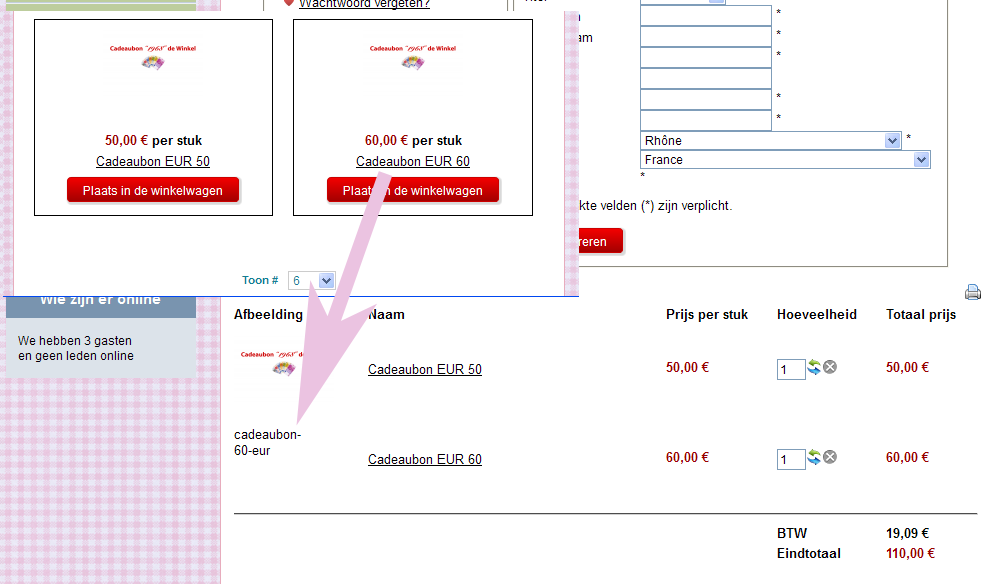
I have more a less the same problem. Images of products show up everywhere except those of products added with version 1.6.0 do not appear in the cart during checkout. Only a link is visible there.
Images of products added with version 1.5.8 do show up correctly in the cart.
I have set permissions to the hikashop media folders also to 777 but that doesn't solve it.
Might this be a general user/file/folder permission issue? I've been reading about the apache ownership of files and folders.
It seems that a lot of Joomla users have problems with that. I am not a server geek but my hoster can implement SuPHP so that problems with ownership should be solved. Will Hikashop work with that? All folders then will have the maximum CHMOD value 755 (files max 644). At this moment I can't set the FTP layer on even with setting the configuration.php to 777
Images of products added with version 1.5.8 do show up correctly in the cart.
I have set permissions to the hikashop media folders also to 777 but that doesn't solve it.
Might this be a general user/file/folder permission issue? I've been reading about the apache ownership of files and folders.
It seems that a lot of Joomla users have problems with that. I am not a server geek but my hoster can implement SuPHP so that problems with ownership should be solved. Will Hikashop work with that? All folders then will have the maximum CHMOD value 755 (files max 644). At this moment I can't set the FTP layer on even with setting the configuration.php to 777
Please Log in or Create an account to join the conversation.
Less
More
- Posts: 53
- Thank you received: 2
14 years 2 weeks ago #64664
by doogledesign
Replied by doogledesign on topic Re: 1.5.8 to 1.6.0 Product Pictures stopped working
There's not a permission issue here, I don't think. If you look at the way the URLs are constructed--they are pointing to incorrect folder destinations, but if you look in the uploads folders, you will see the images thumbnails are generated, but the folder name and the folder URL calling to it are wrong. You can rename the uploads folder to match the incorrect URL, but I am pretty sure there must be a bug somewhere yet to be found by the developers here.
Please Log in or Create an account to join the conversation.
14 years 2 weeks ago - 14 years 2 weeks ago #64671
by didero
Replied by didero on topic Re: 1.5.8 to 1.6.0 Product Pictures stopped working
@doodledesign
Thank you. You are probably right. I just copied the contents of the 1.5.8 checkout cart.php into the view of 1.6.0 and the problem remains.
If I copy the link to the image in the browser the image is displayed correctly. We'll have to wait for a solution.
In the meantime I have ruled out the display of images in the cart (see example). That works for me.
Now yet to make a popup window for the hideous link to the product. When a customer clicks on the link of the product in the cart all navigation is completely lost: product opens alone in the browser window without proper ways to navigate back to the cart.
Example here to add products to the cart: www.1968dewinkel.nl/cadeaubonnen
Amended cart.php (see attachment).
Thank you. You are probably right. I just copied the contents of the 1.5.8 checkout cart.php into the view of 1.6.0 and the problem remains.
If I copy the link to the image in the browser the image is displayed correctly. We'll have to wait for a solution.
In the meantime I have ruled out the display of images in the cart (see example). That works for me.
Now yet to make a popup window for the hideous link to the product. When a customer clicks on the link of the product in the cart all navigation is completely lost: product opens alone in the browser window without proper ways to navigate back to the cart.
Example here to add products to the cart: www.1968dewinkel.nl/cadeaubonnen
Amended cart.php (see attachment).
Last edit: 14 years 2 weeks ago by didero.
Please Log in or Create an account to join the conversation.
Less
More
- Posts: 53
- Thank you received: 2
14 years 2 weeks ago #64673
by doogledesign
Replied by doogledesign on topic Re: 1.5.8 to 1.6.0 Product Pictures stopped working
I am just taking a guess, but where ever--in the configuration php (admin part of hika), there is some code that creates the links to the thumbnails or creates the folder names. Somewhere in that area is the problem.
Please Log in or Create an account to join the conversation.
14 years 2 weeks ago - 14 years 2 weeks ago #64675
by didero
Replied by didero on topic Re: 1.5.8 to 1.6.0 Product Pictures stopped working
@doodledesign
I really don't know. The image link in the cart was correct (checked with Mozilla Firebug).
Maybe the fault is somewhere here?
<tr class="row1">
<td class="hikashop_cart_product_image_value">
<div class="hikashop_cart_product_image_thumb">
<a onclick="SqueezeBox.fromElement(this,{parse: 'rel'});return false;" href="/media/com_hikashop/upload/cadeaubon_1570569477.png" target="_blank" rel="{handler: 'image'}" title="cadeaubon-60-eur">
<img width="100" height="66" style="margin-top:10px;margin-bottom:10px;display:inline-block;vertical-align:middle" alt="cadeaubon-60-eur" src="/media/com_hikashop/upload/thumbnail_66x100/cadeaubon_1570569477.png">
</a>
</div>
</td>
I am already behind schedule and leave it for what it is now.
I really don't know. The image link in the cart was correct (checked with Mozilla Firebug).
Maybe the fault is somewhere here?
<tr class="row1">
<td class="hikashop_cart_product_image_value">
<div class="hikashop_cart_product_image_thumb">
<a onclick="SqueezeBox.fromElement(this,{parse: 'rel'});return false;" href="/media/com_hikashop/upload/cadeaubon_1570569477.png" target="_blank" rel="{handler: 'image'}" title="cadeaubon-60-eur">
<img width="100" height="66" style="margin-top:10px;margin-bottom:10px;display:inline-block;vertical-align:middle" alt="cadeaubon-60-eur" src="/media/com_hikashop/upload/thumbnail_66x100/cadeaubon_1570569477.png">
</a>
</div>
</td>
I am already behind schedule and leave it for what it is now.
Last edit: 14 years 2 weeks ago by didero.
Please Log in or Create an account to join the conversation.
14 years 2 weeks ago - 14 years 2 weeks ago #64734
by didero
Replied by didero on topic Re: 1.5.8 to 1.6.0 Product Pictures stopped working
@doodledesign
Fixed. At least for me it worked. Saw in the showcase an example of a cart that was working correctly.
So I downloaded Hikashop Starter 1.60 Edition and copied a part of the PHP code from the cart.php into the checkout cart view.
After a few trial and errors voila...
Code to be copied and remove the red line:
<td class="hikashop_cart_product_image_value">
<?php if(!empty($row->images)){
$image = reset($row->images);
$width = $this->config->get('thumbnail_x');
$height = $this->config->get('thumbnail_y');
$this->image->checkSize($width,$height,$image);
if(!$this->config->get('thumbnail')){
echo '<img src="'.$this->image->uploadFolder_url.$image->file_path.'" alt="'.$image->file_name.'" id="hikashop_main_image" style="margin-top:10px;margin-bottom:10px;display:inline-block;vertical-align:middle" />';
}else{ ?>
<div class="hikashop_cart_product_image_thumb" >
<?php echo $this->image->display($image->file_path,true,$image->file_name,'style="margin-top:10px;margin-bottom:10px;display:inline-block;vertical-align:middle"', '', $width, $height); ?>
</div>
<?php }
} ?>
</td>
Fixed. At least for me it worked. Saw in the showcase an example of a cart that was working correctly.
So I downloaded Hikashop Starter 1.60 Edition and copied a part of the PHP code from the cart.php into the checkout cart view.
After a few trial and errors voila...
Code to be copied and remove the red line:
<td class="hikashop_cart_product_image_value">
<?php if(!empty($row->images)){
$image = reset($row->images);
$width = $this->config->get('thumbnail_x');
$height = $this->config->get('thumbnail_y');
$this->image->checkSize($width,$height,$image);
if(!$this->config->get('thumbnail')){
echo '<img src="'.$this->image->uploadFolder_url.$image->file_path.'" alt="'.$image->file_name.'" id="hikashop_main_image" style="margin-top:10px;margin-bottom:10px;display:inline-block;vertical-align:middle" />';
}else{ ?>
<div class="hikashop_cart_product_image_thumb" >
<?php echo $this->image->display($image->file_path,true,$image->file_name,'style="margin-top:10px;margin-bottom:10px;display:inline-block;vertical-align:middle"', '', $width, $height); ?>
</div>
<?php }
} ?>
</td>
Last edit: 14 years 2 weeks ago by didero. Reason: new file attached
The following user(s) said Thank You: doogledesign, FRMYR
Please Log in or Create an account to join the conversation.
Less
More
- Posts: 53
- Thank you received: 2
14 years 2 weeks ago #64735
by doogledesign
Replied by doogledesign on topic Re: 1.5.8 to 1.6.0 Product Pictures stopped working
didero to the rescue! Works like a charm.
The following user(s) said Thank You: didero
Please Log in or Create an account to join the conversation.
14 years 2 weeks ago #64743
by bigchumpy
Replied by bigchumpy on topic Re: 1.5.8 to 1.6.0 Product Pictures stopped working
Just wanted to confirm that after reinstalling HS, things are now fixed. On a side note, and maybe I need a new thread for this:
-When I upload images, the first image seems to be the default image for the product. When I add the item to the cart however, the default seems to be the last image. I want it to be the first image as in the catalog. Is this a bug or feature or something I failed to set up?
Thanks
Shane
-When I upload images, the first image seems to be the default image for the product. When I add the item to the cart however, the default seems to be the last image. I want it to be the first image as in the catalog. Is this a bug or feature or something I failed to set up?
Thanks
Shane
Please Log in or Create an account to join the conversation.
Time to create page: 0.405 seconds