
Display "Add to Wishlist" button
- jackpotwinner
-
 Topic Author
- Offline
Less
More
14 years 4 weeks ago #62700
by jackpotwinner
"The doctor of the future will give no medicine, but will interest his patients in the care of the human frame, in diet, and in the cause and prevention of disease." Thomas Edison
Meditation for Health
www.seekwithinyou.com
Display "Add to Wishlist" button was created by jackpotwinner
I wanted to add a wishlist to my products so I clicked on display "add to wishlist" button. When I did this and clicked on my menu item I received this message:
Fatal error: Call to a member function displayButton() on a non-object in /home/seekwith/public_html/components/com_hikashop/views/product/tmpl/quantity.php on line 84
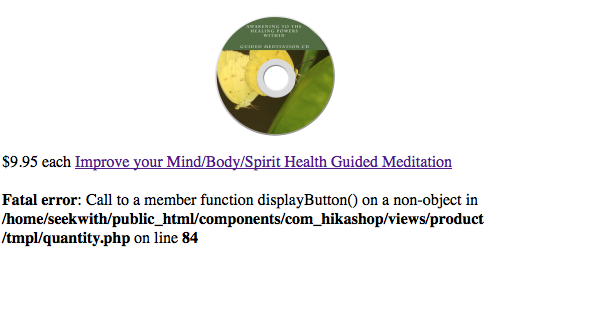
Also, as you can see from the picture, only the one item is available to view on a blank page.
The menu item is a hikashop product listing. I have the newest version of hikashop essential installed as of 8/29/2012.
Thanks for your help Nicolas!
Fatal error: Call to a member function displayButton() on a non-object in /home/seekwith/public_html/components/com_hikashop/views/product/tmpl/quantity.php on line 84
Also, as you can see from the picture, only the one item is available to view on a blank page.
The menu item is a hikashop product listing. I have the newest version of hikashop essential installed as of 8/29/2012.
Thanks for your help Nicolas!
"The doctor of the future will give no medicine, but will interest his patients in the care of the human frame, in diet, and in the cause and prevention of disease." Thomas Edison
Meditation for Health
www.seekwithinyou.com
Please Log in or Create an account to join the conversation.

14 years 4 weeks ago - 14 years 4 weeks ago #62748
by Xavier
Replied by Xavier on topic Re: Display "Add to Wishlist" button
Hi jackpotwinner,
Try to edit the file "product / quantity" in HikaShop > Display > View.
Add the line at the top of the file:
Try to edit the file "product / quantity" in HikaShop > Display > View.
Add the line at the top of the file:
Code:
$this->cart = hikashop_get('helper.cart');
Last edit: 14 years 4 weeks ago by Xavier.
Please Log in or Create an account to join the conversation.
- jackpotwinner
-
Topic Author
- Offline
14 years 4 weeks ago #62877
by jackpotwinner
"The doctor of the future will give no medicine, but will interest his patients in the care of the human frame, in diet, and in the cause and prevention of disease." Thomas Edison
Meditation for Health
www.seekwithinyou.com
Replied by jackpotwinner on topic Re: Display "Add to Wishlist" button
Thanks Xavier, it worked, however there are still issues! Now when I click on the add to wish list button, the window either does not load or if it loads I receive an error message "an error occurred". Despite this, when I refresh my screen, I can see that the product was added to my wishlist module.
Just to be clear for anyone else with the previous issue, you have to place the code within the php tag.
<?php
if(!isset($this->cart))
$this->cart = hikashop_get('helper.cart');
Just to be clear for anyone else with the previous issue, you have to place the code within the php tag.
<?php
if(!isset($this->cart))
$this->cart = hikashop_get('helper.cart');
"The doctor of the future will give no medicine, but will interest his patients in the care of the human frame, in diet, and in the cause and prevention of disease." Thomas Edison
Meditation for Health
www.seekwithinyou.com
Please Log in or Create an account to join the conversation.
14 years 3 weeks ago #62941
by Xavier
Replied by Xavier on topic Re: Display "Add to Wishlist" button
Hi jackpotwinner,
Please try to install the last version of HikaShop from our website.
And install it over the other version.
Please try to install the last version of HikaShop from our website.
And install it over the other version.
The following user(s) said Thank You: jackpotwinner
Please Log in or Create an account to join the conversation.
Time to create page: 0.178 seconds