
- Posts: 40
- Thank you received: 0
Address page in cart not advancing
- cluckngood
-
 Topic Author
- Offline
Less
More
13 years 10 months ago #78039
by cluckngood
Address page in cart not advancing was created by cluckngood
I'm experiencing an issue with the Billing/Shipping addresses in the HS Business.
When the page loads the Billing Address and the Shipping Address are both shown with the same information. Shipping address has the box checked beside 'Use the same address as for billing' AND the address is shown.
If 'Next' button is clicked the page refreshed and goes back to the exact same Billing/Shipping Address page. If the 'Next' button is clicked a 2nd time the user then advances to the next page where they can enter their Payment Method and Coupons.
Is there a fix for this? I think it would be a cleaner look if the 'Use the same address as for billing' box was checked but the address didn't show. If the box was unchecked (by the user) then the address fields would appear. Obviously the 'Next button should only need to be clicked 1x to advance to the next page.
Suggestions?
Jason
When the page loads the Billing Address and the Shipping Address are both shown with the same information. Shipping address has the box checked beside 'Use the same address as for billing' AND the address is shown.
If 'Next' button is clicked the page refreshed and goes back to the exact same Billing/Shipping Address page. If the 'Next' button is clicked a 2nd time the user then advances to the next page where they can enter their Payment Method and Coupons.
Is there a fix for this? I think it would be a cleaner look if the 'Use the same address as for billing' box was checked but the address didn't show. If the box was unchecked (by the user) then the address fields would appear. Obviously the 'Next button should only need to be clicked 1x to advance to the next page.
Suggestions?
Jason
Please Log in or Create an account to join the conversation.

13 years 10 months ago #78094
by Xavier
Replied by Xavier on topic Address page in cart not advancing
Hi,
Which version of HikaShop do you have ?
Could you give us a link to your website ?
Which version of HikaShop do you have ?
Could you give us a link to your website ?
Please Log in or Create an account to join the conversation.
- cluckngood
-
Topic Author
- Offline
Less
More
- Posts: 40
- Thank you received: 0
13 years 10 months ago #78196
by cluckngood
Replied by cluckngood on topic Address page in cart not advancing
Please Log in or Create an account to join the conversation.

13 years 10 months ago #78230
by nicolas
Replied by nicolas on topic Address page in cart not advancing
Hi,
I just checked on your website and didn't had to click twice on the next button to validate the address step.
Did you change anything in the mean time ?
Do you still have the problem on your end ?
I just checked on your website and didn't had to click twice on the next button to validate the address step.
Did you change anything in the mean time ?
Do you still have the problem on your end ?
Please Log in or Create an account to join the conversation.
- cluckngood
-
Topic Author
- Offline
Less
More
- Posts: 40
- Thank you received: 0
13 years 10 months ago #78478
by cluckngood
Replied by cluckngood on topic Address page in cart not advancing
Yes, I reduced the number of steps in the checkout process and that seems to have corrected the issue of needing to click 2x to advance to the next screen. However, the shipping address is still appearing with the checkbox selected. Is there a way to have the Billing address show and only the checkbox for 'use same address as billing' displayed without actually showing the shipping address?
If the Shipping address box is 'unchecked' by the customer then the address would appear with the option to edit/change the shipping information.
Jason
If the Shipping address box is 'unchecked' by the customer then the address would appear with the option to edit/change the shipping information.
Jason
Please Log in or Create an account to join the conversation.

13 years 10 months ago #78556
by Jerome
Jerome - Obsidev.com
HikaMarket & HikaSerial developer / HikaShop core dev team.
Also helping the HikaShop support team when having some time or couldn't sleep.
By the way, do not send me private message, use the "contact us" form instead.
Replied by Jerome on topic Address page in cart not advancing
Hi,
I think you are using a template override which have remove the original HikaShop code.
When the shipping is the same, the checkbox is checked and the div is hide.
Regards,
I think you are using a template override which have remove the original HikaShop code.
Code:
if($override === false) {
$onclick = 'return hikashopSameAddress(this.checked);';
if($this->shipping_address==$this->billing_address){
$checked = 'checked="checked" ';
$style = ' style="display:none"';
$nb_addresses = count(@$this->addresses);
if($nb_addresses==1){
$address = reset($this->addresses);
$onclick='if(!this.checked) { hikashopEditAddress(document.getElementById(\'hikashop_checkout_shipping_address_edit_'.$address->address_id.'\'),1,false); } '.$onclick;
}
}
?>
<label for="same_address">
<input class="hikashop_checkout_shipping_same_address inputbox" <?php echo $checked; ?>type="checkbox" id="same_address" name="same_address" value="yes" alt="Same address" onclick="<?php echo $onclick; ?>" />
<?php echo JText::_('SAME_AS_BILLING');?>
</label>
<div class="hikashop_checkout_shipping_div" id="hikashop_checkout_shipping_div" <?php echo $style;?>>
Regards,
Jerome - Obsidev.com
HikaMarket & HikaSerial developer / HikaShop core dev team.
Also helping the HikaShop support team when having some time or couldn't sleep.
By the way, do not send me private message, use the "contact us" form instead.
Please Log in or Create an account to join the conversation.
Less
More
- Posts: 79
- Thank you received: 0
13 years 9 months ago #79920
by PhantomPWR
Replied by PhantomPWR on topic Address page in cart not advancing
Hi Nicolas/Jerome,
I also have to click 'next' twice to proceed from the address step.
I've tried all the suggestions in this post and all the others I could find relating to the issue.
I've also deleted my checkout->address view override, but no luck.
My website's URL is: heidikjeldsen.co.uk
I'm using Hikashop 2.0.0 on Joomla 2.5.8
I also have to click 'next' twice to proceed from the address step.
I've tried all the suggestions in this post and all the others I could find relating to the issue.
I've also deleted my checkout->address view override, but no luck.
My website's URL is: heidikjeldsen.co.uk
I'm using Hikashop 2.0.0 on Joomla 2.5.8
Please Log in or Create an account to join the conversation.
- cluckngood
-
Topic Author
- Offline
Less
More
- Posts: 40
- Thank you received: 0
13 years 9 months ago #79972
by cluckngood
Replied by cluckngood on topic Address page in cart not advancing
Thank you for this suggestion on fixing the issue. If any overrides were used they were not intentional. I'll update the code with your code and see if that fixes the functionality.
Jason
Jason
Please Log in or Create an account to join the conversation.
13 years 9 months ago #80019
by nicolas
Replied by nicolas on topic Address page in cart not advancing
@PhantomPWR And could you provide a screenshot of the Checkout tab of the HikaShop configuration on your website please ?
Please Log in or Create an account to join the conversation.
Less
More
- Posts: 79
- Thank you received: 0
13 years 9 months ago #80036
by PhantomPWR
Replied by PhantomPWR on topic Address page in cart not advancing
Hi Nicolas,
I've attached my checkout configuration.
I don't know if it's relevant, but I've also modified the checkout->step view to change the 'next' button to 'confirm order' in the final step.
The unusual names in the workflow is because I've added language overrides for the progress bar to display properly.
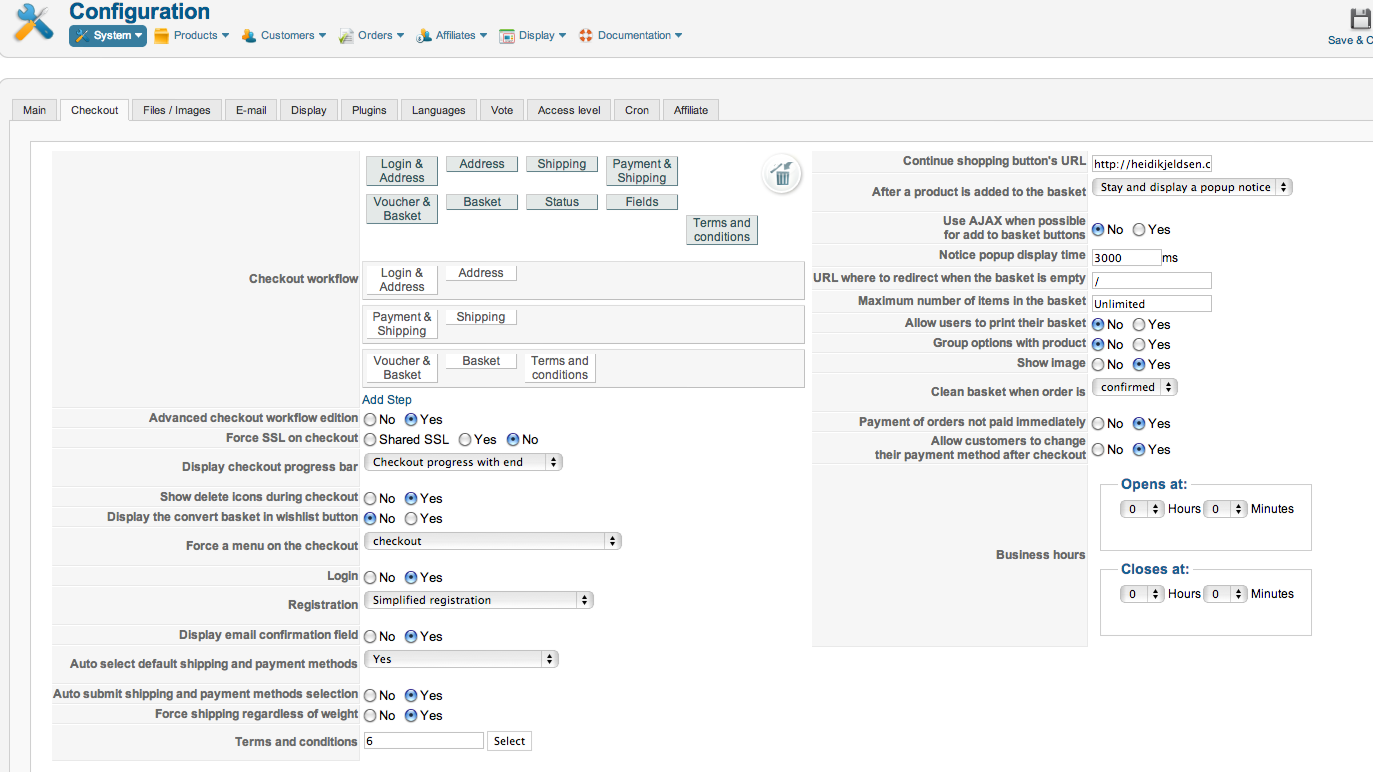
I've attached my checkout configuration.
I don't know if it's relevant, but I've also modified the checkout->step view to change the 'next' button to 'confirm order' in the final step.
The unusual names in the workflow is because I've added language overrides for the progress bar to display properly.
Please Log in or Create an account to join the conversation.
13 years 9 months ago #80162
by nicolas
Replied by nicolas on topic Address page in cart not advancing
Did you do any other overrides in the checkout view files ? If so, please remove all of them and try again.
Your settings are fine and there is no such problem with the latest version of Hikashop so it must come from a view file of a previous version of HikaShop. That's all I can think of.
Your settings are fine and there is no such problem with the latest version of Hikashop so it must come from a view file of a previous version of HikaShop. That's all I can think of.
The following user(s) said Thank You: PhantomPWR
Please Log in or Create an account to join the conversation.
Less
More
- Posts: 79
- Thank you received: 0
13 years 9 months ago #80182
by PhantomPWR
Replied by PhantomPWR on topic Address page in cart not advancing
Hi Nicolas,
Thanks for your reply.
I'll check all my overrides and let you know what I find, it might just help someone else as well.
Thanks for your reply.
I'll check all my overrides and let you know what I find, it might just help someone else as well.
Please Log in or Create an account to join the conversation.
- cluckngood
-
Topic Author
- Offline
Less
More
- Posts: 40
- Thank you received: 0
13 years 9 months ago #80183
by cluckngood
Replied by cluckngood on topic Address page in cart not advancing
Thank you once again for your help. The code you sent over worked perfectly.
The design of this cart makes it so easy to customize, configure and troubleshoot. I can see i'll be using this for many cart sites in the future.
Cheers,
Jason
The design of this cart makes it so easy to customize, configure and troubleshoot. I can see i'll be using this for many cart sites in the future.
Cheers,
Jason
Please Log in or Create an account to join the conversation.
Less
More
- Posts: 79
- Thank you received: 0
13 years 9 months ago #80213
by PhantomPWR
Replied by PhantomPWR on topic Address page in cart not advancing
@Nicolas,
I removed all checkout overrides and still have the same problem.
Any other ideas?
I removed all checkout overrides and still have the same problem.
Any other ideas?
Please Log in or Create an account to join the conversation.
Less
More
- Posts: 79
- Thank you received: 0
13 years 9 months ago #80384
by PhantomPWR
Replied by PhantomPWR on topic Address page in cart not advancing
Here's an update:
I changed my workflow to: login_address,coupon_cart,payment_shipping_cart,cart_status_terms_confirm,end
I don't know why it works, but it does. :woohoo:
Now I just need the payment selection to stay on the same step when it (auto)submits. Is this possible?
I changed my workflow to: login_address,coupon_cart,payment_shipping_cart,cart_status_terms_confirm,end
I don't know why it works, but it does. :woohoo:
Now I just need the payment selection to stay on the same step when it (auto)submits. Is this possible?
Please Log in or Create an account to join the conversation.
13 years 9 months ago #80445
by Jerome
Jerome - Obsidev.com
HikaMarket & HikaSerial developer / HikaShop core dev team.
Also helping the HikaShop support team when having some time or couldn't sleep.
By the way, do not send me private message, use the "contact us" form instead.
Replied by Jerome on topic Address page in cart not advancing
Hi,
When the payment method, a shipping method, a coupon, an address change, the step does not increase.
Do you have the auto selection of the payment method ?
Regards,
When the payment method, a shipping method, a coupon, an address change, the step does not increase.
Do you have the auto selection of the payment method ?
Regards,
Jerome - Obsidev.com
HikaMarket & HikaSerial developer / HikaShop core dev team.
Also helping the HikaShop support team when having some time or couldn't sleep.
By the way, do not send me private message, use the "contact us" form instead.
The following user(s) said Thank You: PhantomPWR
Please Log in or Create an account to join the conversation.
Less
More
- Posts: 79
- Thank you received: 0
13 years 9 months ago #80471
by PhantomPWR
Replied by PhantomPWR on topic Address page in cart not advancing
Hi Jerome,
I have:
1. Auto select default shipping and payment methods: YES
2. Auto submit shipping and payment methods selection: YES
If #2 is not on auto submit, then the user has to click 'Next' twice, which is not good.
I have:
1. Auto select default shipping and payment methods: YES
2. Auto submit shipping and payment methods selection: YES
If #2 is not on auto submit, then the user has to click 'Next' twice, which is not good.
Please Log in or Create an account to join the conversation.
13 years 9 months ago #80552
by nicolas
Replied by nicolas on topic Address page in cart not advancing
It's normal that the system moves to the next step when you select a payment method and that the option #2 is activated.
That can't be changed.
It's also normal that the user has to validate twice when that option is turned off. One to submit the selection, and a second time to go to the next step.
That can't be changed.
It's also normal that the user has to validate twice when that option is turned off. One to submit the selection, and a second time to go to the next step.
The following user(s) said Thank You: PhantomPWR
Please Log in or Create an account to join the conversation.
Less
More
- Posts: 79
- Thank you received: 0
13 years 9 months ago #80623
by PhantomPWR
Replied by PhantomPWR on topic Address page in cart not advancing
Thanks Nicolas,
I don't think users will have a problem with the current set-up. They'll just have to use a bit of common sense.
You can please some of the people, some of the time...(Steve Jobs)
I don't think users will have a problem with the current set-up. They'll just have to use a bit of common sense.
You can please some of the people, some of the time...(Steve Jobs)
Please Log in or Create an account to join the conversation.
Time to create page: 0.324 seconds