

- Posts: 10
- Thank you received: 0
Registration form : fill in email warning while it
13 years 9 months ago #86228
by Dojec
Registration form : fill in email warning while it was created by Dojec
I changed the language into dutch.
When I fill in the registration form, I fill in all field, inclusive the email fields, I keep getting the messsage I should fill in the email.
I have no idea where to fix this problem. Can you have a look?
www.toetjesshop.be and press the registration button.
When I fill in the registration form, I fill in all field, inclusive the email fields, I keep getting the messsage I should fill in the email.
I have no idea where to fix this problem. Can you have a look?
www.toetjesshop.be and press the registration button.
Please Log in or Create an account to join the conversation.

13 years 9 months ago - 13 years 9 months ago #86442
by nicolas
Replied by nicolas on topic Registration form : fill in email warning while it
Hi,
That's something which has been fixed on our end and will be included in next release of HikaShop.
You can fix it by editing the file "registration_bootstrap" for your frontend template via the menu Display->Views and changing the line:
to:
That's something which has been fixed on our end and will be included in next release of HikaShop.
You can fix it by editing the file "registration_bootstrap" for your frontend template via the menu Display->Views and changing the line:
Code:
<input type="text" name="data[register][email]" id="register_email" value="<?php echo $this->escape($this->mainUser->get( 'email' ));?>" class="required validate-email" maxlength="100" size="30" aria-required="true" required="required" onchange="if(this.value!=document.getElementById('register_email').value){alert('<?php echo JText::_('THE_CONFIRMATION_EMAIL_DIFFERS_FROM_THE_EMAIL_YOUR_ENTERED',true); ?>'); this.value = '';}">
to:
Code:
<input type="text" name="data[register][email_confirm]" id="register_email_confirm" value="<?php echo $this->escape($this->mainUser->get( 'email' ));?>" class="required validate-email" maxlength="100" size="30" aria-required="true" required="required" onchange="if(this.value!=document.getElementById('register_email').value){alert('<?php echo JText::_('THE_CONFIRMATION_EMAIL_DIFFERS_FROM_THE_EMAIL_YOUR_ENTERED',true); ?>'); this.value = '';}">
Last edit: 13 years 9 months ago by nicolas.
Please Log in or Create an account to join the conversation.
13 years 9 months ago #86452
by Dojec
Replied by Dojec on topic Registration form : fill in email warning while it
Hi,
I updated the line as you suggested, but I still have the same issue.
I copy pasted the registration_bootstrap below. Can you check if I've done it correctly, or if something else also needs to be modified?
Regards.
I updated the line as you suggested, but I still have the same issue.
I copy pasted the registration_bootstrap below. Can you check if I've done it correctly, or if something else also needs to be modified?
Regards.
Code:
<?php
/**
* @package HikaShop for Joomla!
* @version 2.0.0
* @author hikashop.com
* @copyright (C) 2010-2012 HIKARI SOFTWARE. All rights reserved.
* @license GNU/GPLv3 http://www.gnu.org/licenses/gpl-3.0.html
*/
defined('_JEXEC') or die('Restricted access');
?><fieldset class="form-horizontal">
<?php if(!$this->simplified_registration){ ?>
<div class="control-group hikashop_registration_name_line">
<div class="control-label">
<label id="namemsg" for="register_name" class="required" title=""><?php echo JText::_( 'HIKA_USER_NAME' ); ?></label>
</div>
<div class="controls">
<input type="text" name="data[register][name]" id="register_name" value="<?php echo $this->escape($this->mainUser->get( 'name' ));?>" class="required" size="30" maxlength="50" aria-required="true" required="required">
</div>
</div>
<div class="control-group hikashop_registration_name_line">
<div class="control-label">
<label id="usernamemsg" for="register_username" class="required" title=""><?php echo JText::_( 'HIKA_USERNAME' ); ?></label>
</div>
<div class="controls">
<input type="text" name="data[register][username]" id="register_username" value="<?php echo $this->escape($this->mainUser->get( 'username' ));?>" class="required validate-username" maxlength="25" size="30" aria-required="true" required="required">
</div>
</div>
<?php }?>
<div class="control-group hikashop_registration_email_line">
<div class="control-label">
<label id="emailmsg" for="register_email" class="required" title=""><?php echo JText::_( 'HIKA_EMAIL' ); ?></label>
</div>
<div class="controls">
<input type="text" name="data[register][email]" id="register_email" value="<?php echo $this->escape($this->mainUser->get( 'email' ));?>" class="required validate-email" maxlength="100" size="30" aria-required="true" required="required">
</div>
</div>
<?php if($this->config->get('show_email_confirmation_field',0)){ ?>
<div class="control-group hikashop_registration_email_confirm_line">
<div class="control-label">
<label id="email_confirm_msg" for="register_email_confirm" class="required" title=""><?php echo JText::_( 'HIKA_EMAIL_CONFIRM' ); ?></label>
</div>
<div class="controls">
<input type="text" name="data[register][email_confirm]" id="register_email_confirm" value="<?php echo $this->escape($this->mainUser->get( 'email' ));?>" class="required validate-email" maxlength="100" size="30" aria-required="true" required="required" onchange="if(this.value!=document.getElementById('register_email').value){alert('<?php echo JText::_('THE_CONFIRMATION_EMAIL_DIFFERS_FROM_THE_EMAIL_YOUR_ENTERED',true); ?>'); this.value = '';}">
</div>
</div>
<?php
}
if(!$this->simplified_registration || $this->simplified_registration == 3){ ?>
<div class="control-group hikashop_registration_password_line">
<div class="control-label">
<label id="pwmsg" for="register_password" class="required" title=""><?php echo JText::_( 'HIKA_PASSWORD' ); ?></label>
</div>
<div class="controls">
<input type="text" name="data[register][password]" id="register_password" value="" class="required validate-password" size="30" aria-required="true" required="required">
</div>
</div>
<div class="control-group hikashop_registration_password2_line">
<div class="control-label">
<label id="pw2msg" for="register_password2" class="required" title=""><?php echo JText::_( 'HIKA_VERIFY_PASSWORD' ); ?></label>
</div>
<div class="controls">
<input type="text" name="data[register][password2]" id="register_password2" value="" class="required validate-password" size="30" aria-required="true" required="required">
</div>
</div>
<?php }
$this->setLayout('custom_fields_bootstrap');
$this->type = 'user';
echo $this->loadTemplate();
if($this->config->get('affiliate_registration',0)){ ?>
<div class="control-group hikashop_registration_password2_line">
<div class="controls">
<?php
$affiliate_terms = $this->config->get('affiliate_terms',0);
if(!empty($affiliate_terms)){
?>
<input class="hikashop_affiliate_checkbox" id="hikashop_affiliate_checkbox" type="checkbox" name="hikashop_affiliate_checkbox" value="1" <?php echo $this->affiliate_checked; ?> />
<span class="hikashop_affiliate_terms_span_link" id="hikashop_affiliate_terms_span_link">
<a class="hikashop_affiliate_terms_link" id="hikashop_affiliate_terms_link" target="_blank" href="<?php echo JRoute::_('index.php?option=com_content&view=article&id='.$affiliate_terms); ?>"><?php echo JText::_('BECOME_A_PARTNER'); ?></a>
</span>
<?php
} else {
?> <label class="checkbox">
<input class="hikashop_affiliate_checkbox" id="hikashop_affiliate_checkbox" type="checkbox" name="hikashop_affiliate_checkbox" value="1" <?php echo $this->affiliate_checked; ?> />
<?php echo JText::_('BECOME_A_PARTNER');?>
</label>
<?php
}
?>
</div>
</div>
<?php }?>
<div class=""><legend><?php echo JText::_( 'ADDRESS_INFORMATION' ); ?></legend></div>
<?php
$this->type = 'address';
echo $this->loadTemplate();
?>
<div class="control-group hikashop_registration_required_info_line">
<div class="controls"><?php echo JText::_( 'HIKA_REGISTER_REQUIRED' ); ?></div>
</div>
<input type="hidden" name="data[register][id]" value="<?php echo (int)$this->mainUser->get( 'id' );?>" />
<input type="hidden" name="data[register][gid]" value="<?php echo (int)$this->mainUser->get( 'gid' );?>" />
<?php
$additional_check='';
if(empty($this->form_name)){
$this->form_name = 'hikashop_checkout_form';
if(JRequest::getVar('hikashop_check_order')) $additional_check='&& hikashopCheckChangeForm(\'order\',\''.$this->form_name.'\')';
}
?>
<div class="control-group">
<div class="controls">
<?php echo $this->cartClass->displayButton(JText::_('HIKA_REGISTER'),'register',$this->params,'','if(hikashopCheckChangeForm(\'register\',\''.$this->form_name.'\') && hikashopCheckChangeForm(\'user\',\''.$this->form_name.'\') && hikashopCheckChangeForm(\'address\',\''.$this->form_name.'\')'.$additional_check.'){ var button = document.getElementById(\'login_view_action\'); if(button) button.value=\'register\'; document.'.$this->form_name.'.submit();} return false;', '', 0, 1, 'btn btn-primary'); ?>
</div>
</div>
</fieldset>
Please Log in or Create an account to join the conversation.

13 years 9 months ago #86536
by Eliot
Replied by Eliot on topic Registration form : fill in email warning while it
Here is the file.
Tell us if it solves the problem
Tell us if it solves the problem
Attachment not found
Please Log in or Create an account to join the conversation.
13 years 9 months ago #86583
by Dojec
Replied by Dojec on topic Registration form : fill in email warning while it
Hi,
the result is still the same.
I copied the content of your file over the existing one.
the result is still the same.
I copied the content of your file over the existing one.
Please Log in or Create an account to join the conversation.
13 years 9 months ago #86660
by Dojec
Replied by Dojec on topic Registration form : fill in email warning while it
When is the next release to be expected?
For me this is a blocking issue, so the sooner, the better.
For me this is a blocking issue, so the sooner, the better.
Please Log in or Create an account to join the conversation.
13 years 9 months ago #86677
by nicolas
Replied by nicolas on topic Registration form : fill in email warning while it
I think that the problem is that you're not editing that view file for your frontend template. Please make sure that you're editing the correct one (there is one view file per template), otherwise, you won't see any change.
Please Log in or Create an account to join the conversation.
13 years 9 months ago #86703
by Dojec
Replied by Dojec on topic Registration form : fill in email warning while it
Normally it should be the correct one.
It's frontend, and on the template I currently use.
See screenshot.
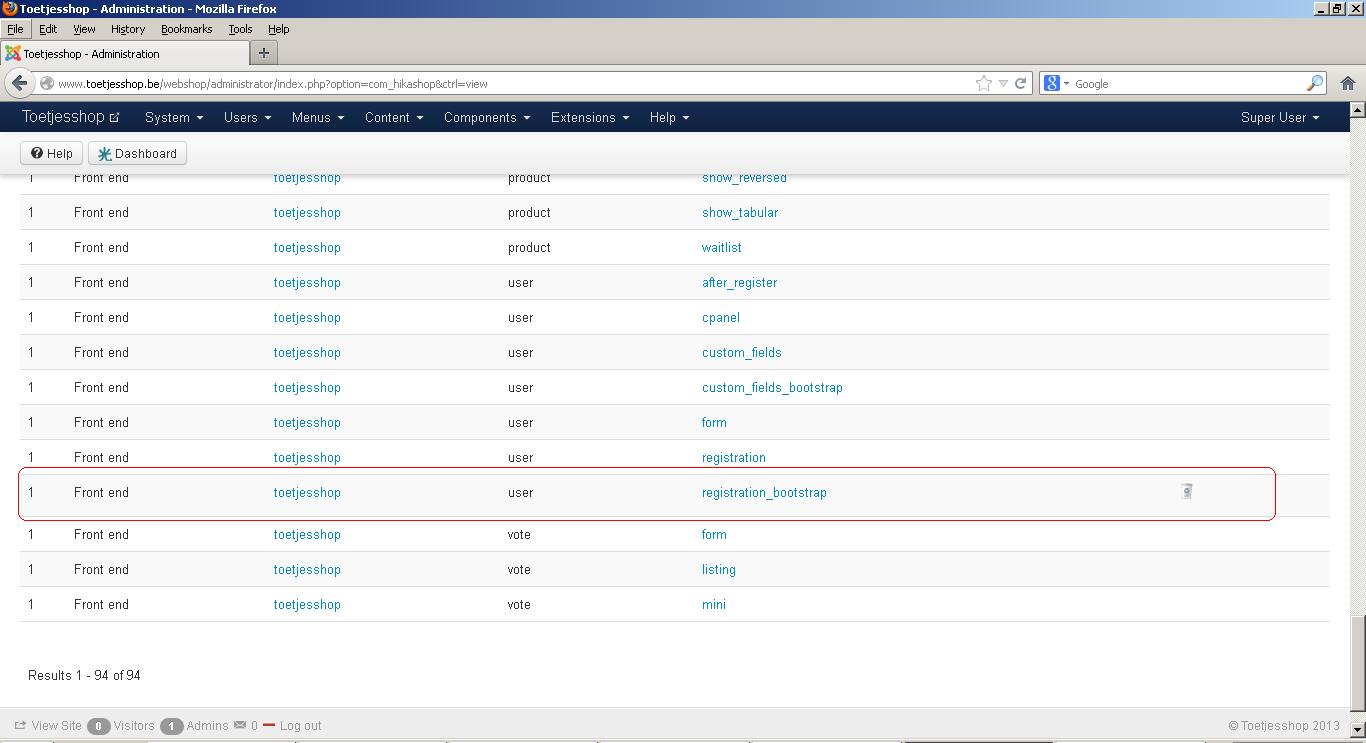
It's frontend, and on the template I currently use.
See screenshot.
Please Log in or Create an account to join the conversation.
13 years 9 months ago #86873
by nicolas
Replied by nicolas on topic Registration form : fill in email warning while it
That's indeed the correct one.
But I checked your website and I still see the old code for the email confirm field:
where it should be:
That indicates that either the modification was not made, or that it was not made at the correct place.
But I checked your website and I still see the old code for the email confirm field:
Code:
<input type="text" name="data[register][email]" id="register_email" value="" class="required validate-email" maxlength="100" size="30" aria-required="true" required="required" onchange="if(this.value!=document.getElementById('register_email').value){alert('Het adres voor de bevestigings e-mail wijkt af van het adres dat u heeft ingevuld. Vul het opnieuw in a.u.b.'); this.value = '';}">
where it should be:
Code:
<input type="text" name="data[register][email_confirm]" id="register_email_confirm" value="" class="required validate-email" maxlength="100" size="30" aria-required="true" required="required" onchange="if(this.value!=document.getElementById('register_email').value){alert('Het adres voor de bevestigings e-mail wijkt af van het adres dat u heeft ingevuld. Vul het opnieuw in a.u.b.'); this.value = '';}">
Please Log in or Create an account to join the conversation.
13 years 9 months ago #86952
by Dojec
Replied by Dojec on topic Registration form : fill in email warning while it
Hi,
in the meantime I changed all templates which were present ( the default ones ). In the menus manager, I selected to be sure to take my template. But it still displays the error.
Do you know from which module this registration part is sended, or where it's located in the joomla files on the server?
If I changed all files, and it still takes the old one, then it must take a copy from somewhere? Somewhere in a configuration it refers to something that isn't updated this way?
If your new release resolves this problem, maybe you can release this update?
in the meantime I changed all templates which were present ( the default ones ). In the menus manager, I selected to be sure to take my template. But it still displays the error.
Do you know from which module this registration part is sended, or where it's located in the joomla files on the server?
If I changed all files, and it still takes the old one, then it must take a copy from somewhere? Somewhere in a configuration it refers to something that isn't updated this way?
If your new release resolves this problem, maybe you can release this update?
Please Log in or Create an account to join the conversation.

13 years 9 months ago #87069
by Xavier
Replied by Xavier on topic Registration form : fill in email warning while it
Hi,
Try to edit the file directly in your template folder via FTP.
The new release will not solve this problem, because we don't override the edited views to not lost your changes.
Try to edit the file directly in your template folder via FTP.
The new release will not solve this problem, because we don't override the edited views to not lost your changes.
Please Log in or Create an account to join the conversation.
13 years 9 months ago #87312
by Dojec
Replied by Dojec on topic Registration form : fill in email warning while it
This time I renamed the original file and copied your file directly into what I think is the correct folder.
But still the problem stays the same.
How can I be sure that file on that location is used?
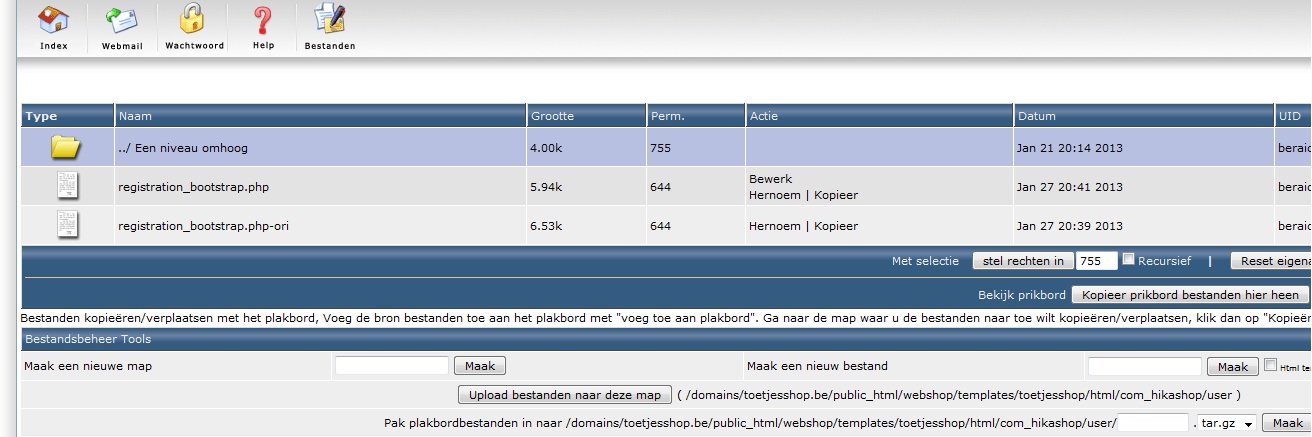
But still the problem stays the same.
How can I be sure that file on that location is used?
Please Log in or Create an account to join the conversation.
13 years 9 months ago #87399
by Xavier
Replied by Xavier on topic Registration form : fill in email warning while it
You can try to add some text in this view and see if it's displayed in the frontend.
Like:
Like:
Code:
<?php echo "Good file ?"; ?>
Please Log in or Create an account to join the conversation.
13 years 9 months ago #87424
by Dojec
Replied by Dojec on topic Registration form : fill in email warning while it
I did add that to the code, but I don't see it appearing in the front end. ( if it was supposed to be visible. )
Is there an other way I can do the registration?
Otherwise I give you the admin rights so you can take a look.
Is there an other way I can do the registration?
Otherwise I give you the admin rights so you can take a look.
Please Log in or Create an account to join the conversation.
13 years 9 months ago #87475
by Xavier
Replied by Xavier on topic Registration form : fill in email warning while it
Yes you can give us the backend access via pm.
Please Log in or Create an account to join the conversation.
13 years 9 months ago #87864
by Dojec
Replied by Dojec on topic Registration form : fill in email warning while it
Hi,
could you already find/fix the problem?
As long if this isn't solved, the shop can't go live.
There is pressure here to get the site live.
could you already find/fix the problem?
As long if this isn't solved, the shop can't go live.
There is pressure here to get the site live.
Please Log in or Create an account to join the conversation.
13 years 9 months ago #88029
by nicolas
Replied by nicolas on topic Registration form : fill in email warning while it
Hi,
The modification I had proposed was not applied properly.
I've done it for you thanks to the access you provided and it's now working.
The modification I had proposed was not applied properly.
I've done it for you thanks to the access you provided and it's now working.
The following user(s) said Thank You: Dojec
Please Log in or Create an account to join the conversation.
13 years 9 months ago #88039
by Dojec
Replied by Dojec on topic Registration form : fill in email warning while it
Thanks.
What did you have to do extra, or was it a file on another location?
If I now update the template ( overwrite it ), does it still works?
Regards.
What did you have to do extra, or was it a file on another location?
If I now update the template ( overwrite it ), does it still works?
Regards.
Please Log in or Create an account to join the conversation.
13 years 9 months ago #88076
by Xavier
Replied by Xavier on topic Registration form : fill in email warning while it
Hi,
I think that it was a file on another location. In all case you should made modifications on this view with no problems.
Don't forget to do a backup before, we never know.
I think that it was a file on another location. In all case you should made modifications on this view with no problems.
Don't forget to do a backup before, we never know.
Please Log in or Create an account to join the conversation.
Time to create page: 0.213 seconds