
- Posts: 13
- Thank you received: 0
problem with add product
- marko05nikolic
-
 Topic Author
- Offline
Less
More
13 years 9 months ago - 13 years 9 months ago #86657
by marko05nikolic
problem with add product was created by marko05nikolic
Hello everyone,
I have hikashop almost one year, and everything is okey, but now i have problem when i want to add new product.
I open editor and set name, description, price. When i click on add button for category, images and related product does not open windows.
Please help.
Best Regards,
Elektronika-projekti.com
I have hikashop almost one year, and everything is okey, but now i have problem when i want to add new product.
I open editor and set name, description, price. When i click on add button for category, images and related product does not open windows.
Please help.
Best Regards,
Elektronika-projekti.com
Last edit: 13 years 9 months ago by marko05nikolic.
Please Log in or Create an account to join the conversation.

Less
More
- Posts: 12953
- Thank you received: 1778
13 years 9 months ago - 13 years 9 months ago #86694
by Mohamed Thelji
Replied by Mohamed Thelji on topic problem with add product
Hello,
I didn't really understood what your problem is, so can you explain it again through some screenshots ?
Thanks ?
I didn't really understood what your problem is, so can you explain it again through some screenshots ?
Thanks ?
Last edit: 13 years 9 months ago by Mohamed Thelji.
Please Log in or Create an account to join the conversation.
- marko05nikolic
-
Topic Author
- Offline
Less
More
- Posts: 13
- Thank you received: 0
13 years 9 months ago #86722
by marko05nikolic
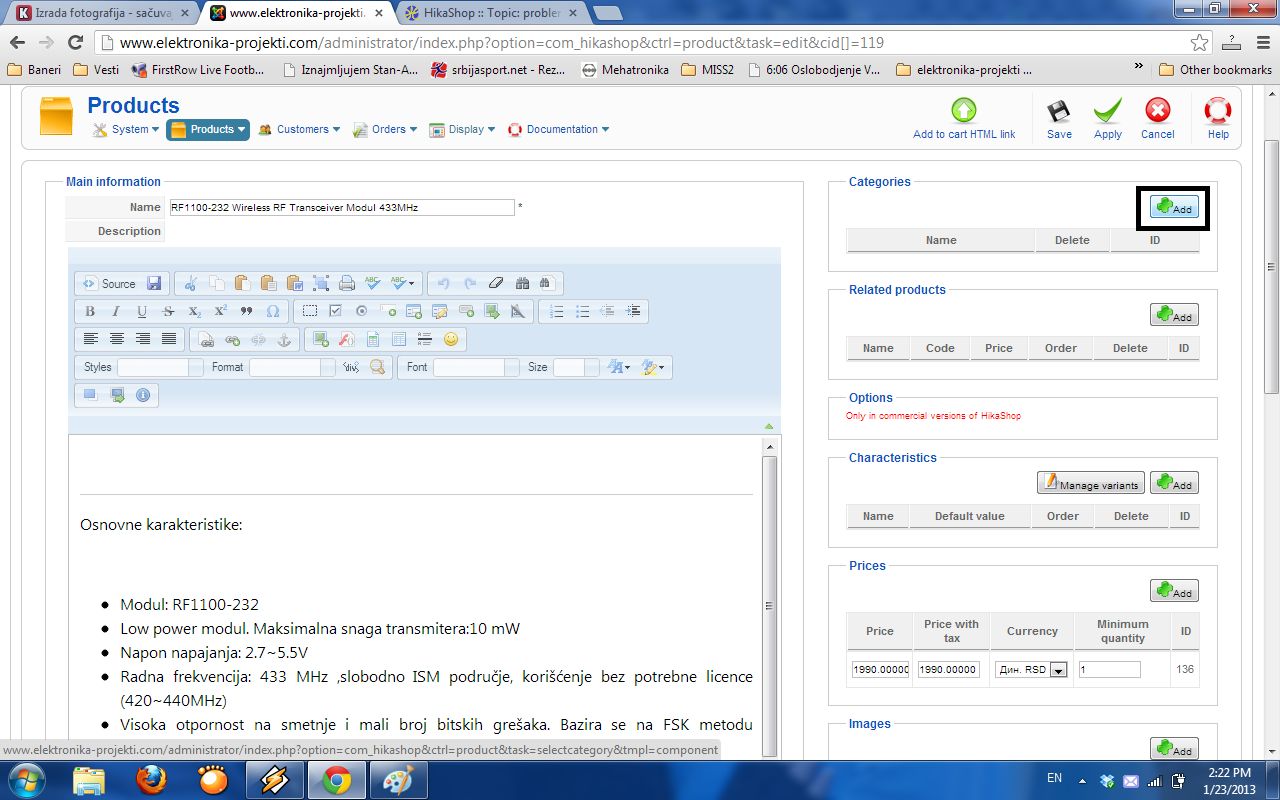
when i click to add categories, does not open a window where you can choose a category, also with related products and images.
i okey now?
Replied by marko05nikolic on topic problem with add product
when i click to add categories, does not open a window where you can choose a category, also with related products and images.
i okey now?
Please Log in or Create an account to join the conversation.
Less
More
- Posts: 12953
- Thank you received: 1778
13 years 9 months ago - 13 years 9 months ago #86758
by Mohamed Thelji
Replied by Mohamed Thelji on topic problem with add product
Ok so, can you :
1. Turn on the debug mode and the error reporting options of the joomla configuration and try it again. Then tell me if it display some error message ?
2. See if you have a JavaScript error ?
1. Turn on the debug mode and the error reporting options of the joomla configuration and try it again. Then tell me if it display some error message ?
2. See if you have a JavaScript error ?
Last edit: 13 years 9 months ago by Mohamed Thelji.
Please Log in or Create an account to join the conversation.
- marko05nikolic
-
Topic Author
- Offline
Less
More
- Posts: 13
- Thank you received: 0
13 years 9 months ago #86824
by marko05nikolic
Replied by marko05nikolic on topic problem with add product
Javascrip do not have error.
I turn on system debug in global configuration and dont see anything error messages. Do you mean on that error reporting options of the joomla configuration ?
I turn on system debug in global configuration and dont see anything error messages. Do you mean on that error reporting options of the joomla configuration ?
Please Log in or Create an account to join the conversation.
- marko05nikolic
-
Topic Author
- Offline
Less
More
- Posts: 13
- Thank you received: 0
13 years 9 months ago #86845
by marko05nikolic
Replied by marko05nikolic on topic problem with add product
Same problem with change status of orders. also i cant send email to customer is order confirm, shipp or something else.
Please Log in or Create an account to join the conversation.
Less
More
- Posts: 12953
- Thank you received: 1778
13 years 9 months ago #86905
by Mohamed Thelji
Replied by Mohamed Thelji on topic problem with add product
Hi,
If the Add button doesn't work anywhere, it's maybe caused by a plugin using jquery on your backend and that breaks the mootools javascript library which handle the popups.
I would recommend that you try to disable the system plugins one by one to see which one is causing that problem.
The extension jquery easy can most of the times fix these kind of issues so you could also try to use it.
If the Add button doesn't work anywhere, it's maybe caused by a plugin using jquery on your backend and that breaks the mootools javascript library which handle the popups.
I would recommend that you try to disable the system plugins one by one to see which one is causing that problem.
The extension jquery easy can most of the times fix these kind of issues so you could also try to use it.
The following user(s) said Thank You: marko05nikolic
Please Log in or Create an account to join the conversation.
- marko05nikolic
-
Topic Author
- Offline
Less
More
- Posts: 13
- Thank you received: 0
13 years 9 months ago #86919
by marko05nikolic
Replied by marko05nikolic on topic problem with add product
Problem was with system plugin HikaShop Product Insert and System - Best Alias, when I diseble everything was okey. I am interesting may leave them diseble?
Please Log in or Create an account to join the conversation.
Less
More
- Posts: 12953
- Thank you received: 1778
13 years 9 months ago #86923
by Mohamed Thelji
Replied by Mohamed Thelji on topic problem with add product
If you are not using them sure you can let them disabled, but that's weird, the Hikashop product insert plugin isn't using Jquery  .
.
. Please Log in or Create an account to join the conversation.
- marko05nikolic
-
Topic Author
- Offline
Less
More
- Posts: 13
- Thank you received: 0
13 years 9 months ago #86926
by marko05nikolic
Replied by marko05nikolic on topic problem with add product
i turn on Hikashop product insert plugin and adding work but best alias make some problem. hi is diseble now and everthing is okey.
thanks a lot.
thanks a lot.
Please Log in or Create an account to join the conversation.
Time to create page: 0.191 seconds