

- Posts: 17
- Thank you received: 5
Hikashop 2.1.0 Pagination Bug
13 years 8 months ago - 13 years 8 months ago #90421
by huiyun
Hikashop 2.1.0 Pagination Bug was created by huiyun
After I upgraded Hikashop from Version 2.0.0 to 2.1.0, the pagination no longer worked. Whenever I clicked on any of the page number, I was directed to the home page. It happened only when I turned on the URL Rewriting (Joomla Default SEF). Otherwise it worked normally.
Here's the link to the website AFTER UPGRADE
cavemanprojects.com/ak009/all-tyres/
Before Upgrade (2.0.0)
cavemanprojects.com/ak007/all-tyres/
Other system info
Joomla! Version: 2.5.9
PHP Version: 5.3.15
Hikashop Version: 2.1.0 Business Edition
Here's the link to the website AFTER UPGRADE
cavemanprojects.com/ak009/all-tyres/
Before Upgrade (2.0.0)
cavemanprojects.com/ak007/all-tyres/
Other system info
Joomla! Version: 2.5.9
PHP Version: 5.3.15
Hikashop Version: 2.1.0 Business Edition
Last edit: 13 years 8 months ago by huiyun.
Please Log in or Create an account to join the conversation.
13 years 8 months ago #90443
by Huub
Replied by Huub on topic Hikashop 2.1.0 Pagination Bug
i have the same problem and also the shopping cart is redirected at all times to the index page and never stays on the page of the product or produces the popup (dpending on the configuration settings) ...at all times it goes back to the homepage 
Please Log in or Create an account to join the conversation.

13 years 8 months ago #90783
by nicolas
Replied by nicolas on topic Hikashop 2.1.0 Pagination Bug
Hi,
That the issue only happens on some servers and we cannot reproduce it on our end.
The issue is that the URL in the form of the pagination is not correct on your websites. That URL comes from the $_SERVER variable generated by PHP on your server. So it means that PHP is not returning the correct variable. We will need a backend access to your website in order to analyze the problem.
Could one of you provide that via our contact form please ?
www.hikashop.com/en/contact-us.html
Please include a link to this thread and write urgent in your subject so that we can look at that as soon as possible.
That the issue only happens on some servers and we cannot reproduce it on our end.
The issue is that the URL in the form of the pagination is not correct on your websites. That URL comes from the $_SERVER variable generated by PHP on your server. So it means that PHP is not returning the correct variable. We will need a backend access to your website in order to analyze the problem.
Could one of you provide that via our contact form please ?
www.hikashop.com/en/contact-us.html
Please include a link to this thread and write urgent in your subject so that we can look at that as soon as possible.
Please Log in or Create an account to join the conversation.
13 years 8 months ago #90801
by Huub
Replied by Huub on topic Hikashop 2.1.0 Pagination Bug
Hello Nicolas,
I just send you the info about the website and login.
What surprises me in this that it used to work before the update as huiyun writes and shows with his double installation of the previous and current version. That makes it hard to have my host provider look into it.
I really hope the solution will soon be found because as it is this makes Hikashop not ready for use for our website.
I hope your magic works again Nicolas
I just send you the info about the website and login.
What surprises me in this that it used to work before the update as huiyun writes and shows with his double installation of the previous and current version. That makes it hard to have my host provider look into it.
I really hope the solution will soon be found because as it is this makes Hikashop not ready for use for our website.
I hope your magic works again Nicolas
Please Log in or Create an account to join the conversation.
13 years 8 months ago - 13 years 8 months ago #90837
by nicolas
Replied by nicolas on topic Hikashop 2.1.0 Pagination Bug
Hi,
Change the line:
if(!empty($_SERVER["REDIRECT_URL"])){
to:
in the file administrator/components/com_hikashop/helpers/helper.php and that should fix the problem.
The problem is that in order to handle the strange $_SERVER configuration of some servers, we had to change the hikashop_currentURL() function for the 2.1 version. However, since your server also has a strange $_SERVER configuration albeit different, it now doesn't work with 2.1.
The fix I propose should allow the hikashop_currentURL() to work properly on all server configurations.
Change the line:
if(!empty($_SERVER["REDIRECT_URL"])){
to:
Code:
if(!empty($_SERVER["REDIRECT_URL"]) && preg_match('#.*index\.php$#',$_SERVER["REDIRECT_URL"]) && empty($_SERVER['QUERY_STRING'])&&empty($_SERVER['REDIRECT_QUERY_STRING']) && !empty($_SERVER["REQUEST_URI"])){
$requestUri = $_SERVER["REQUEST_URI"];
}elseif(!empty($_SERVER["REDIRECT_URL"]) && (isset($_SERVER['QUERY_STRING'])||isset($_SERVER['REDIRECT_QUERY_STRING']))){
in the file administrator/components/com_hikashop/helpers/helper.php and that should fix the problem.
The problem is that in order to handle the strange $_SERVER configuration of some servers, we had to change the hikashop_currentURL() function for the 2.1 version. However, since your server also has a strange $_SERVER configuration albeit different, it now doesn't work with 2.1.
The fix I propose should allow the hikashop_currentURL() to work properly on all server configurations.
Last edit: 13 years 8 months ago by nicolas.
Please Log in or Create an account to join the conversation.
13 years 8 months ago #90845
by Huub
Replied by Huub on topic Hikashop 2.1.0 Pagination Bug
I made the adjustment you mentioned ...
The result is no change at all .... if i try to go to the next page with products it returns me to the homepage
Code:
if(!empty($_SERVER["REDIRECT_URL"]) && (isset($_SERVER)||isset($_SERVER))){
$requestUri = $_SERVER["REDIRECT_URL"];
if (!empty($_SERVER['REDIRECT_QUERY_STRING'])) $requestUri = rtrim($requestUri,'/').'?'.$_SERVER['REDIRECT_QUERY_STRING'];
elseif (!empty($_SERVER['QUERY_STRING'])) $requestUri = rtrim($requestUri,'/').'?'.$_SERVER['QUERY_STRING'];
}elseif(isset($_SERVER["REQUEST_URI"])){
$requestUri = $_SERVER["REQUEST_URI"];
The result is no change at all .... if i try to go to the next page with products it returns me to the homepage
Please Log in or Create an account to join the conversation.
13 years 8 months ago #90857
by nicolas
Replied by nicolas on topic Hikashop 2.1.0 Pagination Bug
Sorry, I was a bit too fast. I've updated my code above. Please use the new code.
Please Log in or Create an account to join the conversation.
13 years 8 months ago - 13 years 8 months ago #90858
by Huub
Replied by Huub on topic Hikashop 2.1.0 Pagination Bug
Sorry Nicolas ...but unfortunatly this also didnt work
I cleared all caches and still it didnt work ....yet
Can you tell me what is 'strange' about the current $Server congfiguration of my host service.
I might then be able to ask them for support.
I cleared all caches and still it didnt work ....yet
Can you tell me what is 'strange' about the current $Server congfiguration of my host service.
I might then be able to ask them for support.
Last edit: 13 years 8 months ago by Huub.
Please Log in or Create an account to join the conversation.
13 years 8 months ago #90892
by nicolas
Replied by nicolas on topic Hikashop 2.1.0 Pagination Bug
The forum has removed some of my code in my message. I've added the code tags to avoid that. Please get the code again from my message and try again.
The issue is that the REDIRECT_URL variable is present but with the wrong URL. it is /ak007/index.php instead of /ak007/all-tyres/ which is in REQUEST_URI.
And on the other server for which we had to do a patch for HikaShop 2.1, it was the opposite, the REDIRECT_URL was correct and the REQUEST_URI was not correct.
The issue is that the REDIRECT_URL variable is present but with the wrong URL. it is /ak007/index.php instead of /ak007/all-tyres/ which is in REQUEST_URI.
And on the other server for which we had to do a patch for HikaShop 2.1, it was the opposite, the REDIRECT_URL was correct and the REQUEST_URI was not correct.
Please Log in or Create an account to join the conversation.
13 years 8 months ago - 13 years 8 months ago #90895
by Huub
Replied by Huub on topic Hikashop 2.1.0 Pagination Bug
You are a genius Nicolas!
I hereby will suggest to award you with the Nobel-price-for-Joomla-development-and-support!!!!!
IT WORKS !!!!!!!
You have no idea how happy you just made me
(but this means i must manually update the helper.php file if there is an update ..right?)
I hereby will suggest to award you with the Nobel-price-for-Joomla-development-and-support!!!!!
IT WORKS !!!!!!!
You have no idea how happy you just made me
(but this means i must manually update the helper.php file if there is an update ..right?)
Last edit: 13 years 8 months ago by Huub.
Please Log in or Create an account to join the conversation.

13 years 8 months ago #90899
by Jerome
Jerome - Obsidev.com
HikaMarket & HikaSerial developer / HikaShop core dev team.
Replied by Jerome on topic Hikashop 2.1.0 Pagination Bug
Hi,
The fix would be include in the next package release.
So you have to modify it today, but with the next update, the fix would be there !
Regards,
The fix would be include in the next package release.
So you have to modify it today, but with the next update, the fix would be there !
Regards,
Jerome - Obsidev.com
HikaMarket & HikaSerial developer / HikaShop core dev team.
Please Log in or Create an account to join the conversation.
13 years 8 months ago #90902
by Huub
Replied by Huub on topic Hikashop 2.1.0 Pagination Bug
Thank you so much for pointing that out Jerome
Thats the best solution i could hope for.
Thats the best solution i could hope for.
Please Log in or Create an account to join the conversation.
13 years 8 months ago #90907
by huiyun
Replied by huiyun on topic Hikashop 2.1.0 Pagination Bug
Yes the pagination works properly for me as well. Thanks.
However, when I click on add to cart, I am not directed to the check out page.
Attached is my configuration.
On a sidenote, I tried the setting "stay and display a popup notice" and that worked fine.
It just did not work with the setting shown in the attached pic.
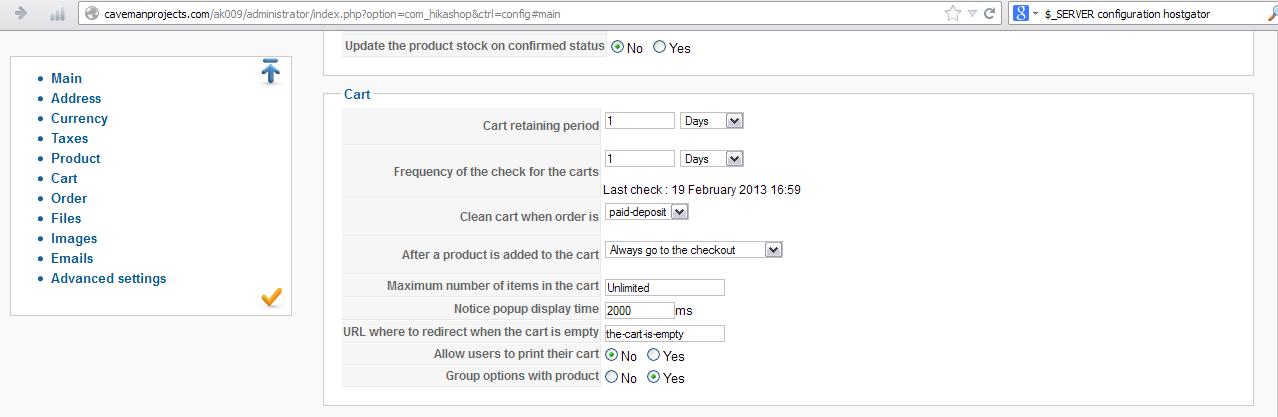
However, when I click on add to cart, I am not directed to the check out page.
Attached is my configuration.
On a sidenote, I tried the setting "stay and display a popup notice" and that worked fine.
It just did not work with the setting shown in the attached pic.
Please Log in or Create an account to join the conversation.
13 years 8 months ago - 13 years 8 months ago #90966
by Jerome
Jerome - Obsidev.com
HikaMarket & HikaSerial developer / HikaShop core dev team.
Replied by Jerome on topic Hikashop 2.1.0 Pagination Bug
Hi,
Are your redirected to the homepage ? Did you stayed on the product page ?
Regards,
Are your redirected to the homepage ? Did you stayed on the product page ?
Regards,
Jerome - Obsidev.com
HikaMarket & HikaSerial developer / HikaShop core dev team.
Last edit: 13 years 8 months ago by Jerome.
Please Log in or Create an account to join the conversation.
13 years 8 months ago - 13 years 8 months ago #91027
by huiyun
Replied by huiyun on topic Hikashop 2.1.0 Pagination Bug
I stayed on the product page. However, when I check the cart, the product was correctly added.
Edit:
Ok it might be a template or customization issue on my end since it works properly with Beez2 template.
On the template I am using, if I choose "No" for "Use AJAX when possible for add to cart buttons" setting, then it works. Come to think about it, if a buyer is to be brought straight to "check out" upon clicking on the "Add to cart" button, there is no need for AJAX. Correct me if I am wrong.
Anyway thanks for your time.
Edit:
Ok it might be a template or customization issue on my end since it works properly with Beez2 template.
On the template I am using, if I choose "No" for "Use AJAX when possible for add to cart buttons" setting, then it works. Come to think about it, if a buyer is to be brought straight to "check out" upon clicking on the "Add to cart" button, there is no need for AJAX. Correct me if I am wrong.
Anyway thanks for your time.
Last edit: 13 years 8 months ago by huiyun.
Please Log in or Create an account to join the conversation.
Time to create page: 0.127 seconds