
- Posts: 32
- Thank you received: 2
HikaShop Content Module Error
- freemanbob
-
 Topic Author
- Offline
Less
More
13 years 8 months ago #90470
by freemanbob
HikaShop Content Module Error was created by freemanbob
Hi anyone know how to stop the HikaShop content Module from laying multiple products one on top of the other when the module is set to have a single column and more than one product. I have the random image set to 'yes' and the carousel set to 'yes' with a transition os 3200.
If an article has an image in the article it causes this problem. It took me some time to make the connection but when I removed the image from the article the HikaShop Content Module worked fine??
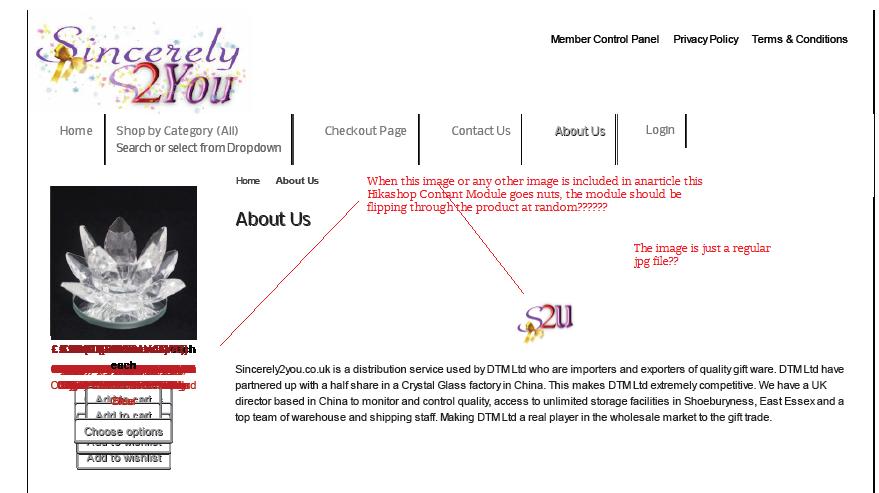
If an article has an image in the article it causes this problem. It took me some time to make the connection but when I removed the image from the article the HikaShop Content Module worked fine??
Please Log in or Create an account to join the conversation.

13 years 8 months ago #90632
by Xavier
Replied by Xavier on topic HikaShop Content Module Error
Hi,
You have maybe a javascript error/conflict. Could you give us a link to your website ? We are not able to reproduce this problem on our end.
You have maybe a javascript error/conflict. Could you give us a link to your website ? We are not able to reproduce this problem on our end.
Please Log in or Create an account to join the conversation.
- freemanbob
-
Topic Author
- Offline
Less
More
- Posts: 32
- Thank you received: 2
13 years 8 months ago #90748
by freemanbob
Replied by freemanbob on topic HikaShop Content Module Error
The web site is sincerely2you.co.uk but I have of course removed the images as the products module needs to be present and I wasn't going to leve it up for the world to see.
if you login to the site using username: test1 password: test1
I shall put a link on the main menu (testarticle) for that user to an article with a simple jpg image in it.
You will see that the other articles without images (because I had to remove them) the module works fine?
I await your feedback.
regards
Bob
if you login to the site using username: test1 password: test1
I shall put a link on the main menu (testarticle) for that user to an article with a simple jpg image in it.
You will see that the other articles without images (because I had to remove them) the module works fine?
I await your feedback.
regards
Bob
Please Log in or Create an account to join the conversation.
13 years 8 months ago #90867
by Xavier
Replied by Xavier on topic HikaShop Content Module Error
an error is present on the page with images:
Try to install the plugin jQuery easy and see if it solve the problem.ReferenceError: jQuery is not defined
[Stopper sur une erreur]
jQuery(document).ready(function($){
Please Log in or Create an account to join the conversation.
Time to create page: 0.278 seconds