

- Posts: 1184
- Thank you received: 13
Product main information translation
13 years 6 months ago #93914
by verzevoul
Product main information translation was created by verzevoul
Hello. I saw that when you go in the main information translation pop up, something wierd happens. In some categories translation are empty, but in other categpries, the title is auto translated. Also when I tried to empty the title and textarea , i pressed ok and save but everything is still there nothing erased. I use
HikaShop 2.1.0
Release date : February, 5 2013
Thanks
HikaShop 2.1.0
Release date : February, 5 2013
Thanks
Please Log in or Create an account to join the conversation.

13 years 6 months ago #93922
by nicolas
Replied by nicolas on topic Product main information translation
Hi,
Isn't that because it was already translated before ? I tried on my end but I cannot reproduce that.
If you empty the translation, the translation is not emptied. That's because we want to avoid the case where an inexperienced user open the popup, click on save and then wonders why the name and description is not displayed anymore on the frontend even do he didn't change anything.
So when you have an empty field, it discard the change. If you want to remove a translation, simply unpublish it with the publish/unpublish icons next to the field, or unpublish/delete it via the Falang interface.
If you really want to "empty" the translation so that nothing displays for a translation, you can write in it and that will display an invisible space on the frontend.
Isn't that because it was already translated before ? I tried on my end but I cannot reproduce that.
If you empty the translation, the translation is not emptied. That's because we want to avoid the case where an inexperienced user open the popup, click on save and then wonders why the name and description is not displayed anymore on the frontend even do he didn't change anything.
So when you have an empty field, it discard the change. If you want to remove a translation, simply unpublish it with the publish/unpublish icons next to the field, or unpublish/delete it via the Falang interface.
If you really want to "empty" the translation so that nothing displays for a translation, you can write in it and that will display an invisible space on the frontend.
Please Log in or Create an account to join the conversation.
13 years 6 months ago #94244
by verzevoul
Replied by verzevoul on topic Product main information translation
tried to unpublish but it sais unforbidden
see attach.
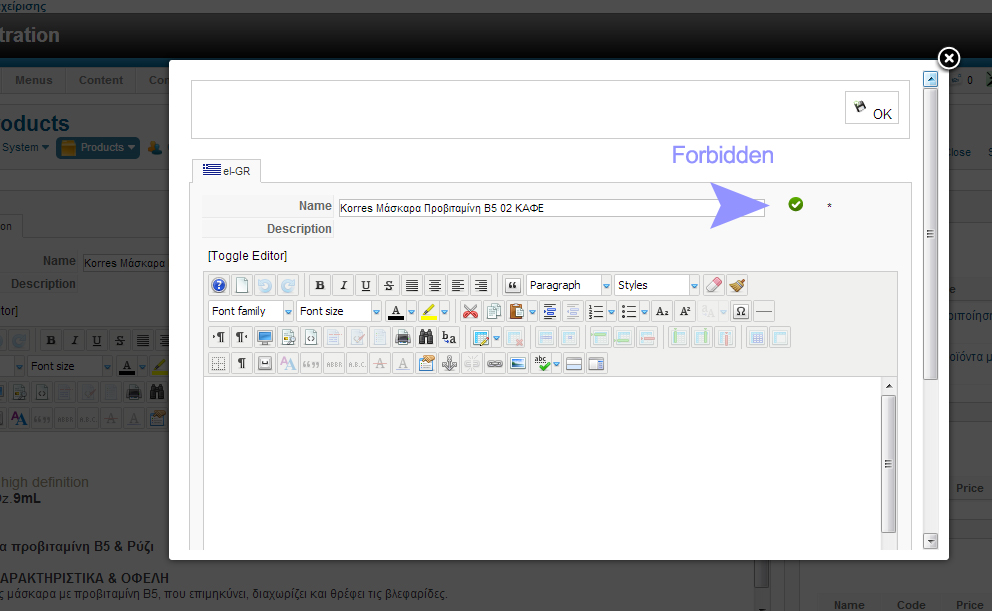
see attach.
Please Log in or Create an account to join the conversation.
13 years 6 months ago - 13 years 6 months ago #94245
by verzevoul
Replied by verzevoul on topic Product main information translation
the real problem is that if accidentaly you type something in the translation tab of your main language, you are obligated to use the translation of your main language as text and title. If you erase it isnt erased. Unpublished is forbidden, if you write (space) it comes empty on the frontend
Last edit: 13 years 6 months ago by verzevoul.
Please Log in or Create an account to join the conversation.
13 years 6 months ago #94270
by nicolas
Replied by nicolas on topic Product main information translation
The forbidden is a bug which has already been fixed in HikaShop.
You should update to HikaShop 2.1.1 to have that problem fixed.
The auto update is not activated yet so you need to download the new version directly from our website and then install it via the joomla installer.
You should update to HikaShop 2.1.1 to have that problem fixed.
The auto update is not activated yet so you need to download the new version directly from our website and then install it via the joomla installer.
Please Log in or Create an account to join the conversation.
Time to create page: 0.175 seconds