
- Posts: 27
- Thank you received: 0
Hikashop options for Cart module are not stored
- Buchberger
-
 Topic Author
- Offline
Less
More
13 years 7 months ago - 13 years 7 months ago #95735
by Buchberger
Hikashop options for Cart module are not stored was created by Buchberger
Objective : to have a module showing a mini-cart with few options
...
Bug: used to be possible via usual procedures, can no longer configure through the relevant Display -> Content module
...
Detail :
We have created a module using Hikashop Cart Module. Save to make the Hikashop options available as per normal.
The related content module ( screen shot attached ) is not functioning correctly. That is, some of the options are not being stored.
From what we see, the form posts to the #_modules and #_hika_config tables. So an option like 'published' will be stored in #_modules.
We used to be able to select and save fields such as : mini-cart, show quantities, show proceed, empty message override etc . Whereas now on save the form reverts to original state and the options are not stored ( and the font end shows no difference ).
...
Version: v 2.1.1 - Business edition
...
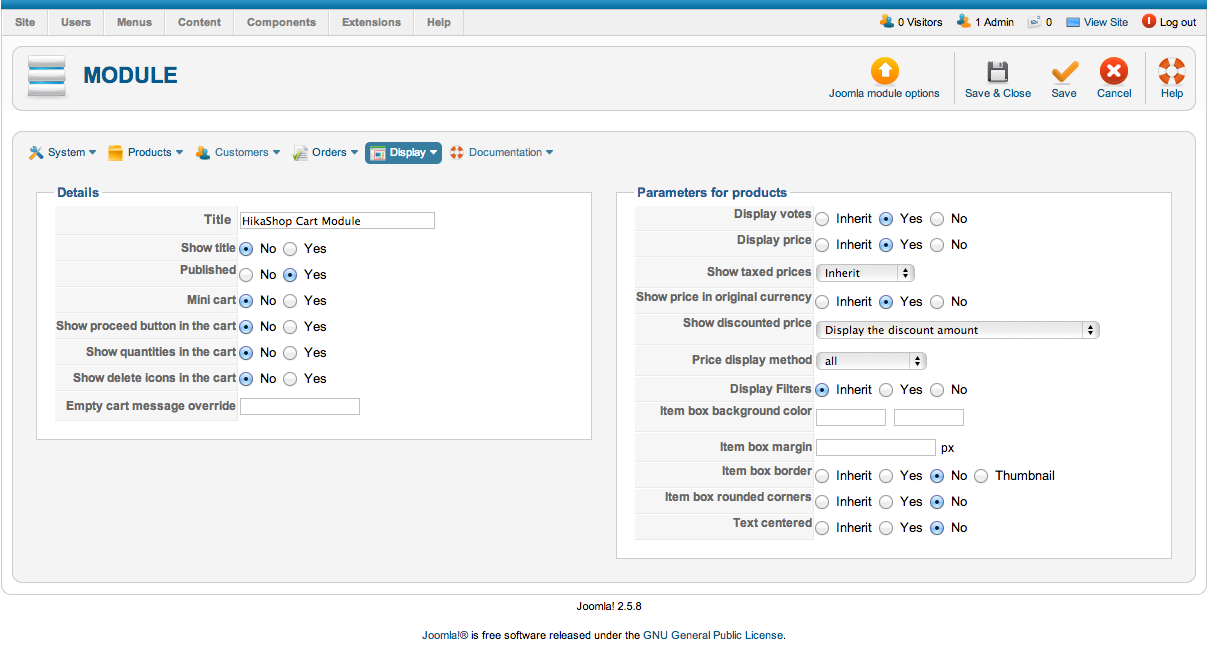
...
Bug: used to be possible via usual procedures, can no longer configure through the relevant Display -> Content module
...
Detail :
We have created a module using Hikashop Cart Module. Save to make the Hikashop options available as per normal.
The related content module ( screen shot attached ) is not functioning correctly. That is, some of the options are not being stored.
From what we see, the form posts to the #_modules and #_hika_config tables. So an option like 'published' will be stored in #_modules.
We used to be able to select and save fields such as : mini-cart, show quantities, show proceed, empty message override etc . Whereas now on save the form reverts to original state and the options are not stored ( and the font end shows no difference ).
...
Version: v 2.1.1 - Business edition
...
Last edit: 13 years 7 months ago by Buchberger.
Please Log in or Create an account to join the conversation.

13 years 7 months ago #95835
by Jerome
Jerome - Obsidev.com
HikaMarket & HikaSerial developer / HikaShop core dev team.
Replied by Jerome on topic Hikashop options for Cart module are not stored
Hi,
Do you have an error during the saving ?
Could you activate the Joomla Debug mode and check if there is no error during saving ?
Regards,
Do you have an error during the saving ?
Could you activate the Joomla Debug mode and check if there is no error during saving ?
Regards,
Jerome - Obsidev.com
HikaMarket & HikaSerial developer / HikaShop core dev team.
Please Log in or Create an account to join the conversation.
- Buchberger
-
Topic Author
- Offline
Less
More
- Posts: 27
- Thank you received: 0
13 years 7 months ago #95879
by Buchberger
Replied by Buchberger on topic Hikashop options for Cart module are not stored
Hi Jerome,
The Joomla error console reports nothing.
And the php errors log shows nothing. Strange ... it used to work so I did a diff on the config tables from when it worked and now. But I cannot get much out of this .. the first field is often hashed. If there is a difference, I cannot tell what. I did see some 'show_cart_something' rows that stored different booleans .. I did not want quantity, so i set value to 0 for this one but not much happened even with his manual edit. The source show the form collecting array elements as values. The first level of the array for say 'mini-cart' is config ... I searched for this in the database. This might be misguided, since I got nothing.
I'll try deleting the module and start again. Feel free to make any other suggestions.
Thanks for your help.
G
The Joomla error console reports nothing.
And the php errors log shows nothing. Strange ... it used to work so I did a diff on the config tables from when it worked and now. But I cannot get much out of this .. the first field is often hashed. If there is a difference, I cannot tell what. I did see some 'show_cart_something' rows that stored different booleans .. I did not want quantity, so i set value to 0 for this one but not much happened even with his manual edit. The source show the form collecting array elements as values. The first level of the array for say 'mini-cart' is config ... I searched for this in the database. This might be misguided, since I got nothing.
I'll try deleting the module and start again. Feel free to make any other suggestions.
Thanks for your help.
G
Please Log in or Create an account to join the conversation.
- Buchberger
-
Topic Author
- Offline
Less
More
- Posts: 27
- Thank you received: 0
13 years 7 months ago #95897
by Buchberger
Replied by Buchberger on topic Hikashop options for Cart module are not stored
Jerome, I started again. Same issue. However, if I leave the module created in Joomla unpublished and then publish it in the Hikashop options, the other options will be saved correctly.
Using this sequence resolves my problem. Perhaps try replicating at your end.
Using this sequence resolves my problem. Perhaps try replicating at your end.
Please Log in or Create an account to join the conversation.

13 years 7 months ago #95906
by nicolas
Replied by nicolas on topic Hikashop options for Cart module are not stored
It's probably a user session glitch. Removing your cookies/cache in your browser and logging in and out of the backend, and/or using another browser should help edit that module options.
The following user(s) said Thank You: Buchberger
Please Log in or Create an account to join the conversation.
Time to create page: 0.071 seconds