

- Posts: 187
- Thank you received: 10
Menu on checkout not redirecting
13 years 6 months ago #95781
by zebrafilm
Menu on checkout not redirecting was created by zebrafilm
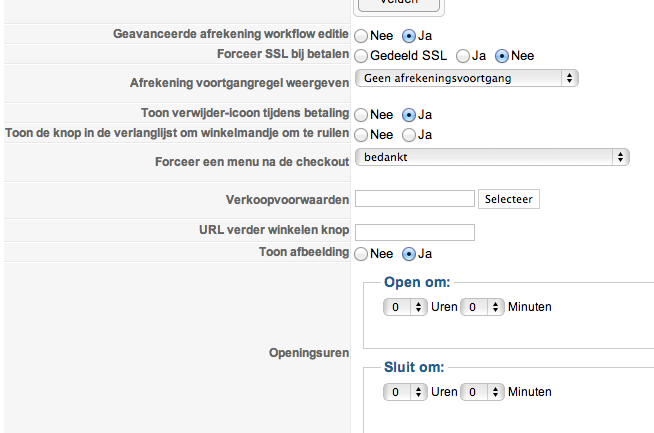
When I set the option, force menu after checkout it does not redirect. It shows the standard thank you file.
Link also remains the same: component/hikashop/checkout/step/step-1?Itemid=298
It points to a 'dummy' / invisible menu that points to an article, both set to public
Bastiaan
Using Hika 2.1.1 / J259 / PHP 5.4
Link also remains the same: component/hikashop/checkout/step/step-1?Itemid=298
It points to a 'dummy' / invisible menu that points to an article, both set to public
Bastiaan
Using Hika 2.1.1 / J259 / PHP 5.4
Please Log in or Create an account to join the conversation.

13 years 6 months ago #95827
by Xavier
Replied by Xavier on topic Menu on checkout not redirecting
Hi,
This option is to use the modules present in a menu.
For example you have a menu with a module A when displaying this menu, so with this option you will have the module A on the checkout pages.
This option is to use the modules present in a menu.
For example you have a menu with a module A when displaying this menu, so with this option you will have the module A on the checkout pages.
Please Log in or Create an account to join the conversation.
13 years 6 months ago #95841
by zebrafilm
Replied by zebrafilm on topic Menu on checkout not redirecting
Ok I am probably a bit slow after a long working day but I do not really grab what you are saying or the label is misleading.
In English and Dutch it boths seems to point to a menu choice after the checkout. I don't see a mentioning of modules anywhere.
Please help my tired brains with a good example.
In English and Dutch it boths seems to point to a menu choice after the checkout. I don't see a mentioning of modules anywhere.
Please help my tired brains with a good example.
Please Log in or Create an account to join the conversation.

13 years 6 months ago #95945
by nicolas
Replied by nicolas on topic Menu on checkout not redirecting
The text of this option is not "force menu after checkout" but "force menu on checkout".
That means that on any page of the checkout, the system will make sure that the current Itemid (id of the menu) is the one selected in that dropdown and not another one. If it's another one, it will redirect to the same page with the correct Itemid.
If you want the system to redirect somewhere else that the default thank you page after the payment, that usually can be done by entering a "return URL" in your payment methods options screen.
That means that on any page of the checkout, the system will make sure that the current Itemid (id of the menu) is the one selected in that dropdown and not another one. If it's another one, it will redirect to the same page with the correct Itemid.
If you want the system to redirect somewhere else that the default thank you page after the payment, that usually can be done by entering a "return URL" in your payment methods options screen.
Please Log in or Create an account to join the conversation.
13 years 6 months ago #95947
by zebrafilm
Replied by zebrafilm on topic Menu on checkout not redirecting
Hi Nicolas, as always: clear as it can be.
Thanks for the effort and enjoy the Joomla days.
Thanks for the effort and enjoy the Joomla days.
Please Log in or Create an account to join the conversation.
Time to create page: 0.175 seconds