

- Posts: 94
- Thank you received: 0
Header broken in latest hikashop and joomla 3
13 years 6 months ago #98420
by Mattlab
Header broken in latest hikashop and joomla 3 was created by Mattlab
So I am running the latest version of hikashop business and joomla three but the header comes up like this in the backend...
Any idea what is going on and how to fix it? It makes it very difficult to use the store.
Any idea what is going on and how to fix it? It makes it very difficult to use the store.
Please Log in or Create an account to join the conversation.

13 years 6 months ago #98441
by nicolas
Replied by nicolas on topic Header broken in latest hikashop and joomla 3
It's probably the "menu position" of your HikaShop configuration which is not configured properly. Try to change it.
Please Log in or Create an account to join the conversation.
13 years 6 months ago #98442
by Mattlab
Replied by Mattlab on topic Header broken in latest hikashop and joomla 3
I am not sure what that means. I am seeing this in the admin section of the site. Can you give me instructions on how to fix?
Please Log in or Create an account to join the conversation.

13 years 6 months ago #98502
by Xavier
Replied by Xavier on topic Header broken in latest hikashop and joomla 3
In the Joomla module management, display the administrator modules, and change the position of the module "Admin sub-Menu".
Please Log in or Create an account to join the conversation.
13 years 6 months ago #98567
by Mattlab
Replied by Mattlab on topic Header broken in latest hikashop and joomla 3
I do not think that is correct since it looks fine for my other modules. Only hikashop has the error. It is a new bug. The admin sub menu is in the sub menu position which is where it should be I think. Can you please advise or log into my site and look at your code to fix it? I have support and would like help as this is clearly broken.
Please Log in or Create an account to join the conversation.
13 years 6 months ago #98593
by nicolas
Replied by nicolas on topic Header broken in latest hikashop and joomla 3
I don't think that there is anything broken in HikaShop since it works for everyone else.
Can you please do a screenshot of your issue so that we can be sure that we're talking about the same thing ?
Can you please do a screenshot of your issue so that we can be sure that we're talking about the same thing ?
Please Log in or Create an account to join the conversation.
13 years 6 months ago #98598
by Mattlab
Replied by Mattlab on topic Header broken in latest hikashop and joomla 3
Ok here is a screenshot...
s14.postimg.org/m12327pgh/websiteimage.png
I thought I had it in my original email. Clearly something is going on and its related to hikashop as my other programs arent showing it. Any ideas? I really would like this fixed.
I thought I had it in my original email. Clearly something is going on and its related to hikashop as my other programs arent showing it. Any ideas? I really would like this fixed.
Please Log in or Create an account to join the conversation.
13 years 6 months ago #98599
by nicolas
Replied by nicolas on topic Header broken in latest hikashop and joomla 3
Well, I already gave the solution in my first message:
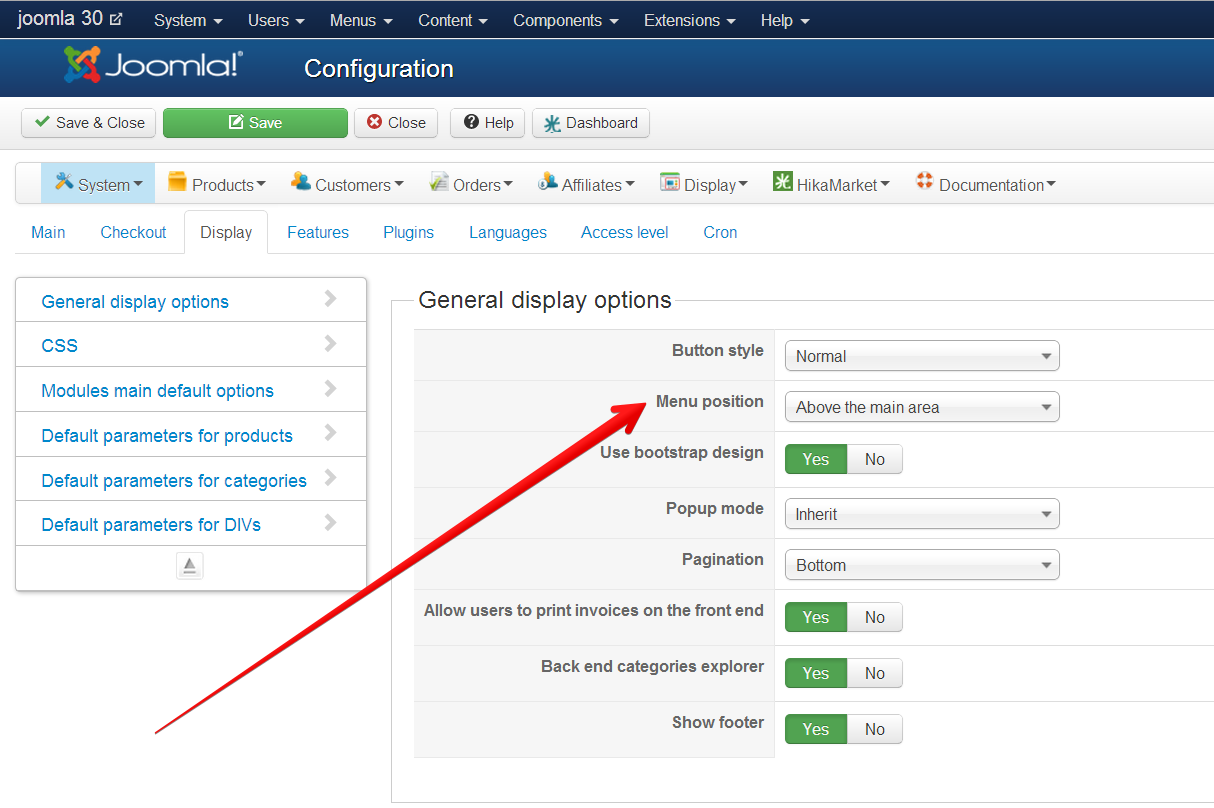
Simply click on the configuration link of the components->HikaShop to access the configuration page and change the option...
You can't miss that option:It's probably the "menu position" of your HikaShop configuration which is not configured properly. Try to change it.
Simply click on the configuration link of the components->HikaShop to access the configuration page and change the option...
The following user(s) said Thank You: Mattlab
Please Log in or Create an account to join the conversation.
13 years 6 months ago #98600
by Mattlab
Replied by Mattlab on topic Header broken in latest hikashop and joomla 3
Excellent that worked!!!! Thank you!!!
Please Log in or Create an account to join the conversation.
Time to create page: 0.304 seconds