

- Posts: 69
- Thank you received: 1
Wishlist Errors
13 years 5 months ago - 13 years 5 months ago #98604
by BasketBox
Wishlist Errors was created by BasketBox
There is no delete button for the wishlist items on the front end wishlist control panel.
When adding one item to the cart from the wishlist, it adds the same item two times.
After converting cart to wishlist, then go to wishlist control panel, there is no name for the wishlist.
The "Display the convert cart in wishlist button" - why does it show twice in checkout tab and also in wishlist tab in backend? Plus it does nothing in checkout tab.
Just seems that the wishlist does weird things, like delayed popup message confirming adding to wishlist from cart, etc.
I have 2.1.2 installed.
When adding one item to the cart from the wishlist, it adds the same item two times.
After converting cart to wishlist, then go to wishlist control panel, there is no name for the wishlist.
The "Display the convert cart in wishlist button" - why does it show twice in checkout tab and also in wishlist tab in backend? Plus it does nothing in checkout tab.
Just seems that the wishlist does weird things, like delayed popup message confirming adding to wishlist from cart, etc.
I have 2.1.2 installed.
Last edit: 13 years 5 months ago by BasketBox. Reason: Added "Display the convert cart in wishlist button"
Please Log in or Create an account to join the conversation.

13 years 5 months ago #98678
by Xavier
Replied by Xavier on topic Wishlist Errors
Hi,
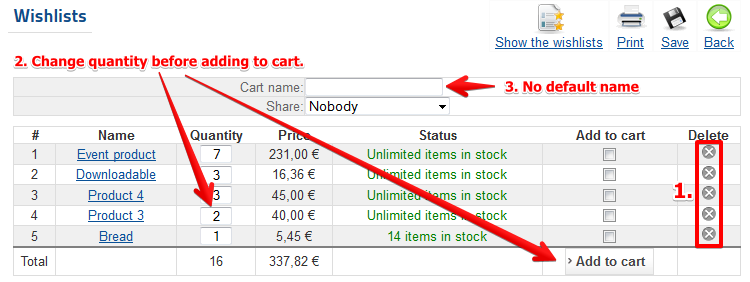
1. The delete buttons are present, but you must be the wishlist owner to delete items.
2. You have to set the quantity in the quantity field before adding to cart.
3. By default the carts have no name, the customer have to set a name to the cart/wishlist. If a name is set to a cart and then converted, the wishlist keep the cart name.
4. Thanks for the report, I have deleted the option in "checkout".
5. The popup delay is the same as the cart one.
1. The delete buttons are present, but you must be the wishlist owner to delete items.
2. You have to set the quantity in the quantity field before adding to cart.
3. By default the carts have no name, the customer have to set a name to the cart/wishlist. If a name is set to a cart and then converted, the wishlist keep the cart name.
4. Thanks for the report, I have deleted the option in "checkout".
5. The popup delay is the same as the cart one.
Please Log in or Create an account to join the conversation.
13 years 5 months ago #98688
by BasketBox
Replied by BasketBox on topic Wishlist Errors
Thanks for the information. I will check this further.
But I noticed that my checkout tab will not show the content. Was that something done when you removed the wishlist option in checkout tab?
But I noticed that my checkout tab will not show the content. Was that something done when you removed the wishlist option in checkout tab?
Please Log in or Create an account to join the conversation.
13 years 5 months ago #98691
by Xavier
Replied by Xavier on topic Wishlist Errors
I removed the option on my end, and it's not released so it can't affect your website, the problem come from something else.
Please Log in or Create an account to join the conversation.
13 years 5 months ago #99160
by BasketBox
Replied by BasketBox on topic Wishlist Errors
Can you confirm that the checkout tab in config is viewable in IE8? I don't see the content in this browser.
Please Log in or Create an account to join the conversation.
13 years 5 months ago #99186
by Xavier
Replied by Xavier on topic Wishlist Errors
I can confirm that:
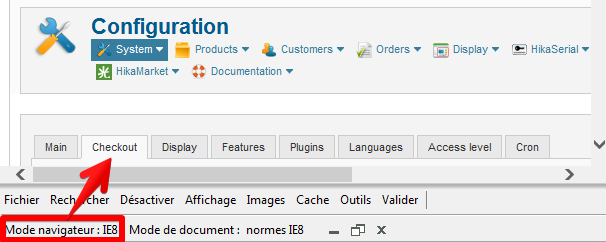
Using IE8 compatibility mode from IE10
Using IE8 compatibility mode from IE10
Please Log in or Create an account to join the conversation.
13 years 5 months ago #99205
by BasketBox
Replied by BasketBox on topic Wishlist Errors
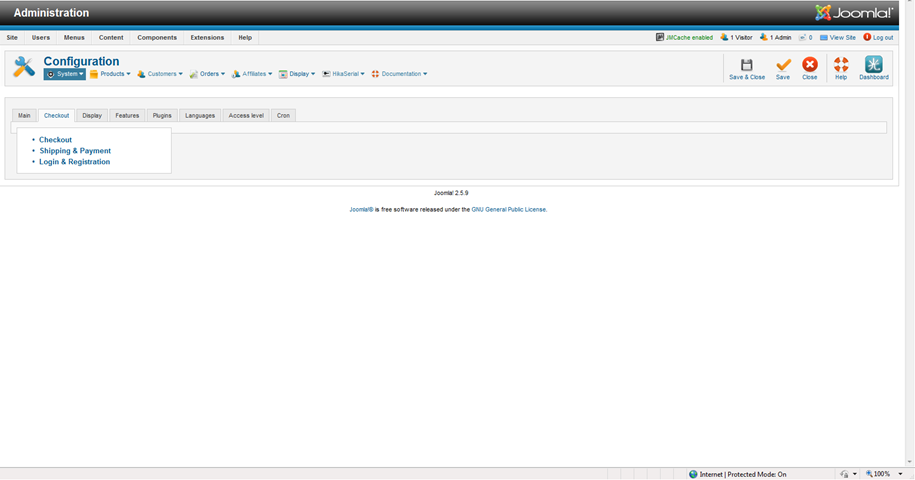
okay, must be my machine and network. I don't see checkout items in IE8. Maybe cache issue. The other tabs work.
Please Log in or Create an account to join the conversation.
13 years 5 months ago #99287
by Xavier
Replied by Xavier on topic Wishlist Errors
Can you try with another browser ?
Have you edited a backend view ?
Have you edited a backend view ?
Please Log in or Create an account to join the conversation.
13 years 5 months ago #99331
by BasketBox
Replied by BasketBox on topic Wishlist Errors
The other browsers work, Chrome, Firefox, IE10, but IE8 it's not and was at one point. Must be this machine, network or cached. I will watch for any changes. Thanks
Please Log in or Create an account to join the conversation.
Time to create page: 0.260 seconds