

- Posts: 91
- Thank you received: 0
product listing hiding description doesn t work
13 years 4 months ago #103104
by ces
product listing hiding description doesn t work was created by ces
Hello
The description is showing even if i hide the product description in hikashop.
see my screen shop
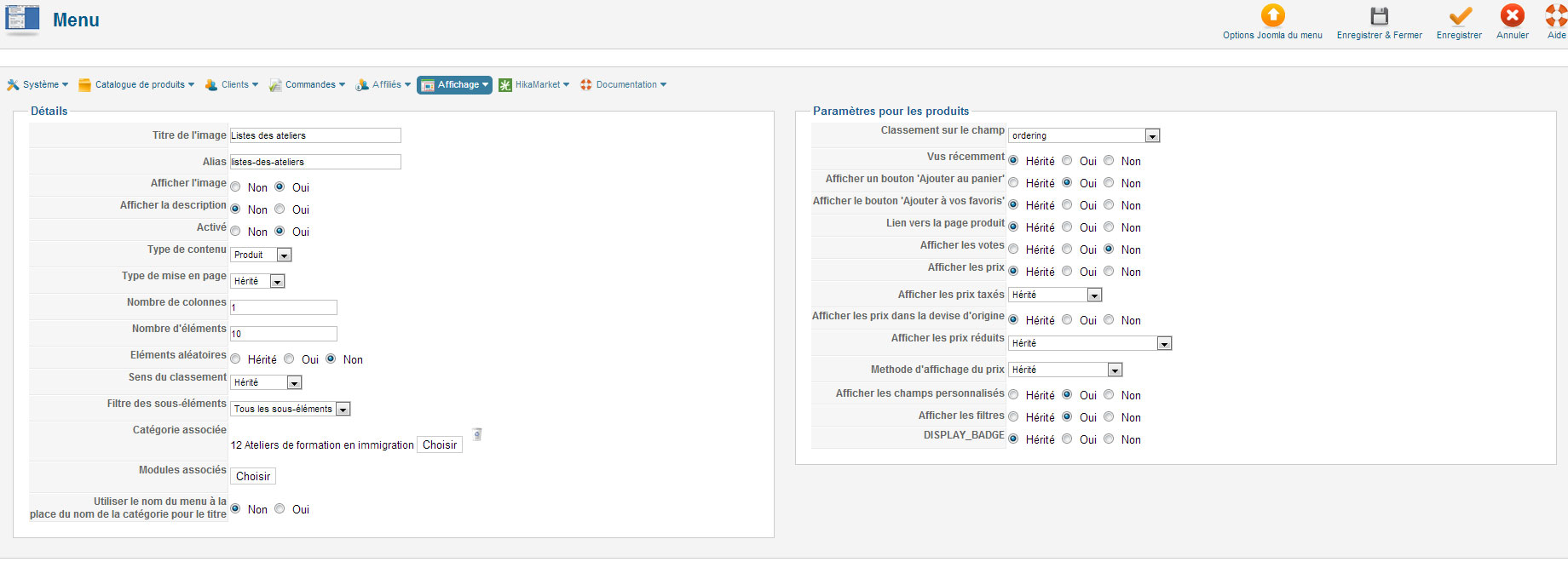
The description is showing even if i hide the product description in hikashop.
see my screen shop
Please Log in or Create an account to join the conversation.

13 years 4 months ago #103131
by Jerome
Jerome - Obsidev.com
HikaMarket & HikaSerial developer / HikaShop core dev team.
Also helping the HikaShop support team when having some time or couldn't sleep.
By the way, do not send me private message, use the "contact us" form instead.
Replied by Jerome on topic product listing hiding description doesn t work
Hi,
Do you have a link to this product listing ?
Regards,
Do you have a link to this product listing ?
Regards,
Jerome - Obsidev.com
HikaMarket & HikaSerial developer / HikaShop core dev team.
Also helping the HikaShop support team when having some time or couldn't sleep.
By the way, do not send me private message, use the "contact us" form instead.
Please Log in or Create an account to join the conversation.
13 years 4 months ago #103295
by Jerome
Jerome - Obsidev.com
HikaMarket & HikaSerial developer / HikaShop core dev team.
Also helping the HikaShop support team when having some time or couldn't sleep.
By the way, do not send me private message, use the "contact us" form instead.
Replied by Jerome on topic product listing hiding description doesn t work
Hi,
Thanks for the link.
I think you should set the type of layout ("Type de mise en page") in order to access to the options.
At this moment, you will be able to select the "type of item layout" and select a layout without the description.
For the moment, you use the default "product div" option from your HikaShop configuration "Display > Default parameters for DIVs > Type of item layout".
You can change the value here and stay as "inherit" for your content menu configuration.
Regards,
Thanks for the link.
I think you should set the type of layout ("Type de mise en page") in order to access to the options.
At this moment, you will be able to select the "type of item layout" and select a layout without the description.
For the moment, you use the default "product div" option from your HikaShop configuration "Display > Default parameters for DIVs > Type of item layout".
You can change the value here and stay as "inherit" for your content menu configuration.
Regards,
Jerome - Obsidev.com
HikaMarket & HikaSerial developer / HikaShop core dev team.
Also helping the HikaShop support team when having some time or couldn't sleep.
By the way, do not send me private message, use the "contact us" form instead.
Please Log in or Create an account to join the conversation.
Time to create page: 0.217 seconds